
മാസ്റ്റർ ലോക്ക് 630D
മാസ്റ്റർ ലോക്ക് 630D കോമ്പിനേഷൻ പാഡ്ലോക്ക് ഉപയോക്തൃ മാനുവൽ
മോഡൽ: 630D | ബ്രാൻഡ്: മാസ്റ്റർ ലോക്ക്
ആമുഖം
മാസ്റ്റർ ലോക്ക് 630D സെറ്റ് യുവർ ഓൺ കോമ്പിനേഷൻ പാഡ്ലോക്കിനുള്ള നിർദ്ദേശങ്ങൾ ഈ മാനുവലിൽ നൽകിയിരിക്കുന്നു. ഈടുനിൽക്കുന്നതിനും സൗകര്യത്തിനുമായി രൂപകൽപ്പന ചെയ്തിരിക്കുന്ന ഈ പാഡ്ലോക്ക് ബാക്ക്പാക്കുകൾ, ക്യാബിനറ്റുകൾ, സിപ്പറുകൾ എന്നിവ സുരക്ഷിതമാക്കാൻ അനുയോജ്യമാണ്. ഇതിന്റെ സോളിഡ് മെറ്റൽ ബോഡിയും നിക്കൽ പൂശിയ സ്റ്റീൽ ഷാക്കിളും മുറിക്കുന്നതിനും അരിയുന്നതിനും പ്രതിരോധം നൽകുന്നു, അതേസമയം 3-ഡയൽ കോമ്പിനേഷൻ കീലെസ് സുരക്ഷ നൽകുന്നു.

ചിത്രം: മാസ്റ്റർ ലോക്ക് 630D കോമ്പിനേഷൻ പാഡ്ലോക്ക്, ഒരു വെള്ളി അലുമിനിയം ബോഡിയും മൂന്ന് സംഖ്യാ ഡയലുകളും ഉൾക്കൊള്ളുന്നു.
ഉൽപ്പന്ന സവിശേഷതകൾ
- കോംപാക്റ്റ് ഡിസൈൻ: ചെറിയ പൂട്ട്, ഒരു യാത്രാ ലോക്ക്, ബാക്ക്പാക്ക് ലോക്ക് അല്ലെങ്കിൽ കാബിനറ്റ് ലോക്ക് ആയി ഉപയോഗിക്കുന്നതാണ് നല്ലത്.
- ഇഷ്ടാനുസൃതമാക്കാവുന്ന കോമ്പിനേഷൻ: കീലെസ് സൗകര്യത്തിനായി നിങ്ങളുടെ സ്വന്തം മൂന്നക്ക കോമ്പിനേഷൻ സജ്ജമാക്കുക.
- നീണ്ടുനിൽക്കുന്ന നിർമ്മാണം: അലുമിനിയം ബോഡിയും നിക്കൽ പൂശിയ സ്റ്റീൽ ഷാക്കിളും ഉപയോഗിച്ചാണ് നിർമ്മിച്ചിരിക്കുന്നത്.
- അളവുകൾ: 1-3/16 ഇഞ്ച് (30 മില്ലീമീറ്റർ) വീതിയുള്ള ലോക്ക് ബോഡി; 3/16 ഇഞ്ച് (5 മില്ലീമീറ്റർ) വ്യാസമുള്ള ഷാക്കിൾ, 1 ഇഞ്ച് (25 മില്ലീമീറ്റർ) നീളവും 9/16 ഇഞ്ച് (14 മില്ലീമീറ്റർ) വീതിയും.

ചിത്രം: മാസ്റ്റർ ലോക്ക് 630D യുടെ ക്ലോസ്-അപ്പ്, അതിന്റെ സവിശേഷതകൾ എടുത്തുകാണിക്കുന്നു: "നിങ്ങളുടെ സ്വന്തം 3-അക്ക കോമ്പിനേഷൻ സജ്ജമാക്കുക", "നിക്കൽ-പ്ലേറ്റഡ് സ്റ്റീൽ ഷാക്കിൾ ഉപയോഗിച്ച് അലുമിനിയം ബോഡി."
സജ്ജീകരണം: നിങ്ങളുടെ കോമ്പിനേഷൻ ക്രമീകരിക്കുന്നു
ഷാക്കിൾ 0-0-0 ന് തുറക്കാൻ മുൻകൂട്ടി സജ്ജീകരിച്ചിരിക്കുന്നു. നിങ്ങളുടെ വ്യക്തിഗത കോമ്പിനേഷൻ സജ്ജമാക്കാൻ ഈ ഘട്ടങ്ങൾ പാലിക്കുക:
- ഡയലുകൾ നിലവിലെ കോഡിലേക്ക് സജ്ജമാക്കുക (ഫാക്ടറി പ്രീസെറ്റ് 0-0-0 ആണ്).
- പൂട്ട് തുറക്കാൻ ചങ്ങല വലിച്ചു.
- ചങ്ങല ഇരു ദിശകളിലേക്കും 90 ഡിഗ്രി (ഒരു കാൽ തിരിവ്) തിരിക്കുക.
- ലോക്ക് ബോഡിയിലേക്ക് ഷാക്കിൾ ദൃഢമായി അമർത്തുക.
- ഷാക്കിൾ താഴേക്ക് അമർത്തിപ്പിടിച്ചുകൊണ്ട്, ഡയലുകൾ തിരിക്കുന്നതിലൂടെ നിങ്ങൾക്ക് ആവശ്യമുള്ള പുതിയ 3-അക്ക കോമ്പിനേഷൻ സജ്ജമാക്കുക. നമ്പറുകൾ ഇൻഡിക്കേറ്റർ ലൈനുമായി വിന്യസിക്കുന്നുണ്ടെന്ന് ഉറപ്പാക്കുക.
- ചങ്ങല അഴിച്ചുമാറ്റി സാധാരണ തുറന്ന സ്ഥാനത്തേക്ക് തിരികെ കൊണ്ടുവരിക.
- ഷാക്കിൾ യഥാർത്ഥ 0-ഡിഗ്രി സ്ഥാനത്തേക്ക് തിരികെ തിരിക്കുക.
- ലോക്ക് ചെയ്യാൻ ഷാക്കിൾ താഴേക്ക് അമർത്തുക. ലോക്ക് സുരക്ഷിതമാക്കാൻ ഡയലുകൾ സ്ക്രാമ്പിൾ ചെയ്യുക.
പ്രധാനം: നിങ്ങളുടെ പുതിയ കോമ്പിനേഷൻ ഓർമ്മിക്കുക. ഈ ലോക്കിന് മാസ്റ്റർ കീയോ ഓവർറൈഡോ ഇല്ല.
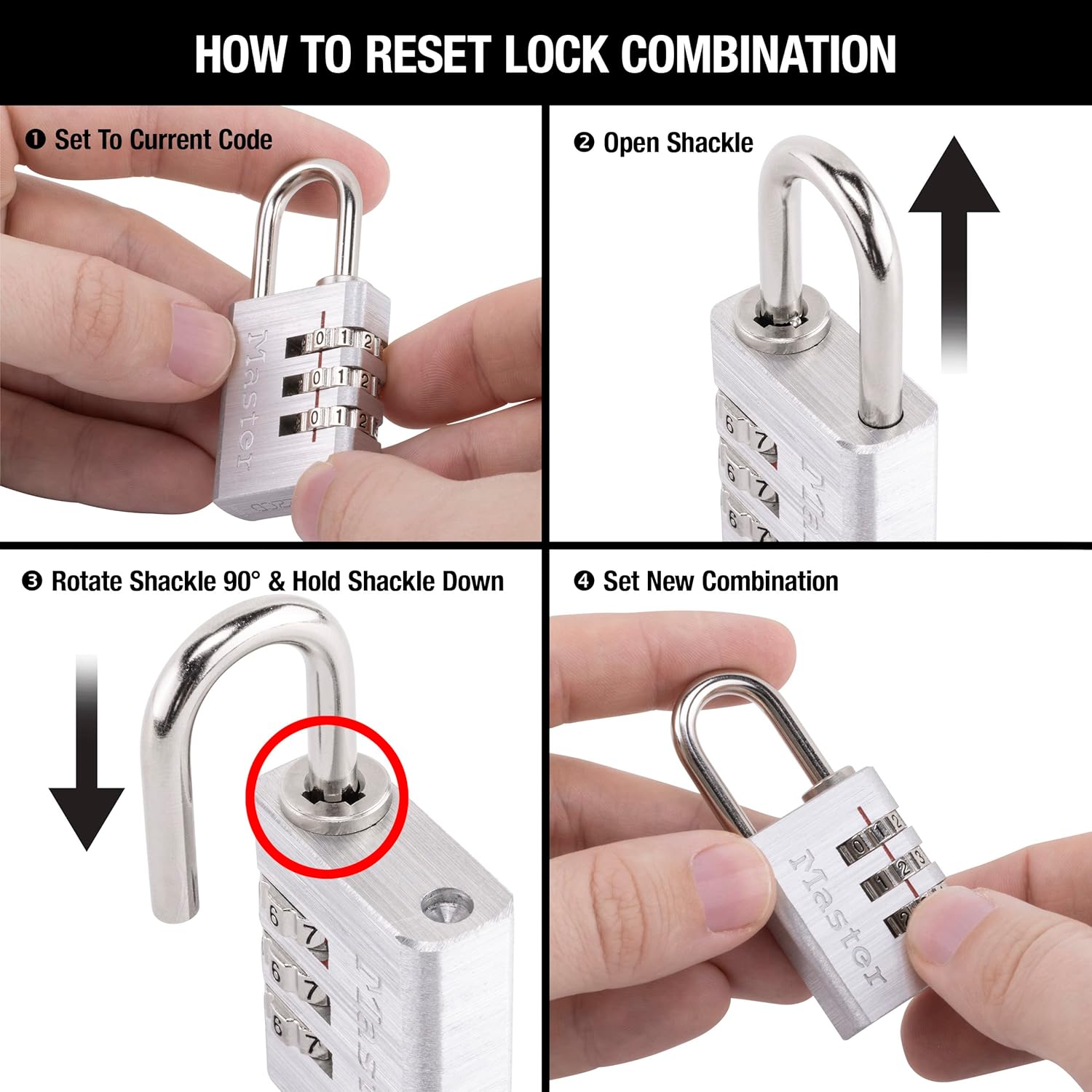
ചിത്രം: ലോക്ക് കോമ്പിനേഷൻ പുനഃസജ്ജമാക്കുന്നതിനുള്ള ഘട്ടങ്ങൾ ചിത്രീകരിക്കുന്ന നാല് പാനൽ ഡയഗ്രം, ലോക്ക് തുറക്കുന്നതും, ഷാക്കിൾ തിരിക്കുന്നതും, അമർത്തുന്നതും, പുതിയ കോമ്പിനേഷൻ സെറ്റ് ചെയ്യുന്നതും കാണിക്കുന്നു.
പാഡ്ലോക്ക് പ്രവർത്തിപ്പിക്കുന്നു
പാഡ്ലോക്ക് തുറക്കാൻ, മൂന്ന് ഡയലുകളും നിങ്ങളുടെ സെറ്റ് കോമ്പിനേഷനിലേക്ക് വിന്യസിക്കുക. ഷാക്കിൾ വിടും, അതുവഴി ലോക്ക് തുറക്കാൻ നിങ്ങളെ അനുവദിക്കുന്നു. അടയ്ക്കാൻ, ഷാക്കിൾ ലോക്ക് ബോഡിയിലേക്ക് തിരികെ തള്ളി ഡയലുകൾ സുരക്ഷിതമാക്കാൻ സ്ക്രാംബിൾ ചെയ്യുക.

ചിത്രം: ഒരു കറുത്ത ബാക്ക്പാക്കിന്റെ സിപ്പറുകൾ സുരക്ഷിതമാക്കുന്ന ഒരു മാസ്റ്റർ ലോക്ക് 630D പാഡ്ലോക്ക്, യാത്ര ചെയ്യുമ്പോൾ അധിക സുരക്ഷയ്ക്കായി അതിന്റെ ഉപയോഗം തെളിയിക്കുന്നു.
മെയിൻ്റനൻസ്
മാസ്റ്റർ ലോക്ക് 630D കുറഞ്ഞ അറ്റകുറ്റപ്പണികൾക്കായി രൂപകൽപ്പന ചെയ്തിരിക്കുന്നു. സുഗമമായ പ്രവർത്തനം ഉറപ്പാക്കാനും നിങ്ങളുടെ പാഡ്ലോക്കിന്റെ ആയുസ്സ് വർദ്ധിപ്പിക്കാനും:
- ഡയലുകൾ വൃത്തിയായും അഴുക്കോ അവശിഷ്ടങ്ങളോ ഇല്ലാതെ സൂക്ഷിക്കുക.
- ഷാക്കിൾ മെക്കാനിസം കടുപ്പമേറിയതായി തോന്നുകയാണെങ്കിൽ ഇടയ്ക്കിടെ ചെറിയ അളവിൽ സിലിക്കൺ ലൂബ്രിക്കന്റ് അതിൽ പുരട്ടുക. എണ്ണ അടിസ്ഥാനമാക്കിയുള്ള ലൂബ്രിക്കന്റുകൾ ഒഴിവാക്കുക, കാരണം അവ അഴുക്ക് ആകർഷിക്കും.
- നാശത്തെ തടയാൻ ഉപയോഗത്തിലില്ലാത്തപ്പോൾ പൂട്ട് വരണ്ട അന്തരീക്ഷത്തിൽ സൂക്ഷിക്കുക.

ചിത്രം: നീല ബാക്ക്പാക്കിന്റെ സിപ്പറിൽ ഘടിപ്പിച്ചിരിക്കുന്ന ഒരു മാസ്റ്റർ ലോക്ക് 630D പാഡ്ലോക്ക്, വസ്തുക്കൾ സുരക്ഷിതമാക്കുന്നതിനുള്ള അതിന്റെ പ്രായോഗിക പ്രയോഗം ചിത്രീകരിക്കുന്നു.
ട്രബിൾഷൂട്ടിംഗ്
ശരിയായ സംയോജനം ഉപയോഗിച്ചാലും ലോക്ക് തുറക്കില്ല.
ശരിയായ കോമ്പിനേഷൻ നൽകിയിട്ടും ലോക്ക് തുറക്കുന്നില്ലെങ്കിൽ, ഇനിപ്പറയുന്നവ പരീക്ഷിക്കുക:
- ഡയലുകളിലെ ഓരോ നമ്പറും ഇൻഡിക്കേറ്റർ ലൈനുമായി കൃത്യമായി വിന്യസിച്ചിട്ടുണ്ടെന്ന് ഉറപ്പാക്കുക. ചിലപ്പോൾ ചെറിയ തെറ്റായ ക്രമീകരണം പോലും തുറക്കുന്നത് തടയാൻ സാധ്യതയുണ്ട്.
- കോമ്പിനേഷനിൽ പ്രവേശിക്കുമ്പോൾ ഷാക്കിൾ സൌമ്യമായി ഇളക്കുക.
- നിങ്ങൾ ശരിയായ കോമ്പിനേഷനാണോ ഉപയോഗിക്കുന്നതെന്ന് രണ്ടുതവണ പരിശോധിക്കുക. നിങ്ങൾ അടുത്തിടെയാണ് ഇത് പുനഃസജ്ജമാക്കിയതെങ്കിൽ, പുതിയ കോഡാണ് ഉപയോഗിക്കുന്നതെന്ന് ഉറപ്പാക്കുക.
- ലോക്ക് അങ്ങേയറ്റത്തെ അവസ്ഥകൾക്ക് (ഉദാ: അഴുക്ക്, ഈർപ്പം) വിധേയമാക്കിയിട്ടുണ്ടെങ്കിൽ, ഡയലുകളും ഷാക്കിൾ ഏരിയയും നന്നായി വൃത്തിയാക്കി ഒരു ലൂബ്രിക്കന്റ് പുരട്ടുക.
ചങ്ങല കടുപ്പമുള്ളതോ നീക്കാൻ പ്രയാസമുള്ളതോ ആണ്.
- ഷാക്കിൾ ലോക്ക് ബോഡിയിലേക്ക് പ്രവേശിക്കുന്നിടത്ത് സിലിക്കോൺ അടിസ്ഥാനമാക്കിയുള്ള ഒരു ലൂബ്രിക്കന്റ് പുരട്ടുക.
- തുറക്കാനോ പുനഃസജ്ജമാക്കാനോ ശ്രമിക്കുന്നതിന് മുമ്പ് കോമ്പിനേഷൻ 0-0-0 (അല്ലെങ്കിൽ നിങ്ങളുടെ നിലവിലെ കോമ്പിനേഷൻ) ആയി ശരിയായി സജ്ജീകരിച്ചിട്ടുണ്ടെന്ന് ഉറപ്പാക്കുക.
സ്പെസിഫിക്കേഷനുകൾ
| ഫീച്ചർ | വിശദാംശങ്ങൾ |
|---|---|
| ബ്രാൻഡ് | മാസ്റ്റർ ലോക്ക് |
| മോഡലിൻ്റെ പേര് | നിങ്ങളുടെ സ്വന്തം കോമ്പിനേഷൻ ലോക്ക് സജ്ജമാക്കുക |
| മോഡൽ നമ്പർ | 630D |
| ലോക്ക് തരം | കോമ്പിനേഷൻ ലോക്ക് |
| ബോഡി മെറ്റീരിയൽ | അലുമിനിയം |
| ചങ്ങല മെറ്റീരിയൽ | നിക്കൽ പൂശിയ സ്റ്റീൽ |
| ലോക്ക് ബോഡി വീതി | 1-3/16 ഇഞ്ച് (30 മിമി) |
| ഷാക്കിൾ വ്യാസം | 3/16 ഇഞ്ച് (5 മില്ലീമീറ്റർ) |
| ചങ്ങലയുടെ നീളം | 1 ഇഞ്ച് (25 മിമി) |
| ഷാക്കിൾ വീതി (ക്ലിയറൻസ്) | 9/16 ഇഞ്ച് (14 മില്ലീമീറ്റർ) |
| ഇനത്തിൻ്റെ ഭാരം | 2.4 ഔൺസ് |
| ഉൽപ്പന്ന അളവുകൾ (L x W x H) | 5.56 x 2.75 x 0.7 ഇഞ്ച് |
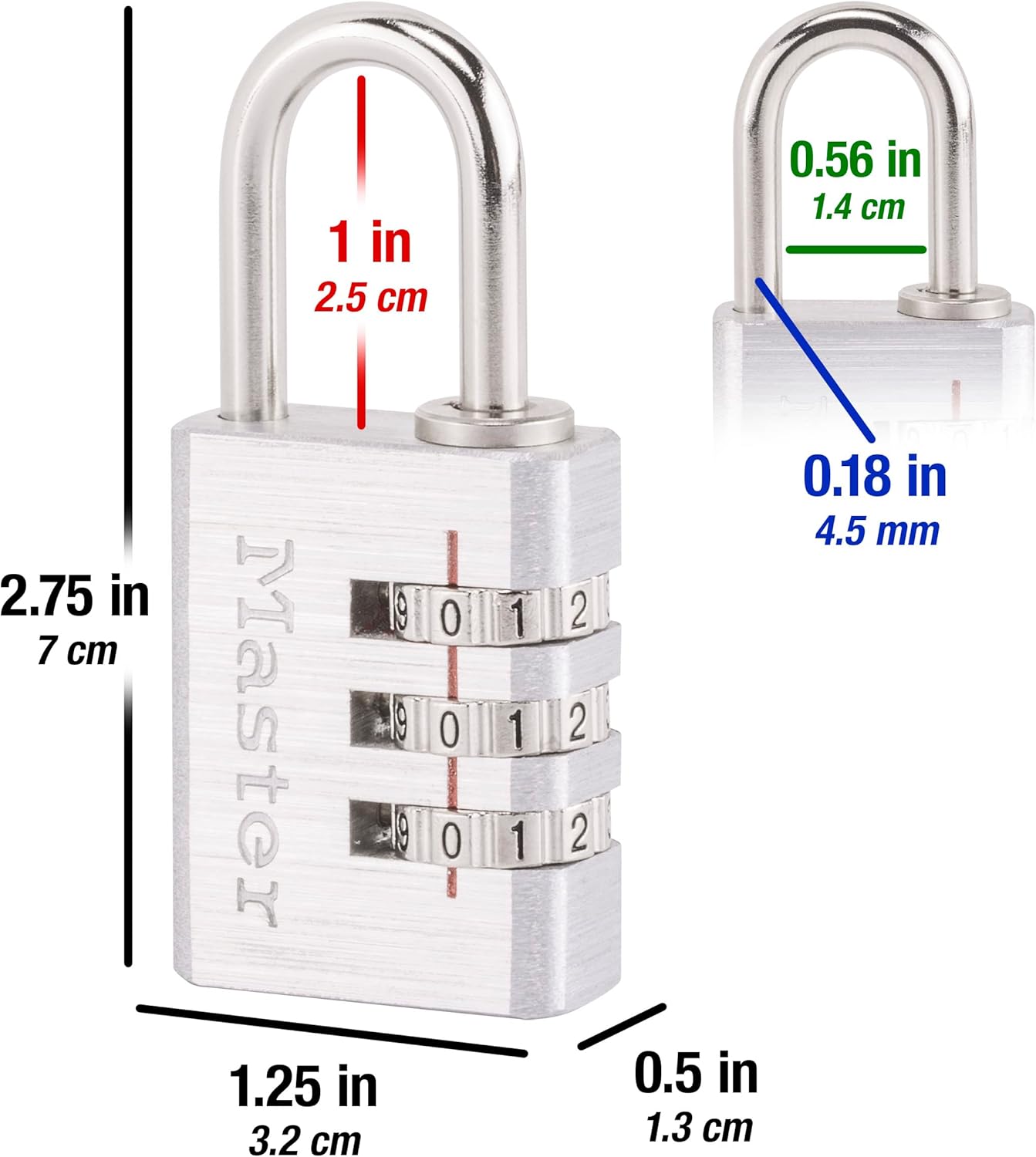
ചിത്രം: ബോഡി വീതി, ഷാക്കിൾ നീളം, ഷാക്കിൾ വ്യാസം എന്നിവയുൾപ്പെടെ മാസ്റ്റർ ലോക്ക് 630D യുടെ കൃത്യമായ അളവുകൾ കാണിക്കുന്ന ഒരു ഡയഗ്രം.
വാറൻ്റി വിവരങ്ങൾ
മാസ്റ്റർ ലോക്ക് 630D സെറ്റ് യുവർ ഓൺ കോമ്പിനേഷൻ അലൂമിനിയം ലോക്ക് ഒരു പരിമിതമായ ആജീവനാന്ത വാറൻ്റി. ഈ വാറന്റി മനസ്സമാധാനം പ്രദാനം ചെയ്യുന്നു, ഉൽപ്പന്നത്തിന്റെ ആയുഷ്കാലം മുഴുവൻ മെറ്റീരിയലിലെയും വർക്ക്മാൻഷിപ്പിലെയും പോരായ്മകൾ മറയ്ക്കുന്നു. പൂർണ്ണ വിവരങ്ങൾക്കും ക്ലെയിം ഉന്നയിക്കുന്നതിനും, ദയവായി ഔദ്യോഗിക മാസ്റ്റർ ലോക്ക് പരിശോധിക്കുക. webസൈറ്റ് അല്ലെങ്കിൽ അവരുടെ ഉപഭോക്തൃ സേവനവുമായി ബന്ധപ്പെടുക.
ഉപഭോക്തൃ പിന്തുണ
കൂടുതൽ സഹായം, ഉൽപ്പന്ന അന്വേഷണങ്ങൾ, അല്ലെങ്കിൽ ഈ മാനുവലിൽ ഉൾപ്പെടുത്തിയിട്ടില്ലാത്ത ട്രബിൾഷൂട്ടിംഗ് എന്നിവയ്ക്കായി, ദയവായി ഔദ്യോഗിക മാസ്റ്റർ ലോക്ക് സന്ദർശിക്കുക. webസൈറ്റ് അല്ലെങ്കിൽ അവരുടെ ഉപഭോക്തൃ പിന്തുണ ടീമിനെ ബന്ധപ്പെടുക.
Webസൈറ്റ്: www.masterlock.com
ഉൽപ്പന്ന പാക്കേജിംഗിലും ബന്ധപ്പെടാനുള്ള വിവരങ്ങൾ കാണാവുന്നതാണ്.
Ask a question about this manual
Ask about setup, troubleshooting, compatibility, parts, safety, or missing instructions. Manuals+ will review the question and use this page’s manual context to help answer it.