
ആമുഖം
വാങ്ങിയതിന് നന്ദി.asing the Sharp XL-70-H Compact Stereo System. This manual provides essential information for the safe and efficient operation of your audio system. Please read it thoroughly before use and keep it for future reference.
സുരക്ഷാ വിവരങ്ങൾ
സുരക്ഷിതമായ പ്രവർത്തനം ഉറപ്പാക്കുന്നതിനും കേടുപാടുകൾ തടയുന്നതിനും, ദയവായി ഇനിപ്പറയുന്ന മുൻകരുതലുകൾ പാലിക്കുക:
- തീയോ വൈദ്യുതാഘാതമോ തടയാൻ യൂണിറ്റ് മഴയിലോ ഈർപ്പത്തിലോ തുറന്നുകാട്ടരുത്.
- വെന്റിലേഷൻ തുറസ്സുകൾ തടയരുത്. ശരിയായ വായുസഞ്ചാരത്തിനായി യൂണിറ്റിന് ചുറ്റും മതിയായ ഇടം ഉറപ്പാക്കുക.
- യൂണിറ്റ് ഒരു സുസ്ഥിരവും ലെവൽ പ്രതലത്തിൽ സ്ഥാപിക്കുക.
- പാത്രങ്ങൾ പോലുള്ള ദ്രാവകങ്ങൾ നിറച്ച വസ്തുക്കൾ യൂണിറ്റിൽ വയ്ക്കരുത്.
- ഇടിമിന്നൽ ഉണ്ടാകുമ്പോഴോ ദീർഘനേരം ഉപയോഗിക്കാതിരിക്കുമ്പോഴോ വാൾ ഔട്ട്ലെറ്റിൽ നിന്ന് യൂണിറ്റ് ഊരിമാറ്റുക.
- എല്ലാ സേവനങ്ങളും യോഗ്യതയുള്ള സേവന ഉദ്യോഗസ്ഥർക്ക് റഫർ ചെയ്യുക.
പാക്കേജ് ഉള്ളടക്കം
പാക്കേജിൽ എല്ലാ ഇനങ്ങളും ഉണ്ടെന്ന് ഉറപ്പാക്കുക:
- Sharp XL-70-H Main Unit (Tower)
- Two 2-way MDF Speakers
- പവർ കോർഡ്
- Remote Control (if included, not explicitly mentioned but common)
- സ്പീക്കർ കേബിളുകൾ
ഉൽപ്പന്നം കഴിഞ്ഞുview
The Sharp XL-70-H is a compact stereo system designed for versatile audio playback. It features a CD player with a glass lid, a full logic cassette deck, and an auxiliary input for connecting external devices. The system includes two 2-way MDF speakers for clear sound reproduction.
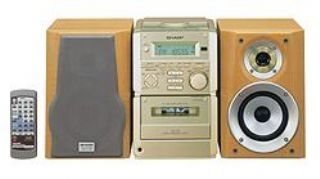
ചിത്രം 1: ഫ്രണ്ട് view of the Sharp XL-70-H Compact Stereo System, showing the main unit and two speakers. The main unit features a central display, control buttons, and the CD tray.
സജ്ജമാക്കുക
1 സ്പീക്കർ കണക്ഷൻ
Connect the included 2-way MDF speakers to the main unit. Ensure that the positive (+) and negative (-) terminals on the speakers match the corresponding terminals on the main unit. Incorrect polarity can affect sound quality.
2. പവർ കണക്ഷൻ
Plug the AC power cord into the power input on the rear of the main unit, then plug the other end into a standard wall outlet (AC 230V, 50Hz).
3. പ്രാരംഭ പവർ ഓൺ
Press the Power button on the main unit or remote control to turn on the system. The display will illuminate.
പ്രവർത്തന നിർദ്ദേശങ്ങൾ
സിഡി പ്ലെയർ ഓപ്പറേഷൻ
- അമർത്തുക CD സിഡി ഫംഗ്ഷൻ തിരഞ്ഞെടുക്കാൻ ബട്ടൺ അമർത്തുക.
- അമർത്തുക തുറക്കുക/അടയ്ക്കുക button. The glass lid will open via motor assistance.
- Place a CD (CD-DA format) with the label side up on the disc tray.
- അമർത്തുക തുറക്കുക/അടയ്ക്കുക button again to close the lid.
- അമർത്തുക പ്ലേ/താൽക്കാലികമായി നിർത്തുക പ്ലേബാക്ക് ആരംഭിക്കുന്നതിനുള്ള ബട്ടൺ.
- ഉപയോഗിക്കുക ഒഴിവാക്കുക ട്രാക്കുകൾക്കിടയിൽ നാവിഗേറ്റ് ചെയ്യാനുള്ള ബട്ടണുകൾ.
കാസറ്റ് പ്ലെയർ ഓപ്പറേഷൻ
- അമർത്തുക ടേപ്പ് കാസറ്റ് ഫംഗ്ഷൻ തിരഞ്ഞെടുക്കാൻ ബട്ടൺ അമർത്തുക.
- അമർത്തുക തുറക്കുക/പ്രത്യക്ഷപ്പെടുത്തൽ button to open the cassette deck.
- ഒരു കാസറ്റ് ടേപ്പ് തിരുകുക.
- അമർത്തുക കളിക്കുക പ്ലേബാക്ക് ആരംഭിക്കുന്നതിനുള്ള ബട്ടൺ.
- ഉപയോഗിക്കുക റിവൈൻഡ് ചെയ്യുക ഒപ്പം ഫാസ്റ്റ് ഫോർവേഡ് നാവിഗേഷനുള്ള ബട്ടണുകൾ.
- അമർത്തുക നിർത്തുക/പുറത്തള്ളുക പ്ലേബാക്ക് നിർത്തി ടേപ്പ് പുറത്തെടുക്കാൻ ബട്ടൺ അമർത്തുക.
AUX ഇൻപുട്ട് പ്രവർത്തനം
Connect an external audio device (e.g., smartphone, MP3 player) to the AUX input jack on the main unit using a 3.5mm audio cable. Press the ഓക്സ് button to select the auxiliary input. Audio from the connected device will play through the system speakers.
Volume and Tone Control
- വോളിയം: Rotate the motorized SERVO VOLUME knob or use the volume buttons on the remote control to adjust the sound level.
- ബാസ്/ട്രെബിൾ: സമർപ്പിത ഉപയോഗിക്കുക ബാസ്സ് ഒപ്പം ട്രെബിൾ controls to adjust the low and high frequency response of the audio.
Clock, Timer, and Sleep Functions
The system includes a clock display, a timer function for scheduled operations, and a sleep function to automatically turn off the system after a set period. Refer to the on-screen menu and Multi Jog Control for setting these features.
മെയിൻ്റനൻസ്
യൂണിറ്റ് വൃത്തിയാക്കൽ
Wipe the exterior of the unit with a soft, dry cloth. Do not use abrasive cleaners, waxes, or solvents as they may damage the finish. For stubborn stains, lightly dampen the cloth with water and mild detergent, then wipe dry.
സിഡി പ്ലെയർ കെയർ
Handle CDs by their edges to avoid fingerprints. If a CD is dirty, wipe it gently from the center outwards with a soft, lint-free cloth. Do not use solvents or abrasive cleaners on CDs.
കാസറ്റ് ഡെക്ക് കെയർ
Periodically clean the tape heads and pinch rollers using a specialized cassette head cleaning kit to ensure optimal sound quality and prevent tape damage.
ട്രബിൾഷൂട്ടിംഗ്
| പ്രശ്നം | സാധ്യമായ കാരണം | പരിഹാരം |
|---|---|---|
| ശക്തിയില്ല | പവർ കോർഡ് ബന്ധിപ്പിച്ചിട്ടില്ല; പവർ ഔട്ട്ലെറ്റ് സജീവമല്ല. | Ensure power cord is securely plugged in; Check the wall outlet with another device. |
| ശബ്ദമില്ല | Volume too low; Speakers not connected; Incorrect input selected. | Increase volume; Check speaker connections; Select the correct input source (CD, TAPE, AUX). |
| സിഡി പ്ലേ ചെയ്യുന്നില്ല | CD inserted incorrectly; CD is dirty or scratched; Disc format not supported. | Insert CD with label side up; Clean or replace CD; Ensure CD is CD-DA format. |
| കാസറ്റ് ടേപ്പ് പ്ലേ ചെയ്യുന്നില്ല | Tape inserted incorrectly; Tape heads dirty. | Ensure tape is inserted correctly; Clean tape heads. |
ഈ പരിഹാരങ്ങൾ പരീക്ഷിച്ചതിന് ശേഷവും പ്രശ്നം നിലനിൽക്കുകയാണെങ്കിൽ, ദയവായി ഉപഭോക്തൃ പിന്തുണയുമായി ബന്ധപ്പെടുക.
സ്പെസിഫിക്കേഷനുകൾ
- മോഡൽ: XL-70-H
- ബ്രാൻഡ്: മൂർച്ചയുള്ള
- Output Power (DIN 45324):
- Peak Music Power: 120W (Total)
- Music Power: 60W (30W + 30W)
- Sine Wave Power: 40W (20W + 20W)
- അളവുകൾ (W x H x D):
- Main Unit (Tower): 160mm x 241mm x 298mm
- Speakers: 160mm x 240mm x 189mm
- ഇനത്തിൻ്റെ ഭാരം: 8 കി.ഗ്രാം
- കണക്റ്റിവിറ്റി: സഹായക
- സ്പീക്കർ തരം: 2-way MDF speaker system
- ഊർജ്ജ സ്രോതസ്സ്: AC-adapter (connected to a standard wall outlet)
- അനുയോജ്യമായ ഉപകരണങ്ങൾ: Cassette player, AUX device
- പിന്തുണയ്ക്കുന്ന ഓഡിയോ ഫോർമാറ്റ്: സിഡി-ഡിഎ
- സ്പീക്കർമാരുടെ എണ്ണം: 2
- ഓഡിയോ putട്ട്പുട്ട് മോഡ്: Stereo (2.0 channels)
- നിറം: വെള്ളി
- ബ്ലൂടൂത്ത് പിന്തുണ: അതെ
വാറൻ്റിയും പിന്തുണയും
This product comes with a standard manufacturer's warranty. For detailed warranty information, please refer to the warranty card included with your purchase or visit the official Sharp webസൈറ്റ്. സാങ്കേതിക പിന്തുണയ്ക്കോ സേവന അന്വേഷണങ്ങൾക്കോ, ദയവായി ഷാർപ്പ് ഉപഭോക്തൃ സേവനവുമായി ബന്ധപ്പെടുക.