
പ്രധാനപ്പെട്ട സുരക്ഷാ വിവരങ്ങൾ
Please read all safety and operating instructions carefully before using this VCR. Retain this manual for future reference.
- ഊർജ്ജ സ്രോതസ്സ്: Connect the VCR only to the power supply indicated on the label.
- വെൻ്റിലേഷൻ: ആവശ്യത്തിന് വായുസഞ്ചാരം ഉറപ്പാക്കുക. വായുസഞ്ചാര ദ്വാരങ്ങൾ തടയരുത്.
- ജലവും ഈർപ്പവും: Do not expose the VCR to rain or moisture. Do not place objects filled with liquids on the VCR.
- വൃത്തിയാക്കൽ: Unplug the VCR from the wall outlet before cleaning. Use a dry cloth.
- സേവനം: ഈ ഉൽപ്പന്നം സ്വയം സേവിക്കാൻ ശ്രമിക്കരുത്. യോഗ്യതയുള്ള സേവന ഉദ്യോഗസ്ഥർക്ക് എല്ലാ സേവനങ്ങളും റഫർ ചെയ്യുക.
ഉൽപ്പന്നം കഴിഞ്ഞുview
The Sharp VC-A422 is a 4-head VCR designed for reliable playback and recording of VHS tapes. It features a user-friendly interface for easy operation.
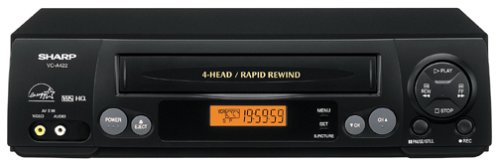
ചിത്രം: മുൻഭാഗം view of the Sharp VC-A422 4-Head VCR, showing the tape slot, display, and control buttons.
സജ്ജമാക്കുക
1. പായ്ക്ക് ചെയ്യലും പ്ലേസ്മെന്റും
- Carefully remove the VCR from its packaging.
- Place the VCR on a stable, level surface. Ensure there is adequate space around the unit for ventilation.
- Avoid placing the VCR near heat sources, direct sunlight, or areas with high humidity.
2. ഒരു ടെലിവിഷനുമായി ബന്ധിപ്പിക്കുന്നു
To connect your VCR to a television, you will typically use RCA audio/video cables (red, white, yellow) or a coaxial cable.
- RCA Connection (Recommended for best quality):
- നിങ്ങളുടെ ടിവിയിലെ മഞ്ഞ വീഡിയോ ഇൻപുട്ട് ജാക്കുമായി VCR-ലെ മഞ്ഞ വീഡിയോ ഔട്ട്പുട്ട് ജാക്ക് ബന്ധിപ്പിക്കുക.
- നിങ്ങളുടെ ടിവിയിലെ വെളുത്ത ഓഡിയോ ഇൻപുട്ട് ജാക്കിലേക്ക് VCR-ലെ വെളുത്ത ഓഡിയോ ഔട്ട്പുട്ട് ജാക്ക് ബന്ധിപ്പിക്കുക.
- നിങ്ങളുടെ ടിവിയിലെ ചുവന്ന ഓഡിയോ ഇൻപുട്ട് ജാക്കിലേക്ക് VCR-ലെ ചുവന്ന ഓഡിയോ ഔട്ട്പുട്ട് ജാക്ക് ബന്ധിപ്പിക്കുക.
- Select the corresponding AV input on your television (e.g., Video 1, AV1, Input 1).
- കോക്സിയൽ കണക്ഷൻ:
- Connect a coaxial cable from the "RF Out" or "Antenna Out" jack on the VCR to the "Antenna In" or "RF In" jack on your TV.
- Connect your antenna or cable TV signal to the "RF In" or "Antenna In" jack on the VCR.
- Tune your television to channel 3 or 4 (depending on the VCR's output setting) to receive the VCR signal.
3. പവർ കണക്ഷൻ
- Plug the VCR's power cord into a standard electrical outlet.
- The VCR should enter standby mode, indicated by a clock display or power light.
പ്രവർത്തന നിർദ്ദേശങ്ങൾ
1. അടിസ്ഥാന പ്ലേബാക്ക്
- Ensure the VCR is powered on and your TV is set to the correct input.
- Insert a VHS tape into the tape slot. The VCR will automatically load the tape.
- അമർത്തുക കളിക്കുക വിസിആറിലോ റിമോട്ട് കൺട്രോളിലോ ഉള്ള ബട്ടൺ.
- പ്ലേബാക്ക് നിർത്താൻ, അമർത്തുക നിർത്തുക ബട്ടൺ.
- പ്ലേബാക്ക് താൽക്കാലികമായി നിർത്താൻ, അമർത്തുക താൽക്കാലികമായി നിർത്തുക ബട്ടൺ. പുനരാരംഭിക്കാൻ വീണ്ടും അമർത്തുക.
- വേഗത്തിൽ മുന്നോട്ട് പോകാനോ പിന്നോട്ട് പോകാനോ, FF (Fast Forward) or REW (Rewind) button. Press കളിക്കുക സാധാരണ പ്ലേബാക്ക് പുനരാരംഭിക്കാൻ.
- ടേപ്പ് പുറത്തെടുക്കാൻ, EJECT ബട്ടൺ.
2. റെക്കോർഡിംഗ് പ്രോഗ്രാമുകൾ
The Sharp VC-A422 allows for recording television programs. Ensure a blank or recordable VHS tape is inserted and its safety tab is intact.
- Tune the VCR to the desired channel using the VCR's tuner.
- അമർത്തുക രേഖപ്പെടുത്തുക ബട്ടൺ. VCR റെക്കോർഡിംഗ് ആരംഭിക്കും.
- റെക്കോർഡിംഗ് നിർത്താൻ, അമർത്തുക നിർത്തുക ബട്ടൺ.
- For timed recordings, refer to the VCR's on-screen programming guide (if available) or consult the full manual for detailed timer recording instructions.
മെയിൻ്റനൻസ്
Proper maintenance ensures the longevity and optimal performance of your VCR.
- ബാഹ്യ ശുചീകരണം: Wipe the exterior of the VCR with a soft, dry cloth. Do not use liquid cleaners or abrasive materials.
- തല വൃത്തിയാക്കൽ: If picture quality degrades (e.g., snowy picture, lines), the video heads may be dirty. Use a dry-type VCR head cleaning cassette sparingly. Excessive use can wear down the heads.
- Tape Care: Store VHS tapes in their cases, away from dust, direct sunlight, and strong magnetic fields. Avoid exposing tapes to extreme temperatures.
- വെൻ്റിലേഷൻ: Keep the VCR's ventilation slots clear of obstructions to prevent overheating.
ട്രബിൾഷൂട്ടിംഗ്
If you encounter issues with your Sharp VC-A422 VCR, refer to the following common problems and solutions:
| പ്രശ്നം | സാധ്യമായ കാരണം | പരിഹാരം |
|---|---|---|
| ശക്തിയില്ല | Power cord unplugged; power outlet not active. | പവർ കോർഡ് കണക്ഷൻ പരിശോധിക്കുക. മറ്റൊരു ഉപകരണം ഉപയോഗിച്ച് ഔട്ട്ലെറ്റ് പരിശോധിക്കുക. |
| ചിത്രമോ ശബ്ദമോ ഇല്ല | Incorrect TV input selected; A/V cables loose or incorrectly connected. | Select correct TV input (e.g., AV1, Video 1). Ensure A/V cables are securely connected to matching color ports. |
| Snowy or distorted picture | Dirty video heads; poor tape quality; incorrect channel for coaxial connection. | Use a VCR head cleaning cassette. Try a different tape. If using coaxial, ensure TV is on channel 3 or 4. |
| ടേപ്പ് പുറത്തേക്ക് പോകില്ല | Power failure; mechanical issue. | Ensure VCR is powered on. If problem persists, seek professional service. |
| രേഖപ്പെടുത്താൻ കഴിയില്ല | Tape's safety tab removed; VCR not tuned to a channel. | Check if the safety tab on the VHS tape is intact (cover the notch with tape if removed). Ensure VCR tuner is set to the desired channel. |
സ്പെസിഫിക്കേഷനുകൾ
- ബ്രാൻഡ്: മൂർച്ചയുള്ള
- മോഡൽ: VC-A422
- തലവന്മാർ: 4-Head (Video)
- ഇനത്തിൻ്റെ ഭാരം: 6 പൗണ്ട്
- പാക്കേജ് അളവുകൾ: 15.55 x 11.02 x 5.24 ഇഞ്ച്
- ASIN: B00005LABU
- ആദ്യം ലഭ്യമായ തീയതി: സെപ്റ്റംബർ 4, 1999
കുറിപ്പ്: അറിയിപ്പുകൾ കൂടാതെ സവിശേഷതകൾ മാറ്റത്തിന് വിധേയമാണ്.
വാറൻ്റി വിവരങ്ങൾ
This Sharp product is covered by a limited warranty. For specific details regarding warranty coverage, duration, and terms, please refer to the warranty card included with your purchase or visit the official Sharp webസൈറ്റ്. വാറന്റി ക്ലെയിമുകൾക്കായി നിങ്ങളുടെ വാങ്ങലിന്റെ തെളിവ് സൂക്ഷിക്കുക.
ഉപഭോക്തൃ പിന്തുണ
For further assistance, technical support, or service inquiries, please contact Sharp customer support. You can find contact information on the official Sharp webസൈറ്റ് അല്ലെങ്കിൽ നിങ്ങളുടെ ഉൽപ്പന്നത്തിനൊപ്പം നൽകിയിരിക്കുന്ന ഡോക്യുമെന്റേഷനിൽ.
Visit the official Sharp store for more information: ഷാർപ്പ് ഒഫീഷ്യൽ സ്റ്റോർ
നിയമപരമായ നിരാകരണം
ഉപഭോക്തൃ മുന്നറിയിപ്പ്: ഈ ടെലിവിഷൻ റിസീവറിന് ഒരു അനലോഗ് ബ്രോഡ്കാസ്റ്റ് ട്യൂണർ മാത്രമേ ഉള്ളൂ, യുഎസ് ഡിജിറ്റൽ ബ്രോഡ്കാസ്റ്റിംഗിലേക്കുള്ള മാറ്റം കാരണം ആന്റിന ഉപയോഗിച്ച് ഓവർ-ദി-എയർ പ്രക്ഷേപണങ്ങൾ സ്വീകരിക്കുന്നതിന് 2009 ഫെബ്രുവരി 17 ന് ശേഷം ഒരു കൺവെർട്ടർ ബോക്സ് ആവശ്യമായി വരും. അനലോഗ്-ഒൺലി ടിവികൾ കേബിൾ, സാറ്റലൈറ്റ് ടിവി സേവനങ്ങൾ, ഗെയിമിംഗ് കൺസോളുകൾ, വിസിആറുകൾ, ഡിവിഡി പ്ലെയറുകൾ, സമാന ഉൽപ്പന്നങ്ങൾ എന്നിവയിൽ മുമ്പത്തെപ്പോലെ പ്രവർത്തിക്കണം. കൂടുതൽ വിവരങ്ങൾക്ക്, ഫെഡറൽ കമ്മ്യൂണിക്കേഷൻസ് കമ്മീഷനെ 1-888-225-5322 (TTY: 1-888-835-5322) എന്ന നമ്പറിൽ വിളിക്കുക, അല്ലെങ്കിൽ കമ്മീഷന്റെ ഡിജിറ്റൽ-ടെലിവിഷൻ സന്ദർശിക്കുക. Web സൈറ്റ്: www.dtv.gov.