
1. ആമുഖം
This manual provides detailed instructions for the proper setup, operation, and maintenance of your iRiver SlimX iMP-550 portable CD and MP3 player. Please read this manual thoroughly before using the device to ensure optimal performance and longevity.
1.1 പാക്കേജ് ഉള്ളടക്കം
താഴെ ലിസ്റ്റ് ചെയ്തിരിക്കുന്ന എല്ലാ ഇനങ്ങളും നിങ്ങളുടെ ഉൽപ്പന്ന പാക്കേജിൽ ഉൾപ്പെടുത്തിയിട്ടുണ്ടെന്ന് ഉറപ്പാക്കുക:
- iRiver SlimX iMP-550 Player
- റിമോട്ട് കൺട്രോൾ
- ഇയർഫോണുകൾ
- ചുമക്കുന്ന കേസ്
- Car Cassette Adapter
- കാർ പവർ അഡാപ്റ്റർ
- 2 x NiMH Rechargeable Batteries
- എസി അഡാപ്റ്റർ
- AA ബാറ്ററി അഡാപ്റ്റർ
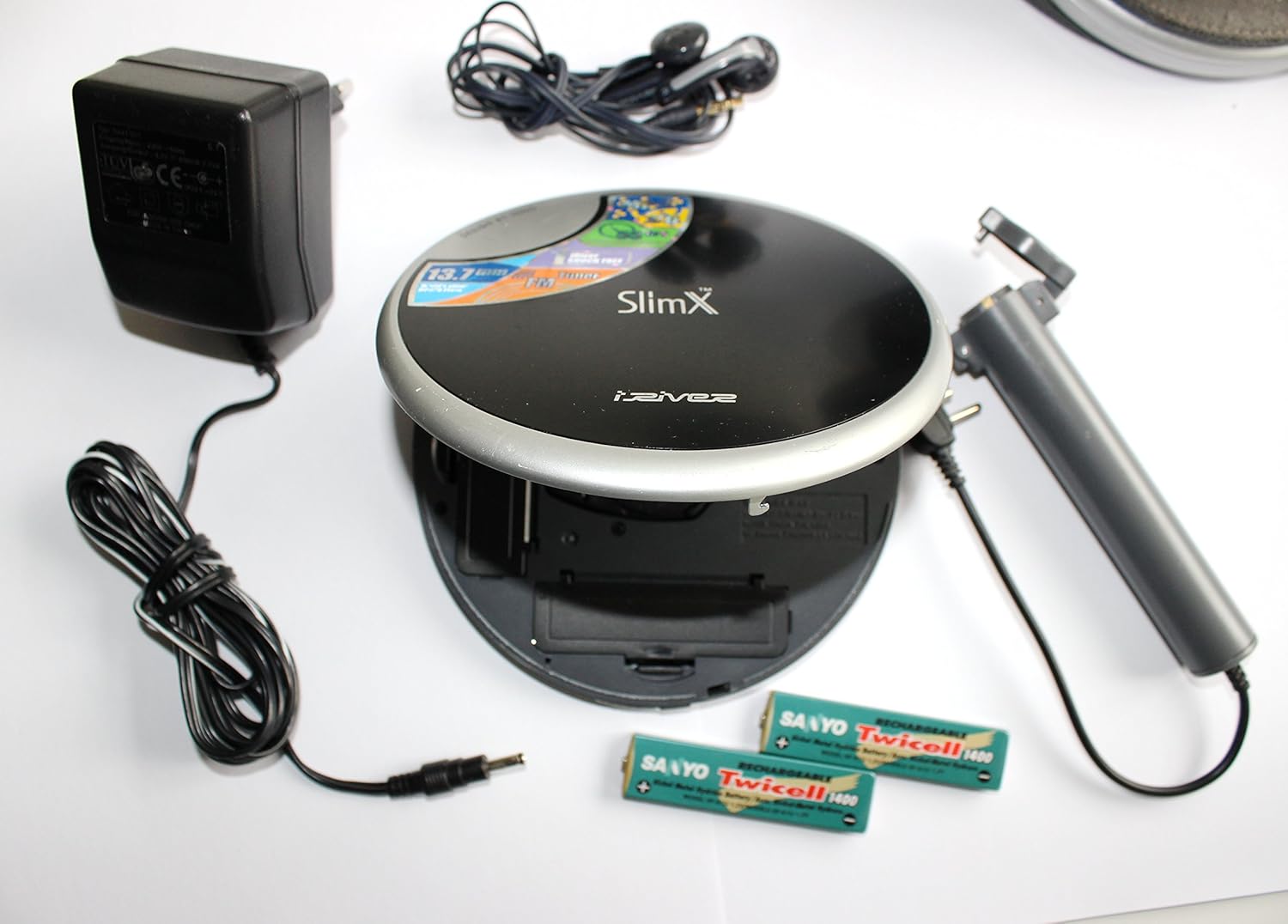
Figure 1.1: iRiver SlimX iMP-550 player with included accessories, including the remote, earphones, AC adapter, car adapters, and rechargeable batteries.
2 സുരക്ഷാ വിവരങ്ങൾ
വൈദ്യുതാഘാതം, തീപിടുത്തം അല്ലെങ്കിൽ യൂണിറ്റിന് കേടുപാടുകൾ എന്നിവ തടയാൻ, ദയവായി ഇനിപ്പറയുന്ന സുരക്ഷാ മുൻകരുതലുകൾ പാലിക്കുക:
- മഴ, ഈർപ്പം, അല്ലെങ്കിൽ തീവ്രമായ താപനില എന്നിവയിൽ യൂണിറ്റ് തുറന്നുകാട്ടരുത്.
- താപ സ്രോതസ്സുകൾക്ക് സമീപമോ നേരിട്ടുള്ള സൂര്യപ്രകാശത്തിലോ യൂണിറ്റ് സ്ഥാപിക്കുന്നത് ഒഴിവാക്കുക.
- യൂണിറ്റ് സ്വയം ഡിസ്അസംബ്ലിംഗ് ചെയ്യുകയോ നന്നാക്കാൻ ശ്രമിക്കുകയോ ചെയ്യരുത്. എല്ലാ സേവനങ്ങളും യോഗ്യതയുള്ള ഉദ്യോഗസ്ഥരെ ഏൽപ്പിക്കുക.
- നിർദ്ദിഷ്ട പവർ അഡാപ്റ്ററുകളും ബാറ്ററികളും മാത്രം ഉപയോഗിക്കുക.
- പ്രാദേശിക നിയന്ത്രണങ്ങൾ അനുസരിച്ച് ബാറ്ററികൾ നശിപ്പിക്കുക. ബാറ്ററികൾ കത്തിച്ചുകളയരുത്.
- കേൾവിക്ക് കേടുപാടുകൾ സംഭവിക്കുന്നത് തടയാൻ ദീർഘനേരം ഉയർന്ന ശബ്ദത്തിൽ കേൾക്കുന്നത് ഒഴിവാക്കുക.
3. ഉൽപ്പന്നം കഴിഞ്ഞുview
3.1 പ്രധാന സവിശേഷതകൾ
- Audio CD, MP3, WMA, and ASF music file പ്ലേബാക്ക്
- 32-minute skip-free playback
- Built-in digital FM tuner
- Up to 55 hours of battery life (with external AA battery pack)
- Optical output for connection to other audio devices
- Upgradeable firmware for future formats and features
3.2 ഘടകം തിരിച്ചറിയൽ
Familiarize yourself with the various parts of your iRiver SlimX iMP-550 player:
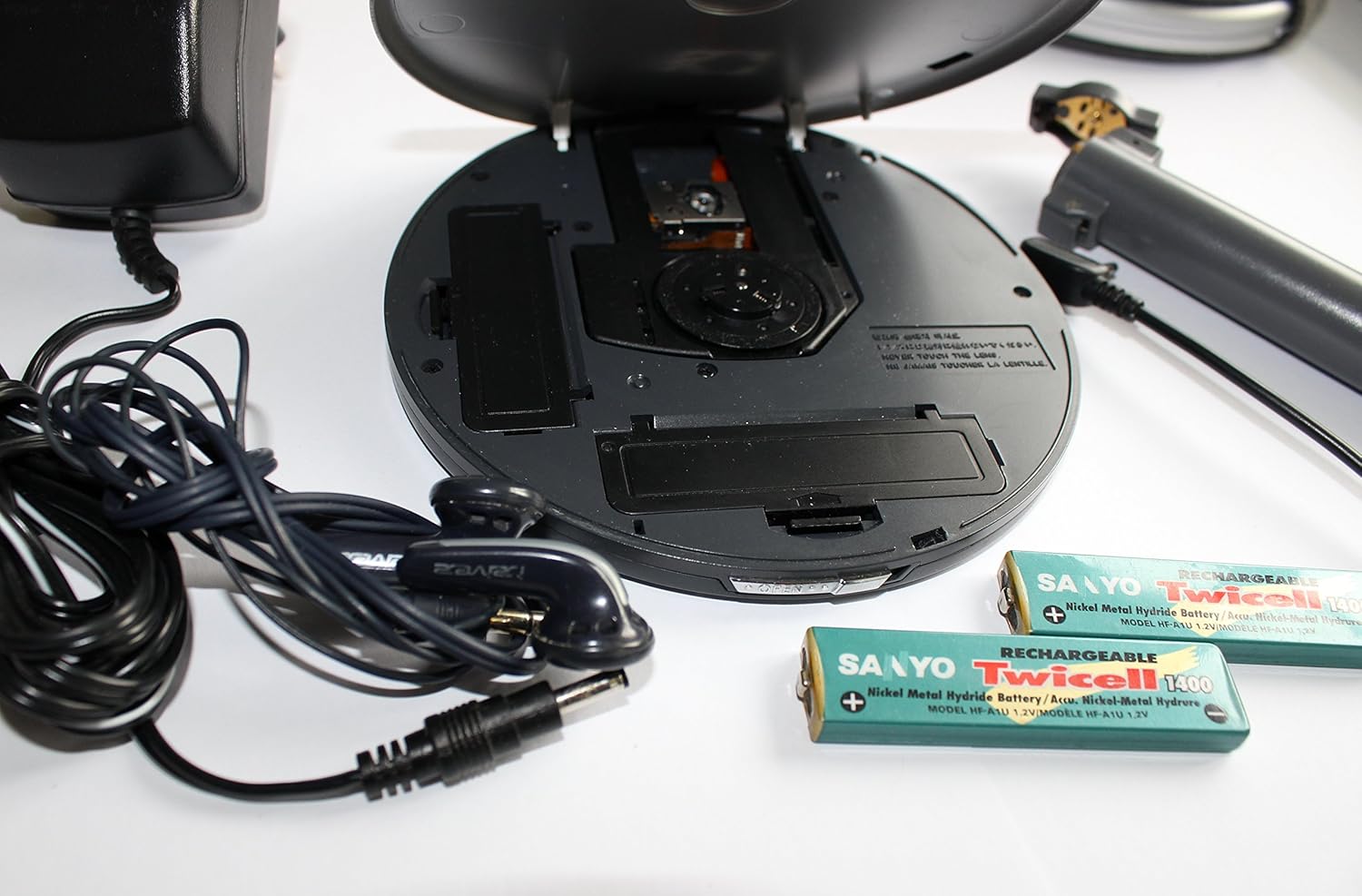
Figure 3.1: The iRiver SlimX iMP-550 player shown open, revealing the CD disc tray, internal rechargeable battery compartment, and external AA battery adapter connection. Earphones and power adapter are also visible.
പ്രധാന ഘടകങ്ങൾ:
- ഡിസ്ക് ട്രേ: For inserting audio CDs or data CDs with MP3/WMA/ASF files.
- ബാറ്ററി കമ്പാർട്ട്മെൻ്റ്: Houses the rechargeable NiMH batteries.
- പവർ ഇൻപുട്ട്: Connects the AC adapter for charging and power.
- ഹെഡ്ഫോൺ ജാക്ക്: ഇയർഫോണുകൾ ബന്ധിപ്പിക്കുന്നതിന്.
- റിമോട്ട് കൺട്രോൾ പോർട്ട്: വയർഡ് റിമോട്ട് കൺട്രോൾ ബന്ധിപ്പിക്കുന്നതിന്.
- ഒപ്റ്റിക്കൽ ഔട്ട്പുട്ട്: For digital audio connection to external audio systems.
4. സജ്ജീകരണം
4.1 ബാറ്ററി ഇൻസ്റ്റാളേഷൻ
- പ്ലെയറിന്റെ അടിവശത്തുള്ള ബാറ്ററി കമ്പാർട്ട്മെന്റ് കവർ തുറക്കുക.
- Insert the two supplied NiMH rechargeable batteries, observing the correct polarity (+/-).
- ബാറ്ററി കമ്പാർട്ട്മെൻ്റ് കവർ സുരക്ഷിതമായി അടയ്ക്കുക.
- For extended playback, connect the AA battery adapter to the designated port and insert two AA batteries (not included) into the adapter.
4.2 ബാറ്ററികൾ ചാർജ് ചെയ്യുന്നു
- Connect the AC adapter to the power input jack on the player.
- ഒരു സാധാരണ വാൾ ഔട്ട്ലെറ്റിലേക്ക് എസി അഡാപ്റ്റർ പ്ലഗ് ചെയ്യുക.
- The charging indicator will illuminate. Allow sufficient time for a full charge (refer to specifications for charging time).
- Disconnect the AC adapter once charging is complete.
4.3 Connecting Earphones and Remote Control
- Plug the earphones into the headphone jack.
- Connect the remote control cable to the remote control port on the player.
- Plug your earphones into the headphone jack on the remote control.
5. പ്രവർത്തന നിർദ്ദേശങ്ങൾ
5.1 പവർ ഓൺ/ഓഫ്
- To power on, press and hold the Power button on the player or remote control.
- To power off, press and hold the Power button again until the display turns off.
5.2 Disc Playback (CD/MP3/WMA/ASF)
- Open the disc cover by sliding the latch.
- Place a disc (Audio CD, CD-R/RW with MP3, WMA, or ASF files) ലേബൽ വശം മുകളിലേക്ക് അഭിമുഖീകരിക്കുന്ന തരത്തിൽ സ്പിൻഡിൽ സ്ഥാപിക്കുക.
- Close the disc cover firmly until it clicks.
- The player will read the disc and begin playback automatically or display the track list.
- Use the Play/Pause, Stop, Skip Forward, and Skip Backward buttons on the player or remote to control playback.
- Adjust volume using the Volume Up/Down buttons.
5.3 FM Tuner Operation
- Press the Mode button to switch to FM radio mode.
- Use the Seek/Tune buttons to scan for radio stations.
- Press the Preset button to save or recall favorite stations.
5.4 റിമോട്ട് കൺട്രോൾ ഉപയോഗിക്കുന്നു
The wired remote control provides convenient access to most player functions, including power, play/pause, stop, skip, volume, and mode selection. Refer to the remote control's button labels for specific functions.
6. പരിപാലനം
6.1 വൃത്തിയാക്കൽ
- മൃദുവായതും ഉണങ്ങിയതുമായ തുണി ഉപയോഗിച്ച് പ്ലെയറിന്റെ പുറംഭാഗം തുടയ്ക്കുക. അബ്രാസീവ് ക്ലീനറുകളോ ലായകങ്ങളോ ഉപയോഗിക്കരുത്.
- To clean the optical lens, use a specialized CD lens cleaning kit.
- ഡിസ്ക് ട്രേ പൊടിയും അവശിഷ്ടങ്ങളും ഇല്ലാതെ സൂക്ഷിക്കുക.
6.2 സംഭരണം
When not in use for extended periods, remove all batteries and store the player in a cool, dry place away from direct sunlight and extreme temperatures.
7. പ്രശ്നപരിഹാരം
If you encounter problems with your iRiver SlimX iMP-550, refer to the following common issues and solutions:
| പ്രശ്നം | സാധ്യമായ കാരണം / പരിഹാരം |
|---|---|
| പ്ലെയർ പവർ ഓൺ ചെയ്യുന്നില്ല. | Check battery installation and charge level. Ensure AC adapter is properly connected if using external power. |
| ഡിസ്ക് പ്ലേ ചെയ്യുകയോ ഒഴിവാക്കുകയോ ചെയ്യുന്നില്ല. | Ensure the disc is clean and free of scratches. Verify the disc is inserted correctly. Close the disc cover completely. |
| ഇയർഫോണുകളിൽ നിന്ന് ശബ്ദമൊന്നുമില്ല. | Check earphone connection. Adjust volume level. Ensure earphones are not damaged. |
| മോശം എഫ്എം സ്വീകരണം. | Extend the earphone cable (which acts as an antenna). Move to an area with better signal. |
| റിമോട്ട് കൺട്രോൾ പ്രതികരിക്കുന്നില്ല. | Ensure the remote control cable is securely connected to the player. |
8 സ്പെസിഫിക്കേഷനുകൾ
| ഫീച്ചർ | വിശദാംശങ്ങൾ |
|---|---|
| മോഡൽ നമ്പർ | IMP-550 |
| ഉൽപ്പന്ന അളവുകൾ | 5.51 x 5.14 x 0.53 ഇഞ്ച് |
| ഇനത്തിൻ്റെ ഭാരം | 5.1 ഔൺസ് |
| പിന്തുണയ്ക്കുന്ന ഓഡിയോ ഫോർമാറ്റുകൾ | Audio CD, MP3, WMA, ASF |
| സംരക്ഷണം ഒഴിവാക്കുക | 32 മിനിറ്റ് |
| ട്യൂണർ | Built-in Digital FM Tuner |
| ബാറ്ററി ലൈഫ് | Up to 55 hours (with external AA battery adapter) |
| കണക്റ്റിവിറ്റി | Auxiliary, Optical Output |
| നിറം | കറുപ്പ് |
| നിർമ്മാതാവ് | iRiver |
| ആദ്യ തീയതി ലഭ്യമാണ് | ജൂൺ 25, 2003 |
9. വാറൻ്റിയും പിന്തുണയും
For warranty information and technical support, please refer to the warranty card included in your product packaging or visit the official iRiver support webവാറന്റി ക്ലെയിമുകൾക്കുള്ള വാങ്ങലിന്റെ തെളിവായി നിങ്ങളുടെ വാങ്ങൽ രസീത് സൂക്ഷിക്കുക.