
പ്രധാനപ്പെട്ട സുരക്ഷാ വിവരങ്ങൾ
ഈ ഉപകരണം പ്രവർത്തിപ്പിക്കുന്നതിന് മുമ്പ് ദയവായി എല്ലാ നിർദ്ദേശങ്ങളും ശ്രദ്ധാപൂർവ്വം വായിക്കുക. ഭാവി റഫറൻസിനായി ഈ മാനുവൽ സൂക്ഷിക്കുക.
- തീ അല്ലെങ്കിൽ ഷോക്ക് അപകടങ്ങൾ തടയാൻ യൂണിറ്റ് മഴയോ ഈർപ്പമോ കാണിക്കരുത്.
- Do not block ventilation openings. Ensure proper airflow around the unit.
- Use only the power adapters supplied with the unit. Using unauthorized adapters may damage the device and void the warranty.
- അസ്ഥിരമായ പ്രതലങ്ങളിൽ യൂണിറ്റ് സ്ഥാപിക്കുന്നത് ഒഴിവാക്കുക.
- യൂണിറ്റ് സ്വയം സർവീസ് ചെയ്യാൻ ശ്രമിക്കരുത്. എല്ലാ സർവീസിംഗും യോഗ്യതയുള്ള ഉദ്യോഗസ്ഥർക്ക് റഫർ ചെയ്യുക.
- പ്രാദേശിക നിയന്ത്രണങ്ങൾ അനുസരിച്ച് ബാറ്ററികൾ ശരിയായി വിനിയോഗിക്കുക.
പാക്കേജ് ഉള്ളടക്കം
പാക്കേജിൽ എല്ലാ ഇനങ്ങളും ഉണ്ടെന്ന് ഉറപ്പാക്കുക:
- Coby TFDVD-7700 Portable DVD Player
- പൂർണ്ണ പ്രവർത്തന വിദൂര നിയന്ത്രണം
- റിമോട്ട് കൺട്രോൾ ബാറ്ററി
- ലിഥിയം-അയൺ റീചാർജ് ചെയ്യാവുന്ന ബാറ്ററി
- എസി പവർ കോർഡ്
- 100-240V UL Adapter
- DC Car/Boat Charger
- Car/Boat AC/DC Adapter and Cassette Audio Adapter
- 2 Sets of Stereo Headphones
- Headphone Jack Splitter
- ചുമക്കുന്ന സഞ്ചി
- Headrest Mounting Pouch
- ഉപയോക്തൃ മാനുവൽ (ഈ പ്രമാണം)
ഉൽപ്പന്നം കഴിഞ്ഞുview
The Coby TFDVD-7700 is a 7-inch side-loading portable DVD player designed for entertainment on the go. It features a widescreen TFT LCD display and built-in stereo speakers.
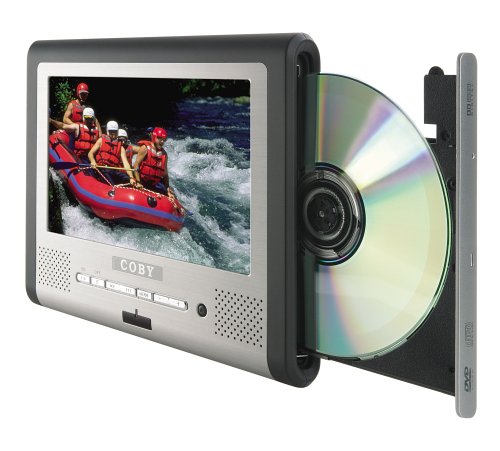
ചിത്രം 1: Coby TFDVD-7700 Portable DVD Player and its remote control. The player features a 7-inch screen, control buttons below the screen, and a side-loading DVD slot. The remote control has numerous buttons for full functionality.
പ്രധാന സവിശേഷതകൾ:
- 7-inch Widescreen TFT LCD Display
- Side-loading DVD Mechanism
- Multi-format Playback (DVD, MP3 CD, JPEG CD)
- ബിൽറ്റ്-ഇൻ സ്റ്റീരിയോ സ്പീക്കറുകൾ
- Composite Video Output for external display connection
- പൂർണ്ണ പ്രവർത്തന വിദൂര നിയന്ത്രണം
- റീചാർജ് ചെയ്യാവുന്ന ലിഥിയം-അയൺ ബാറ്ററി
- Picture Zoom and Parental Controls
സജ്ജമാക്കുക
1 ബാറ്ററി ചാർജ് ചെയ്യുന്നു
- Connect the 100-240V UL adapter to the DC IN port on the DVD player.
- ഒരു സാധാരണ മതിൽ let ട്ട്ലെറ്റിലേക്ക് അഡാപ്റ്റർ പ്ലഗ് ചെയ്യുക.
- Allow the unit to charge fully before first use (approximately 3-4 hours). The charging indicator light will typically change color or turn off when charging is complete.
- For in-car use, connect the DC car charger to the DC IN port and plug it into your vehicle's cigarette lighter socket.
2. Inserting the Remote Control Battery
- റിമോട്ട് കൺട്രോളിൻ്റെ പിൻഭാഗത്തുള്ള ബാറ്ററി കമ്പാർട്ട്മെൻ്റ് തുറക്കുക.
- Insert the supplied battery, ensuring correct polarity (+/-).
- ബാറ്ററി കമ്പാർട്ട്മെൻ്റ് സുരക്ഷിതമായി അടയ്ക്കുക.
3. Connecting to an External Display (Optional)
- Locate the composite video output port on the DVD player.
- Connect a composite video cable (not always included, may need to be purchased separately) from the player's video output to the video input of your TV or monitor.
- Ensure your TV/monitor is set to the correct input source.
പ്രവർത്തന നിർദ്ദേശങ്ങൾ
1. പവർ ഓൺ/ഓഫ്
- To power on, slide the POWER switch to the ON position or press the POWER button on the remote.
- To power off, slide the POWER switch to the OFF position or press the POWER button on the remote.
2. ഒരു ഡിസ്ക് ചേർക്കൽ
- With the unit powered on, gently insert a DVD, MP3 CD, or JPEG CD into the side-loading disc slot with the label side facing up.
- The player will automatically detect the disc and begin playback or display the disc menu.
3. അടിസ്ഥാന പ്ലേബാക്ക് നിയന്ത്രണങ്ങൾ
Use the buttons on the unit or the remote control:
- പ്ലേ/താൽക്കാലികമായി നിർത്തുക: പ്ലേബാക്ക് ആരംഭിക്കുന്നതിനോ താൽക്കാലികമായി നിർത്തുന്നതിനോ അമർത്തുക.
- നിർത്തുക: പ്ലേബാക്ക് നിർത്താൻ അമർത്തുക.
- ഒഴിവാക്കുക (<< / >>): മുമ്പത്തേതിലേക്കോ അടുത്ത അധ്യായത്തിലേക്കോ/ട്രാക്കിലേക്കോ പോകാൻ അമർത്തുക.
- ഫാസ്റ്റ് ഫോർവേഡ്/റിവൈൻഡ്: ഫാസ്റ്റ് ഫോർവേഡ് ചെയ്യാനോ റിവൈൻഡ് ചെയ്യാനോ അമർത്തിപ്പിടിക്കുക.
- വോളിയം (+/-): ഓഡിയോ വോളിയം ക്രമീകരിക്കുക.
4. ഹെഡ്ഫോണുകൾ ഉപയോഗിക്കുന്നത്
- Plug one or both sets of stereo headphones into the headphone jack(s).
- Use the headphone splitter to connect both sets of headphones to a single jack if needed.
- Adjust volume to a comfortable level to prevent hearing damage.
5. വിപുലമായ സവിശേഷതകൾ
- മെനു: Access the disc's main menu.
- സജ്ജമാക്കുക: Access the player's system settings (e.g., language, display settings, parental controls).
- സൂം: Enlarge a portion of the screen during video playback.
- കോൺ: മാറ്റുക viewing angle on discs that support multiple angles.
- സബ്ടൈറ്റിൽ: Select different subtitle tracks.
- SLOW/FAST MOTION: Control playback speed.
മെയിൻ്റനൻസ്
1. യൂണിറ്റ് വൃത്തിയാക്കൽ
- മൃദുവായതും ഉണങ്ങിയതുമായ തുണി ഉപയോഗിച്ച് യൂണിറ്റിന്റെ പുറംഭാഗം തുടയ്ക്കുക.
- ശാഠ്യമുള്ള അടയാളങ്ങൾക്ക്, dampen the cloth slightly with water, then wipe dry immediately.
- അബ്രാസീവ് ക്ലീനറുകൾ, മെഴുക്, ലായകങ്ങൾ എന്നിവ ഉപയോഗിക്കരുത്.
- To clean the screen, use a soft, lint-free cloth specifically designed for LCD screens.
2. ഡിസ്ക് കെയർ
- വിരലടയാളങ്ങൾ ഒഴിവാക്കാൻ ഡിസ്കുകൾ അവയുടെ അരികുകളിൽ പിടിക്കുക.
- ഉപയോഗത്തിലില്ലാത്തപ്പോൾ ഡിസ്കുകൾ അവയുടെ കെയ്സുകളിൽ തന്നെ സൂക്ഷിക്കുക.
- മലിനമായ ഡിസ്കുകൾ മൃദുവായ, ലിന്റ് രഹിത തുണി ഉപയോഗിച്ച് വൃത്തിയാക്കുക, മധ്യഭാഗത്ത് നിന്ന് പുറത്തേക്ക് തുടയ്ക്കുക.
3. ബാറ്ററി പരിചരണം
- Recharge the battery regularly, even if the unit is not used frequently, to maintain battery life.
- Avoid fully discharging the battery repeatedly.
- ദീർഘനേരം ഉപയോഗിക്കാത്തപ്പോൾ യൂണിറ്റ് തണുത്തതും വരണ്ടതുമായ സ്ഥലത്ത് സൂക്ഷിക്കുക.
ട്രബിൾഷൂട്ടിംഗ്
If you encounter issues with your Coby TFDVD-7700, refer to the following common problems and solutions:
| പ്രശ്നം | സാധ്യമായ കാരണം | പരിഹാരം |
|---|---|---|
| യൂണിറ്റ് പവർ ഓണാക്കുന്നില്ല. | Battery is discharged; Power adapter not connected; Power switch is OFF. | Charge the battery; Connect the power adapter; Slide the POWER switch to ON. |
| No disc detected / Disc error. | Disc is dirty or scratched; Disc inserted incorrectly; Unsupported disc format. | Clean the disc; Reinsert disc with label side up; Ensure disc is DVD, MP3 CD, or JPEG CD. |
| ശബ്ദമില്ല. | Volume is too low; Headphones not connected properly; Mute function is active. | Increase volume; Reconnect headphones; Deactivate mute. |
| Picture is distorted or black. | External display connection issue; Disc problem. | Check composite video cable connection and TV input; Try a different disc. |
| റിമോട്ട് കൺട്രോൾ പ്രവർത്തിക്കുന്നില്ല. | Battery is dead or inserted incorrectly; Obstruction between remote and player. | Replace or reinsert battery; Ensure clear line of sight to the player's IR sensor. |
സ്പെസിഫിക്കേഷനുകൾ
- മോഡൽ: TFDVD-7700
- സ്ക്രീൻ വലിപ്പം: 7 Inches (Widescreen TFT LCD)
- പിന്തുണയ്ക്കുന്ന മീഡിയ തരങ്ങൾ: DVD, CD-R, CD-RW, SVCD, MP3 CD, JPEG CD
- ഓഡിയോ ഔട്ട്പുട്ട്: ബിൽറ്റ്-ഇൻ സ്റ്റീരിയോ സ്പീക്കറുകൾ, ഹെഡ്ഫോൺ ജാക്ക്
- വീഡിയോ ഔട്ട്പുട്ട്: സംയോജിത വീഡിയോ
- ഊർജ്ജ സ്രോതസ്സ്: AC Adapter (100-240V), DC Car Charger, Rechargeable Lithium-ion Battery
- നിർമ്മാതാവ്: കോബി
വാറൻ്റി വിവരങ്ങൾ
This product is covered by a limited warranty. Please refer to the warranty card included in your original packaging for specific terms and conditions, including coverage period and service procedures. Typically, Coby products come with a 90-day warranty on parts and labor from the date of purchase.
വാറന്റി ക്ലെയിമുകൾക്കുള്ള വാങ്ങിയതിന്റെ തെളിവായി നിങ്ങളുടെ വാങ്ങൽ രസീത് സൂക്ഷിക്കുക.
ഉപഭോക്തൃ പിന്തുണ
For technical assistance, troubleshooting beyond this manual, or warranty inquiries, please contact Coby customer support.
Please have your model number (TFDVD-7700) and proof of purchase ready when contacting support.
Contact information (phone number, website) would typically be provided on the manufacturer's official webസൈറ്റ് അല്ലെങ്കിൽ വാറന്റി ഡോക്യുമെന്റേഷനിൽ.