
1. ആമുഖം
This manual provides instructions for the setup, operation, maintenance, and troubleshooting of the InFocus LP540 Multimedia Video Projector. The LP540 is designed for presenting visual content with an XGA 1024x768 native resolution and 1700 ANSI lumens brightness. It features a zoom lens with manual focus and zoom adjustment, and includes a 2-watt speaker for audio output.
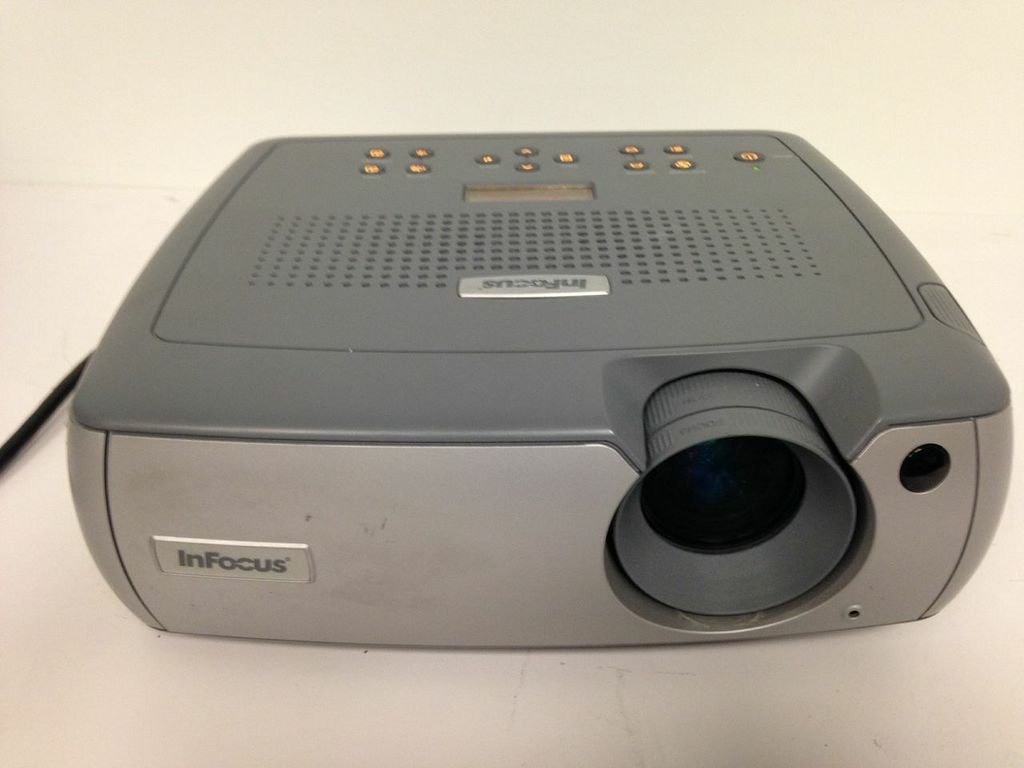
ചിത്രം 1: മുൻവശം view of the InFocus LP540 Projector, showing the lens and InFocus branding.
2. സജ്ജീകരണം
2.1 പായ്ക്ക് ചെയ്യലും ഉള്ളടക്കവും
Carefully unpack the projector and verify that all components are present:
- InFocus LP540 Projector
- Navigator remote control
- പവർ കോർഡ്
- M1-A computer cable with USB mouse
- 3.5mm computer audio cable
- RCA ഓഡിയോ/വീഡിയോ കേബിൾ
- കളർ കോഡ് ചെയ്ത കേബിൾ സ്ട്രാപ്പുകൾ
- സോഫ്റ്റ് ചുമക്കുന്ന കേസ്
- User's guide and CD
2.2 പ്രൊജക്ടർ പ്ലേസ്മെന്റ്
The LP540 supports front, rear, and ceiling projection methods. For optimal image quality, place the projector on a stable, flat surface or mount it securely. Ensure adequate ventilation around the unit.
2.3 ബന്ധിപ്പിക്കുന്ന പവർ
- പ്രൊജക്ടറിന്റെ പവർ ഇൻലെറ്റിലേക്ക് പവർ കോർഡ് ബന്ധിപ്പിക്കുക.
- പവർ കോർഡിന്റെ മറ്റേ അറ്റം ഗ്രൗണ്ടഡ് ഇലക്ട്രിക്കൽ ഔട്ട്ലെറ്റിലേക്ക് പ്ലഗ് ചെയ്യുക.
2.4 Connecting Video and Audio Sources
The LP540 offers various input ports for video and audio connections. Refer to Figure 2 for port locations.

Figure 2: Rear panel of the InFocus LP540 Projector, displaying monitor out, computer in, audio in, video in, and serial control ports.
- Computer Input: Use the M1-A computer cable to connect your computer to the 'computer 1' or 'computer in' port. The M1-A cable also supports USB mouse functionality.
- വീഡിയോ ഇൻപുട്ട്: Connect video sources (e.g., DVD player, VCR) using the RCA audio/video cable to the 'video in' ports (yellow for video, red/white for audio).
- ഓഡിയോ ഇൻപുട്ട്: For separate audio input from a computer, use the 3.5mm computer audio cable to connect to the 'audio in' port.
- Serial Control: The 'serial control' port (RS-232) allows for external control of the projector.
- നിരീക്ഷിക്കുക: The 'monitor out' port allows you to connect an external monitor to display the same image as the projector.
2.5 ഇമേജ് അഡ്ജസ്റ്റ്മെന്റ്
After connecting and powering on, adjust the image:
- ഫോക്കസ്: ചിത്രം വ്യക്തവും വ്യക്തവുമാകുന്നതുവരെ ലെൻസിലെ ഫോക്കസ് റിംഗ് തിരിക്കുക.
- സൂം: Adjust the zoom ring on the lens to achieve the desired image size. The projector can display images from 40 inches to 300 inches diagonally.
3. പ്രൊജക്ടർ പ്രവർത്തിപ്പിക്കൽ
3.1 പവർ ഓൺ/ഓഫ്
- പവർ ഓണാക്കാൻ: Press the power button on the projector's control panel or the remote control. The power indicator light will illuminate.
- പവർ ഓഫ് ചെയ്യാൻ: Press the power button again. The projector will enter a cooling cycle before completely shutting down. Do not unplug the projector during the cooling cycle.
3.2 റിമോട്ട് കൺട്രോൾ ഉപയോഗിക്കുന്നു
The included navigator remote control allows for convenient operation of the projector from a distance. It provides access to menu navigation, input selection, volume control, and other functions.
3.3 ഇൻപുട്ട് ഉറവിട തിരഞ്ഞെടുപ്പ്
Use the 'Input' button on the projector's control panel or remote control to cycle through available input sources (e.g., Computer 1, Video). The projector will automatically detect active signals.
3.4 ഓൺ-സ്ക്രീൻ ഡിസ്പ്ലേ (OSD) മെനു
Press the 'Menu' button on the projector or remote to access the On-Screen Display. Use the arrow keys to navigate and 'Enter' to select options. The OSD allows adjustment of various settings:
- ചിത്ര ക്രമീകരണങ്ങൾ: തെളിച്ചം, ദൃശ്യതീവ്രത, നിറം, ടിന്റ്, ഷാർപ്നെസ് എന്നിവ ക്രമീകരിക്കുക.
- ഡിസ്പ്ലേ ക്രെമീകരണങ്ങൾ: Change aspect ratio, keystone correction, and projection method.
- ഓഡിയോ ക്രമീകരണങ്ങൾ: Control volume and mute.
- വിപുലമായ ക്രമീകരണങ്ങൾ: ആക്സസ് എൽamp timer, language, and other system options.
3.5 ഓഡിയോ putട്ട്പുട്ട്
The projector features a built-in 2-watt speaker. Adjust the volume using the remote control or the OSD menu. Ensure external audio sources are properly connected to the 'audio in' ports.
3.6 Wireless Connectivity (Optional)
The LP540 supports wireless connectivity with a LiteShow module (sold separately). Refer to the LiteShow module's documentation for installation and setup instructions.
4. പരിപാലനം
4.1 എൽamp Care and Replacement
പ്രൊജക്ടർ എൽamp പരിമിതമായ ആയുസ്സ് ഉണ്ട്. lamp life is nearing its end, a warning message may appear, or the image brightness may decrease significantly. Replace the lamp with an authorized InFocus replacement lamp only. Refer to the full user manual on the included CD for detailed lamp മാറ്റിസ്ഥാപിക്കാനുള്ള നിർദ്ദേശങ്ങൾ.
4.2 ലെൻസ് വൃത്തിയാക്കൽ
Use a soft, lint-free cloth specifically designed for optical lenses to gently clean the projector lens. Avoid using abrasive cleaners or excessive force, as this can scratch the lens surface.
4.3 എയർ ഫിൽട്ടറുകൾ വൃത്തിയാക്കൽ
Regularly clean the projector's air filters to ensure proper ventilation and prevent overheating. Dust and debris can accumulate, reducing cooling efficiency. Refer to the full user manual for filter location and cleaning procedures.
4.4 പൊതുവായ ശുചീകരണം
Wipe the projector's exterior casinഗ്രാം വിത്ത് എ സോഫ്റ്റ്, ഡിamp cloth. Do not use harsh chemicals or solvents. Ensure the projector is powered off and unplugged before cleaning.
5. പ്രശ്നപരിഹാരം
This section addresses common issues you may encounter with the InFocus LP540 projector. For more detailed troubleshooting, consult the complete user manual.
- ശക്തിയില്ല:
- പ്രൊജക്ടറിലേക്കും പ്രവർത്തിക്കുന്ന ഒരു ഇലക്ട്രിക്കൽ ഔട്ട്ലെറ്റിലേക്കും പവർ കോർഡ് സുരക്ഷിതമായി ബന്ധിപ്പിച്ചിട്ടുണ്ടെന്ന് ഉറപ്പാക്കുക.
- Check if the power indicator light is on. If not, try a different outlet.
- സ്ക്രീനിൽ ചിത്രമില്ല:
- Verify that the correct input source is selected (e.g., Computer 1, Video).
- Check all video cables for secure connections.
- Ensure the computer or video source is powered on and outputting a signal.
- Adjust the projector's brightness and contrast settings via the OSD menu.
- Poor Image Quality (Blurry, Distorted, Incorrect Colors):
- Adjust the focus and zoom rings on the lens.
- Check the resolution settings on your computer to ensure they are compatible with the projector's native resolution (1024x768).
- Perform keystone correction if the image is trapezoidal.
- Adjust color, tint, and sharpness settings in the OSD menu.
- ശബ്ദമില്ല:
- Ensure audio cables are securely connected to the 'audio in' port.
- Check the volume level on the projector and the audio source.
- Verify that the projector is not muted.
- റിമോട്ട് കൺട്രോൾ പ്രവർത്തിക്കുന്നില്ല:
- റിമോട്ട് കൺട്രോളിലെ ബാറ്ററികൾ പരിശോധിച്ച് മാറ്റിസ്ഥാപിക്കുക.
- റിമോട്ടിനും പ്രൊജക്ടറിന്റെ ഐആർ റിസീവറിനും ഇടയിൽ തടസ്സങ്ങളൊന്നുമില്ലെന്ന് ഉറപ്പാക്കുക.
6 സ്പെസിഫിക്കേഷനുകൾ
The following table details the technical specifications for the InFocus LP540 Multimedia Video Projector:
| ഫീച്ചർ | സ്പെസിഫിക്കേഷൻ |
|---|---|
| ബ്രാൻഡ് | ഇൻഫോക്കസ് |
| മോഡലിൻ്റെ പേര് | LP540 |
| ഡിസ്പ്ലേ തരം | എൽസിഡി |
| നേറ്റീവ് റെസല്യൂഷൻ | 1024 x 768 (XGA) |
| തെളിച്ചം | 1700 ANSI Lumens (max.) |
| കോൺട്രാസ്റ്റ് റേഷ്യോ | 400:1 |
| ചിത്രത്തിൻ്റെ വലുപ്പം (ഡയഗണൽ) | 40 ഇഞ്ച് മുതൽ 300 ഇഞ്ച് വരെ |
| കണക്റ്റിവിറ്റി ടെക്നോളജി | USB |
| ഹാർഡ്വെയർ കണക്റ്റിവിറ്റി | USB |
| പ്രത്യേക ഫീച്ചർ | ബിൽറ്റ്-ഇൻ സ്പീക്കറുകൾ |
| ഓഡിയോ ഔട്ട്പുട്ട് | രണ്ട് 2-വാട്ട് സ്പീക്കറുകൾ |
| Lamp വാട്ട്tage | 170 വാട്ട്സ് |
| വാട്ട്tage (ആകെ) | 260 വാട്ട്സ് |
| നിയന്ത്രണ രീതി | Remote, Keypad, RS-232 |
| ഫോം ഫാക്ടർ | പോർട്ടബിൾ |
| മൗണ്ടിംഗ് തരം | ടേബിൾടോപ്പ് മൗണ്ട് |
| ഇനത്തിൻ്റെ ഭാരം | 14.6 പൗണ്ട് |
| ബാഹ്യ പരിശോധന സർട്ടിഫിക്കേഷൻ | UL |
| യു.പി.സി | 797212604897 |
7. വാറൻ്റി വിവരങ്ങൾ
The InFocus LP540 Projector comes with a 2-year projector warranty. Please retain your proof of purchase for warranty claims. For specific terms and conditions, refer to the warranty documentation included with your product or contact InFocus customer support.
8. പിന്തുണ
For further assistance, technical support, or service inquiries regarding your InFocus LP540 Multimedia Video Projector, please visit the official InFocus webസൈറ്റിൽ ബന്ധപ്പെടുക അല്ലെങ്കിൽ അവരുടെ ഉപഭോക്തൃ സേവന വിഭാഗവുമായി ബന്ധപ്പെടുക. കോൺടാക്റ്റ് വിവരങ്ങൾ സാധാരണയായി നിർമ്മാതാവിന്റെ വെബ്സൈറ്റിൽ കാണാം. website or in the full user manual provided on the included CD.