
1. ആമുഖം
The PreSonus HP4 is a compact, high-quality 4-channel headphone amplifier designed to deliver clear and powerful audio monitoring for studio and live applications. This manual provides comprehensive instructions for setting up, operating, and maintaining your HP4 ampജീവൻ.
2 പ്രധാന സവിശേഷതകൾ
- Four Stereo Headphone Ampജീവപര്യന്തം: Provides four independent, high-output (130 mW per channel) stereo headphone outputs.
- Individual Level Controls: Each headphone channel features its own volume control for personalized listening levels.
- Monitor Level Control: A dedicated control for the overall monitor output level.
- Monitor Mute Button: Allows for quick muting of the monitor outputs.
- Mono Summing Switch: Converts the stereo input signal to mono for specific monitoring needs.
- Balanced Line Inputs: Two balanced 1/4-inch line inputs (Left/Right) for connecting audio sources.
- Balanced Monitor Outputs: Two balanced 1/4-inch monitor outputs (Left/Right) for daisy-chaining multiple HP4 units or connecting to other monitoring systems.
- വൈഡ് ഡൈനാമിക് റേഞ്ച്: Ensures clear audio reproduction across a broad spectrum.
- Low Noise Floor: Operates with a super-quiet -98dB noise floor for pristine sound.
- ഒതുക്കമുള്ളതും മോടിയുള്ളതുമായ ഡിസൈൻ: Housed in a robust 1/3U rack-mount chassis, designed for longevity and portability.
3. സജ്ജീകരണ ഗൈഡ്
3.1 അൺപാക്ക് ചെയ്യുന്നു
Carefully remove the PreSonus HP4 from its packaging. Ensure all components, including the HP4 unit and its power supply, are present and undamaged. Retain the packaging for future transport or storage.
3.2 ഫ്രണ്ട് പാനൽ ഓവർview

The front panel features four 1/4-inch headphone outputs, each with an independent volume control knob. Additionally, there is a Mono summing switch and a Monitor Mute button, along with a master Monitor Level control.
3.3. പിൻ പാനൽ കണക്ഷനുകൾ
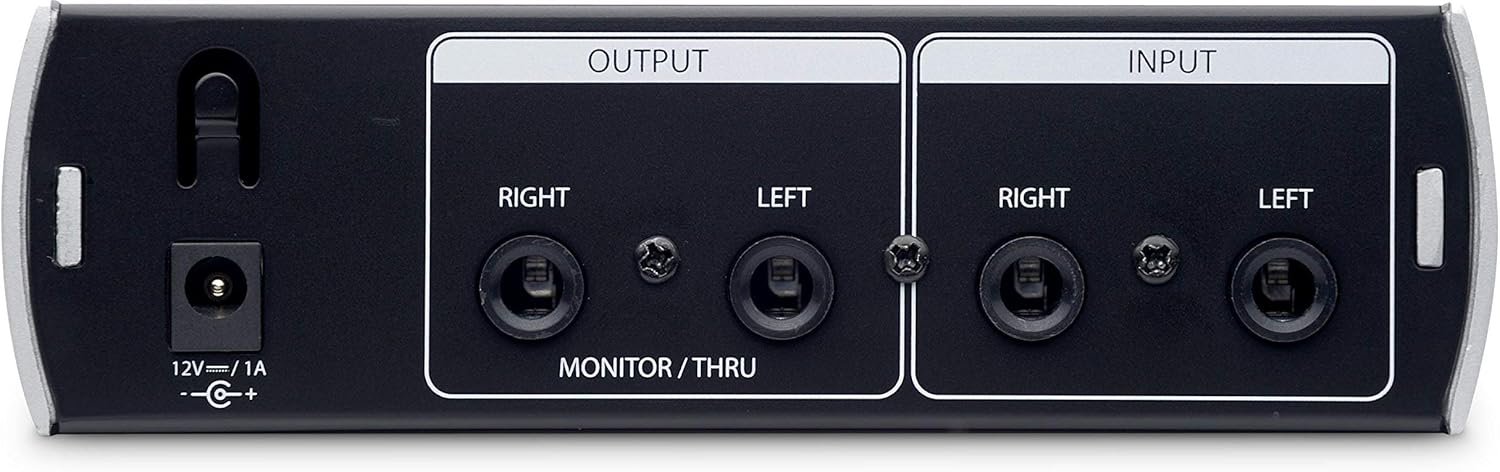
The rear panel includes the 12V DC power input, two balanced 1/4-inch Left and Right inputs for your audio source, and two balanced 1/4-inch Left and Right monitor/thru outputs. These outputs allow for daisy-chaining to another HP4 unit or connecting to studio monitors.
3.4. Connecting Your HP4
- പവർ കണക്ഷൻ: Connect the included 12V DC power supply to the HP4's power input on the rear panel. Plug the power supply into an appropriate AC outlet.
- ഓഡിയോ ഇൻപുട്ട്: Connect the Left and Right outputs from your audio interface, mixer, or other audio source to the HP4's balanced 1/4-inch Left and Right inputs on the rear panel.
- ഹെഡ്ഫോൺ കണക്ഷൻ: Plug your headphones into any of the four 1/4-inch headphone outputs on the front panel.
- Monitor Output (Optional): If you wish to daisy-chain another HP4 or connect to studio monitors, use balanced 1/4-inch cables to connect the HP4's monitor/thru outputs to the inputs of the next device.
4. പ്രവർത്തന നിർദ്ദേശങ്ങൾ
4.1. പവർ ഓൺ/ഓഫ്
Once all connections are made, ensure the master Monitor Level knob is turned down before powering on. The HP4 does not have a dedicated power switch on the unit itself; it powers on when connected to the power supply and off when disconnected. Some power supplies may include an inline switch.
4.2. Adjusting Headphone Levels
Each of the four headphone outputs has an independent volume knob. Rotate the knob clockwise to increase the volume and counter-clockwise to decrease it. Advise users to start with low volume and gradually increase to a comfortable listening level.
4.3. Using the Mono Switch
ദി മോണോ switch on the front panel sums the stereo input signal to mono. This can be useful for checking phase compatibility or for monitoring a mono source across both ears of the headphones.
4.4. Monitor Level and Mute
ദി ലെവൽ നിരീക്ഷിക്കുക knob controls the overall output level of the balanced monitor/thru outputs on the rear panel. The മ്യൂട്ട് നിരീക്ഷിക്കുക button silences these outputs without affecting the headphone outputs. This is useful for quickly cutting monitor sound while maintaining headphone mixes.
5. പരിപാലനം
- വൃത്തിയാക്കൽ: Use a soft, dry cloth to clean the exterior of the HP4. Avoid using abrasive cleaners or solvents, as these can damage the finish.
- സംഭരണം: When not in use for extended periods, store the HP4 in a cool, dry place, away from direct sunlight and extreme temperatures.
- കേബിൾ മാനേജുമെന്റ്: Ensure all cables are neatly organized and not under strain to prevent damage to connectors or the unit.
6. പ്രശ്നപരിഹാരം
| പ്രശ്നം | സാധ്യമായ കാരണം | പരിഹാരം |
|---|---|---|
| ഹെഡ്ഫോണുകളിൽ നിന്ന് ശബ്ദമില്ല. |
|
|
| No sound from monitor outputs. |
|
|
| വികലമായ അല്ലെങ്കിൽ ശബ്ദായമാനമായ ഓഡിയോ. |
|
|
7 സ്പെസിഫിക്കേഷനുകൾ
- ചാനലുകൾ: 4 stereo headphone outputs
- ഔട്ട്പുട്ട് പവർ: ഒരു ചാനലിന് 130 മെഗാവാട്ട്
- ഇൻപുട്ടുകൾ: 2 x 1/4" TRS Balanced Line Inputs (Left/Right)
- ഔട്ട്പുട്ടുകൾ: 2 x 1/4" TRS Balanced Monitor/Thru Outputs (Left/Right)
- ഹെഡ്ഫോൺ ഔട്ട്പുട്ടുകൾ: 4 x 1/4" TRS Stereo
- നിയന്ത്രണങ്ങൾ: 4 x Headphone Level, 1 x Monitor Level, Mono Switch, Monitor Mute Button
- നോയിസ് ഫ്ലോർ: -98 ഡിബി
- ശക്തി: 12V DC / 1A (external power supply included)
- ഭാരം: 907 ഗ്രാം (ഏകദേശം 2 പൗണ്ട്)
- ചേസിസ്: Compact 1/3U rack-mount design
8. ഉൽപ്പന്ന വീഡിയോകൾ
8.1. PreSonus HP4 Compact Headphone Ampലൈഫയർ ഓവർview
ഈ വീഡിയോ ഒരു സംക്ഷിപ്ത വിവരണം നൽകുന്നുview of the PreSonus HP4 Compact Headphone Amplifier, highlighting its features and typical use cases in a studio environment. It demonstrates the physical unit and its various controls and connections.
8.2. PreSonus HP4 4-Channel Compact Headphone Amplifier - Review
This video offers a detailed review of the PreSonus HP4, showcasing its build quality, functionality, and how it integrates into a professional audio setup. It covers the front and rear panel features and discusses its performance.
9. വാറൻ്റിയും പിന്തുണയും
9.1. വാറൻ്റി വിവരങ്ങൾ
The PreSonus HP4 comes with a one-year warranty from the date of purchase from an authorized dealer, applicable to the original purchaser only. Please retain your proof of purchase for warranty claims.
9.2. ഉപഭോക്തൃ പിന്തുണ
For technical support, product registration, or additional information, please visit the official PreSonus webസൈറ്റ്: www.presonus.com/support. നിങ്ങൾക്ക് അവിടെ പതിവുചോദ്യങ്ങളും കമ്മ്യൂണിറ്റി ഫോറങ്ങളും കണ്ടെത്താനാകും.