
1. ആമുഖം
The Rane RS-1 is a dedicated external power supply designed to provide reliable 120VAC power to a range of compatible Rane audio products. This manual provides essential information for the safe and correct setup, operation, and maintenance of your RS-1 power supply.
Please read this manual thoroughly before using the product to ensure proper function and to prevent damage to the unit or connected equipment.
2 സുരക്ഷാ വിവരങ്ങൾ
- ഊർജ്ജ സ്രോതസ്സ്: Connect the RS-1 only to a 120VAC, 60Hz power outlet. Ensure the outlet is properly grounded.
- വെൻ്റിലേഷൻ: Do not block any ventilation openings. Ensure adequate airflow around the power supply.
- ഈർപ്പം: Do not expose the unit to rain, moisture, or excessive humidity. Keep liquids away from the power supply.
- ചൂട്: റേഡിയേറ്ററുകൾ, ഹീറ്റ് രജിസ്റ്ററുകൾ, സ്റ്റൗകൾ അല്ലെങ്കിൽ മറ്റ് ചൂട് ഉൽപ്പാദിപ്പിക്കുന്ന ഉപകരണങ്ങൾ പോലുള്ള താപ സ്രോതസ്സുകൾക്ക് സമീപം യൂണിറ്റ് സ്ഥാപിക്കുന്നത് ഒഴിവാക്കുക.
- കേബിളുകൾ: പ്രത്യേകിച്ച് പ്ലഗുകൾ, കൺവീനിയൻസ് റെസെപ്റ്റക്കിളുകൾ, ഉപകരണത്തിൽ നിന്ന് പുറത്തുകടക്കുന്ന ഇടം എന്നിവയിൽ നടക്കുകയോ നുള്ളുകയോ ചെയ്യുന്നതിൽ നിന്ന് പവർ കോർഡ് സംരക്ഷിക്കുക.
- സേവനം: ഈ ഉൽപ്പന്നം സ്വയം സേവിക്കാൻ ശ്രമിക്കരുത്. യോഗ്യതയുള്ള സേവന ഉദ്യോഗസ്ഥർക്ക് എല്ലാ സേവനങ്ങളും റഫർ ചെയ്യുക.
- വിച്ഛേദിക്കൽ: Unplug the power supply from the wall outlet during lightning storms or when unused for long periods.
3. സജ്ജീകരണം
Follow these steps to correctly set up your Rane RS-1 Power Supply:
- അനുയോജ്യമായ ഉപകരണം തിരിച്ചറിയുക: Ensure your Rane audio product requires the RS-1 power supply and has the appropriate RJ-45 style power input port.
- ഉപകരണത്തിലേക്ക് കണക്റ്റുചെയ്യുക: Carefully insert the RJ-45 style connector from the RS-1 power supply into the designated power input port on your Rane audio device. Ensure a secure connection.
- പവർ ഔട്ട്ലെറ്റിലേക്ക് ബന്ധിപ്പിക്കുക: Plug the two-prong AC power cord of the RS-1 into a standard 120VAC, 60Hz wall outlet.
- പവർ ഓൺ: Once connected, your Rane audio device should receive power. Refer to your Rane audio device's manual for specific power-on procedures.
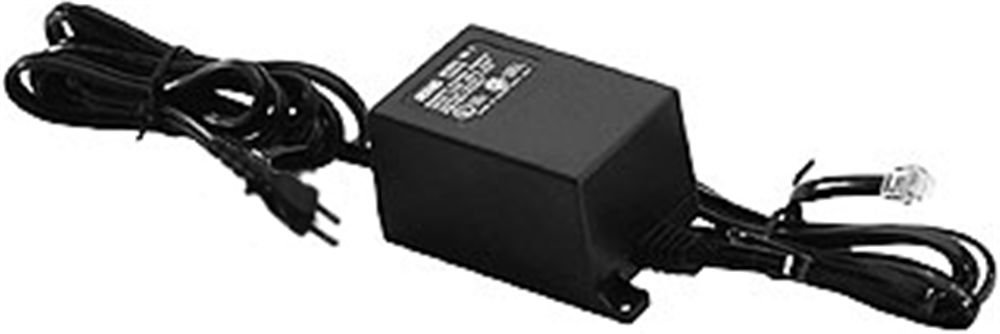
Image: Rane RS-1 Power Supply. This image displays the Rane RS-1 Power Supply, a black rectangular unit with an attached power cord featuring a two-prong North American plug on one end and an RJ-45 style connector on the other, designed to provide power to compatible Rane audio equipment.
4. പ്രവർത്തന നിർദ്ദേശങ്ങൾ
The Rane RS-1 is an external power supply that operates automatically once connected to a power source and a compatible Rane device. It does not have user-adjustable controls.
- Ensure all connections are firm before applying power.
- The power supply is designed for continuous operation within its specified voltagഇ, വാട്ട്tagഇ പരിധികൾ.
- Always disconnect the power supply from the wall outlet before disconnecting it from the Rane audio device, especially if the device does not have its own power switch.
5. പരിപാലനം
The Rane RS-1 Power Supply requires minimal maintenance. Follow these guidelines to ensure longevity:
- വൃത്തിയാക്കൽ: Disconnect the power supply from the wall outlet before cleaning. Use a soft, dry cloth to wipe the exterior. Do not use liquid cleaners or aerosol sprays.
- പരിശോധന: Periodically inspect the power cord and connectors for any signs of damage, fraying, or loose connections. If damage is observed, discontinue use and seek professional servicing.
- സംഭരണം: ദീർഘനേരം ഉപയോഗിക്കാത്തപ്പോൾ, വൈദ്യുതി വിതരണം തണുത്തതും വരണ്ടതുമായ സ്ഥലത്ത് സൂക്ഷിക്കുക, നേരിട്ടുള്ള സൂര്യപ്രകാശത്തിൽ നിന്നും കടുത്ത താപനിലയിൽ നിന്നും അകറ്റി നിർത്തുക.
6. പ്രശ്നപരിഹാരം
If you encounter issues with your Rane RS-1 Power Supply, refer to the following common troubleshooting steps:
| പ്രശ്നം | സാധ്യമായ കാരണം | പരിഹാരം |
|---|---|---|
| No power to connected Rane device. |
|
|
| ഇടവിട്ടുള്ള ശക്തി. |
|
|
If these steps do not resolve the issue, contact Rane customer support or a qualified service technician.
7 സ്പെസിഫിക്കേഷനുകൾ
| മോഡൽ | RS1 |
| ബ്രാൻഡ് | റാണെ |
| ഇൻപുട്ട് വോളിയംtage | 120 വോൾട്ട് എസി |
| പവർ ഉറവിടം | AC |
| വാട്ട്tage | 1000 വാട്ട്സ് |
| പവർ പ്ലഗ് തരം | ടൈപ്പ് എ - 2 പിൻ (വടക്കേ അമേരിക്കൻ) |
| ഇനത്തിൻ്റെ ഭാരം | 1.3 പൗണ്ട് (0.59 കി.ഗ്രാം) |
| അളവുകൾ | (ഡാറ്റയിൽ വ്യക്തമാക്കിയിട്ടില്ല) |
| യു.പി.സി | 687499101045 |
| ASIN | B0002IU02S |
8. Compatible Rane Devices
The Rane RS-1 Power Supply is compatible with the following Rane audio products:
- എസി 22 ബി
- എസി 23 ബി
- AD 22d
- എപി 13
- AVA 22d
- CP 52
- CP 64
- DA 216a
- ഡിഎ 26
- DC 24
- DMS 22
- ജിഇ 130
- ജിഇ 215
- ജിഇ 30
- HC 4
- HC 6
- MLM 42
- MLM 82a
- MM 8z
- എംപി 2
- MP 22z
- MP 24z
- എംപി 2016
- MS 1b
- PE 17
- PS 1
- RA 30
- എസ്എം 26 ബി
- എസ്എം 82
- SRM 66
- എസ്എസ്ഇ 35
- THX 22
- THX 44
- TTM 54i
- ടിടിഎം 56
- വിപി 12
9. വാറൻ്റിയും പിന്തുണയും
For information regarding warranty coverage, product registration, or technical support, please refer to the official Rane website or contact Rane customer service directly. Keep your purchase receipt as proof of purchase for warranty claims.
Rane Official Webസൈറ്റ്: www.rane.com