
1. ആമുഖം
The iriver N10 is a compact, pendant-style digital audio player designed for portable music enjoyment. This manual provides essential information for setting up, operating, maintaining, and troubleshooting your device.
2. പാക്കേജ് ഉള്ളടക്കം
Please check that all items are present in your product package:
- iriver N10 256MB Flash Memory Player
- സ്റ്റീരിയോ ഇയർഫോണുകൾ
- യുഎസ്ബി കണക്ഷൻ കേബിൾ
- ക്വിക്ക് സ്റ്റാർട്ട് ഗൈഡ് (ഉൾപ്പെടുത്തിയിട്ടുണ്ടെങ്കിൽ)
3. ഉൽപ്പന്നം കഴിഞ്ഞുview
Familiarize yourself with the physical components and controls of your iriver N10 player.
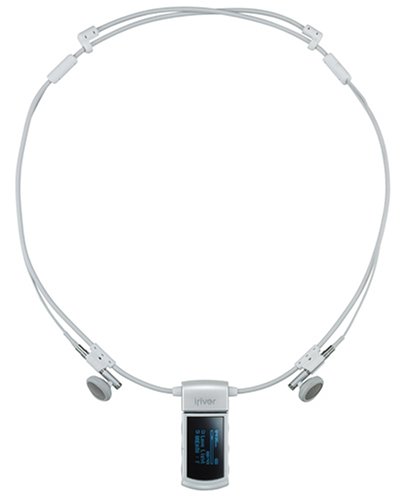
ചിത്രം 1: ഫ്രണ്ട് view of the iriver N10 256MB Flash Memory Player. This image displays the compact, pendant-style design of the device, featuring a small black and white display screen and control buttons typically located on the front or sides for navigation and playback.
പ്രധാന സവിശേഷതകൾ:
- ഡിസ്പ്ലേ: 0.96-inch black and white screen for track information and menu navigation.
- നിയന്ത്രണങ്ങൾ: Dedicated buttons for power, volume, play/pause, skip, and menu access.
- കണക്റ്റിവിറ്റി: USB port for data transfer and charging.
- മൈക്രോഫോൺ: Built-in microphone for voice recording functionality.
4. സജ്ജീകരണം
4.1 ബാറ്ററി ചാർജ് ചെയ്യുന്നു
Before initial use, fully charge the player's built-in battery. Connect the iriver N10 to a computer's USB port or a compatible USB wall adapter using the provided USB cable. A full charge typically takes approximately 1.5 hours.
4.2 ഒരു കമ്പ്യൂട്ടറിലേക്ക് ബന്ധിപ്പിക്കുന്നു
സംഗീതം കൈമാറാൻ files, connect the player to your computer using the USB cable. The device is compatible with Windows and Mac operating systems. Once connected, the player will appear as a removable storage device.
4.3 സംഗീതം കൈമാറൽ Files
Drag and drop your MP3, WMA, or ASF audio files directly into the player's storage folder. Ensure files are in a supported format for playback.
5. പ്ലെയർ പ്രവർത്തിപ്പിക്കുക
5.1 പവർ ഓൺ/ഓഫ്
- പവർ ഓണാക്കാൻ: സ്ക്രീൻ പ്രകാശിക്കുന്നത് വരെ പവർ ബട്ടൺ അമർത്തിപ്പിടിക്കുക.
- പവർ ഓഫ് ചെയ്യാൻ: ഉപകരണം ഓഫാകുന്നത് വരെ പവർ ബട്ടൺ അമർത്തിപ്പിടിക്കുക.
5.2 അടിസ്ഥാന പ്ലേബാക്ക്
- പ്ലേ/താൽക്കാലികമായി നിർത്തുക: പ്ലേബാക്ക് ആരംഭിക്കുന്നതിനോ താൽക്കാലികമായി നിർത്തുന്നതിനോ പ്ലേ/താൽക്കാലികമായി നിർത്തുക ബട്ടൺ അമർത്തുക.
- വോളിയം നിയന്ത്രണം: Use the Volume Up (+) and Volume Down (-) buttons to adjust the audio level.
- ട്രാക്കുകൾ ഒഴിവാക്കുക: Use the Forward (▶▶) and Backward (◀◀) buttons to navigate between tracks.
The player offers approximately 11 hours of continuous playback on a full charge.
5.3 മെനു നാവിഗേഷൻ
Use the navigation buttons to browse through menus on the black and white display. Select options by pressing the Play/Pause button.
5.4 വോയ്സ് റെക്കോർഡിംഗ്
The built-in microphone allows for voice recording. Access the recording function through the device's menu. Recorded files are saved in a designated folder on the player.
6. പരിപാലനം
- വൃത്തിയാക്കൽ: Use a soft, dry cloth to clean the player's exterior. Avoid liquid cleaners or abrasive materials.
- സംഭരണം: നേരിട്ടുള്ള സൂര്യപ്രകാശവും കടുത്ത താപനിലയും ഏൽക്കാത്ത തണുത്തതും വരണ്ടതുമായ സ്ഥലത്ത് പ്ലെയർ സൂക്ഷിക്കുക.
- ബാറ്ററി കെയർ: ബാറ്ററി ലൈഫ് വർദ്ധിപ്പിക്കാൻ, ബാറ്ററി ഇടയ്ക്കിടെ പൂർണ്ണമായും ഡിസ്ചാർജ് ചെയ്യുന്നത് ഒഴിവാക്കുക. ദീർഘനേരം ഉപയോഗത്തിലില്ലെങ്കിൽ പോലും ഉപകരണം പതിവായി ചാർജ് ചെയ്യുക.
- ഡാറ്റ ബാക്കപ്പ്: Regularly back up important voice recordings or other data to your computer.
7. പ്രശ്നപരിഹാരം
Player Does Not Turn On:
- ബാറ്ററി ചാർജ്ജ് ചെയ്തിട്ടുണ്ടെന്ന് ഉറപ്പാക്കുക. കുറഞ്ഞത് 30 മിനിറ്റെങ്കിലും പ്ലെയർ ഒരു പവർ സ്രോതസ്സുമായി ബന്ധിപ്പിക്കുക.
- പവർ ബട്ടൺ 10-15 സെക്കൻഡ് അമർത്തിപ്പിടിച്ചുകൊണ്ട് ഒരു സോഫ്റ്റ് റീസെറ്റ് നടത്തുക.
പ്ലേബാക്ക് സമയത്ത് ശബ്ദമില്ല:
- വോളിയം ലെവൽ പരിശോധിച്ച് അത് നിശബ്ദമാക്കിയിട്ടില്ലെന്ന് ഉറപ്പാക്കുക.
- Verify that the earphones are securely connected.
- Test with a different pair of earphones to rule out a faulty set.
- ഓഡിയോ ഉറപ്പാക്കുക files are not corrupted and are in a supported format (MP3, WMA, ASF).
Player Not Recognized by Computer:
- Ensure the USB cable is properly connected to both the player and the computer.
- നിങ്ങളുടെ കമ്പ്യൂട്ടറിൽ മറ്റൊരു USB പോർട്ട് പരീക്ഷിക്കുക.
- Restart your computer and reconnect the player.
- Ensure your operating system (Windows/Mac) is up to date.
8 സ്പെസിഫിക്കേഷനുകൾ
- മോഡൽ: N10 256MB
- സംഭരണ ശേഷി: 256 MB ഫ്ലാഷ് മെമ്മറി
- പിന്തുണയ്ക്കുന്ന ഓഡിയോ ഫോർമാറ്റുകൾ: MP3, WMA, ASF
- ഡിസ്പ്ലേ: 0.96-inch Black and White LCD
- ബാറ്ററി തരം: ബിൽറ്റ്-ഇൻ റീചാർജ് ചെയ്യാവുന്ന ബാറ്ററി
- ചാർജിംഗ് സമയം: ഏകദേശം 1.5 മണിക്കൂർ
- തുടർച്ചയായ പ്ലേബാക്ക് സമയം: 11 മണിക്കൂർ വരെ
- കണക്റ്റിവിറ്റി: USB
- ഓപ്പറേറ്റിംഗ് സിസ്റ്റം അനുയോജ്യത: വിൻഡോസ്, മാക്
- വോയിസ് റെക്കോർഡിംഗ്: ബിൽറ്റ്-ഇൻ മൈക്രോഫോൺ
- അളവുകൾ: 1.32 x 2.72 x 4.98 സെ.മീ (0.52 x 1.07 x 1.96 ഇഞ്ച്)
- ഭാരം: 22.68 ഗ്രാം (0.8 ഔൺസ്)
9. വാറൻ്റിയും പിന്തുണയും
For warranty information and technical support, please refer to the documentation provided at the time of purchase or visit the official iriver webസൈറ്റ്. വാറന്റി ക്ലെയിമുകൾക്കായി നിങ്ങളുടെ വാങ്ങലിന്റെ തെളിവ് സൂക്ഷിക്കുക.