
1. ആമുഖം
വാങ്ങിയതിന് നന്ദി.asing the GPX BCD2004 Boombox. This portable audio system features a top-loading CD player and an AM/FM tuner, designed for versatile audio playback. This manual provides essential information for setting up, operating, and maintaining your device to ensure optimal performance and longevity.
2 സുരക്ഷാ വിവരങ്ങൾ
- നിർദ്ദേശങ്ങൾ വായിക്കുക: Carefully read all operating instructions before using the unit.
- നിർദ്ദേശങ്ങൾ നിലനിർത്തുക: ഭാവി റഫറൻസിനായി ഈ മാനുവൽ സൂക്ഷിക്കുക.
- ജലവും ഈർപ്പവും: Do not expose this appliance to dripping or splashing water. Do not place objects filled with liquids, such as vases, on the appliance.
- വെൻ്റിലേഷൻ: ശരിയായ വായുസഞ്ചാരം ഉറപ്പാക്കുക. വായുസഞ്ചാര ദ്വാരങ്ങളൊന്നും തടയരുത്.
- ചൂട്: റേഡിയേറ്ററുകൾ, ഹീറ്റ് രജിസ്റ്ററുകൾ, സ്റ്റൗകൾ അല്ലെങ്കിൽ മറ്റ് ഉപകരണങ്ങൾ (ഉൾപ്പെടെ) പോലുള്ള താപ സ്രോതസ്സുകൾക്ക് സമീപം സ്ഥാപിക്കരുത്. ampലൈഫയറുകൾ) ചൂട് ഉത്പാദിപ്പിക്കുന്നത്.
- ഊർജ്ജ സ്രോതസ്സുകൾ: Use only the power source indicated on the appliance.
- ബാറ്ററികൾ: Follow battery safety guidelines. Do not mix old and new batteries, or different types of batteries. Remove batteries if the unit is not used for extended periods.
- സേവനം: എല്ലാ സേവനങ്ങളും യോഗ്യതയുള്ള സേവന ഉദ്യോഗസ്ഥർക്ക് റഫർ ചെയ്യുക.
3. പാക്കേജ് ഉള്ളടക്കം
നിങ്ങളുടെ പാക്കേജിൽ ഇനിപ്പറയുന്ന ഇനങ്ങൾ ഉൾപ്പെടുത്തിയിട്ടുണ്ടോയെന്ന് ദയവായി പരിശോധിക്കുക:
- GPX BCD2004 Boombox Unit
- എസി പവർ കോർഡ്
- ഉപയോക്തൃ മാനുവൽ
4. നിയന്ത്രണങ്ങളും സവിശേഷതകളും കഴിഞ്ഞുview
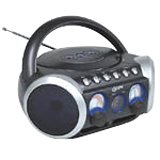
ചിത്രം 1: ഫ്രണ്ട് view of the GPX BCD2004 Boombox. This image shows the overall design of the boombox, including the speaker grilles and the general layout of the front panel.
Familiarize yourself with the main controls and features of your boombox:
- സിഡി കമ്പാർട്ട്മെന്റ്: Top-loading bay for inserting CDs.
- ഫംഗ്ഷൻ സ്വിച്ച്: Selects between CD, AM, FM, and OFF modes.
- വോളിയം നിയന്ത്രണം: Rotary dial to adjust the audio output level.
- ട്യൂണിംഗ് ഡയൽ: Rotary dial for selecting AM or FM radio frequencies.
- പ്ലേ/താൽക്കാലികമായി നിർത്തുക ബട്ടൺ: Starts or temporarily stops CD playback.
- ബട്ടൺ നിർത്തുക: സിഡി പ്ലേബാക്ക് നിർത്തുന്നു.
- ഒഴിവാക്കുക/തിരയൽ ബട്ടണുകൾ (◀◀ / ▶▶): Skips to the previous/next track or searches within a track.
- പ്രോഗ്രാം ബട്ടൺ: Used to program a sequence of tracks for CD playback.
- ആവർത്തിക്കുക ബട്ടൺ: Repeats the current track or the entire CD.
- AM/FM Antenna: Telescopic antenna for FM reception, internal antenna for AM.
- എസി പവർ ഇൻപുട്ട്: Jack for connecting the AC power cord.
- ബാറ്ററി കമ്പാർട്ട്മെൻ്റ്: Located on the bottom or rear for 'C' batteries.
- Fold-down Carrying Handle: എളുപ്പമുള്ള പോർട്ടബിലിറ്റിക്ക്.
5. സജ്ജീകരണം
5.1 യൂണിറ്റിന് പവർ നൽകുന്നു
Your GPX BCD2004 Boombox can be powered by either AC power or batteries.
എസി പവർ ഓപ്പറേഷൻ
- Ensure the Function Switch is in the OFF position.
- Insert the small end of the AC power cord into the AC power input jack on the back of the unit.
- എസി പവർ കോഡിന്റെ മറ്റേ അറ്റം ഒരു സ്റ്റാൻഡേർഡ് എസി വാൾ ഔട്ട്ലെറ്റിലേക്ക് (120V ~ 60Hz) പ്ലഗ് ചെയ്യുക.
ബാറ്ററി പവർ ഓപ്പറേഷൻ
For portable use, the boombox requires 8 'C' size batteries (not included).
- Ensure the Function Switch is in the OFF position.
- Open the battery compartment cover located on the bottom or rear of the unit.
- Insert 8 'C' size batteries, observing the correct polarity (+ and -) as indicated inside the compartment.
- ബാറ്ററി കമ്പാർട്ട്മെൻ്റ് കവർ സുരക്ഷിതമായി അടയ്ക്കുക.
- കുറിപ്പ്: When operating on battery power, disconnect the AC power cord from the unit.
6. Operating the CD Player
The GPX BCD2004 is compatible with standard audio CDs, CD-R, and CD-RW discs.
6.1 Loading a CD
- Lift the CD compartment door located on the top of the unit.
- Place a CD onto the center spindle with the label side facing up.
- Gently close the CD compartment door until it clicks shut.
6.2 അടിസ്ഥാന സിഡി പ്ലേബാക്ക്
- ഫംഗ്ഷൻ സ്വിച്ച് സിഡി സ്ഥാനത്തേക്ക് സജ്ജമാക്കുക.
- The CD player will begin to read the disc. The track number will typically display.
- Press the PLAY/PAUSE (▶/██) button to start playback.
- നിങ്ങൾക്ക് ആവശ്യമുള്ള ശ്രവണ നിലവാരത്തിലേക്ക് വോളിയം നിയന്ത്രണം ക്രമീകരിക്കുക.
- To pause playback, press the PLAY/PAUSE (▶/██) button. Press it again to resume.
- പ്ലേബാക്ക് നിർത്താൻ, നിർത്തുക (■) ബട്ടൺ അമർത്തുക.
6.3 Skipping and Searching Tracks
- ട്രാക്ക് ഒഴിവാക്കുക: During playback, press the SKIP/SEARCH FORWARD (▶▶) button to go to the next track. Press the SKIP/SEARCH BACKWARD (◀◀) button to go to the beginning of the current track, or press it twice to go to the previous track.
- Search Within Track: During playback, press and hold the SKIP/SEARCH FORWARD (▶▶) or SKIP/SEARCH BACKWARD (◀◀) button to fast forward or rewind through the current track. Release the button to resume normal playback.
6.4 Program Play
ഒരു പ്രത്യേക ക്രമത്തിൽ പ്ലേ ചെയ്യാൻ നിങ്ങൾക്ക് 16 ട്രാക്കുകൾ വരെ പ്രോഗ്രാം ചെയ്യാം.
- In STOP mode, press the PROGRAM button. The program indicator will flash.
- Use the SKIP/SEARCH buttons (◀◀ / ▶▶) to select your desired first track.
- Press the PROGRAM button again to confirm the selection.
- Repeat steps 2 and 3 to add up to 16 tracks to your program list.
- After programming all desired tracks, press the PLAY/PAUSE (▶/██) button to start programmed playback.
- To clear the program, press the STOP (■) button twice.
6.5 Repeat Play
During CD playback, press the REPEAT button:
- ഇതിനായി ഒരിക്കൽ അമർത്തുക ആവർത്തിക്കുക 1 (repeats the current track).
- Press twice for എല്ലാം ആവർത്തിക്കുക (repeats the entire CD or programmed tracks).
- Press a third time to cancel repeat function.
7. AM/FM റേഡിയോ പ്രവർത്തിപ്പിക്കൽ
7.1 Tuning to Radio Stations
- Set the Function Switch to either the AM or FM position.
- Adjust the Tuning Dial to select your desired radio station.
- നിങ്ങൾക്ക് ആവശ്യമുള്ള ശ്രവണ നിലവാരത്തിലേക്ക് വോളിയം നിയന്ത്രണം ക്രമീകരിക്കുക.
7.2 Improving Radio Reception
- എഫ്എം സ്വീകരണം: Extend the telescopic antenna fully and adjust its position for the best reception.
- രാവിലെ സ്വീകരണം: The unit has a built-in AM antenna. Rotate the entire boombox for optimal AM reception.
8. പരിപാലനം
8.1 യൂണിറ്റ് വൃത്തിയാക്കൽ
- ഒരു സോഫ്റ്റ്, ഡി ഉപയോഗിച്ച് യൂണിറ്റിൻ്റെ പുറംഭാഗം തുടയ്ക്കുകamp തുണി. ഉരച്ചിലുകളുള്ള ക്ലീനറുകളോ ലായകങ്ങളോ ഉപയോഗിക്കരുത്.
- സിഡി ലെൻസിനായി, ഒരു പ്രത്യേക സിഡി ലെൻസ് ക്ലീനർ ഡിസ്ക് അല്ലെങ്കിൽ ഒപ്റ്റിക്കൽ ലെൻസുകൾക്കായി പ്രത്യേകം രൂപകൽപ്പന ചെയ്ത മൃദുവായ, ലിന്റ്-ഫ്രീ തുണി ഉപയോഗിക്കുക.
8.2 ബാറ്ററി കെയർ
- ചോർച്ച തടയാൻ യൂണിറ്റ് ദീർഘനേരം ഉപയോഗിക്കുന്നില്ലെങ്കിൽ ബാറ്ററികൾ നീക്കം ചെയ്യുക.
- ഉപയോഗിച്ച ബാറ്ററികൾ പ്രാദേശിക നിയന്ത്രണങ്ങൾ അനുസരിച്ച് ഉത്തരവാദിത്തത്തോടെ നീക്കം ചെയ്യുക.
9. പ്രശ്നപരിഹാരം
If you experience issues with your boombox, please refer to the following common problems and solutions:
| പ്രശ്നം | സാധ്യമായ കാരണം | പരിഹാരം |
|---|---|---|
| ശക്തിയില്ല | AC cord not connected; Batteries dead or incorrectly inserted; Function switch OFF. | Check AC cord connection; Replace batteries or check polarity; Set Function switch to CD, AM, or FM. |
| സിഡി പ്ലേ ചെയ്യുന്നില്ല | CD inserted incorrectly; CD dirty or scratched; CD compartment door open; Function switch not on CD. | Insert CD with label side up; Clean or replace CD; Close CD door securely; Set Function switch to CD. |
| മോശം റേഡിയോ സ്വീകരണം | Antenna not extended/adjusted; Weak signal. | എഫ്എം ആന്റിന നീട്ടി ക്രമീകരിക്കുക; എഎം റിസപ്ഷനായി യൂണിറ്റ് തിരിക്കുക; മറ്റൊരു സ്ഥലം പരീക്ഷിക്കുക. |
| ശബ്ദമോ കുറഞ്ഞ വോളിയമോ ഇല്ല | Volume too low; Unit in pause mode. | Increase volume; Press Play/Pause button to resume playback. |
10 സ്പെസിഫിക്കേഷനുകൾ
- മോഡൽ: BCD2004
- ബ്രാൻഡ്: GPX
- സിഡി അനുയോജ്യത: CD, CD-R, CD-RW
- റേഡിയോ ട്യൂണർ: AM/FM
- ഊർജ്ജ സ്രോതസ്സ്: AC 120V ~ 60Hz or 8 x 'C' Batteries (not included)
- സ്പീക്കറുകൾ: 2 Full-range speakers
- അളവുകൾ (ഏകദേശം): 33.02 x 27.94 x 17.02 സെ.മീ (L x W x H)
- ഭാരം (ഏകദേശം): 2.18 കി.ഗ്രാം
- ഫീച്ചറുകൾ: 16-track programming, Repeat play, Song skip/search, Fold-down carrying handle
11. വാറൻ്റിയും പിന്തുണയും
This GPX BCD2004 Boombox comes with a 90 ദിവസത്തെ വാറൻ്റി from the date of original purchase. This warranty covers defects in materials and workmanship under normal use.
For warranty service or technical support, please refer to the contact information provided with your purchase documentation or visit the official GPX website. Please have your model number (BCD2004) and proof of purchase ready when contacting support.