
1. ആമുഖവും അവസാനവുംview
The Audiovox VE720 is a compact, ultra-slim 7-inch LCD television designed for under-cabinet mounting, ideal for spaces like kitchens. It features an integrated slot-loading DVD player, an AM/FM radio tuner, and a built-in NTSC standard 181-channel TV tuner. The swivel screen allows for flexible viewകോണുകൾ.
പ്രധാന സവിശേഷതകൾ:
- സ്ലിം-പ്രോfile, drop-down 7-inch LCD display.
- Designed for under-cabinet mounting with a swivel screen.
- Slot-loading DVD player compatible with CD-R/RW discs and MP3 digital audio.
- Integrated AM/FM radio tuner.
- ബിൽറ്റ്-ഇൻ സ്റ്റീരിയോ സ്പീക്കറുകൾ.
- One RF signal input and one Composite AV input.
- Includes a wireless remote control.
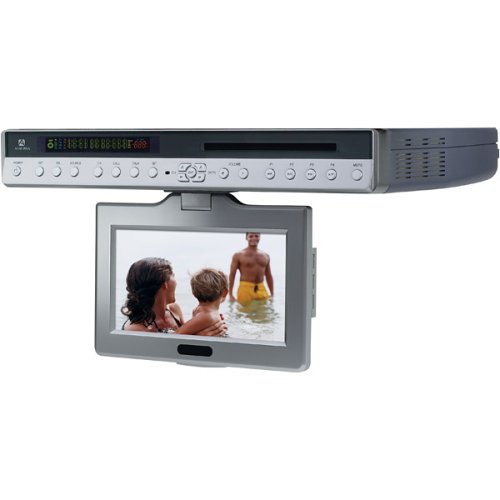
ചിത്രം 1: മുൻഭാഗം view of the Audiovox VE720 unit. This image displays the 7-inch LCD screen and the integrated slot-load DVD player.
2. സജ്ജീകരണവും ഇൻസ്റ്റാളേഷനും
Before beginning installation, ensure all components are present: the VE720 unit, remote control, batteries, and mounting hardware.
2.1 യൂണിറ്റ് മൌണ്ട് ചെയ്യുന്നു
- ലൊക്കേഷൻ തിരഞ്ഞെടുക്കുക: Choose a sturdy, flat surface under a cabinet for mounting. Ensure there is sufficient clearance for the screen to drop down and swivel without obstruction.
- മൗണ്ടിംഗ് പ്ലേറ്റ് അറ്റാച്ചുചെയ്യുക: Use the provided mounting hardware (screws) to securely attach the mounting plate to the underside of the cabinet. Refer to the mounting template (if included in the physical manual) for precise screw placement.
- യൂണിറ്റ് സുരക്ഷിതമാക്കുക: Slide the VE720 unit onto the mounted plate until it clicks securely into place. Double-check that the unit is firmly attached.
2.2 Connecting Power and Antennas
- പവർ കണക്ഷൻ: Plug the AC power adapter into the unit's power input, then into a standard electrical outlet.
- RF Input (TV Antenna/Cable): Connect your TV antenna or cable TV coaxial cable to the RF IN port on the unit.
- Composite AV Input (External Devices): If connecting external devices like a VCR or game console, use RCA cables to connect their video and audio outputs to the Composite AV IN ports on the VE720.
2.3 വിദൂര നിയന്ത്രണ സജ്ജീകരണം
Insert the two AAA batteries (included) into the remote control, ensuring correct polarity.
3. പ്രവർത്തന നിർദ്ദേശങ്ങൾ
3.1 അടിസ്ഥാന പ്രവർത്തനം
- പവർ ഓൺ/ഓഫ്: അമർത്തുക പവർ യൂണിറ്റിലെയോ റിമോട്ട് കൺട്രോളിലെയോ ബട്ടൺ അമർത്തിപ്പിടിച്ചുകൊണ്ട്.
- Screen Deployment: Gently pull down the screen from its folded position. It can then be swiveled for optimal viewing.
- വോളിയം നിയന്ത്രണം: ഉപയോഗിക്കുക VOL+ ഒപ്പം വോൾ- യൂണിറ്റിലോ റിമോട്ടിലോ ഉള്ള ബട്ടണുകൾ.
- ഉറവിട തിരഞ്ഞെടുപ്പ്: അമർത്തുക ഉറവിടം or മോഡ് button to switch between TV, DVD, and AV input modes.
3.2 ടിവി പ്രവർത്തനം
- ചാനൽ സ്കാൻ: In TV mode, access the menu to perform an automatic channel scan to find available NTSC analog channels.
- ചാനൽ തിരഞ്ഞെടുക്കൽ: ഉപയോഗിക്കുക CH+ ഒപ്പം CH- buttons or the numeric keypad on the remote to change channels.
- Digital TV Note: This unit has an analog broadcast tuner. To receive over-the-air digital broadcasts after February 17, 2009, a separate digital-to-analog converter box is required.
3.3 DVD Player Operation
- ഡിസ്ക് ചേർക്കുക: Gently insert a DVD or CD into the slot-loading mechanism with the label side facing up. The player will automatically draw the disc in.
- പ്ലേബാക്ക്: The disc should begin playing automatically. Use the പ്ലേ/താൽക്കാലികമായി നിർത്തുക, നിർത്തുക, ഒഴിവാക്കുക, ഒപ്പം ഫാസ്റ്റ് ഫോർവേഡ്/റിവൈൻഡ് നിയന്ത്രണത്തിനായി റിമോട്ടിലെ ബട്ടണുകൾ.
- ഡിസ്ക് എജക്റ്റ് ചെയ്യുക: അമർത്തുക EJECT button on the unit or remote to remove the disc.
- പിന്തുണയ്ക്കുന്ന ഫോർമാറ്റുകൾ: The DVD player supports DVD video discs, audio CDs, CD-R/RW discs, and MP3 audio files.
3.4 AM/FM റേഡിയോ പ്രവർത്തനം
- റേഡിയോ മോഡ് തിരഞ്ഞെടുക്കുക: Switch to AM/FM radio mode using the ഉറവിടം or മോഡ് ബട്ടൺ.
- ട്യൂൺ സ്റ്റേഷനുകൾ: ഉപയോഗിക്കുക ട്യൂൺ+ ഒപ്പം ട്യൂൺ- buttons to manually tune to stations, or use the സ്കാൻ ചെയ്യുക function to automatically find and store stations.
- ആന്റിന ക്രമീകരണം: Extend and adjust the built-in wire antenna for optimal FM reception. For AM, the internal antenna is usually sufficient, but repositioning the unit slightly may improve reception.
4. പരിപാലനം
4.1 യൂണിറ്റ് വൃത്തിയാക്കൽ
- സ്ക്രീൻ: Use a soft, lint-free cloth specifically designed for LCD screens. Do not use abrasive cleaners or solvents.
- മന്ത്രിസഭ: ഒരു സോഫ്റ്റ്, ഡി ഉപയോഗിച്ച് പുറംഭാഗം തുടയ്ക്കുകamp തുണി. അമിതമായ ഈർപ്പം ഒഴിവാക്കുക.
- ഡിസ്ക് സ്ലോട്ട്: Do not attempt to clean the internal disc slot with foreign objects. If disc reading issues occur, consider a specialized DVD/CD lens cleaning disc.
4.2 പൊതു പരിചരണം
- യൂണിറ്റ് തീവ്രമായ താപനില, നേരിട്ടുള്ള സൂര്യപ്രകാശം അല്ലെങ്കിൽ ഉയർന്ന ഈർപ്പം എന്നിവയിൽ ഏൽക്കുന്നത് ഒഴിവാക്കുക.
- വെന്റിലേഷൻ തുറക്കൽ തടയരുത്.
- Handle discs by their edges to prevent scratches and fingerprints.
5. പ്രശ്നപരിഹാരം
| പ്രശ്നം | സാധ്യമായ കാരണം | പരിഹാരം |
|---|---|---|
| ശക്തിയില്ല | പവർ കോർഡ് ബന്ധിപ്പിച്ചിട്ടില്ല; ഔട്ട്ലെറ്റ് സജീവമല്ല. | പവർ കോർഡ് സുരക്ഷിതമായി പ്ലഗ് ഇൻ ചെയ്തിട്ടുണ്ടെന്ന് ഉറപ്പാക്കുക. മറ്റൊരു ഉപകരണം ഉപയോഗിച്ച് ഔട്ട്ലെറ്റ് പരിശോധിക്കുക. |
| No picture/sound in TV mode | Antenna not connected; incorrect source selected; no channels scanned. | Check RF cable connection. Select TV source. Perform a channel scan. |
| DVD not playing/Disc error | Disc is dirty or scratched; disc inserted incorrectly; unsupported disc format. | Clean the disc. Ensure disc is inserted label-side up. Verify disc format compatibility. |
| No sound from radio | Volume too low; incorrect mode; poor reception. | Increase volume. Ensure AM/FM mode is selected. Adjust antenna or unit position. |
| റിമോട്ട് കൺട്രോൾ പ്രവർത്തിക്കുന്നില്ല | Batteries depleted or inserted incorrectly; obstruction between remote and unit. | Replace batteries. Check polarity. Remove any obstructions. Point remote directly at the unit. |
6 സ്പെസിഫിക്കേഷനുകൾ
- മോഡൽ: VE720
- ഡിസ്പ്ലേ: 7-ഇഞ്ച് എൽസിഡി
- വീക്ഷണ അനുപാതം: 16:9 (വൈഡ്സ്ക്രീൻ)
- റെസലൂഷൻ: 1280x720 (Note: Product description states 1280x720, but this is unusually high for a 7-inch NTSC TV from 2005. It might be the internal processing resolution or a typo in the source data. The actual display resolution for NTSC would be lower.)
- ടിവി ട്യൂണർ: NTSC Standard 181-channel analog tuner
- ഡിവിഡി പ്ലയർ: Slot-loading, compatible with DVD, CD, CD-R/RW, MP3
- റേഡിയോ ട്യൂണർ: AM/FM
- ഓഡിയോ ഔട്ട്പുട്ട്: ബിൽറ്റ്-ഇൻ സ്റ്റീരിയോ സ്പീക്കറുകൾ
- ഇൻപുട്ടുകൾ: 1 x RF In, 1 x Composite AV In (RCA)
- കണക്റ്റിവിറ്റി ടെക്നോളജി: Bluetooth (Note: This specification appears to be an anomaly in the provided data for a 2005 device. It is listed in the specifications but not in the product description or features. Users should verify if Bluetooth functionality is present.)
- ശക്തി: AC Adapter (Batteries for remote: 2 x AAA, included)
- അളവുകൾ (ഉൽപ്പന്നം): 15.8 x 2.2 x 11 ഇഞ്ച് (ഏകദേശം)
- ഭാരം: 7.5 പൗണ്ട് (ഏകദേശം)
- നിറം: വെള്ളി
7. വാറൻ്റിയും പിന്തുണയും
For warranty information and technical support, please refer to the documentation included with your product at the time of purchase or contact Audiovox customer service.
Important Consumer Alert: This television receiver has only an analog broadcast tuner. A converter box was required after February 17, 2009, to receive over-the-air broadcasts with an antenna due to the U.S.'s transition to digital broadcasting. Analog-only TVs continue to work with cable and satellite TV services, gaming consoles, VCRs, and DVD players. For more information, contact the Federal Communications Commission (FCC) or visit their digital-television webസൈറ്റ്.