
1. ആമുഖം
This manual provides instructions for the SEGA Monopoly game cartridge, designed for use with the SEGA Master System console. Monopoly is a classic board game adapted for video game consoles, where players buy, rent, and trade properties in an effort to drive their opponents into bankruptcy. This version brings the strategic gameplay of Monopoly to your Master System.
2. സജ്ജീകരണം
Follow these steps to set up your SEGA Monopoly game and begin playing:
- Connect your SEGA Master System: Ensure your SEGA Master System console is properly connected to your television and power supply according to the console's own instruction manual.
- Insert the Game Cartridge: With the console powered off, carefully insert the SEGA Monopoly game cartridge into the cartridge slot on the top of your SEGA Master System. Push firmly until it clicks into place. Do not force the cartridge.
- കൺട്രോളറുകൾ ബന്ധിപ്പിക്കുക: Plug your SEGA Master System controllers into the controller ports on the front of the console.
- പവർ ഓൺ: Turn on your television and select the correct input channel. Then, power on your SEGA Master System console. The game should load automatically.
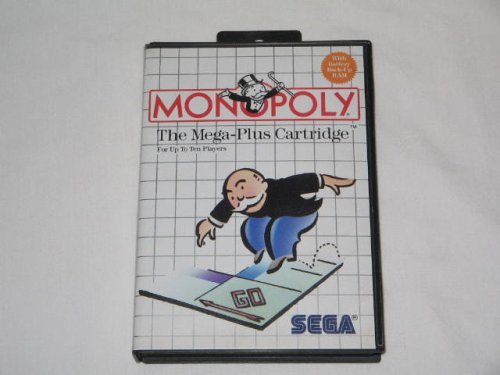
Image 1: The SEGA Monopoly Master System game cartridge. This image shows the front of the game cartridge, which should be inserted into the console's cartridge slot.
3. പ്രവർത്തന നിർദ്ദേശങ്ങൾ
Once the game has loaded, you will navigate through menus and play using your SEGA Master System controller.
3.1 അടിസ്ഥാന നിയന്ത്രണങ്ങൾ
- ദിശാസൂചന പാഡ് (ഡി-പാഡ്): Used to navigate menus, select options, and move your game piece around the board.
- ബട്ടൺ 1: Typically used to confirm selections, roll dice, or perform actions.
- ബട്ടൺ 2: Often used to cancel selections, go back in menus, or access additional options.
- START Button (if applicable): May be used to pause the game or access in-game menus.
3.2 ഒരു ഗെയിം ആരംഭിക്കുന്നു
- From the title screen, use the D-Pad to select "Start Game" or a similar option. Press Button 1 to confirm.
- Choose the number of players (1-4, depending on the game's support for AI opponents).
- Select player names or types (human/computer).
- Confirm game settings to begin play.
3.3 ഗെയിംപ്ലേ കഴിഞ്ഞുview
The objective is to become the wealthiest player by buying, renting, and selling property. Players take turns rolling dice and moving their game piece around the board. When landing on an unowned property, you can choose to buy it. If you land on an owned property, you must pay rent to the owner. Develop properties with houses and hotels to increase rent. Strategic trading and managing finances are key to winning.
4. പരിപാലനം
Proper care of your SEGA Monopoly game cartridge will ensure its longevity and reliable performance.
- സംഭരണം: Store the cartridge in its original case or a protective sleeve when not in use to prevent dust and physical damage. Keep it away from direct sunlight, extreme temperatures, and high humidity.
- വൃത്തിയാക്കൽ: If the game cartridge contacts appear dirty or the game is not loading correctly, gently clean the gold-plated connector pins with a cotton swab lightly dampened with isopropyl alcohol. Allow the contacts to dry completely before reinserting the cartridge into the console. Do not use abrasive materials or harsh chemicals.
- കൈകാര്യം ചെയ്യൽ: കാട്രിഡ്ജ് എപ്പോഴും അതിന്റെ പ്ലാസ്റ്റിക് സി ഉപയോഗിച്ച് കൈകാര്യം ചെയ്യുക.asing. Avoid touching the metal connector pins directly, as oils and dirt from your hands can interfere with connectivity.
5. പ്രശ്നപരിഹാരം
If you encounter issues while using your SEGA Monopoly game, refer to the following common problems and solutions:
- ഗെയിം ലോഡ് ആകുന്നില്ല:
- കാട്രിഡ്ജ് പൂർണ്ണമായും കൃത്യമായും കൺസോളിൽ ചേർത്തിട്ടുണ്ടെന്ന് ഉറപ്പാക്കുക.
- Power off the console, remove the cartridge, gently clean the connector pins (as described in Section 4), and reinsert it.
- Verify that your SEGA Master System console is functioning correctly with other games.
- Garbled Graphics or Sound:
- This often indicates a poor connection. Power off, remove, clean, and reinsert the cartridge.
- Check your television's connection to the console.
- കൺട്രോളർ പ്രതികരിക്കുന്നില്ല:
- കൺട്രോളർ കൺസോളിൽ സുരക്ഷിതമായി പ്ലഗിൻ ചെയ്തിട്ടുണ്ടെന്ന് ഉറപ്പാക്കുക.
- Test the controller with another game or another controller if available to rule out a faulty controller.
6 സ്പെസിഫിക്കേഷനുകൾ
Key specifications for the SEGA Monopoly game cartridge:
| ഫീച്ചർ | വിശദാംശങ്ങൾ |
|---|---|
| ബ്രാൻഡ് നാമം | സെഗ |
| തരം | ബോർഡ് ഗെയിമുകൾ |
| പതിപ്പ് | സ്റ്റാൻഡേർഡ് എഡിഷൻ |
| മോഡൽ നമ്പർ | 4K-BZHL-XQRA |
| നിർമ്മാതാവ് | Sega of America - Master System |
| യുപിസി / ജിടിഐഎൻ | 010086055009 |
| ASIN | B000B9G374 |
| ഇനത്തിൻ്റെ ഭാരം | 2.4 ഔൺസ് |
| ഇനത്തിൻ്റെ അളവുകൾ | 4.1 x 3.1 x 0.6 ഇഞ്ച് |
| ബാറ്ററികൾ ആവശ്യമാണ് | ഇല്ല |
7. വാറൻ്റിയും പിന്തുണയും
This instruction manual does not contain specific warranty information or direct support contact details for the SEGA Monopoly game cartridge. For warranty inquiries or technical support related to this product, please refer to the original packaging or contact SEGA customer support directly through their official website or support channels. Information regarding the SEGA Master System console itself can be found in its dedicated manual.
You may also find community support and resources for retro gaming hardware and software online.