
Escali P115
എസ്കാലി പ്രൈമോ ഡിജിറ്റൽ ഫുഡ് സ്കെയിൽ (മോഡൽ P115) ഇൻസ്ട്രക്ഷൻ മാനുവൽ
Your guide to precise weight measurement and portion control.
1. ആമുഖം
Thank you for choosing the Escali Primo Digital Food Scale. This manual provides essential information for the proper setup, operation, and maintenance of your new scale. Designed for accuracy and ease of use, the Escali Primo is ideal for various kitchen tasks, including food preparation, baking, and portion control.
The Escali Primo Digital Food Scale features a simple two-button operation, a sealed control panel for easy cleaning, and an automatic shut-off function to conserve battery life. It measures weights up to 11 lb (5,000 g) with precision.

Image: Escali Primo Digital Food Scale, Metallic.
2. ഉൽപ്പന്ന ഘടകങ്ങൾ
The Escali Primo Digital Food Scale consists of the following main components:
- വെയ്റ്റിംഗ് പ്ലാറ്റ്ഫോം: The surface where items are placed for measurement.
- ഡിജിറ്റൽ ഡിസ്പ്ലേ: Shows weight readings and unit indicators.
- On/Tare/Off Button: Used to power the scale on/off and activate the tare function.
- Unit (g/oz) Button: Used to switch between measurement units (grams, ounces, pounds:ounces).
- ബാറ്ററി കമ്പാർട്ട്മെൻ്റ്: Located on the underside, holds two AA batteries.
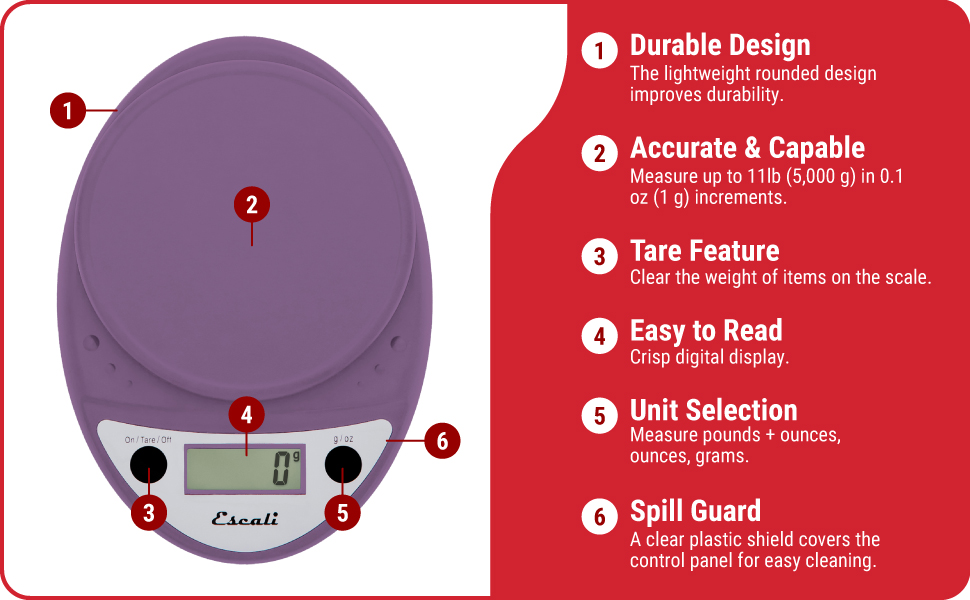
Image: Key features of the Escali Primo Digital Food Scale.
3. സജ്ജീകരണം
3.1 ബാറ്ററി ഇൻസ്റ്റാളേഷൻ
- സ്കെയിലിൻ്റെ അടിഭാഗത്ത് ബാറ്ററി കമ്പാർട്ട്മെൻ്റ് കണ്ടെത്തുക.
- ബാറ്ററി കമ്പാർട്ട്മെൻ്റ് കവർ തുറക്കുക.
- കമ്പാർട്ടുമെന്റിനുള്ളിൽ സൂചിപ്പിച്ചിരിക്കുന്നതുപോലെ ശരിയായ പോളാരിറ്റി (+/-) ഉറപ്പാക്കിക്കൊണ്ട് രണ്ട് AA ബാറ്ററികൾ ഇടുക.
- ബാറ്ററി കമ്പാർട്ട്മെൻ്റ് കവർ സുരക്ഷിതമായി അടയ്ക്കുക.
3.2 പ്രാരംഭ പ്ലേസ്മെന്റ്
Place the scale on a flat, stable, and level surface. Avoid placing it on soft or uneven surfaces, which can affect accuracy.
4. പ്രവർത്തന നിർദ്ദേശങ്ങൾ
4.1 പവർ ഓൺ/ഓഫ്
- പവർ ഓണാക്കാൻ: അമർത്തുക On/Tare/Off ബട്ടൺ. തയ്യാറാകുമ്പോൾ ഡിസ്പ്ലേ "0" കാണിക്കും.
- പവർ ഓഫ് ചെയ്യാൻ: അമർത്തിപ്പിടിക്കുക On/Tare/Off button for approximately 3 seconds. The scale will also automatically shut off after four minutes of inactivity to conserve battery life.
4.2 യൂണിറ്റ് തിരഞ്ഞെടുപ്പ്
To change the unit of measurement (grams, ounces, pounds:ounces), press the g/oz button while the scale is on. The display will cycle through the available units.

Image: Display and unit selection button.
4.3 ടാരെ ഫംഗ്ഷൻ
The tare function allows you to subtract the weight of a container or to measure multiple ingredients consecutively.
- വെയ്സിംഗ് പ്ലാറ്റ്ഫോമിൽ ഒരു ഒഴിഞ്ഞ പാത്രം വയ്ക്കുക. ഡിസ്പ്ലേ അതിന്റെ ഭാരം കാണിക്കും.
- അമർത്തുക On/Tare/Off ബട്ടൺ. ഡിസ്പ്ലേ "0" ആയി പുനഃസജ്ജമാക്കും.
- കണ്ടെയ്നറിൽ നിങ്ങളുടെ ചേരുവ ചേർക്കുക. ഡിസ്പ്ലേ ചേരുവയുടെ ഭാരം മാത്രം കാണിക്കും.
- Repeat the tare process for additional ingredients if needed.

Image: Using the scale for portion control with meal prep.
4.4 തൂക്കം കണക്കാക്കുന്ന വസ്തുക്കൾ
Once the scale is on and set to your desired unit, simply place the item(s) to be weighed directly onto the weighing platform or into a tared container. The weight will be displayed instantly.

Image: Weighing ingredients for baking.
5. പരിപാലനം
5.1 വൃത്തിയാക്കൽ
The sealed control panel and rounded design make the Escali Primo scale easy to clean. Wipe the scale with a damp തുണി. സ്കെയിൽ വെള്ളത്തിൽ മുക്കുകയോ ഉരച്ചിലുകളുള്ള ക്ലീനറുകൾ ഉപയോഗിക്കുകയോ ചെയ്യരുത്.
5.2 സംഭരണം
Store the scale in a dry place at room temperature. Avoid placing heavy objects on the scale when not in use, as this may affect its calibration over time.
6. പ്രശ്നപരിഹാരം
| പ്രശ്നം | സാധ്യമായ കാരണം | പരിഹാരം |
|---|---|---|
| സ്കെയിൽ ഓണാക്കുന്നില്ല | ഡെഡ് അല്ലെങ്കിൽ തെറ്റായി ഇൻസ്റ്റാൾ ചെയ്ത ബാറ്ററികൾ. | ബാറ്ററികൾ പുതിയ AA ബാറ്ററികൾ ഉപയോഗിച്ച് മാറ്റിസ്ഥാപിക്കുക, ശരിയായ പോളാരിറ്റി ഉറപ്പാക്കുക. |
| കൃത്യമല്ലാത്ത വായനകൾ | Scale not on a flat, stable surface; scale overloaded; debris under platform. | Place scale on a firm, level surface. Ensure weight does not exceed 11 lb (5000 g). Clean any debris from under the platform. |
| ഡിസ്പ്ലേ "പിശക്" കാണിക്കുന്നു | സ്കെയിൽ ഓവർലോഡ് ആണ്. | Remove items from the scale. Ensure total weight is within the 11 lb (5000 g) capacity. |
| Automatic shut-off too soon | Normal operation (4 minutes of inactivity). | This is a battery-saving feature. Press the On/Tare/Off button to restart. |
7 സ്പെസിഫിക്കേഷനുകൾ
- മോഡൽ: P115
- ശേഷി: 11 lb (5,000 ഗ്രാം)
- വർദ്ധനവ്: 0.05 ഔൺസ് (1 ഗ്രാം)
- അളവെടുപ്പ് യൂണിറ്റുകൾ: oz, lb:oz, g
- ശക്തി: 2 AA ബാറ്ററികൾ (ഉൾപ്പെട്ടിരിക്കുന്നു)
- ഉൽപ്പന്ന അളവുകൾ: 8.5 x 6 x 1.5 ഇഞ്ച് (ഏകദേശം)
- ഡിസ്പ്ലേ തരം: ഡിജിറ്റൽ LED
- പ്രത്യേക സവിശേഷതകൾ: Auto Shut Off, Tare Function, Sealed Control Panel
8. വാറൻ്റി വിവരങ്ങൾ
The Escali Primo Digital Food Scale comes with a ആജീവനാന്ത വാറൻ്റി. For detailed warranty terms and conditions, please refer to the official Escali webസൈറ്റ് അല്ലെങ്കിൽ ഉപഭോക്തൃ പിന്തുണയുമായി ബന്ധപ്പെടുക.
9. ഉപഭോക്തൃ പിന്തുണ
For further assistance, product information, or support, please visit the official Escali webസൈറ്റിൽ നൽകുകയോ അവരുടെ ഉപഭോക്തൃ സേവന വിഭാഗവുമായി ബന്ധപ്പെടുകയോ ചെയ്യുക. കോൺടാക്റ്റ് വിശദാംശങ്ങൾ സാധാരണയായി ഉൽപ്പന്ന പാക്കേജിംഗിലോ നിർമ്മാതാവിന്റെയോ webസൈറ്റ്.
കൂടുതൽ വിവരങ്ങളും പിന്തുണയും നിങ്ങൾക്ക് ഇവിടെ കണ്ടെത്താനാകും Escali Store on Amazon.
Ask a question about this manual
Ask about setup, troubleshooting, compatibility, parts, safety, or missing instructions. Manuals+ will review the question and use this page’s manual context to help answer it.