
ECS Elitegroup P4M800-M7
ECS P4M800-M7 Motherboard User Manual
Model: P4M800-M7
ആമുഖം
This manual provides detailed instructions for the installation, operation, and maintenance of the ECS P4M800-M7 motherboard. The P4M800-M7 is designed to support Socket LGA775 Intel Pentium 4 / Pentium D / Celeron D Processors with FSB 800/533 MHz and Hyper-Threading Technology.
Key features include 64-bit support, FSB 800MHz, RAID0, RAID1, and Serial ATA capabilities.
ഉൽപ്പന്നം കഴിഞ്ഞുview

Figure 1: ECS P4M800-M7 Motherboard Layout. This image displays the main components of the motherboard, including the CPU socket (LGA 775), two DDR RAM slots, PCI and AGP expansion slots, and various I/O ports.
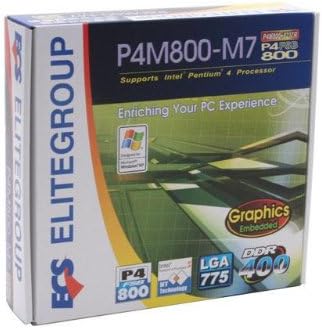
Figure 2: ECS P4M800-M7 Retail Box. The product packaging indicates support for Intel Pentium 4 processors, embedded graphics, and DDR400 memory, along with the LGA 775 socket type.
സജ്ജീകരണവും ഇൻസ്റ്റാളേഷനും
Follow these steps for proper installation of the ECS P4M800-M7 motherboard into your computer system.
1. നിങ്ങളുടെ സിസ്റ്റം തയ്യാറാക്കുക
- നിങ്ങളുടെ വൈദ്യുതി വിതരണം വാൾ ഔട്ട്ലെറ്റിൽ നിന്ന് വിച്ഛേദിക്കപ്പെട്ടിട്ടുണ്ടെന്ന് ഉറപ്പാക്കുക.
- നിലത്തുകിടക്കുന്ന ഒരു ലോഹ വസ്തുവിൽ സ്പർശിച്ചുകൊണ്ട് ഏതെങ്കിലും സ്റ്റാറ്റിക് വൈദ്യുതി ഡിസ്ചാർജ് ചെയ്യുക.
2. സിപിയു ഇൻസ്റ്റാൾ ചെയ്യുക
- സിപിയു സോക്കറ്റ് ലിവർ തുറക്കുക.
- Carefully align the CPU (Intel Pentium 4 / Pentium D / Celeron D) with the socket, ensuring the notches match.
- സോക്കറ്റിലേക്ക് സിപിയു പതുക്കെ താഴ്ത്തുക. ബലം പ്രയോഗിച്ച് ഞെക്കരുത്.
- സിപിയു സുരക്ഷിതമാക്കാൻ സോക്കറ്റ് ലിവർ അടയ്ക്കുക.
- Apply a thin layer of thermal paste to the CPU surface.
- നിർമ്മാതാവിന്റെ നിർദ്ദേശങ്ങൾക്കനുസൃതമായി സിപിയു കൂളർ ഇൻസ്റ്റാൾ ചെയ്യുക.
3. Install Memory Modules
The motherboard supports DDR memory. Insert DDR modules into the available memory slots (2 slots).
- DIMM സ്ലോട്ടിന്റെ രണ്ടറ്റത്തുമുള്ള ക്ലിപ്പുകൾ തുറക്കുക.
- മെമ്മറി മൊഡ്യൂൾ സ്ലോട്ടുമായി വിന്യസിക്കുക, മൊഡ്യൂളിലെ നോച്ച് സ്ലോട്ടിലെ കീയുമായി പൊരുത്തപ്പെടുന്നുണ്ടെന്ന് ഉറപ്പാക്കുക.
- ക്ലിപ്പുകൾ ശരിയായ സ്ഥാനത്ത് വരുന്നത് വരെ മൊഡ്യൂളിന്റെ രണ്ട് അറ്റങ്ങളിലും ദൃഢമായി അമർത്തുക.
4. മദർബോർഡ് മൌണ്ട് ചെയ്യുക
- Install standoffs in your PC case that align with the motherboard's mounting holes.
- Carefully place the motherboard onto the standoffs, aligning the I/O shield with the case opening.
- സ്ക്രൂകൾ ഉപയോഗിച്ച് മദർബോർഡ് സുരക്ഷിതമാക്കുക.
5. പവറും പെരിഫറലുകളും ബന്ധിപ്പിക്കുക
Connect the 20-pin ATX main power connector and the 4-pin ATX 12V power connector from your power supply to the motherboard. Connect SATA and IDE devices, front panel connectors, and expansion cards as needed.
പ്രവർത്തന നിർദ്ദേശങ്ങൾ
Once the motherboard is installed and all components are connected, you can proceed with system operation.
1. പ്രാരംഭ ബൂട്ട്-അപ്പ്
After connecting the power supply and monitor, power on your system. The system should display the BIOS POST screen. Press the designated key (usually DEL or F2) to enter the BIOS setup utility.
2. ബയോസ് കോൺഫിഗറേഷൻ
In the BIOS, you can configure various system settings, including boot order, date/time, and hardware parameters. Refer to the BIOS section of the full manual for detailed settings. Save changes and exit the BIOS to continue.
3. ഓപ്പറേറ്റിംഗ് സിസ്റ്റം ഇൻസ്റ്റലേഷൻ
Insert your operating system installation media (e.g., Windows CD/DVD) and follow the on-screen prompts to install the OS. Ensure all necessary drivers (chipset, audio, network, graphics) are installed after the OS installation for optimal performance. Drivers are typically provided on a CD with the motherboard or can be downloaded from the ECS Elitegroup webസൈറ്റ്.
മെയിൻ്റനൻസ്
ശരിയായ അറ്റകുറ്റപ്പണി നിങ്ങളുടെ മദർബോർഡിന്റെ ദീർഘായുസ്സും സ്ഥിരതയുള്ള പ്രവർത്തനവും ഉറപ്പാക്കുന്നു.
- പൊടി നീക്കം: Regularly clean dust from inside your computer case, especially from heatsinks and fans, using compressed air. Ensure the system is powered off and unplugged before cleaning.
- കേബിൾ മാനേജുമെന്റ്: Ensure internal cables are neatly routed to allow for proper airflow.
- ബയോസ് അപ്ഡേറ്റുകൾ: Periodically check the ECS Elitegroup website for BIOS updates. Only update the BIOS if necessary and follow the instructions precisely to avoid system instability.
- ഡ്രൈവർ അപ്ഡേറ്റുകൾ: Keep your device drivers updated to ensure compatibility and performance.
ട്രബിൾഷൂട്ടിംഗ്
This section addresses common issues you might encounter with the ECS P4M800-M7 motherboard.
| പ്രശ്നം | സാധ്യമായ കാരണം | പരിഹാരം |
|---|---|---|
| സിസ്റ്റം പവർ ഓണാക്കുന്നില്ല. | Power cables not connected, faulty power supply, or short circuit. | Check all power connections (20-pin ATX, 4-pin 12V). Test power supply. Ensure no metal objects are touching the motherboard. |
| മോണിറ്ററിൽ ഡിസ്പ്ലേ ഇല്ല. | Monitor cable loose, faulty graphics card (if external), or RAM not seated correctly. | Verify monitor cable connection. Reseat RAM modules. If using an external graphics card, ensure it is properly seated and powered. |
| System freezes or crashes. | Overheating, unstable drivers, or faulty RAM. | Check CPU and chipset temperatures. Update drivers. Test RAM modules individually. |
| ഓപ്പറേറ്റിംഗ് സിസ്റ്റം കണ്ടെത്തിയില്ല. | Incorrect boot order in BIOS, or hard drive not detected. | Enter BIOS and set the correct boot order. Check SATA/IDE cable connections to the hard drive. |
സ്പെസിഫിക്കേഷനുകൾ
| ഫീച്ചർ | വിശദാംശങ്ങൾ |
|---|---|
| നിർമ്മാതാവ് | ഇസിഎസ് |
| മോഡൽ നമ്പർ | P4M800-M7 |
| സിപിയു സോക്കറ്റ് | LGA 775 |
| അനുയോജ്യമായ പ്രോസസ്സറുകൾ | Intel Celeron D, Intel Pentium 4, Intel Pentium |
| ചിപ്സെറ്റ് തരം | ഇൻ്റൽ |
| മെമ്മറി സ്ലോട്ടുകൾ ലഭ്യമാണ് | 2 |
| സിസ്റ്റം ബസ് സ്റ്റാൻഡേർഡ് പിന്തുണയ്ക്കുന്നു | SATA 3 |
| FSB Support | 800/533 MHz |
| ഹൈപ്പർ-ത്രെഡിംഗ് ടെക്നോളജി | പിന്തുണച്ചു |
| റെയിഡ് പിന്തുണ | RAID0, RAID1 |
| യു.പി.സി | 881038001678 |
| ആദ്യ തീയതി ലഭ്യമാണ് | ഏപ്രിൽ 5, 2006 |
വാറൻ്റിയും പിന്തുണയും
For warranty information and technical support, please refer to the documentation included with your purchase or visit the official ECS Elitegroup webസൈറ്റ്. വാറന്റി നിബന്ധനകളും വ്യവസ്ഥകളും പ്രദേശത്തിനും റീട്ടെയിലർക്കും അനുസരിച്ച് വ്യത്യാസപ്പെടാം.
Official ECS Elitegroup Webസൈറ്റ്: ECS Elitegroup Store on Amazon (Note: This link directs to the brand's store page on Amazon, where further support information might be available.)
Ask a question about this manual
Ask about setup, troubleshooting, compatibility, parts, safety, or missing instructions. Manuals+ will review the question and use this page’s manual context to help answer it.