
ആമുഖം
വാങ്ങിയതിന് നന്ദി.asing the Optimus F-1230 12-Inch Oscillating 3-Speed Table Fan. This manual provides essential information for the safe and efficient operation, maintenance, and care of your new fan. Please read these instructions thoroughly before use and retain them for future reference.

Figure 1: Optimus F-1230 12-Inch Oscillating 3-Speed Table Fan, White.
പ്രധാനപ്പെട്ട സുരക്ഷാ നിർദ്ദേശങ്ങൾ
- ഈ ഫാൻ ഉപയോഗിക്കുന്നതിന് മുമ്പ് എല്ലാ നിർദ്ദേശങ്ങളും വായിക്കുക.
- കേടായ കോർഡ് അല്ലെങ്കിൽ പ്ലഗ് ഉപയോഗിച്ച് ഒരു ഫാനും പ്രവർത്തിപ്പിക്കരുത്. ഫാൻ നിരസിക്കുക അല്ലെങ്കിൽ പരിശോധനയ്ക്കും/അല്ലെങ്കിൽ നന്നാക്കുന്നതിനുമായി അംഗീകൃത സേവന സൗകര്യത്തിലേക്ക് മടങ്ങുക.
- പരവതാനിയുടെ കീഴിൽ ചരട് ഓടരുത്. ത്രോ റഗ്ഗുകൾ, റണ്ണറുകൾ അല്ലെങ്കിൽ സമാനമായ കവറുകൾ എന്നിവ ഉപയോഗിച്ച് ചരട് മൂടരുത്. ട്രാഫിക് ഏരിയയിൽ നിന്നും അത് മുകളിലേക്ക് കയറാത്ത ഇടങ്ങളിൽ നിന്നും ചരട് ക്രമീകരിക്കുക.
- Always unplug the fan when moving it, cleaning, or when not in use.
- Do not insert fingers or any foreign objects into the grille openings.
- Do not use this fan near windows, in wet areas, or where it may come into contact with water.
- ഫാൻ ടിപ്പിംഗ് തടയാൻ സ്ഥിരതയുള്ളതും പരന്നതുമായ പ്രതലത്തിൽ സ്ഥാപിച്ചിട്ടുണ്ടെന്ന് ഉറപ്പാക്കുക.
പാക്കേജ് ഉള്ളടക്കം
Upon opening the package, ensure all components are present and undamaged. The Optimus F-1230 fan typically includes the following parts:
- Fan Motor Unit with Base and Control Panel
- ഫ്രണ്ട് ഗ്രിൽ
- പിൻ ഗ്രിൽ
- ഫാൻ ബ്ലേഡ്
- ഗ്രിൽ റീട്ടെയ്നിംഗ് നട്ട്
- ബ്ലേഡ് നിലനിർത്തുന്ന തൊപ്പി

Figure 2: Components of the Optimus F-1230 Table Fan.
അസംബ്ലി നിർദ്ദേശങ്ങൾ
The Optimus F-1230 fan is designed for no-tool assembly. Follow these steps to set up your fan:
- Attach Rear Grille: Align the rear grille with the motor housing, ensuring the alignment pins on the motor housing fit into the corresponding holes on the rear grille. Secure it with the grille retaining nut by turning clockwise.
- Install Fan Blade: Slide the fan blade onto the motor shaft, making sure the notch on the blade aligns with the pin on the shaft. Secure it with the blade retaining cap by turning counter-clockwise.
- ഫ്രണ്ട് ഗ്രിൽ ഘടിപ്പിക്കുക: Place the front grille over the rear grille, aligning the clips. Snap the front grille into place, ensuring it is securely fastened around the entire circumference.
- ഫാൻ സ്ഥാപിക്കുക: Place the assembled fan on a stable, flat surface.
പ്രവർത്തന നിർദ്ദേശങ്ങൾ
Once assembled, your Optimus F-1230 fan is ready for use. Ensure the fan is plugged into a standard 120V AC electrical outlet.
പവർ, വേഗത ക്രമീകരണങ്ങൾ
The fan features a 4-position push button switch located on the base for controlling power and speed:
- Press the appropriate button to select one of the 3 സ്പീഡ് ക്രമീകരണങ്ങൾ (Low, Medium, High).
- Press the 'OFF' button to turn the fan off.
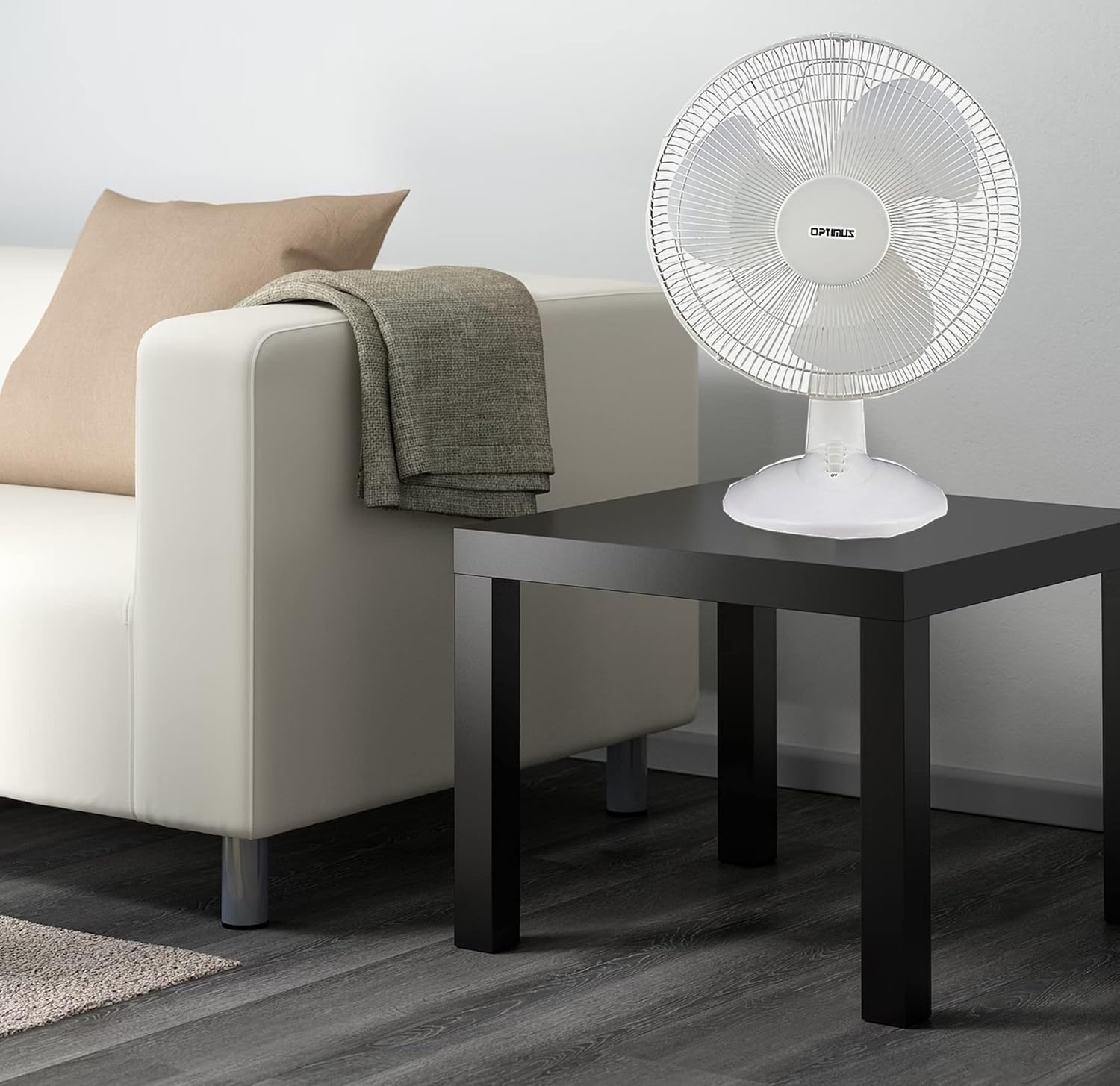
Figure 3: 4-Position Push Button Switch for speed control.
ആന്ദോളന പ്രവർത്തനം
The fan offers a full room of directional 90-degree oscillation to distribute air across a wider area:
- To start oscillation, push down the oscillation knob located on top of the motor housing.
- To stop oscillation and direct airflow in a fixed position, pull up the oscillation knob.
Adjustable Tilt/Angle Head
The fan head can be adjusted vertically to direct airflow precisely where needed:
- To adjust the tilt, gently push the fan head up or down to the desired angle. The fan head will remain in the selected position.

Figure 4: Adjustable tilt/angle head for vertical airflow adjustment.
പരിപാലനവും ശുചീകരണവും
Regular cleaning and maintenance will ensure optimal performance and extend the life of your fan.
വൃത്തിയാക്കൽ
- വൃത്തിയാക്കുന്നതിന് മുമ്പ് എല്ലായ്പ്പോഴും പവർ ഔട്ട്ലെറ്റിൽ നിന്ന് ഫാൻ ഊരിമാറ്റുക.
- ഒരു സോഫ്റ്റ് ഉപയോഗിക്കുക, ഡിamp ഫാനിന്റെ പുറംഭാഗങ്ങൾ തുടയ്ക്കാൻ തുണി ഉപയോഗിക്കുക. അബ്രാസീവ് ക്ലീനറുകളോ ലായകങ്ങളോ ഉപയോഗിക്കരുത്.
- To clean the fan blades, you may need to carefully remove the front grille. Refer to the assembly instructions in reverse order for safe removal and reattachment.
- ഫാൻ തിരികെ പ്ലഗ് ഇൻ ചെയ്യുന്നതിനുമുമ്പ് എല്ലാ ഭാഗങ്ങളും പൂർണ്ണമായും ഉണങ്ങിയെന്ന് ഉറപ്പാക്കുക.
സംഭരണം
ദീർഘനേരം ഉപയോഗിക്കാത്തപ്പോൾ, ഫാൻ തണുത്തതും വരണ്ടതുമായ സ്ഥലത്ത് സൂക്ഷിക്കുക, പൊടിയിൽ നിന്നും കേടുപാടുകളിൽ നിന്നും സംരക്ഷിക്കുന്നതിന്, അതിന്റെ യഥാർത്ഥ പാക്കേജിംഗിൽ തന്നെ സൂക്ഷിക്കുക.
ട്രബിൾഷൂട്ടിംഗ്
If your fan is not operating correctly, consult the following common issues and solutions:
- ഫാൻ ഓണാക്കുന്നില്ല:
- പ്രവർത്തിക്കുന്ന ഒരു ഇലക്ട്രിക്കൽ ഔട്ട്ലെറ്റിൽ പവർ കോർഡ് സുരക്ഷിതമായി പ്ലഗ് ചെയ്തിട്ടുണ്ടെന്ന് ഉറപ്പാക്കുക.
- Check if the outlet is receiving power by plugging in another appliance.
- Verify that the speed control button is pressed to an 'ON' setting (1, 2, or 3).
- ഫാൻ ശബ്ദമുള്ളതാണ്:
- ഫാൻ ഒരു സ്ഥിരതയുള്ളതും നിരപ്പായതുമായ പ്രതലത്തിൽ സ്ഥാപിച്ചിട്ടുണ്ടെന്ന് ഉറപ്പാക്കുക.
- ഫാൻ ഗ്രില്ലുകൾക്കുള്ളിലോ ബ്ലേഡുകൾക്ക് ചുറ്റോ അയഞ്ഞ ഭാഗങ്ങളോ തടസ്സങ്ങളോ ഉണ്ടോ എന്ന് പരിശോധിക്കുക.
- Clean the fan blades and grilles to remove any dust buildup that might cause imbalance.
- Fan does not oscillate:
- Ensure the oscillation knob on top of the motor housing is pushed down.
ഈ പരിഹാരങ്ങൾ പരീക്ഷിച്ചതിനുശേഷവും പ്രശ്നം നിലനിൽക്കുകയാണെങ്കിൽ, ദയവായി ഉപഭോക്തൃ പിന്തുണയുമായി ബന്ധപ്പെടുക.
സ്പെസിഫിക്കേഷനുകൾ
| ബ്രാൻഡ് | ഒപ്റ്റിമസ് |
| മോഡൽ നമ്പർ | എഫ്-1230 |
| ഇലക്ട്രിക് ഫാൻ ഡിസൈൻ | ടേബിൾ ഫാൻ |
| നിറം | വെള്ള |
| പവർ ഉറവിടം | കോർഡഡ് ഇലക്ട്രിക് |
| വേഗതകളുടെ എണ്ണം | 3 |
| പ്രത്യേക ഫീച്ചർ | ആന്ദോളനം |
| മൗണ്ടിംഗ് തരം | ടേബിൾടോപ്പ് മൗണ്ട് |
| കൺട്രോളർ തരം | ബട്ടൺ നിയന്ത്രണം |
| വാട്ട്tage | 50 വാട്ട്സ് |
| വാല്യംtage | 120 വോൾട്ട് |
| ഇനത്തിൻ്റെ ഭാരം | 4.95 പൗണ്ട് |
| മെറ്റീരിയൽ തരം | പ്ലാസ്റ്റിക് |
| ഇൻഡോർ/ഔട്ട്ഡോർ ഉപയോഗം | ഇൻഡോർ |
വാറൻ്റിയും ഉപഭോക്തൃ പിന്തുണയും
വാറൻ്റി വിവരങ്ങൾ
This Optimus F-1230 fan comes with a 1 വർഷത്തെ ഭാഗങ്ങളും ജോലിയും warranty. Please retain your proof of purchase for any warranty claims.
ഉപഭോക്തൃ പിന്തുണ
For technical assistance, troubleshooting not covered in this manual, or warranty service, please contact Optimus Enterprises. The manufacturer's contact information is: SEATTLE, WA, 98109 US.
You may also visit the official Optimus webഅധിക പിന്തുണ ഉറവിടങ്ങൾക്കായുള്ള സൈറ്റ്.