
ആമുഖം
സ്വാഗതം Driver: Parallel Lines for the Nintendo Wii. This manual provides essential information for setting up, playing, and maintaining your game. Immerse yourself in a unique narrative spanning two distinct eras, from the late 1970s to 2006, as you navigate the streets of New York City.
As a wheelman, you will undertake 35 diverse missions, experiencing a compelling story of crime and revenge. The game features over 80 customizable vehicles, including cars, trucks, and motorcycles, offering a wide range of driving experiences.
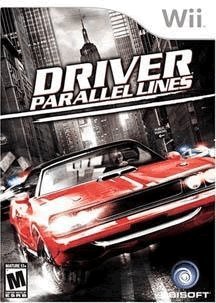
Image: Game cover for Driver: Parallel Lines on Nintendo Wii.
സജ്ജമാക്കുക
1. Game Installation
- Ensure your Nintendo Wii console is powered off.
- സൌമ്യമായി തിരുകുക Driver: Parallel Lines game disc into the disc slot of your Wii console, with the label facing up. Push until it clicks into place.
- നിങ്ങളുടെ Nintendo Wii കൺസോൾ ഓൺ ചെയ്യുക.
- തിരഞ്ഞെടുക്കുക Driver: Parallel Lines channel from the Wii Menu to start the game.
2. കൺട്രോളർ സജ്ജീകരണം
- Ensure your Wii Remote is properly synced with your console. If not, press the SYNC button inside the battery compartment of the Wii Remote and then the SYNC button on the Wii console (usually behind the front panel).
- Connect the Nunchuk accessory to the bottom port of your Wii Remote.
- For optimal gameplay, ensure both the Wii Remote and Nunchuk are fully charged or have fresh batteries.
Operating (Gameplay)
1. അടിസ്ഥാന നിയന്ത്രണങ്ങൾ
Driver: Parallel Lines utilizes the unique motion capabilities of the Wii Remote and Nunchuk for vehicle control and other actions. The game features over 30 different movement functions.
- സ്റ്റിയറിംഗ്: Tilt the Wii Remote left or right to steer your vehicle.
- ത്വരണം: Typically controlled by holding a button on the Wii Remote or Nunchuk. Refer to the in-game control scheme for specifics.
- Braking/Reverse: Usually assigned to a button or a specific motion.
- ഹാൻഡ്ബ്രേക്ക്: May involve tilting the Nunchuk or a button press.
- On-Foot Controls: Use the Nunchuk's control stick for movement and the Wii Remote for aiming and actions.
ഇത് വീണ്ടും ശുപാർശ ചെയ്യുന്നുview the in-game tutorial or options menu for a detailed and customizable control layout.
2. Missions and Progression
The game features a story-driven campaign with 35 main missions. Progress through these missions to advance the narrative and unlock new areas and vehicles. Side activities and challenges may also be available to earn additional rewards.
3. Vehicle Customization
Explore the city to find garages where you can customize your vehicles. Options include:
- Performance Upgrades: Engine, suspension, brakes, shocks.
- Visual Customization: Paint, bodywork.
- പ്രത്യേക ആക്സസറികൾ: Such as bulletproof tires.
Customizing your vehicles can significantly impact their handling and performance during missions and free-roam.
മെയിൻ്റനൻസ്
1. ഗെയിം ഡിസ്ക് കെയർ
- Always handle the game disc by its edges to avoid fingerprints and scratches.
- Store the disc in its original case when not in use to protect it from dust and damage.
- ഡിസ്ക് വൃത്തികേടായാൽ, മധ്യഭാഗത്ത് നിന്ന് പുറത്തേക്ക് മൃദുവായ, ലിന്റ് രഹിത തുണി ഉപയോഗിച്ച് സൌമ്യമായി തുടയ്ക്കുക. അബ്രാസീവ് ക്ലീനറുകളോ ലായകങ്ങളോ ഉപയോഗിക്കരുത്.
2. Console Care
- Keep your Nintendo Wii console in a clean, dust-free environment.
- Ensure adequate ventilation around the console to prevent overheating.
- Regularly check and replace batteries in your Wii Remote and Nunchuk as needed.
ട്രബിൾഷൂട്ടിംഗ്
പൊതുവായ പ്രശ്നങ്ങളും പരിഹാരങ്ങളും
- ഗെയിം ലോഡ് ചെയ്യുന്നില്ല:
- ഡിസ്ക് വൃത്തിയുള്ളതും പോറലുകൾ ഇല്ലാത്തതുമാണെന്ന് ഉറപ്പാക്കുക.
- Wii കൺസോളിൽ ഡിസ്ക് ശരിയായി ചേർത്തിട്ടുണ്ടെന്ന് ഉറപ്പാക്കുക.
- Wii കൺസോൾ പുനരാരംഭിക്കുക.
- കൺട്രോളർ പ്രതികരിക്കുന്നില്ല:
- Check if the Wii Remote has fresh batteries.
- Resync the Wii Remote with the console.
- Ensure the Nunchuk is securely connected to the Wii Remote.
- ഗ്രാഫിക്കൽ അല്ലെങ്കിൽ ഓഡിയോ തകരാറുകൾ:
- ഗെയിം ഡിസ്ക് വൃത്തിയാക്കുക.
- Ensure your Wii console's system software is up to date.
- Restart the game and console.
- Game Freezing:
- Ensure the console has adequate ventilation.
- ഗെയിം ഡിസ്ക് വൃത്തിയാക്കുക.
- Restart the console. If the issue persists, it may indicate a console or disc defect.
സ്പെസിഫിക്കേഷനുകൾ
| തലക്കെട്ട് | Driver: Parallel Lines |
| പ്ലാറ്റ്ഫോം | നിൻ്റെൻഡോ വൈ |
| നിർമ്മാതാവ് | യുബിസോഫ്റ്റ് |
| ASIN | B000M5KT5O |
| യു.പി.സി | 008888173489 |
| റിലീസ് തീയതി | ജൂൺ 26, 2007 |
| ഭാഷ | ഇംഗ്ലീഷ് |
| റേറ്റുചെയ്തത് | പക്വത |
| ഉൽപ്പന്ന അളവുകൾ | 7.5 x 5.5 x 0.75 ഇഞ്ച് |
| ഇനത്തിൻ്റെ ഭാരം | 4 ഔൺസ് |
വാറൻ്റിയും പിന്തുണയും
നിങ്ങളെക്കുറിച്ചുള്ള നിർദ്ദിഷ്ട വാറന്റി വിവരങ്ങൾക്ക് Driver: Parallel Lines game disc, please refer to the packaging or contact Ubisoft customer support directly. General support for Nintendo Wii console issues can be found on the official Nintendo support webസൈറ്റ്.
- Ubisoft Support: Visit the official Ubisoft support website for game-specific assistance.
- നിന്റെൻഡോ പിന്തുണ: Visit the official Nintendo support website for console-related inquiries.