
Barkan 3300.B
Barkan Full Motion TV Wall Mount
Model 3300.B Instruction Manual
ആമുഖം
This manual provides detailed instructions for the safe and proper installation and operation of your Barkan Full Motion TV Wall Mount, Model 3300.B. This articulating wall mount is designed for 13-65 inch flat and curved screen televisions, supporting a maximum weight of 88 lbs (40 kg). Please read all instructions carefully before beginning installation.
സുരക്ഷാ വിവരങ്ങൾ
- ഭാരം ശേഷി: പരമാവധി ഭാരം 88 പൗണ്ട് (40 കിലോഗ്രാം) കവിയരുത്. ഈ പരിധി കവിയുന്നത് ഗുരുതരമായ പരിക്കോ സ്വത്ത് നാശമോ ഉണ്ടാക്കിയേക്കാം.
- സ്ക്രീൻ വലിപ്പം: This mount is compatible with 13-65 inch screens. Ensure your TV's VESA pattern and weight are within the specified limits.
- ചുമർ തരം: Install the mount only on solid concrete walls, concrete block walls, or wood stud walls. ചെയ്യരുത് install on drywall, gypsum, or plaster without wood studs.
- പ്രൊഫഷണൽ ഇൻസ്റ്റാളേഷൻ: ഇൻസ്റ്റാളേഷൻ പ്രക്രിയയെക്കുറിച്ചോ മതിൽ തരത്തെക്കുറിച്ചോ നിങ്ങൾക്ക് ഉറപ്പില്ലെങ്കിൽ, യോഗ്യതയുള്ള ഒരു പ്രൊഫഷണലിനെ സമീപിക്കുക.
- ഉപകരണങ്ങൾ: Use appropriate tools and wear safety glasses during installation.
- കുട്ടികൾ: ഇൻസ്റ്റാളേഷൻ ഏരിയയിൽ നിന്ന് കുട്ടികളെ അകറ്റി നിർത്തുക.
- കണക്ഷനുകൾ പരിശോധിക്കുക: Regularly check that all screws and connections are secure.
പാക്കേജ് ഉള്ളടക്കം
Verify that all components are present before installation. If any parts are missing or damaged, do not proceed with installation and contact Barkan support.
- ടിവി വാൾ മൗണ്ട് അസംബ്ലി
- അസംബ്ലി നിർദ്ദേശങ്ങൾ (ഈ പ്രമാണം)
- Hardware Kit (various screws, anchors, washers, spacers)
- സുരക്ഷാ നിർദ്ദേശങ്ങൾ

Image: Barkan Full Motion TV Wall Mount and its retail packaging.

ചിത്രം: വിശദമായത് view of the Barkan Hardware Kit, including wall screws, wall anchors, M8, M6, M4 TV mounting screws, metal washers, and plastic spacers.
സ്പെസിഫിക്കേഷനുകൾ
| മോഡൽ നമ്പർ | 3300.ബി |
| സ്ക്രീൻ വലിപ്പം അനുയോജ്യത | 13 - 65 ഇഞ്ച് |
| പരമാവധി ലോഡ് കപ്പാസിറ്റി | 88 പൗണ്ട് (40 കി.ഗ്രാം) |
| VESA അനുയോജ്യത | 75x75mm മുതൽ 400x400mm വരെ |
| മൗണ്ടിംഗ് തരം | മതിൽ മൗണ്ട് |
| ചലന തരം | ആർട്ടിക്കുലേറ്റിംഗ് (പൂർണ്ണ ചലനം) |
| ടിൽറ്റ് ആംഗിൾ | 0° മുതൽ 15° വരെ |
| സ്വിവൽ ആംഗിൾ | 180° |
| സ്ക്രീൻ ലെവലിംഗ് | ±5° |
| ചുമരിൽ നിന്നുള്ള വിപുലീകരണം | Min. 2.6" (6.5 cm) / Max. 10.4" (26.5 cm) |
| ഉൽപ്പന്ന അളവുകൾ | 10.83 x 7.17 x 2.36 inches (Mount only) |
| ഇനത്തിൻ്റെ ഭാരം | 5.1 പൗണ്ട് |
| മെറ്റീരിയൽ | ലോഹം |
| നിറം | കറുപ്പ് |

Image: Diagram illustrating the mount's full motion capabilities, including tilt, swivel, leveling, and extension from the wall, with key dimensions.

Image: Detailed specifications and a diagram showing VESA backscreen connection points and mount dimensions.
സജ്ജീകരണവും ഇൻസ്റ്റാളേഷനും
ആവശ്യമായ ഉപകരണങ്ങൾ
- Drill (1/4" - 6mm, 3/8" - 10mm bits for concrete/wood, 5/32" - 4mm for wood)
- ലെവൽ
- സുരക്ഷാ ഗ്ലാസുകൾ
- സ്റ്റഡ് ഫൈൻഡർ (വുഡ് സ്റ്റഡ് ഇൻസ്റ്റാളേഷനായി)
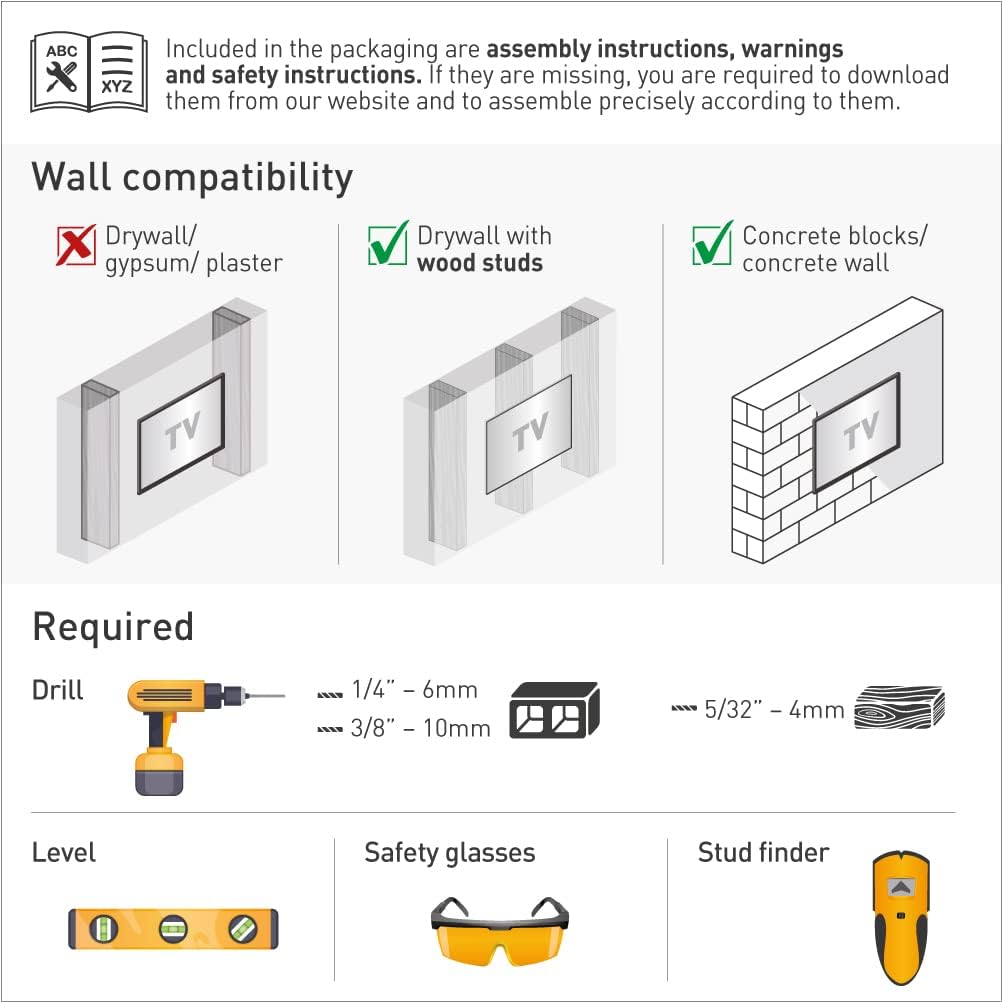
Image: Illustration of required tools for installation and diagrams showing compatible wall types.
മതിൽ അനുയോജ്യത
Ensure your wall is suitable for mounting. This mount is compatible with:
- മരം സ്റ്റഡുകളുള്ള ഡ്രൈവാൾ
- Concrete blocks / Concrete wall
NOT compatible with: Drywall / gypsum / plaster without wood studs.
Assembly Steps (1-2-3)
- Connect the TV plate to the back of the TV: Attach the TV plate to the VESA mounting holes on the back of your television using the appropriate screws, washers, and spacers from the hardware kit. Ensure a secure fit.
- Install the bracket on the wall: Locate the desired mounting position. Use a stud finder for wood studs or mark drill points for concrete. Drill pilot holes and securely fasten the wall bracket to the wall using the provided wall screws and anchors. Use a level to ensure the bracket is straight.
- Snap the TV onto the bracket: Carefully lift the television (with the attached TV plate) and align it with the wall bracket. Snap the TV plate onto the wall bracket. Ensure the safety mechanism is engaged to prevent accidental disengagement.

Image: Visual guide for the three-step assembly process: attaching the TV plate, installing the wall bracket, and snapping the TV onto the bracket.
Backscreen Connection Positioning
The mount supports various VESA patterns. Refer to the diagram to determine the correct positioning for your TV's backscreen connections. Adapters may be required for certain configurations.

Image: Multiple diagrams illustrating different VESA backscreen connection patterns and how the mount's arms can be configured.
സ്ക്രീൻ തരം അനുയോജ്യത
This mount is designed to accommodate both flat and curved screen televisions.

Image: Illustrations demonstrating how the mount fits both flat and curved screen televisions.
പ്രവർത്തന നിർദ്ദേശങ്ങൾ
Once installed, your Barkan Full Motion TV Wall Mount allows for flexible viewക്രമീകരണങ്ങൾ:
- Tilt Adjustment (0° to 15°): Loosen the tilt adjustment screws on the TV plate, adjust the screen to your desired vertical angle, and then securely tighten the screws.
- Swivel Adjustment (180°): Gently push or pull the TV to rotate it horizontally to the left or right. The mount allows for a 180-degree swivel range.
- Screen Leveling (±5°): If the screen appears slightly unlevel after installation, adjust the leveling mechanism on the TV plate to achieve a perfectly horizontal display.
- Extension from Wall (2.6" to 10.4"): Extend or retract the TV from the wall by gently pulling or pushing the arm assembly.
Image: Visual representation of the mount's adjustable features, including distance from wall, tilt, and screen leveling.
മെയിൻ്റനൻസ്
To ensure the longevity and safe operation of your TV wall mount:
- പതിവ് പരിശോധന: Periodically check all mounting screws and connections to ensure they remain tight and secure.
- വൃത്തിയാക്കൽ: മൃദുവായതും ഉണങ്ങിയതുമായ തുണി ഉപയോഗിച്ച് മൗണ്ട് തുടയ്ക്കുക. ഫിനിഷിന് കേടുവരുത്തുന്ന അബ്രാസീവ് ക്ലീനറുകളോ ലായകങ്ങളോ ഉപയോഗിക്കുന്നത് ഒഴിവാക്കുക.
- ലൂബ്രിക്കേഷൻ: The articulating joints are designed for smooth movement. If movement becomes stiff, a small amount of silicone-based lubricant can be applied to the pivot points.
ട്രബിൾഷൂട്ടിംഗ്
- ടിവി നിലവാരമില്ലാത്തതാണ്: Use the screen leveling adjustment feature (±5°) to correct the horizontal alignment. Ensure the wall bracket was installed level.
- ടിവി നീക്കുന്നതിൽ ബുദ്ധിമുട്ട്: Check if any cables are snagged or if the tilt/swivel screws are overtightened. Apply a small amount of silicone lubricant to the joints if necessary.
- മൗണ്ട് അസ്ഥിരമായി തോന്നുന്നു: Immediately remove the TV from the mount. Re-check all wall and TV connections. Ensure the mount is installed on a compatible wall type and that all screws are fully tightened. Do not re-mount the TV until stability is confirmed.
- ഹാർഡ്വെയർ നഷ്ടപ്പെട്ടു: Refer to the package contents list. If parts are missing, contact Barkan customer support.
വാറൻ്റിയും പിന്തുണയും
Barkan products are designed for quality and durability. This product includes a ആജീവനാന്ത വാറൻ്റി. For technical assistance, missing parts, or warranty claims, please visit the official Barkan website or contact their customer service team. Detailed contact information can typically be found on the Barkan webസൈറ്റ് അല്ലെങ്കിൽ ഉൽപ്പന്ന പാക്കേജിംഗിൽ.

Image: Features highlighting the lifetime warranty, patented design, and safety aspects of the Barkan mount.
Ask a question about this manual
Ask about setup, troubleshooting, compatibility, parts, safety, or missing instructions. Manuals+ will review the question and use this page’s manual context to help answer it.