
1. ആമുഖം
Thank you for choosing the TFA Dostmann Digital Weather Station 35.1065. This device provides accurate indoor temperature, humidity, time, date, and a weather trend forecast. Please read this manual carefully before using the device to ensure proper operation and to prevent damage.
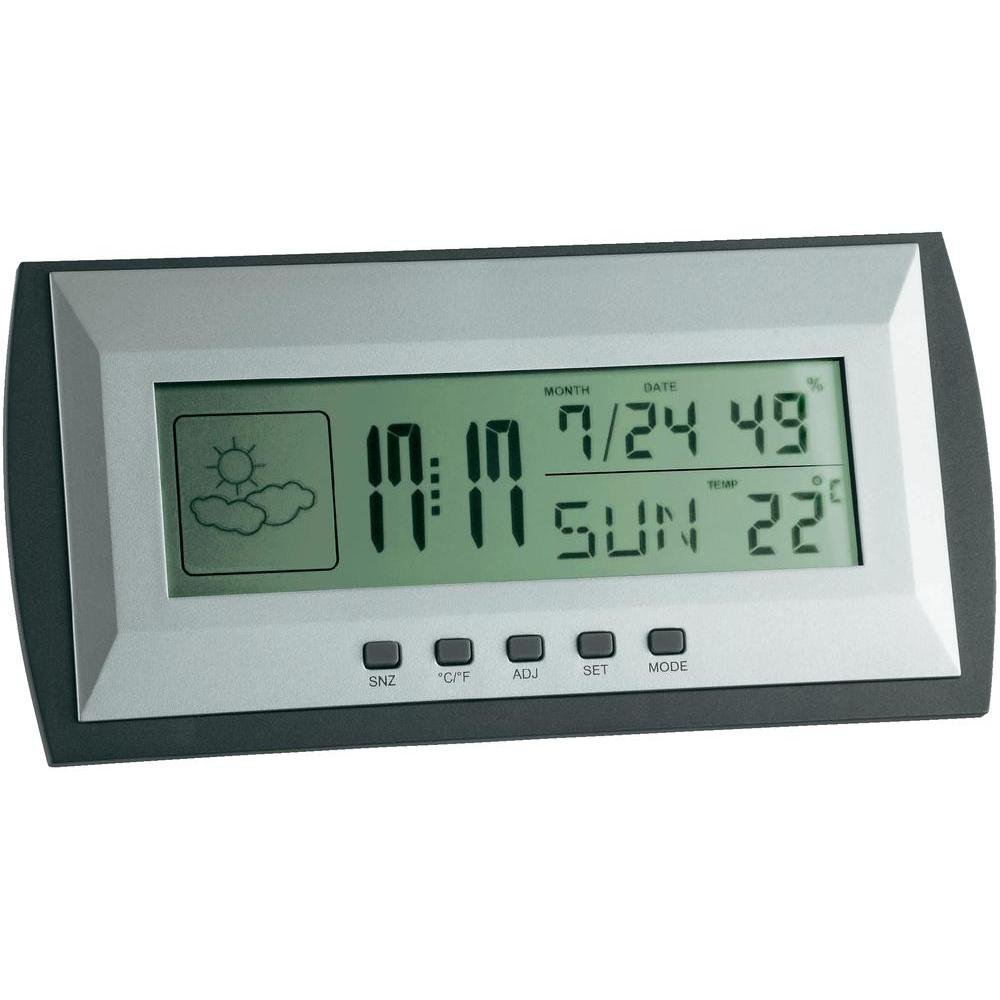
Figure 1: TFA Dostmann Digital Weather Station 35.1065 on a wooden desk. This image shows the weather station displaying time, date, and weather information in a typical home or office setting.
2 സുരക്ഷാ വിവരങ്ങൾ
- ഭാവി റഫറൻസിനായി ഈ മാനുവൽ സൂക്ഷിക്കുക.
- തീവ്രമായ ഊഷ്മാവ്, വൈബ്രേഷനുകൾ, അല്ലെങ്കിൽ ഷോക്കുകൾ എന്നിവയിലേക്ക് ഉപകരണത്തെ തുറന്നുകാട്ടരുത്.
- നേരിട്ടുള്ള സൂര്യപ്രകാശവും ഈർപ്പവും ഒഴിവാക്കുക.
- ഉപകരണം വെള്ളത്തിൽ മുക്കരുത്.
- Do not attempt to repair or modify the device yourself. Contact qualified personnel for service.
- ഉപയോഗിച്ച ബാറ്ററികൾ പ്രാദേശിക ചട്ടങ്ങൾക്കനുസൃതമായി നീക്കം ചെയ്യുക.
3. സജ്ജീകരണം
3.1 പാക്കേജ് ഉള്ളടക്കം
എല്ലാ ഇനങ്ങളും ഉണ്ടെന്ന് ഉറപ്പാക്കുക:
- TFA Dostmann Digital Weather Station 35.1065
- 2 x AA ബാറ്ററികൾ
- ഉപയോക്തൃ മാനുവൽ (ഈ പ്രമാണം)
3.2 ബാറ്ററി ഇൻസ്റ്റാളേഷൻ
- Locate the battery compartment cover on the back of the weather station.
- കവർ തുറക്കുക.
- Insert two (2) AA batteries, observing the correct polarity (+ and - markings).
- ബാറ്ററി കമ്പാർട്ട്മെൻ്റ് കവർ സുരക്ഷിതമായി അടയ്ക്കുക.
The device will power on automatically and display initial readings.
3.3 Initial Settings (Time, Date, Temperature Unit)
Upon first power-on or after battery replacement, you may need to set the time, date, and preferred temperature unit.
- അമർത്തിപ്പിടിക്കുക സെറ്റ് button for a few seconds to enter setting mode. The digit to be set will flash.
- ഉപയോഗിക്കുക എ.ഡി.ജെ ഫ്ലാഷിംഗ് മൂല്യം ക്രമീകരിക്കാനുള്ള ബട്ടൺ (ഉദാ. മണിക്കൂർ, മിനിറ്റ്, വർഷം, മാസം, ദിവസം).
- അമർത്തുക സെറ്റ് button again to confirm the setting and move to the next parameter.
- Repeat steps 2 and 3 until all desired settings (time, date) are configured.
- സെൽഷ്യസ് (°C) നും ഫാരൻഹീറ്റ് (°F) നും ഇടയിൽ മാറാൻ, ° C/° F ബട്ടൺ.
4. കാലാവസ്ഥാ കേന്ദ്രം പ്രവർത്തിപ്പിക്കൽ
4.1 പ്രദർശനം പൂർത്തിയായിview
എൽസിഡി ഡിസ്പ്ലേ വിവിധ വിവരങ്ങൾ കാണിക്കുന്നു:
- സമയം: നിലവിലെ സമയം 12 മണിക്കൂർ അല്ലെങ്കിൽ 24 മണിക്കൂർ ഫോർമാറ്റിൽ.
- തീയതി: Current month, day, and day of the week.
- താപനില: Indoor temperature, displayed in °C or °F.
- ഈർപ്പം: Indoor humidity percentage.
- Weather Forecast Icon: Indicates a trend forecast (e.g., sunny, cloudy, rainy). This is a prediction based on atmospheric pressure changes and may not always reflect actual weather.
4.2 ബട്ടൺ പ്രവർത്തനങ്ങൾ
- SNZ (Snooze): അലാറത്തിനായുള്ള സ്നൂസ് ഫംഗ്ഷൻ സജീവമാക്കുന്നു.
- °C/°F: സെൽഷ്യസിനും ഫാരൻഹീറ്റിനും ഇടയിൽ താപനില ഡിസ്പ്ലേ ടോഗിൾ ചെയ്യുന്നു.
- ADJ (Adjust): ക്രമീകരണ മോഡിൽ മൂല്യങ്ങൾ ക്രമീകരിക്കാൻ ഉപയോഗിക്കുന്നു.
- സജ്ജമാക്കുക: Enters and confirms settings.
- വഴികൾ: Switches between different display modes (e.g., time, alarm time).
4.3 അലാറം സജ്ജമാക്കുന്നു
- അമർത്തുക മോഡ് button repeatedly until the alarm time is displayed.
- അമർത്തിപ്പിടിക്കുക സെറ്റ് ബട്ടൺ. അലാറം മണിക്കൂർ മിന്നിമറയും.
- ഉപയോഗിക്കുക എ.ഡി.ജെ ആവശ്യമുള്ള അലാറം മണിക്കൂർ സജ്ജമാക്കാൻ ബട്ടൺ.
- അമർത്തുക സെറ്റ് സ്ഥിരീകരിച്ച് മിനിറ്റുകളിലേക്ക് നീങ്ങുക.
- ഉപയോഗിക്കുക എ.ഡി.ജെ ആവശ്യമുള്ള അലാറം മിനിറ്റ് സജ്ജമാക്കാൻ.
- അമർത്തുക സെറ്റ് അലാറം ക്രമീകരണം സ്ഥിരീകരിച്ച് പുറത്തുകടക്കാൻ.
- അലാറം സജീവമാക്കുന്നതിനും നിർജ്ജീവമാക്കുന്നതിനും, അമർത്തുക എ.ഡി.ജെ button while the alarm time is displayed. An alarm icon will appear/disappear.
5. പരിപാലനം
5.1 വൃത്തിയാക്കൽ
ഒരു സോഫ്റ്റ്, ഡി ഉപയോഗിച്ച് ഉപകരണം വൃത്തിയാക്കുകamp cloth. Do not use abrasive cleaners or solvents. Ensure no water enters the device.
5.2 ബാറ്ററി മാറ്റിസ്ഥാപിക്കൽ
When the display becomes dim or the device stops functioning, replace the batteries. Follow the steps in Section 3.2. Always replace both batteries at the same time with new AA batteries.
5.3 സംഭരണം
If the device will not be used for an extended period, remove the batteries to prevent leakage and damage. Store in a cool, dry place.
6. പ്രശ്നപരിഹാരം
| പ്രശ്നം | സാധ്യമായ കാരണം | പരിഹാരം |
|---|---|---|
| ഡിസ്പ്ലേയോ മങ്ങിയ ഡിസ്പ്ലേയോ ഇല്ല. | ബാറ്ററികൾ കുറവാണ് അല്ലെങ്കിൽ തെറ്റായി ഇൻസ്റ്റാൾ ചെയ്തിരിക്കുന്നു. | ബാറ്ററികൾ പുതിയവ ഉപയോഗിച്ച് മാറ്റിസ്ഥാപിക്കുക, ശരിയായ ധ്രുവത ഉറപ്പാക്കുക. |
| തെറ്റായ സമയം/തീയതി. | സമയം/തീയതി ശരിയായി സജ്ജീകരിച്ചിട്ടില്ല. | Refer to Section 3.3 to set the time and date. |
| കൃത്യമല്ലാത്ത താപനില/ഈർപ്പനില വായനകൾ. | Device placed near heat sources, vents, or in direct sunlight. | Relocate the weather station to a stable indoor environment away from extreme temperature fluctuations. Allow time for readings to stabilize. |
| Weather forecast icon seems incorrect. | Weather forecast is a trend prediction based on atmospheric pressure, not a real-time forecast. | Understand that the icon indicates a general trend over the next 12-24 hours, not current conditions. |
7 സ്പെസിഫിക്കേഷനുകൾ

Figure 2: TFA Dostmann Digital Weather Station 35.1065 with dimensions. This image provides a detailed view of the device, including its width (18 cm), height (9 cm), and depth (3.81 cm).
- ബ്രാൻഡ്: TFA ഡോസ്റ്റ്മാൻ
- മോഡൽ: 35.1065
- ഊർജ്ജ സ്രോതസ്സ്: Battery-powered (2 x AA batteries, included)
- മെറ്റീരിയൽ: പ്ലാസ്റ്റിക്
- പ്രത്യേക സവിശേഷതകൾ: Trend forecast
- ഡിസ്പ്ലേ തരം: എൽസിഡി
- ഇനത്തിൻ്റെ അളവുകൾ (D x W x H): 3.8 സെ.മീ x 18 സെ.മീ x 9 സെ.മീ
- ഇനത്തിൻ്റെ ഭാരം: 164 ഗ്രാം
- ഉൾപ്പെടുത്തിയ ഘടകങ്ങൾ: Weather station, batteries, user manual
- ശുപാർശ ചെയ്യുന്ന ഉപയോഗം: വീട്, ഓഫീസ്
- പ്രത്യേക ഉപയോഗങ്ങൾ: Date, Humidity, Temperature, Time
- മാതൃരാജ്യം: ചൈന
8. വാറൻ്റിയും പിന്തുണയും
For warranty information, please refer to the documentation provided at the time of purchase or visit the official TFA Dostmann website. For technical support or further assistance, please contact TFA Dostmann customer service through their official channels.
Official TFA Dostmann Webസൈറ്റ്: www.tfa-dostmann.de