
ആമുഖം
This manual provides comprehensive instructions for the safe and efficient operation of your Memorex MVDP1078 Portable DVD Player. Designed for both home and travel, this device features an 8-inch widescreen TFT LCD display and supports various disc formats including DVD, CD, MP3 CD, and Picture CD. Please read this manual thoroughly before using the player and retain it for future reference.
ഉൽപ്പന്ന സവിശേഷതകൾ
- 8-inch widescreen TFT LCD display for clear viewing.
- Compatible with DVD, DVD+R/RW, DVD-R/RW, CD-R/RW, CD+R/RW, MP3 CD, and Picture CD formats.
- Built-in stereo speakers for audio playback.
- On-screen graphical user interface for easy navigation.
- Anti-shock protection ensures smooth DVD playback during movement.
- Zoom function for detailed viewing.
- Rechargeable Lithium-Ion battery pack providing up to 2 hours of playback.
- Includes wireless remote control for convenient operation.
- സ്വകാര്യ ശ്രവണത്തിനായി ഹെഡ്ഫോൺ ജാക്ക്.
- AC/DC Adaptor for home and car use.
പാക്കേജ് ഉള്ളടക്കം
പാക്കേജിൽ എല്ലാ ഇനങ്ങളും ഉണ്ടെന്ന് ഉറപ്പാക്കുക:
- Memorex MVDP1078 Portable DVD Player
- വയർലെസ് റിമോട്ട് കൺട്രോൾ
- എസി/ഡിസി പവർ അഡാപ്റ്റർ
- Car Power Adapter (DC)
- Audio/Video (AV) Cable
- ഉപയോക്തൃ മാനുവൽ
സജ്ജമാക്കുക
1 ബാറ്ററി ചാർജ് ചെയ്യുന്നു
Before initial use, fully charge the built-in Lithium-Ion battery. Connect the AC/DC power adapter to the DC IN 9V port on the player and plug the other end into a standard wall outlet. The charging indicator light will illuminate. A full charge typically takes approximately 3-4 hours and provides up to 2 hours of playback.
2 ശക്തിയിലേക്ക് ബന്ധിപ്പിക്കുന്നു
For continuous operation or to charge the battery, use the provided AC/DC adapter. For in-car use, connect the car power adapter to the DC IN 9V port and the vehicle's 12V power outlet.
3. External Connections (Optional)
To connect the player to an external display or audio system, use the supplied AV cable. Connect one end to the AV OUT port on the player and the other end to the corresponding AV IN ports on your television or audio receiver.
പ്രവർത്തന നിർദ്ദേശങ്ങൾ
1. പവർ ഓൺ/ഓഫ്
സ്ലൈഡ് ചെയ്യുക പവർ എന്നതിലേക്ക് മാറുക ON position to turn on the player. The screen will illuminate. To turn off, slide the switch to the ഓഫ് സ്ഥാനം.
2. Inserting and Removing Discs
- Open the disc compartment cover gently.
- Place a disc onto the spindle with the label side facing up. Ensure the disc is securely seated.
- Close the disc compartment cover until it clicks into place.
- To remove a disc, open the cover, gently press the center spindle, and lift the disc.
3. അടിസ്ഥാന പ്ലേബാക്ക് നിയന്ത്രണങ്ങൾ
- കളിക്കുക/താൽക്കാലികമായി നിർത്തുക (►/−): പ്ലേബാക്ക് ആരംഭിക്കുന്നതിനോ താൽക്കാലികമായി നിർത്തുന്നതിനോ അമർത്തുക.
- നിർത്തുക (■): Press once to stop playback temporarily, press twice to stop completely and return to the disc menu.
- ഒഴിവാക്കുക (◀◀ / ►►): Press to skip to the previous or next track/chapter.
- FAST FORWARD/REWIND (►►► / ◀◀◀): Press and hold to fast forward or rewind through content.
4. മെനു നാവിഗേഷൻ
ഉപയോഗിക്കുക ഡയറക്റ്ററൽ ആരോസ് (Up, Down, Left, Right) and പ്രവേശിക്കുക button on the player or remote to navigate disc menus and settings.
5. വോളിയം അഡ്ജസ്റ്റ്മെൻ്റ്
ഉപയോഗിച്ച് വോളിയം ക്രമീകരിക്കുക വോളിയം +/- buttons on the player or remote control.
6. ഹെഡ്ഫോണുകൾ ഉപയോഗിക്കുന്നത്
സ്റ്റാൻഡേർഡ് 3.5mm ഹെഡ്ഫോണുകൾ പ്ലഗ് ചെയ്യുക ഹെഡ്ഫോൺ jack for private listening. The built-in speakers will automatically mute.
7. സൂം ഫംഗ്ഷൻ
ഡിവിഡി പ്ലേബാക്ക് സമയത്ത്, സൂം button on the remote to cycle through different zoom levels. Use directional arrows to move the zoomed area.
മെയിൻ്റനൻസ്
1. യൂണിറ്റ് വൃത്തിയാക്കൽ
Wipe the exterior of the player with a soft, dry cloth. Do not use liquid cleaners or abrasive materials. Keep the disc compartment free of dust and debris.
2. ബാറ്ററി പരിചരണം
To prolong battery life, avoid fully discharging the battery frequently. Recharge the battery regularly, even if the player is not in use for extended periods. Store the player in a cool, dry place.
3. ഡിസ്ക് കെയർ
Handle discs by their edges. Store discs in their cases to prevent scratches. Clean dirty discs with a soft, lint-free cloth, wiping from the center outwards.
ട്രബിൾഷൂട്ടിംഗ്
നിങ്ങളുടെ പ്ലെയറിൽ പ്രശ്നങ്ങൾ നേരിടുകയാണെങ്കിൽ, ഇനിപ്പറയുന്ന പൊതുവായ പ്രശ്നങ്ങളും പരിഹാരങ്ങളും പരിശോധിക്കുക:
| പ്രശ്നം | സാധ്യമായ കാരണം / പരിഹാരം |
|---|---|
| പ്ലെയർ പവർ ഓൺ ചെയ്യുന്നില്ല. |
|
| ഡിസ്ക് പ്ലേ ചെയ്യുന്നില്ല / "ഡിസ്ക് ഇല്ല" പിശക്. |
|
| ശബ്ദമില്ല അല്ലെങ്കിൽ കുറഞ്ഞ ശബ്ദമില്ല. |
|
| Poor picture quality or distorted image. |
|
സ്പെസിഫിക്കേഷനുകൾ
| ബ്രാൻഡ് നാമം | മെമോറെക്സ് |
| മോഡൽ നമ്പർ | MVDP1085 |
| ഉൽപ്പന്ന അളവുകൾ | 5.8 x 12.5 x 10.3 ഇഞ്ച് |
| ഇനത്തിൻ്റെ ഭാരം | 1 പൗണ്ട് |
| ഡിസ്പ്ലേ വലിപ്പം | 8-inch widescreen TFT LCD (diagonal) |
| പിന്തുണയ്ക്കുന്ന ഡിസ്ക് ഫോർമാറ്റുകൾ | DVD, DVD+R/RW, DVD-R/RW, CD-R/RW, CD+R/RW, MP3 CD, Picture CD |
| ബാറ്ററി തരം | റീചാർജ് ചെയ്യാവുന്ന ലിഥിയം-അയൺ |
| ബാറ്ററി ലൈഫ് | 2 മണിക്കൂർ വരെ |
| നിറം | കറുപ്പ് |
വാറൻ്റിയും പിന്തുണയും
Memorex products are designed for reliability and performance. For warranty information and technical support, please refer to the warranty card included with your product or visit the official Memorex webവാറന്റി ക്ലെയിമുകൾക്കുള്ള വാങ്ങലിന്റെ തെളിവായി നിങ്ങളുടെ വാങ്ങൽ രസീത് സൂക്ഷിക്കുക.
ഉൽപ്പന്നം കഴിഞ്ഞുview
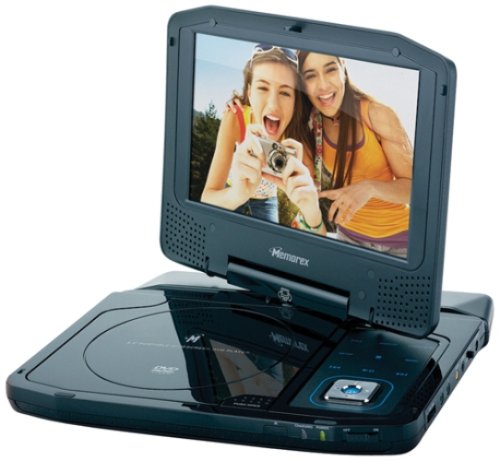
Image: The Memorex MVDP1078 Portable DVD Player shown with its 8-inch screen open, displaying the disc compartment and control buttons. The player is black with a sleek finish.