
1. ആമുഖം
The Multipure Aquaperform Model MP880 is a high-performance drinking water system designed for below-sink installation. It features a durable stainless steel housing and is engineered to reduce a wide range of contaminants, including Arsenic V. This system provides filtered water through a dedicated chrome faucet, equipped with a capacity monitor to track filter life.
- Housing Dimensions: 11 inches (height) x 5.75 inches (width)
- Filter Capacity: 960 gallons
- Stainless steel housing for enhanced contaminant reduction, including Arsenic V.
- Includes a chrome faucet and below-sink installation kit.
2 സുരക്ഷാ വിവരങ്ങൾ
ഇൻസ്റ്റാൾ ചെയ്യുന്നതിനും ഉപയോഗിക്കുന്നതിനും മുമ്പ് എല്ലാ നിർദ്ദേശങ്ങളും ശ്രദ്ധാപൂർവ്വം വായിക്കുക. ഈ നിർദ്ദേശങ്ങൾ പാലിക്കുന്നതിൽ പരാജയപ്പെടുന്നത് വസ്തുവകകൾക്ക് കേടുപാടുകൾ വരുത്തുകയോ പരിക്കേൽക്കുകയോ ചെയ്തേക്കാം.
- ചോർച്ച തടയാൻ എല്ലാ കണക്ഷനുകളും സുരക്ഷിതമാണെന്ന് ഉറപ്പാക്കുക.
- Do not overtighten plastic fittings, as this can cause damage.
- Verify that the water supply is turned off before beginning installation.
- ഇൻസ്റ്റാളേഷൻ സമയത്ത് ഉചിതമായ ഉപകരണങ്ങളും സുരക്ഷാ ഗിയറുകളും ഉപയോഗിക്കുക.
- The system is designed for cold water use only.
- Do not expose the unit to freezing temperatures.
3. പാക്കേജ് ഉള്ളടക്കം
ഇൻസ്റ്റാളേഷൻ ആരംഭിക്കുന്നതിന് മുമ്പ് എല്ലാ ഘടകങ്ങളും നിലവിലുണ്ടെന്ന് ഉറപ്പാക്കുക:
- Multipure Aquaperform MP880 Filter Unit (Stainless Steel Housing)
- Chrome faucet
- Below Sink Installation Kit (includes tubing, fittings, mounting bracket)
- കപ്പാസിറ്റി മോണിറ്റർ
- അഡാപ്റ്റ വാൽവ്
- നിർദ്ദേശ മാനുവൽ (ഈ പ്രമാണം)
4. Setup and Installation (Below Sink)
This section outlines the steps for installing the Aquaperform MP880 system below your sink. Professional installation is recommended if you are not comfortable with plumbing tasks.
4.1 ഇൻസ്റ്റലേഷൻ ഏരിയ തയ്യാറാക്കുക
- നിങ്ങളുടെ സിങ്കിലേക്കുള്ള തണുത്ത ജലവിതരണം ഓഫാക്കുക.
- Clear the area under the sink where the filter unit will be mounted.
- Identify a suitable location on your countertop or sink for the dedicated chrome faucet. A 0.5-inch hole is required for faucet installation. If no existing hole is available, one must be drilled.
4.2 Install the Faucet
- Insert the chrome faucet stem through the 0.5-inch hole in the countertop or sink.
- Secure the faucet from underneath the sink using the provided washer and nut. Ensure it is tightened firmly but do not overtighten.
- Connect the appropriate water line tubing to the faucet stem.
4.3 Mount the Filter Unit
- Using the included mounting bracket, attach the Aquaperform filter unit to a cabinet wall below the sink. Ensure the unit is level and securely fastened.
- Position the unit to allow for easy access for filter changes.
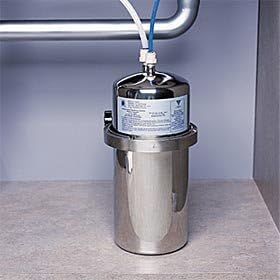
ചിത്രം 1: The Multipure Aquaperform MP880 unit installed below a sink, showing its connection to the cold water line and the outlet tubing.
4.4 Connect Water Lines
- Connect the Adapta Valve to the cold water line under your sink.
- Connect one end of the water line tubing from the Adapta Valve to the inlet port of the Aquaperform filter unit.
- Connect the other end of the water line tubing from the outlet port of the Aquaperform filter unit to the dedicated chrome faucet.
- Ensure all connections are hand-tightened, then use a wrench for a final quarter-turn to ensure a leak-free seal. Avoid overtightening, especially with plastic components.
4.5 Install Capacity Monitor
- Connect the capacity monitor to the appropriate tubing as per the monitor's specific instructions.
- Mount the monitor's indicator light in a visible location, typically near the faucet or inside the cabinet for discreet monitoring.
4.6 Flush the System
- Slowly turn on the cold water supply.
- Open the dedicated chrome faucet and allow water to run for at least 10-15 minutes to flush out any carbon fines and air from the system.
- Check all connections for leaks. Tighten any leaking connections as necessary.
5. ഓപ്പറേഷൻ
Once installed, the Multipure Aquaperform MP880 system operates automatically. Simply open the dedicated chrome faucet to dispense filtered water.
5.1 Capacity Monitor
The included capacity monitor tracks the volume of water filtered. It will provide an indication (e.g., a blinking light or color change) when the filter is nearing its 960-gallon capacity and requires replacement. Refer to the monitor's specific instructions for detailed operation and indicator meanings.
6. പരിപാലനം
6.1 ഫിൽട്ടർ മാറ്റിസ്ഥാപിക്കൽ
The filter cartridge inside the Aquaperform MP880 unit has a rated capacity of 960 gallons. It is recommended to replace the filter annually or when the capacity monitor indicates replacement is due, whichever comes first. Regular filter replacement ensures optimal performance and water quality.
- Turn off the cold water supply to the system.
- Open the dedicated faucet to relieve pressure.
- ഫിൽറ്റർ ഹൗസിംഗ് ശ്രദ്ധാപൂർവ്വം അഴിക്കുക.
- പഴയ ഫിൽട്ടർ കാട്രിഡ്ജ് നീക്കം ചെയ്ത് ശരിയായി വിനിയോഗിക്കുക.
- Insert a new Multipure replacement filter cartridge, ensuring it is seated correctly.
- Screw the housing back on, hand-tightening first, then a quarter-turn with a wrench.
- Slowly turn on the cold water supply and flush the new filter as described in Section 4.6.
- Reset the capacity monitor according to its instructions.
6.2 വൃത്തിയാക്കൽ
Wipe the exterior of the stainless steel housing and the chrome faucet with a soft, damp ആവശ്യാനുസരണം തുണി ഉപയോഗിക്കുക. അബ്രാസീവ് ക്ലീനറുകളോ ലായകങ്ങളോ ഉപയോഗിക്കരുത്.
7. പ്രശ്നപരിഹാരം
| പ്രശ്നം | സാധ്യമായ കാരണം | പരിഹാരം |
|---|---|---|
| താഴ്ന്ന ജലപ്രവാഹം | Clogged filter cartridge; kinked tubing; low water pressure. | Replace filter cartridge; check tubing for kinks; verify household water pressure. |
| വെള്ളം ചോർച്ച | Loose connections; damaged O-rings; cracked fittings. | Check and tighten all connections; inspect O-rings for damage and replace if necessary; replace any cracked fittings. |
| Unusual Taste/Odor | Filter nearing end of life; new filter not properly flushed. | Replace filter cartridge; flush new filter for 10-15 minutes. |
| Capacity Monitor Not Working | Battery depleted; incorrect installation; sensor issue. | Check/replace battery; verify monitor connections; consult Multipure support. |
8 സ്പെസിഫിക്കേഷനുകൾ
- ബ്രാൻഡ്: മൾട്ടിപ്യുവർ
- മോഡലിൻ്റെ പേര്: MP880
- ഭാഗം നമ്പർ: MP880-BC
- ഇൻസ്റ്റലേഷൻ തരം: Below sink, permanent (convertible to countertop with additional parts)
- പ്രത്യേക സവിശേഷതകൾ: NSF certified, Multi-Stage Filtration, Capacity Monitor
- ഭവന മെറ്റീരിയൽ: സ്റ്റെയിൻലെസ്സ് സ്റ്റീൽ
- ഫിൽട്ടർ കപ്പാസിറ്റി: 960 ഗാലൻ
- ഭവന അളവുകൾ: Approximately 11 inches (height) x 5.75 inches (width)
- UPC: 815578005209
- നിർമ്മാതാവ്: മൾട്ടിപ്യുവർ
9. വാറൻ്റിയും പിന്തുണയും
For specific warranty information regarding your Multipure Aquaperform MP880 system, please refer to the warranty card included with your product or visit the official Multipure website. For technical assistance, replacement parts, or further inquiries, please contact Multipure customer support directly.
നിർമ്മാതാവ്: മൾട്ടിപ്യുവർ
Webസൈറ്റ്: www.multipure.com (www.multipure.com) എന്ന വെബ്സൈറ്റ് വഴി ഡൗൺലോഡ് ചെയ്യാം. (ഉദാampലിങ്ക്, യഥാർത്ഥ ലിങ്ക് വ്യത്യാസപ്പെടാം)