
1. ആമുഖം
This manual provides detailed instructions for the proper setup, operation, and maintenance of your Veho VMS-004 Discovery Deluxe USB Microscope. Please read this manual thoroughly before using the device to ensure optimal performance and longevity.
The Veho VMS-004 is a versatile USB microscope designed for detailed observation and digital capture of magnified images and videos. It features up to 400x magnification, a 2.0 Megapixel CMOS lens, and adjustable LED illumination, making it suitable for various applications including educational, hobbyist, and professional use.
2 സുരക്ഷാ വിവരങ്ങൾ
- ഡിസ്അസംബ്ലിംഗ് ചെയ്യരുത്: Attempting to disassemble or modify the microscope may cause damage and void the warranty.
- നേരിട്ടുള്ള സൂര്യപ്രകാശം ഒഴിവാക്കുക: Do not expose the microscope to direct sunlight or high temperatures.
- ശ്രദ്ധയോടെ കൈകാര്യം ചെയ്യുക: The lens and internal components are delicate. Avoid dropping or subjecting the device to strong impacts.
- വരണ്ടതായി സൂക്ഷിക്കുക: ഈ ഉപകരണം വാട്ടർപ്രൂഫ് അല്ല. വെള്ളത്തിലോ ഉയർന്ന ആർദ്രതയിലോ സമ്പർക്കം ഒഴിവാക്കുക.
- പവർ ഉറവിടം: Use only the specified USB power source.
- കുട്ടികൾ: Keep out of reach of small children. Adult supervision is recommended during use.
3. പാക്കേജ് ഉള്ളടക്കം
നിങ്ങളുടെ പാക്കേജിൽ എല്ലാ ഇനങ്ങളും ഉണ്ടെന്ന് ഉറപ്പാക്കുക:
- Veho VMS-004 Discovery Deluxe USB Microscope
- Flexi Alloy Stand
- Software CD (for drivers and application)
- ഉപയോക്തൃ മാനുവൽ (ഈ പ്രമാണം)
4. ഉൽപ്പന്നം കഴിഞ്ഞുview
Familiarize yourself with the main components of the Veho VMS-004 microscope.

Figure 4.1: The Veho VMS-004 Discovery Deluxe USB Microscope mounted on its flexi alloy stand.
- മൈക്രോസ്കോപ്പ് ബോഡി: Contains the lens, CMOS sensor, and illumination LEDs.
- ഫോക്കസ് വീൽ: Located on the microscope body, used to adjust the focus for clear images.
- സ്നാപ്പ്ഷോട്ട് ബട്ടൺ: A button on the microscope body for capturing still images.
- LED Illumination Control: A small wheel or dial to adjust the brightness of the built-in LEDs.
- യൂഎസ്ബി കേബിൾ: For connecting the microscope to your computer.
- Flexi Alloy Stand: Provides a stable base and adjustable positioning for the microscope.

ചിത്രം 4.2: ക്ലോസപ്പ് view of the focus wheel and magnification markings on the microscope body.

ചിത്രം 4.3: മുൻഭാഗം view of the microscope lens, showing the integrated LED illumination ring.
5. സജ്ജീകരണം
5.1 സ്റ്റാൻഡ് അസംബ്ലി
The flexi alloy stand provides stability and allows for precise positioning of the microscope.
- Attach the microscope holder to the flexible arm of the stand.
- Secure the microscope into the holder. Ensure it is firmly seated but not overly tightened to avoid damage.
- സ്ഥിരതയുള്ള, പരന്ന പ്രതലത്തിൽ സ്റ്റാൻഡ് സ്ഥാപിക്കുക.
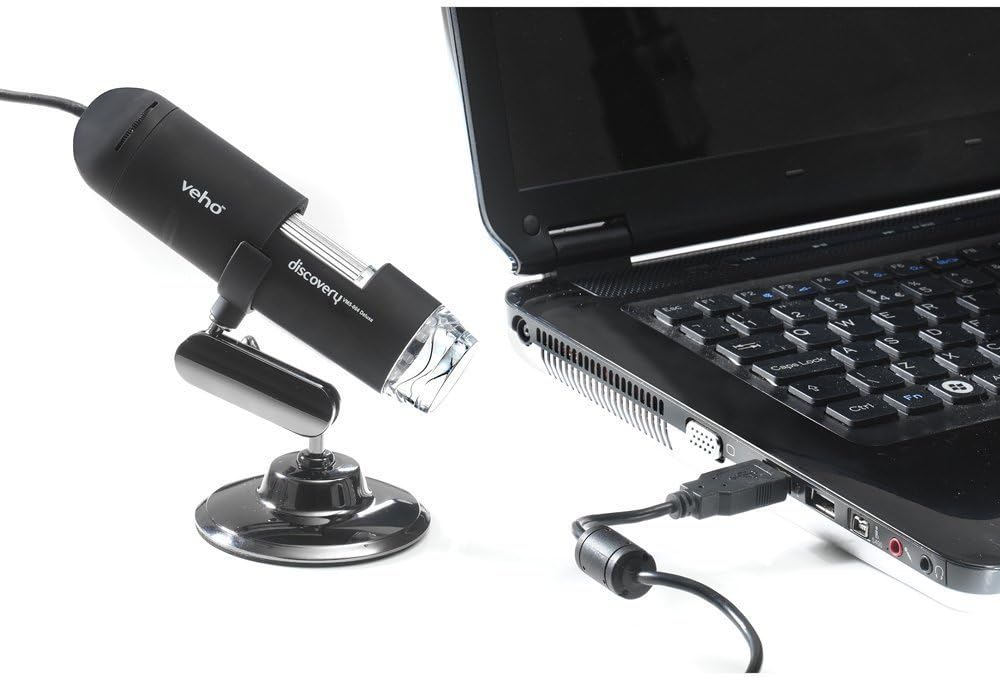
Figure 5.1: The microscope securely mounted on its flexi alloy stand.
5.2 സോഫ്റ്റ്വെയർ ഇൻസ്റ്റലേഷൻ
The Veho VMS-004 requires driver and software installation for full functionality on your computer (PC or Mac compatible).
- Insert the provided software CD into your computer's CD/DVD drive. If your computer does not have a CD drive, please visit the official Veho support website to download the necessary drivers and software.
- Follow the on-screen instructions to install the drivers and the accompanying application.
- ഇൻസ്റ്റാളേഷന് ശേഷം ആവശ്യപ്പെടുകയാണെങ്കിൽ നിങ്ങളുടെ കമ്പ്യൂട്ടർ പുനരാരംഭിക്കുക.
5.3 Connecting the Microscope
Once the software is installed, connect the microscope to your computer.
- Plug the USB cable of the microscope into an available USB port on your computer.
- The computer should automatically detect the device.
- Launch the installed microscope application. You should see a live feed from the microscope's camera.

Figure 5.2: The USB microscope connected to a laptop, ready for use.
6. പ്രവർത്തന നിർദ്ദേശങ്ങൾ
6.1 Placing the Object
Position the object you wish to observe directly beneath the microscope lens. Adjust the flexible stand to bring the lens close to the object.

Figure 6.1: The microscope positioned over a coin for observation.
6.2 മാഗ്നിഫിക്കേഷനും ഫോക്കസും ക്രമീകരിക്കൽ
The microscope offers up to 400x digital magnification. To achieve a clear image:
- Adjust the distance between the microscope lens and the object using the flexible stand.
- Rotate the focus wheel on the microscope body until the image on your computer screen is sharp and clear.
- കുറിപ്പ്: The effective magnification changes with the distance from the object and the focus setting.
6.3 LED Illumination Control
The microscope features built-in LEDs to illuminate your subject. To adjust the brightness:
- Locate the LED illumination control (a small wheel or dial) on the microscope cable or body.
- Rotate the control to increase or decrease the LED brightness as needed for optimal viewing.
6.4 ചിത്രങ്ങളും വീഡിയോകളും പകർത്തൽ
The included software allows you to capture still images and record videos.
- നിശ്ചല ചിത്രം: Press the snapshot button on the microscope body or click the capture button within the software interface.
- വീഡിയോ റെക്കോർഡിംഗ്: Use the record function within the software application to start and stop video capture.
- പിടികൂടി files are typically saved to a default folder on your computer, which can usually be configured within the software settings.
6.5 Measurement Software
The accompanying software includes measurement capabilities. Refer to the software's help documentation for detailed instructions on how to calibrate and use the measurement tools. For accurate measurements, it is recommended to use a known reference scale in your image.
7. പരിപാലനം
- ലെൻസ് വൃത്തിയാക്കൽ: ഒപ്റ്റിക്കൽ ലെൻസുകൾക്കായി പ്രത്യേകം രൂപകൽപ്പന ചെയ്ത മൃദുവായ, ലിന്റ് രഹിത തുണി ഉപയോഗിക്കുക. അബ്രസീവ് ക്ലീനറുകളോ ലായകങ്ങളോ ഉപയോഗിക്കരുത്.
- ശരീരം വൃത്തിയാക്കൽ: മൈക്രോസ്കോപ്പ് ബോഡി തുടച്ച് ഉണങ്ങിയതോ ചെറുതായി ഡി-പ്ലാസ്റ്റിക് ഉള്ളതോ ഉപയോഗിച്ച് വയ്ക്കുക.amp, മൃദുവായ തുണി.
- സംഭരണം: When not in use, store the microscope in a clean, dry, and dust-free environment.
- സോഫ്റ്റ്വെയർ അപ്ഡേറ്റുകൾ: Periodically check the Veho official website for software and driver updates to ensure compatibility and optimal performance.
8. പ്രശ്നപരിഹാരം
| പ്രശ്നം | സാധ്യമായ കാരണം | പരിഹാരം |
|---|---|---|
| No image on screen / Device not detected |
|
|
| ചിത്രം മങ്ങിയതോ ഫോക്കസിന് പുറത്തോ ആണ് |
|
|
| ചിത്രം വളരെ ഇരുണ്ടതാണ് അല്ലെങ്കിൽ വളരെ തെളിച്ചമുള്ളതാണ് |
|
|
| Magnification does not appear to be 400x |
|
|
9 സ്പെസിഫിക്കേഷനുകൾ
| മോഡൽ നമ്പർ | VMS-004D |
| മാഗ്നിഫിക്കേഷൻ | Up to x400 (digital) |
| ലെൻസ് | 2.0 മെഗാപിക്സൽ CMOS |
| പ്രകാശം | On/Off LEDs (adjustable brightness) |
| പാർപ്പിടം | Tacton Rubber Touch |
| നിൽക്കുക | Flexi Alloy Stand |
| കണക്റ്റിവിറ്റി | USB |
| അനുയോജ്യത | പിസിയും മാക്കും അനുയോജ്യമാണ് |
| ഉൽപ്പന്ന അളവുകൾ | 13.46 x 10.92 x 22.35 സെ.മീ |
| ഇനത്തിൻ്റെ ഭാരം | 159 ഗ്രാം |
| വാല്യംtage | 5 Volts (USB powered) |
| പ്രകാശ സ്രോതസ്സ് തരം | ഹാലൊജെൻ |
| യഥാർത്ഥ ആംഗിൾ View | 30 ഡിഗ്രി |
10. വാറണ്ടിയും പിന്തുണയും
For warranty information, technical support, or service inquiries, please refer to the warranty card included with your product or visit the official Veho webസൈറ്റ്. വാറന്റി ക്ലെയിമുകൾക്കായി നിങ്ങളുടെ വാങ്ങലിന്റെ തെളിവ് സൂക്ഷിക്കുക.
Veho Official Webസൈറ്റ്: www.veho-world.com (www.veho-world.com) എന്ന വെബ്സൈറ്റ് സന്ദർശിക്കുക.