
1. ആമുഖം
The Laney CXP-110 is an ultra-compact, active enclosure designed for use as a stage monitor or mounted on a speaker stand. It features a robust construction with a tough vinyl covering, metal corners, rubber feet, and a kick-proof steel grill, ensuring durability for various performance environments. Engineered in Great Britain, this unit delivers 130 watts of power through its 10-inch woofer. It includes essential controls such as a balanced Mic input, 1/4-inch jack Line input, two-band EQ, and Master Volume. The CXP-110 also provides a Line Link socket for connecting to additional active enclosures or monitors, and a 35mm pole stand fitting for versatile placement options.
2 സുരക്ഷാ വിവരങ്ങൾ
Please read and understand all safety instructions before operating the Laney CXP-110. Retain this manual for future reference.
- ഊർജ്ജ സ്രോതസ്സ്: ഈ മാനുവലിൽ വിവരിച്ചിരിക്കുന്ന തരത്തിലുള്ളതോ യൂണിറ്റിൽ അടയാളപ്പെടുത്തിയിരിക്കുന്നതോ ആയ ഒരു പവർ സപ്ലൈയിലേക്ക് മാത്രം യൂണിറ്റ് ബന്ധിപ്പിക്കുക.
- വെൻ്റിലേഷൻ: മതിയായ വായുസഞ്ചാരം ഉറപ്പാക്കുക. വായുസഞ്ചാര ദ്വാരങ്ങളൊന്നും തടയരുത്.
- ജലവും ഈർപ്പവും: യൂണിറ്റ് മഴയിലോ ഈർപ്പത്തിലോ തുറന്നുകാട്ടരുത്. പാത്രങ്ങൾ പോലുള്ള ദ്രാവകങ്ങൾ നിറച്ച വസ്തുക്കൾ യൂണിറ്റിൽ വയ്ക്കരുത്.
- ചൂട്: റേഡിയേറ്ററുകൾ, ഹീറ്റ് രജിസ്റ്ററുകൾ, സ്റ്റൗകൾ അല്ലെങ്കിൽ മറ്റ് ഉപകരണങ്ങൾ (ഉൾപ്പെടെ) പോലുള്ള താപ സ്രോതസ്സുകൾക്ക് സമീപം യൂണിറ്റ് സ്ഥാപിക്കരുത്. ampലൈഫയറുകൾ) ചൂട് ഉത്പാദിപ്പിക്കുന്നത്.
- വൃത്തിയാക്കൽ: ഉണങ്ങിയ തുണി ഉപയോഗിച്ച് മാത്രം വൃത്തിയാക്കുക.
- സേവനം: ഈ ഉൽപ്പന്നം സ്വയം സേവിക്കാൻ ശ്രമിക്കരുത്. യോഗ്യതയുള്ള സേവന ഉദ്യോഗസ്ഥർക്ക് എല്ലാ സേവനങ്ങളും റഫർ ചെയ്യുക.
- കേബിളുകൾ: പ്രത്യേകിച്ച് പ്ലഗുകൾ, കൺവീനിയൻസ് റെസെപ്റ്റക്കിളുകൾ, ഉപകരണത്തിൽ നിന്ന് പുറത്തുകടക്കുന്ന ഇടം എന്നിവയിൽ നടക്കുകയോ നുള്ളുകയോ ചെയ്യുന്നതിൽ നിന്ന് പവർ കോർഡ് സംരക്ഷിക്കുക.
- സ്ഥിരത: Ensure the unit is placed on a stable surface or securely mounted on a compatible speaker stand (35mm pole stand fitting).
3. സജ്ജീകരണം
The Laney CXP-110 can be used in two primary configurations: as a floor monitor or mounted on a speaker stand.
3.1. Floor Monitor Setup
Place the CXP-110 on a stable, flat surface directly on the stage floor. Its angled design allows it to project sound upwards towards the performer. Ensure the unit is positioned to avoid obstruction and provide optimal sound coverage.
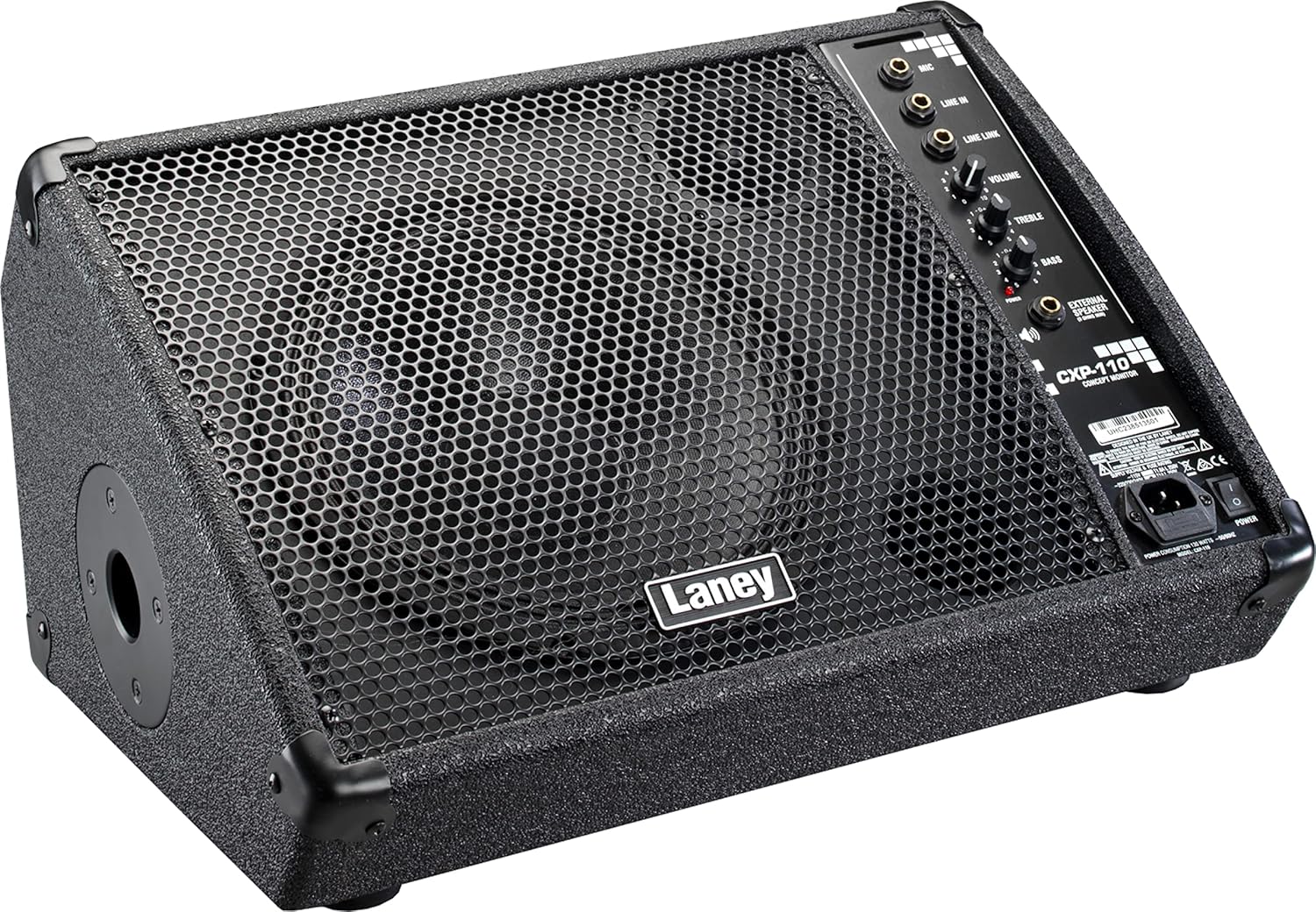
Figure 3.1: Laney CXP-110 in floor monitor position.
This image shows the Laney CXP-110 from an angled perspective, highlighting its design for use as a stage floor monitor. The speaker grille faces upwards, and the control panel is visible on the right side.
3.2. Speaker Stand Setup
For use as a side fill monitor or front-of-house speaker, the CXP-110 is equipped with a 35mm pole stand fitting. Carefully mount the unit onto a compatible speaker stand, ensuring it is stable and secure before operation.

Figure 3.2: Laney CXP-110 showing the pole mount socket.
ഈ ചിത്രം ഒരു വശം നൽകുന്നു view of the Laney CXP-110, clearly showing the circular opening for the 35mm pole stand fitting on its left side, allowing for elevated placement.
3.3. പവർ കണക്ഷൻ
Connect the supplied power cable to the IEC power inlet on the rear panel of the CXP-110 and then to a suitable AC power outlet. Ensure the power switch is in the OFF position before connecting.
4. പ്രവർത്തന നിർദ്ദേശങ്ങൾ
The CXP-110 features a straightforward control panel for easy operation.

ചിത്രം 4.1: നിയന്ത്രണ പാനൽ ഓവർview.
This detailed image focuses on the control panel of the Laney CXP-110, showing the various input jacks (Mic, Line In, Line Link), and control knobs (Volume, Treble, Bass), along with the power indicator and external speaker output.
4.1 ഇൻപുട്ടുകൾ
- MIC ഇൻപുട്ട്: Use this balanced input for connecting a microphone.
- LINE IN Input: Use this 1/4-inch jack input for connecting line-level sources such as mixers, instruments, or playback devices.
- LINE LINK Output: This socket allows you to connect the CXP-110 to an additional active enclosure or monitor, expanding your sound system.
4.2. നിയന്ത്രണങ്ങൾ
- വ്യാപ്തം: Adjusts the overall output level of the monitor. Start with this control at a low setting and gradually increase to the desired level.
- ട്രെബിൾ: Controls the high-frequency response of the monitor. Turn clockwise to increase treble, counter-clockwise to decrease.
- ബാസ്: Controls the low-frequency response of the monitor. Turn clockwise to increase bass, counter-clockwise to decrease.
4.3. പവർ ഓൺ/ഓഫ്
After connecting all inputs and outputs, switch the power button to the ON position. The power indicator light will illuminate. To power off, switch the button to the OFF position.
5. പരിപാലനം
Proper maintenance will ensure the longevity and optimal performance of your Laney CXP-110.
- വൃത്തിയാക്കൽ: യൂണിറ്റിന്റെ പുറംഭാഗം വൃത്തിയാക്കാൻ മൃദുവായതും ഉണങ്ങിയതുമായ തുണി ഉപയോഗിക്കുക. അബ്രസീവ് ക്ലീനറുകൾ, ലായകങ്ങൾ, മെഴുക് എന്നിവ ഉപയോഗിക്കരുത്.
- സംഭരണം: When not in use, store the monitor in a cool, dry place, away from direct sunlight and extreme temperatures.
- ഗതാഗതം: When transporting the unit, ensure it is securely packed to prevent damage. The robust construction with metal corners and a steel grill provides good protection.
- പരിശോധന: Periodically inspect the power cord and all input/output jacks for any signs of wear or damage.

Figure 5.1: Integrated Handle.
This image displays the top of the Laney CXP-110, clearly showing the sturdy integrated handle designed for easy and secure transportation of the unit.
6. പ്രശ്നപരിഹാരം
If you encounter issues with your Laney CXP-110, refer to the following common problems and solutions.
| പ്രശ്നം | സാധ്യമായ കാരണം | പരിഹാരം |
|---|---|---|
| സൗണ്ട് ഔട്ട്പുട്ട് ഇല്ല |
|
|
| വികലമായ ശബ്ദം |
|
|
| ഹം അല്ലെങ്കിൽ ബസ് ശബ്ദം |
|
|
If the problem persists after attempting these solutions, please contact Laney customer support or a qualified service technician.
7 സ്പെസിഫിക്കേഷനുകൾ
| ഫീച്ചർ | വിശദാംശങ്ങൾ |
|---|---|
| മോഡൽ | സിഎക്സ്പി-110 |
| ടൈപ്പ് ചെയ്യുക | സജീവമായ എസ്tagഇ മോണിറ്റർ |
| പവർ ഔട്ട്പുട്ട് | 130 വാട്ട്സ് |
| സ്പീക്കർ കോൺഫിഗറേഷൻ | 10-inch Woofer & HF Tweeter |
| ഫ്രീക്വൻസി പ്രതികരണം | 78Hz മുതൽ 20KHz വരെ |
| ഇൻപുട്ടുകൾ | Balanced Mic Input, 1/4-inch Jack Line Input |
| ഔട്ട്പുട്ടുകൾ | Line Link Socket (for additional active enclosure/monitor) |
| നിയന്ത്രണങ്ങൾ | വോളിയം, ട്രെബിൾ, ബാസ് |
| മൗണ്ടിംഗ് ഓപ്ഷനുകൾ | Floor or 35mm Pole Stand Operation |
| നിർമ്മാണ മെറ്റീരിയൽ | Tough Vinyl Covering, Metal Corners, Rubber Feet, Kick-proof Steel Grill |
| അളവുകൾ (D x W x H) | 13.66"D x 18.43"W x 10.79"H |
| ഇനത്തിൻ്റെ ഭാരം | 11 പൗണ്ട് (ഏകദേശം 5 കിലോഗ്രാം) |
8. വാറൻ്റി വിവരങ്ങൾ
Laney products come with a limited warranty. Please refer to the warranty card included with your product or visit the official Laney webവിശദമായ വാറന്റി നിബന്ധനകൾക്കും വ്യവസ്ഥകൾക്കും സൈറ്റ് സന്ദർശിക്കുക. വാറന്റി ക്ലെയിമുകൾക്കായി നിങ്ങളുടെ വാങ്ങലിന്റെ തെളിവ് സൂക്ഷിക്കുക.
9. ഉപഭോക്തൃ പിന്തുണ
For technical assistance, service, or parts, please contact Laney customer support. Contact information can typically be found on the official Laney webസൈറ്റ് അല്ലെങ്കിൽ ഉൽപ്പന്ന പാക്കേജിംഗിൽ.
Webസൈറ്റ്: www.laney.co.uk