
1. ആമുഖം
The VTech Learning Fun Tool Box is an interactive educational toy designed for young children aged 12 to 36 months. This toy encourages role-play and introduces basic concepts such as shapes, numbers, and colors through engaging activities. It includes realistic tool play pieces and features two distinct modes of play: Learning Mode and Play Mode.
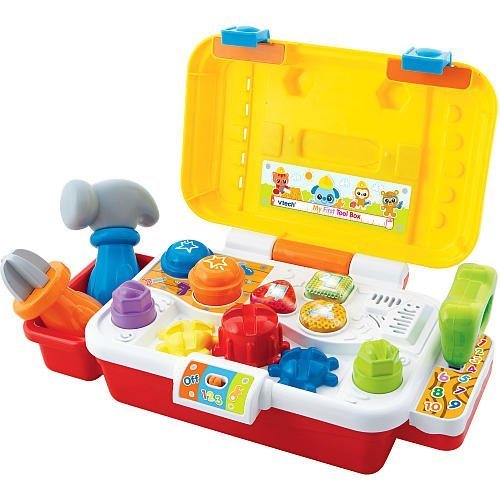
Image 1.1: The VTech Learning Fun Tool Box, a colorful toy featuring a yellow toolbox with a red handle, a blue screwdriver, a green wrench, a red hammer, and a yellow saw. The front of the toolbox includes three light-up buttons and interactive elements like gears and bolts.
2. പാക്കേജ് ഉള്ളടക്കം
താഴെ കൊടുത്തിരിക്കുന്ന എല്ലാ ഇനങ്ങളും നിങ്ങളുടെ പാക്കേജിൽ ഉണ്ടെന്ന് ഉറപ്പാക്കുക:
- 1 x VTech Learning Fun Tool Box unit
- 1 x സ്ക്രൂഡ്രൈവർ ഉപകരണം
- 1 x Wrench tool
- 1 x Saw tool
- 1 x Hammer tool
- നിർദ്ദേശ മാനുവൽ (ഈ പ്രമാണം)
3 പ്രധാന സവിശേഷതകൾ
- Realistic Role-Play Tools: Includes a screwdriver, hammer, wrench, and saw for imaginative play.
- സംവേദനാത്മക ഘടകങ്ങൾ: Features three gears, two bolts, two nails, and three light-up buttons for engaging interaction.
- പോർട്ടബിൾ ഡിസൈൻ: Equipped with an exterior handle for easy carrying.
- Educational Play Modes: Offers two modes of play to teach shapes, numbers, and colors.
- പ്രായപരിധി: Suitable for children 12 months and older.
4. സജ്ജീകരണം
4.1 ബാറ്ററി ഇൻസ്റ്റാളേഷൻ
The VTech Learning Fun Tool Box requires batteries for operation. Locate the battery compartment on the underside of the unit. Use a screwdriver to open the compartment cover. Insert the required batteries, ensuring correct polarity (+/-). Replace the cover and secure it with the screw. Always use new batteries of the recommended type for optimal performance.
5. പ്രവർത്തന നിർദ്ദേശങ്ങൾ
5.1 പവർ ഓൺ/ഓഫ്
To turn the unit on, slide the power switch, typically located on the side or back of the toolbox, to the 'ON' position. To conserve battery life, slide the switch to the 'OFF' position when the toy is not in use.
5.2 പ്ലേ മോഡുകൾ
The Learning Fun Tool Box features two primary play modes:
- പഠന രീതി: In this mode, the toy introduces shapes, numbers, and colors. Pressing the light-up buttons or interacting with the tools (screwdriver, wrench, hammer, saw) will trigger educational phrases and sounds related to these concepts.
- പ്ലേ മോഡ്: This mode encourages imaginative play with realistic tool sounds and phrases. Children can pretend to fix things, turn gears, tighten bolts, and tap nails, enhancing their role-play experience.
Switch between modes by pressing a dedicated mode button or by specific interactions as indicated by the toy's voice prompts.
5.3 Tool Interaction
- സ്ക്രൂഡ്രൈവർ: Use the screwdriver to turn the gears on the toolbox, activating sounds and phrases.
- റെഞ്ച്: Use the wrench to interact with the bolts, triggering specific responses.
- ചുറ്റിക: Tap the nails with the hammer for sound effects.
- കണ്ടു: Engage the saw with designated areas for sawing sounds.
6. പരിപാലനം
6.1 വൃത്തിയാക്കൽ
To clean the VTech Learning Fun Tool Box, wipe the surface with a slightly damp cloth. Do not immerse the toy in water or use harsh cleaning agents, as this may damage the electronic components. Ensure the toy is completely dry before storage or further use.
6.2 സംഭരണം
Store the toy in a cool, dry place away from direct sunlight and extreme temperatures. If the toy will not be used for an extended period, remove the batteries to prevent leakage and potential damage.
7. പ്രശ്നപരിഹാരം
7.1 No Power or Intermittent Sound
- പവർ സ്വിച്ച് 'ഓൺ' സ്ഥാനത്താണോ എന്ന് പരിശോധിക്കുക.
- Ensure batteries are installed correctly with the correct polarity.
- പഴയതോ കാലഹരണപ്പെട്ടതോ ആയ ബാറ്ററികൾ പുതിയവ ഉപയോഗിച്ച് മാറ്റിസ്ഥാപിക്കുക.
- Clean the battery contacts if they appear dirty.
7.2 Incorrect Responses or Malfunctions
- യൂണിറ്റ് ഓഫ് ചെയ്ത് റീസെറ്റ് ചെയ്യാൻ വീണ്ടും ഓണാക്കുക.
- Ensure that the tools are being used with the correct interactive points on the toolbox.
- If issues persist, refer to the VTech customer support for further assistance.
8 സ്പെസിഫിക്കേഷനുകൾ
| ബ്രാൻഡ് നാമം | വിടെക് |
| മോഡൽ നമ്പർ | 80-113100 |
| ASIN | B002T37EF0 |
| ഗ്ലോബൽ ട്രേഡ് ഐഡൻ്റിഫിക്കേഷൻ നമ്പർ | 03417761131008 |
| നിർമ്മാതാവിൻ്റെ കുറഞ്ഞ പ്രായം | 12 മാസം |
| നിർമ്മാതാവിൻ്റെ പരമാവധി പ്രായം | 36 മാസം |
| ഇനത്തിന്റെ അളവുകൾ (L x W x H) | 10.24 x 4.33 x 4.53 ഇഞ്ച് |
| ഇനത്തിൻ്റെ ഭാരം | 2.5 പൗണ്ട് |
| മെറ്റീരിയൽ തരം | പ്ലാസ്റ്റിക് |
| വിദ്യാഭ്യാസ ലക്ഷ്യം | നിറം തിരിച്ചറിയൽ |
9. വാറൻ്റിയും പിന്തുണയും
9.1 വാറൻ്റി വിവരങ്ങൾ
VTech products are manufactured to high-quality standards. For specific warranty details, please refer to the warranty card included with your purchase or visit the official VTech webസൈറ്റ്. വാറന്റി ക്ലെയിമുകൾക്കായി നിങ്ങളുടെ വാങ്ങലിന്റെ തെളിവ് സൂക്ഷിക്കുക.
9.2 ഉപഭോക്തൃ പിന്തുണ
If you have any questions, require technical assistance, or need to report a problem with your VTech Learning Fun Tool Box, please contact VTech customer support. Contact information can typically be found on the VTech official webസൈറ്റ് അല്ലെങ്കിൽ ഉൽപ്പന്ന പാക്കേജിംഗിൽ.