
Degen DE1125
DEGEN DE1125 User Manual
Model: DE1125 | Brand: Degen
1. ഉൽപ്പന്നം കഴിഞ്ഞുview
The DEGEN DE1125 is a compact and versatile portable device that integrates multiple functionalities into a single unit. It serves as a world-band radio, an MP3 player, a digital recorder, and an ebook reader. Designed for portability, it features a slim profile and lightweight construction, making it ideal for travel and on-the-go use.
പ്രധാന സവിശേഷതകളിൽ ഇവ ഉൾപ്പെടുന്നു:
- Pocket-size world-band radio with built-in speaker and Digital Signal Processing (DSP) technology.
- 4 GB flash memory MP3 player for music playback.
- Digital recorder for radio programs and voice recording, offering up to 150 hours of recording time (at 32 kbps).
- 255 preset memories for radio stations.
- Built-in battery charger.
- LED back-lit display for clear visibility.
- Digital clock, sleep timer, key lock, and numeric volume indicator.
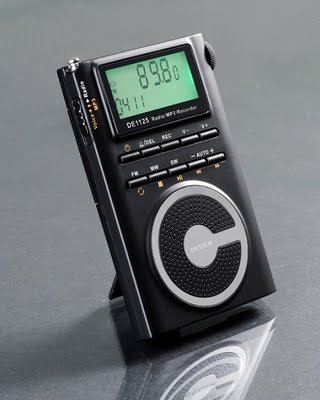
Figure 1.1: The DEGEN DE1125 portable radio and multimedia player, shown standing upright with its integrated kickstand.
2. സജ്ജീകരണ ഗൈഡ്
2.1 പായ്ക്ക് ചെയ്യലും പ്രാരംഭ പരിശോധനയും
പാക്കേജിംഗിൽ നിന്ന് എല്ലാ ഘടകങ്ങളും ശ്രദ്ധാപൂർവ്വം നീക്കം ചെയ്യുക. താഴെ പട്ടികപ്പെടുത്തിയിരിക്കുന്ന എല്ലാ ഇനങ്ങളും ഉണ്ടെന്നും കേടുപാടുകൾ സംഭവിച്ചിട്ടില്ലെന്നും ഉറപ്പാക്കുക:
- DEGEN DE1125 Unit
- ഇയർഫോണുകൾ
- AC Wall Plug (Charger)
- USB കേബിൾ
- ചുമക്കുന്ന സഞ്ചി
- റീചാർജ് ചെയ്യാവുന്ന ബാറ്ററി
- ഉപയോക്തൃ മാനുവൽ (ഈ പ്രമാണം)
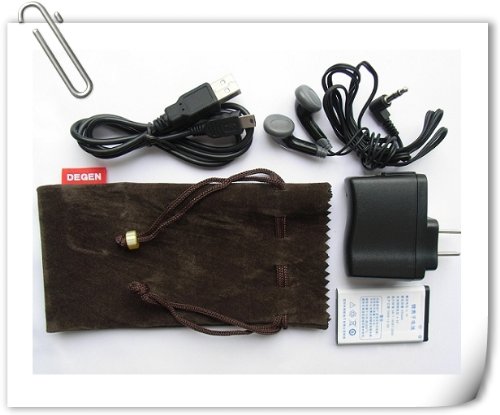
Figure 2.1: All included accessories for the DEGEN DE1125, including earphones, USB cable, AC adapter, carrying pouch, and rechargeable battery.
2.2 ബാറ്ററി ഇൻസ്റ്റാളേഷനും ചാർജിംഗും
The DE1125 is powered by a rechargeable lithium battery. Before first use, ensure the battery is properly installed and fully charged.
- ഉപകരണത്തിന്റെ പിൻഭാഗത്ത് ബാറ്ററി കമ്പാർട്ട്മെന്റ് കണ്ടെത്തുക.
- Insert the rechargeable battery, ensuring correct polarity as indicated inside the compartment.
- ബാറ്ററി കമ്പാർട്ട്മെൻ്റ് കവർ സുരക്ഷിതമായി അടയ്ക്കുക.
- Connect the small end of the USB cable to the mini-USB port on the side of the DE1125.
- Connect the standard USB end of the cable to the AC wall plug, then plug the AC wall plug into a standard electrical outlet. Alternatively, connect the standard USB end directly to a computer's USB port for charging.
- The display will indicate charging status. Allow the battery to fully charge before initial use.
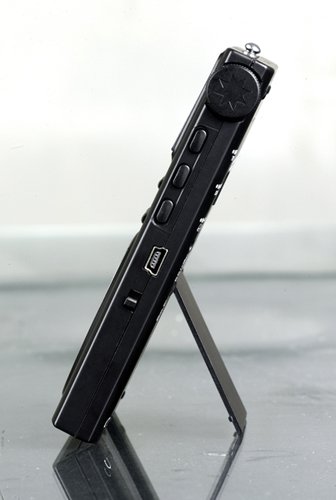
ചിത്രം 2.2: വശം view of the DEGEN DE1125, highlighting the mini-USB port for charging and data transfer.
3. പ്രവർത്തന നിർദ്ദേശങ്ങൾ
3.1 പൊതു നിയന്ത്രണങ്ങൾ
Familiarize yourself with the buttons and display on the DE1125:
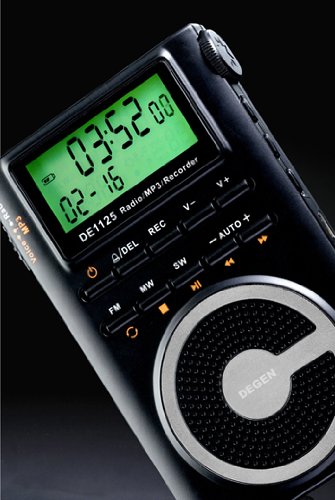
ചിത്രം 3.1: ക്ലോസപ്പ് view of the DEGEN DE1125's display and control panel, showing buttons for power, mode selection, tuning, and volume.
- പവർ ബട്ടൺ (): ഉപകരണം ഓണാക്കാനോ ഓഫാക്കാനോ അമർത്തിപ്പിടിക്കുക.
- Volume Buttons (V+, V-): ഓഡിയോ ഔട്ട്പുട്ട് ലെവൽ ക്രമീകരിക്കുക.
- മെനു ബട്ടൺ: Access the main menu or settings within a mode.
- നാവിഗേഷൻ ബട്ടണുകൾ (, ): Navigate through menus or adjust frequencies/tracks.
- Mode Buttons (FM, MW, SW, MP3, REC): ആവശ്യമുള്ള ഓപ്പറേറ്റിംഗ് മോഡ് തിരഞ്ഞെടുക്കുക.
- പ്ലേ/താൽക്കാലിക ബട്ടൺ (): Start or pause playback in MP3 mode, or confirm selections.
3.2 Radio Operation (FM, AM, SW)
The DE1125 supports FM (64.0 - 108.0 MHz), MW (520-1710 KHz), and SW (2.3-23.0 MHz) bands.
- ഉപകരണം ഓണാക്കുക.
- Press the corresponding mode button (FM, MW, or SW) to select the desired radio band.
- ട്യൂണിംഗ് ഓപ്ഷനുകൾ:
- ഓട്ടോ-സ്കാൻ: Press and hold the 'AUTO' button to automatically scan and store available stations.
- സ്വമേധയാലുള്ള ട്യൂണിംഗ്: നാവിഗേഷൻ ബട്ടണുകൾ ഉപയോഗിക്കുക (, ) to fine-tune the frequency step-by-step.
- Digital Tuning: Enter the desired frequency directly using the numeric keypad (if available, or through menu options).
- ATS (ഓട്ടോ ട്യൂണിംഗ് സ്റ്റോറേജ്): Automatically scans and stores strong signals into memory presets.
- പ്രീസെറ്റ് സ്റ്റേഷനുകൾ: The device can store up to 255 preset stations. Use the 'M+' and 'M-' buttons to navigate through stored presets.
3.3 MP3 Player Function
The DE1125 features 4GB of internal flash memory for MP3 playback.

Figure 3.2: The DEGEN DE1125 display indicating the 'Music' mode, ready for MP3 playback.
- Press the 'MP3' button to enter MP3 player mode.
- സംഗീതം കൈമാറാൻ files from your computer, connect the DE1125 to your computer using the provided USB cable. The device will appear as a removable disk drive. Drag and drop your MP3 fileഉപകരണത്തിന്റെ സംഭരണത്തിലേക്ക്.
- നാവിഗേഷൻ ബട്ടണുകൾ ഉപയോഗിക്കുക (, ) to select tracks.
- പ്ലേ/പോസ് ബട്ടൺ അമർത്തുക () to start or pause playback.
3.4 Digital Recorder Function
The DE1125 can record radio programs or function as a voice recorder.

Figure 3.3: The DEGEN DE1125 display showing the 'Record' mode, indicating readiness for audio capture.

Figure 3.4: The DEGEN DE1125 display showing the 'Voice' mode, used for voice recording functions.
- Press the 'REC' button to enter recording mode.
- Select either 'Radio Record' or 'Voice Record' from the menu.
- Press the 'REC' button again to start recording. The display will show recording time.
- Press the 'REC' button again to stop recording. Recorded files are saved to the internal memory.
- To play back recordings, navigate to the 'Recordings' folder in MP3 mode.
3.5 Ebook Reader Function
The DE1125 supports basic ebook reading functionality.

Figure 3.5: The DEGEN DE1125 display showing the 'Ebook' mode, indicating readiness to display text files.
- Connect the DE1125 to your computer via USB.
- Transfer compatible text files (e.g., .TXT) to the device's internal memory.
- കമ്പ്യൂട്ടറിൽ നിന്ന് ഉപകരണം വിച്ഛേദിക്കുക.
- Navigate to the 'Ebook' mode using the menu or mode selection.
- Select the desired ebook file to open and read.
4. പരിചരണവും പരിപാലനവും
Proper care ensures the longevity and optimal performance of your DEGEN DE1125.
- വൃത്തിയാക്കൽ: ഉപകരണത്തിന്റെ പുറംഭാഗം വൃത്തിയാക്കാൻ മൃദുവായതും ഉണങ്ങിയതുമായ തുണി ഉപയോഗിക്കുക. ലിക്വിഡ് ക്ലീനറുകൾ, എയറോസോളുകൾ, അല്ലെങ്കിൽ ഉരച്ചിലുകൾ ഉള്ള വസ്തുക്കൾ എന്നിവ ഉപയോഗിക്കരുത്.
- സംഭരണം: Store the device in a cool, dry place away from direct sunlight, extreme temperatures, and high humidity. Use the provided carrying pouch for protection during transport.
- ബാറ്ററി കെയർ: ബാറ്ററിയുടെ ആരോഗ്യം നിലനിർത്താൻ, ബാറ്ററി ഇടയ്ക്കിടെ പൂർണ്ണമായും ഡിസ്ചാർജ് ചെയ്യുന്നത് ഒഴിവാക്കുക. ദീർഘനേരം സൂക്ഷിക്കുകയാണെങ്കിൽ, ബാറ്ററി ഏകദേശം 50% വരെ ചാർജ് ചെയ്യുക, കുറച്ച് മാസങ്ങൾ കൂടുമ്പോൾ റീചാർജ് ചെയ്യുക.
- വാട്ടർ എക്സ്പോഷർ: ഈ ഉപകരണം വാട്ടർപ്രൂഫ് അല്ല. വെള്ളത്തിലോ മറ്റ് ദ്രാവകങ്ങളിലോ സമ്പർക്കം ഒഴിവാക്കുക.
- ആഘാതം: ആന്തരിക ഘടകങ്ങളെയോ സ്ക്രീനിനെയോ കേടുവരുത്തുന്ന വീഴ്ചകളിൽ നിന്നും ആഘാതങ്ങളിൽ നിന്നും ഉപകരണത്തെ സംരക്ഷിക്കുക.
5. പ്രശ്നപരിഹാരം
If you encounter issues with your DEGEN DE1125, refer to the following common problems and solutions:
| പ്രശ്നം | സാധ്യമായ കാരണം | പരിഹാരം |
|---|---|---|
| ഉപകരണം ഓണാക്കില്ല. | ബാറ്ററി തീർന്നു അല്ലെങ്കിൽ ശരിയായി ഇൻസ്റ്റാൾ ചെയ്തിട്ടില്ല. | ബാറ്ററി ചാർജ് ചെയ്യുക. ബാറ്ററി ശരിയായ പോളാരിറ്റിയോടെയാണ് ചേർത്തിരിക്കുന്നതെന്ന് ഉറപ്പാക്കുക. |
| No radio reception or poor signal. | Weak signal area, antenna not extended, interference. | Extend the telescopic antenna fully. Move to an area with better reception. Avoid sources of electronic interference. |
| MP3 fileകളിക്കുന്നില്ല. | പിന്തുണയ്ക്കുന്നില്ല file ഫോർമാറ്റ്, കേടായി file, ഇല്ല files on device. | ഉറപ്പാക്കുക files are in MP3 format. Re-transfer files. Verify files exist in the device's memory. |
| Cannot record audio. | Insufficient storage space, incorrect mode. | പഴയത് ഇല്ലാതാക്കുക files to free up space. Ensure you are in the correct recording mode (Radio Record or Voice Record). |
| സ്ക്രീൻ ശൂന്യമാണ് അല്ലെങ്കിൽ നിശ്ചലമാണ്. | System error, low battery. | Press and hold the power button for 10 seconds to force a restart. Charge the battery. |
6 സാങ്കേതിക സവിശേഷതകൾ
| ഫീച്ചർ | സ്പെസിഫിക്കേഷൻ |
|---|---|
| ബ്രാൻഡ് | Degen |
| മോഡൽ | DE1125 |
| ഉൽപ്പന്ന അളവുകൾ | 11 x 1.5 x 6.7 സെ.മീ |
| ഇനത്തിൻ്റെ ഭാരം | 113 ഗ്രാം |
| മെമ്മറി സ്റ്റോറേജ് കപ്പാസിറ്റി | 4 ജിബി |
| ഹാർഡ്വെയർ ഇന്റർഫേസ് | USB |
| ട്യൂണർ ടെക്നോളജി | AM, FM, SW |
| എഫ്എം ഫ്രീക്വൻസി റേഞ്ച് | 64.0 - 108.0 മെഗാഹെട്സ് |
| MW Frequency Range | 520 - 1710 കിലോ ഹെർട്സ് |
| SW ഫ്രീക്വൻസി റേഞ്ച് | 2.3 - 23.0 മെഗാഹെട്സ് |
| അനുയോജ്യമായ ഉപകരണങ്ങൾ | ഇയർഫോൺ |
| ഡിസ്പ്ലേ തരം | എൽഇഡി |
| സ്ക്രീൻ വലിപ്പം | 0.5 Inches (visible diagonal 1" / 2 cm) |
| പവർ ഉറവിടം | ബാറ്ററി പവർ |
| ബാറ്ററി തരം | Lithium Rechargeable |
| കണക്റ്റർ തരം | USB |
| Compatible Media Type | MP3 |
| മെറ്റീരിയൽ | മറ്റുള്ളവ |
7. വാറൻ്റിയും പിന്തുണയും
7.1 വാറൻ്റി വിവരങ്ങൾ
This product is covered by a manufacturer's warranty. Please refer to the warranty policy provided at the time of purchase or contact your retailer for specific details regarding warranty duration and terms. Keep your proof of purchase for warranty claims.
7.2 ഉപഭോക്തൃ പിന്തുണ
For technical assistance, troubleshooting beyond this manual, or inquiries about your DEGEN DE1125, please contact the retailer or the manufacturer's customer support. Refer to the contact information provided with your purchase documentation.
Ask a question about this manual
Ask about setup, troubleshooting, compatibility, parts, safety, or missing instructions. Manuals+ will review the question and use this page’s manual context to help answer it.