
1. ആമുഖം
This manual provides detailed instructions for the installation, operation, and maintenance of the Eaton 4PORT Netxtreme II 1000 Express Ethernet Adapter. Please read this manual thoroughly before installing and using the product to ensure proper functionality and to prevent damage.
2. ഉൽപ്പന്നം കഴിഞ്ഞുview
The Eaton 4PORT Netxtreme II 1000 Express Ethernet Adapter is a high-performance, quad-port, copper Gigabit Ethernet network adapter designed for server environments. It supports both Network Interface Card (NIC) and TCP Offload Engine (TOE) functionalities, as well as iSCSI over a single network connection. This adapter is ideal for implementing virtualization solutions, providing the necessary density and capacity for numerous virtualized systems on a single server.
പ്രധാന സവിശേഷതകളിൽ ഇവ ഉൾപ്പെടുന്നു:
- Quad-port copper Gigabit Ethernet connectivity.
- PCI Express 2.0 x4 interface for high bandwidth.
- Support for NIC/TOE and iSCSI.
- Optimized for virtualization environments.
- Network Technology: 10/100Base-TX.
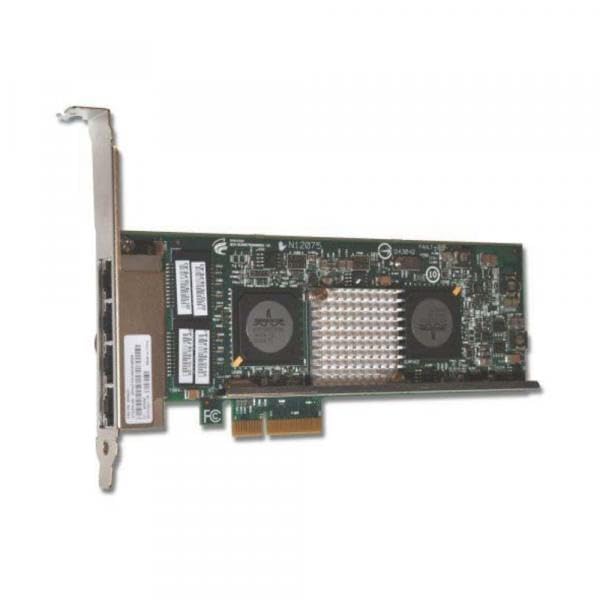
Figure 2.1: Eaton 4PORT Netxtreme II 1000 Express Ethernet Adapter. This image shows the network adapter with its four copper Gigabit Ethernet ports and PCI Express connector.
3. സജ്ജീകരണവും ഇൻസ്റ്റാളേഷനും
Follow these steps to properly install the Eaton 4PORT Netxtreme II 1000 Express Ethernet Adapter into your server system.
3.1 ഹാർഡ്വെയർ ഇൻസ്റ്റാളേഷൻ
- പവർ ഓഫ് സിസ്റ്റം: Ensure your server is completely powered off and disconnected from the power source before opening the chassis.
- ഓപ്പൺ ചേസിസ്: Carefully open the server chassis to access the internal components.
- പിസിഐ എക്സ്പ്രസ് സ്ലോട്ട് കണ്ടെത്തുക: Identify an available PCI Express 2.0 x4 (or larger, e.g., x8, x16) slot on your server's motherboard.
- അഡാപ്റ്റർ ചേർക്കുക: Align the adapter with the chosen PCI Express slot and gently press it down until it is firmly seated. Ensure the bracket is secured to the chassis.
- ചേസിസ് അടയ്ക്കുക: Close the server chassis and reconnect the power source.
3.2. ഡ്രൈവർ ഇൻസ്റ്റാളേഷൻ
After hardware installation, you may need to install or update drivers for the operating system to recognize and utilize the adapter fully.
- പവർ ഓൺ സിസ്റ്റം: Power on your server.
- ഉപകരണ മാനേജർ പരിശോധിക്കുക: In your operating system, open Device Manager (or equivalent) to verify if the adapter is detected. It may appear under "Network Adapters" or "Other Devices" if drivers are not yet installed.
- ഡ്രൈവറുകൾ നേടുക: Visit the official Eaton or IBM (manufacturer) support website and download the latest drivers for the Netxtreme II 1000 Express Quad Port Ethernet Adapter (Model 49Y4220) compatible with your operating system.
- ഡ്രൈവറുകൾ ഇൻസ്റ്റാൾ ചെയ്യുക: Follow the instructions provided with the driver package to install the drivers. This typically involves running an executable file.
- ഇൻസ്റ്റാളേഷൻ പരിശോധിക്കുക: After installation, check Device Manager again to ensure the adapter is recognized correctly and functioning without errors.
3.3. Network Cable Connection
Connect standard RJ-45 Ethernet cables to the four available ports on the adapter and to your network switch or router. Ensure secure connections for optimal performance.
4. പ്രവർത്തന നിർദ്ദേശങ്ങൾ
Once installed and drivers are configured, the Eaton 4PORT Netxtreme II 1000 Express Ethernet Adapter operates as a standard network interface card, providing high-speed Gigabit Ethernet connectivity.
- Standard Network Operation: The adapter will provide network access at speeds up to 1000 Mbps (Gigabit Ethernet) through each of its four ports.
- Virtualization Support: For virtualization environments, configure the adapter within your hypervisor software (e.g., VMware, Hyper-V) to assign network resources to virtual machines. The quad-port design allows for dedicated network paths or link aggregation for increased bandwidth and redundancy.
- NIC/TOE and iSCSI: The adapter's support for NIC/TOE (TCP Offload Engine) and iSCSI can be configured through your operating system's network settings or specialized utility software provided by the driver package. Refer to your operating system's documentation or the driver's user guide for specific configuration steps for these advanced features.
5. പരിപാലനം
The Eaton 4PORT Netxtreme II 1000 Express Ethernet Adapter is designed for reliable operation with minimal maintenance. However, adhering to general best practices for server hardware can prolong its lifespan and ensure optimal performance.
- സിസ്റ്റം വൃത്തിയായി സൂക്ഷിക്കുക: Periodically clean the interior of your server chassis to prevent dust buildup on the adapter and other components. Dust can impede airflow and lead to overheating. Use compressed air for cleaning.
- ശരിയായ വെൻ്റിലേഷൻ ഉറപ്പാക്കുക: Operate the server in an environment with adequate airflow and temperature control to prevent overheating of internal components, including the network adapter.
- ഡ്രൈവർ അപ്ഡേറ്റുകൾ: Regularly check the Eaton or IBM support webഅപ്ഡേറ്റ് ചെയ്ത ഡ്രൈവറുകൾക്കായുള്ള സൈറ്റ്. ഡ്രൈവറുകൾ കാലികമായി നിലനിർത്തുന്നത് പ്രകടനം, സ്ഥിരത, സുരക്ഷ എന്നിവ മെച്ചപ്പെടുത്തും.
- ശാരീരിക പരിശോധന: During routine server maintenance, visually inspect the adapter for any signs of physical damage or loose connections.
6. പ്രശ്നപരിഹാരം
This section provides solutions to common issues you might encounter with the Eaton 4PORT Netxtreme II 1000 Express Ethernet Adapter.
6.1. നെറ്റ്വർക്ക് കണക്റ്റിവിറ്റി ഇല്ല
- കേബിളുകൾ പരിശോധിക്കുക: Ensure all Ethernet cables are securely connected to the adapter ports and the network switch/router.
- Verify Link Lights: Check the LED indicators on the adapter ports. A solid or blinking light usually indicates a successful link and activity. No lights may suggest a cable issue, port issue, or driver problem.
- Driver Status: Confirm that the drivers are correctly installed and the adapter is enabled in the operating system's Device Manager. Reinstall drivers if necessary.
- നെറ്റ്വർക്ക് കോൺഫിഗറേഷൻ: Verify IP address, subnet mask, gateway, and DNS settings in your operating system's network configuration.
6.2. Slow Network Speed
- കേബിൾ നിലവാരം: Ensure you are using Cat5e or Cat6 Ethernet cables for Gigabit speeds. Older Cat5 cables may limit speed.
- Switch/Router Capability: Confirm that your network switch or router supports Gigabit Ethernet (1000 Mbps) on the connected ports.
- ഡ്രൈവർ ക്രമീകരണങ്ങൾ: Check the adapter's speed and duplex settings in the operating system's network adapter properties. Ensure it is set to "Auto Negotiation" or "1.0 Gbps Full Duplex".
- സിസ്റ്റം ലോഡ്: High CPU or disk usage on the server can impact network performance.
6.3. Adapter Not Detected
- Reseat Adapter: Power off the server, open the chassis, and reseat the adapter firmly in its PCI Express slot.
- Try Another Slot: If available, try installing the adapter in a different PCI Express slot to rule out a faulty slot.
- ബയോസ്/യുഇഎഫ്ഐ സജ്ജീകരണങ്ങൾ: Check your server's BIOS/UEFI settings to ensure PCI Express slots are enabled and configured correctly.
7 സ്പെസിഫിക്കേഷനുകൾ
| ഫീച്ചർ | വിശദാംശങ്ങൾ |
|---|---|
| ബ്രാൻഡ് | ഈറ്റൺ |
| മോഡൽ നമ്പർ | 49Y4220 |
| നിർമ്മാതാവ് | ഐ.ബി.എം |
| ഹാർഡ്വെയർ ഇന്റർഫേസ് | PCI Express 2.0 x4, Ethernet |
| ഡാറ്റ ലിങ്ക് പ്രോട്ടോക്കോൾ | ഗിഗാബിറ്റ് ഇഥർനെറ്റ് |
| ഡാറ്റ കൈമാറ്റ നിരക്ക് | സെക്കൻഡിൽ 1000 മെഗാബൈറ്റുകൾ |
| നെറ്റ്വർക്ക് സാങ്കേതികവിദ്യ | 10/100 ബേസ്-ടിഎക്സ് |
| തുറമുഖങ്ങളുടെ എണ്ണം | 4 |
| ഇനത്തിൻ്റെ ഭാരം | 8 ഔൺസ് |
| യു.പി.സി | 883436078085 |
| ASIN | B0037717DM |
8. വാറൻ്റിയും പിന്തുണയും
Specific warranty information for the Eaton 4PORT Netxtreme II 1000 Express Ethernet Adapter (Model 49Y4220) is not provided in this document. For detailed warranty terms, conditions, and technical support, please refer to the official Eaton or IBM product support websites or contact their customer service directly.
It is recommended to register your product, if applicable, to receive updates and support notifications.


