
1. ആമുഖവും അവസാനവുംview
The Pelican 1170 Protector Case is engineered to provide total protection for your valuable equipment. Constructed from Ultra High Impact structural polycarbonate, this case is designed to be unbreakable, watertight, airtight, dust-proof, chemical resistant, and corrosion-proof. It features an exclusive 1/4" (6.4 mm) neoprene O-ring seal and ABS latches for a perfect seal, along with an automatic purge valve to equalize atmospheric pressure changes. The included Pick-N-Pluck foam allows for custom fitting of your equipment, ensuring protection against impact, vibration, or shock. This case is IP-67 rated for waterproof protection and is proudly made in the USA.

Image: The Pelican 1170 Case is shown partially submerged in water, highlighting its waterproof design and robust construction.
2. Setup: Foam Customization
The Pelican 1170 Case comes with a three-layer foam system for optimal protection and customization:
- Lid Foam: 1.10 inch convoluted (egg-crate style) foam.
- Base Foam (Top Layer): 1.50 inch Pick-N-Pluck foam with 0.50 inch x 0.50 inch squares.
- Base Foam (Bottom Layer): 0.50 inch solid foam.
To customize the Pick-N-Pluck foam:
- Place your equipment on the Pick-N-Pluck foam layer to determine the desired outline.
- Carefully remove the pre-scored foam squares around the outline of your equipment. You can use a utility knife for cleaner cuts if needed.
- Ensure a snug fit to prevent movement during transport. Retain any removed foam pieces for potential future reconfigurations or as additional padding.

Image: An open Pelican 1170 Case displays its high-density Pick N Pluck foam interior, customized to securely hold electronic equipment.
Video: This video demonstrates the customization process of the Pick N Pluck foam, showing how to create a secure fit for your items within the Pelican 1170 Case.
3. കേസ് പ്രവർത്തിപ്പിക്കൽ
To ensure the integrity of your Pelican 1170 Case, follow these operating instructions:
- കേസ് അവസാനിപ്പിക്കുന്നു: Ensure the O-ring seal is clean and free of debris. Align the lid with the base and firmly press down until the two double-throw latches engage with an audible click.
- കേസ് തുറക്കുന്നു: To open, simply lift the double-throw latches. The design allows for easy opening while maintaining a secure closure.
- Automatic Pressure Equalization Valve: The case is equipped with an automatic purge valve that balances interior air pressure while keeping water out. This feature operates automatically and does not require manual adjustment.
- സുരക്ഷ: The case includes reinforced padlock protectors, allowing you to secure your contents with padlocks (not included) for added security.
Video: This video provides a detailed look at the Pelican 1170 Case, demonstrating the secure double-throw latches, the automatic pressure equalization valve, and the customizable foam interior, highlighting its suitability for secure travel and storage.
Video: This video showcases the robust construction and features of the Pelican 1170 Case, including its sturdy latches and the ability to customize the foam interior for various items, emphasizing its durability and watertight design.
4. പരിപാലനം
To maintain the performance and longevity of your Pelican 1170 Case:
- വൃത്തിയാക്കൽ: Clean the exterior of the case with mild soap and water. For the interior foam, gently vacuum or brush away debris.
- ഒ-റിംഗ് പരിശോധന: Periodically inspect the O-ring seal for any cracks, tears, or debris. A clean, intact O-ring is crucial for maintaining the watertight seal.
- ലാച്ച് പ്രവർത്തനം: Ensure latches operate smoothly and engage securely. Clean any dirt or grit that may impede their function.
5. പ്രശ്നപരിഹാരം
If you experience issues with your Pelican 1170 Case:
- Case Not Sealing: Check the O-ring for proper placement, cleanliness, and any damage. Ensure no foreign objects are preventing the lid from closing completely.
- Latches Not Engaging: Inspect latches for obstructions or damage. Ensure the lid is properly aligned with the base before attempting to close.
- സമ്മർദ്ദ പ്രശ്നങ്ങൾ: The automatic pressure equalization valve is designed to function without user intervention. If you suspect a problem, ensure the valve is clear of debris.
6 സ്പെസിഫിക്കേഷനുകൾ
| ഫീച്ചർ | സ്പെസിഫിക്കേഷൻ |
|---|---|
| ഇന്റീരിയർ അളവുകൾ (L x W x H) | 10.54" x 6.04" x 3.16" (26.77 സെ.മീ x 15.34 സെ.മീ x 8 സെ.മീ) |
| ബാഹ്യ അളവുകൾ (L x W x H) | 11.64" x 8.34" x 3.78" (29.57 സെ.മീ x 21.2 സെ.മീ x 9.6 സെ.മീ) |
| Weight with Foam | 2.10 പൗണ്ട് (0.95 കി.ഗ്രാം) |
| Weight without Foam | 1.96 പൗണ്ട് (0.89 കി.ഗ്രാം) |
| വോളിയം | 201.17 ക്യുബിക് ഇഞ്ച് (3.3 ലിറ്റർ) |
| വാട്ടർപ്രൂഫ് റേറ്റിംഗ് | IP67 |
| മെറ്റീരിയൽ | Ultra High Impact Structural Polycarbonate |
| പ്രവർത്തന താപനില | -40° F (-4° C) മുതൽ 210° F (99° C) വരെ |
| അടയ്ക്കൽ തരം | Double-throw latches |
| ഹാൻഡിൽ തരം | സംയോജിത കാരി ഹാൻഡിൽ |
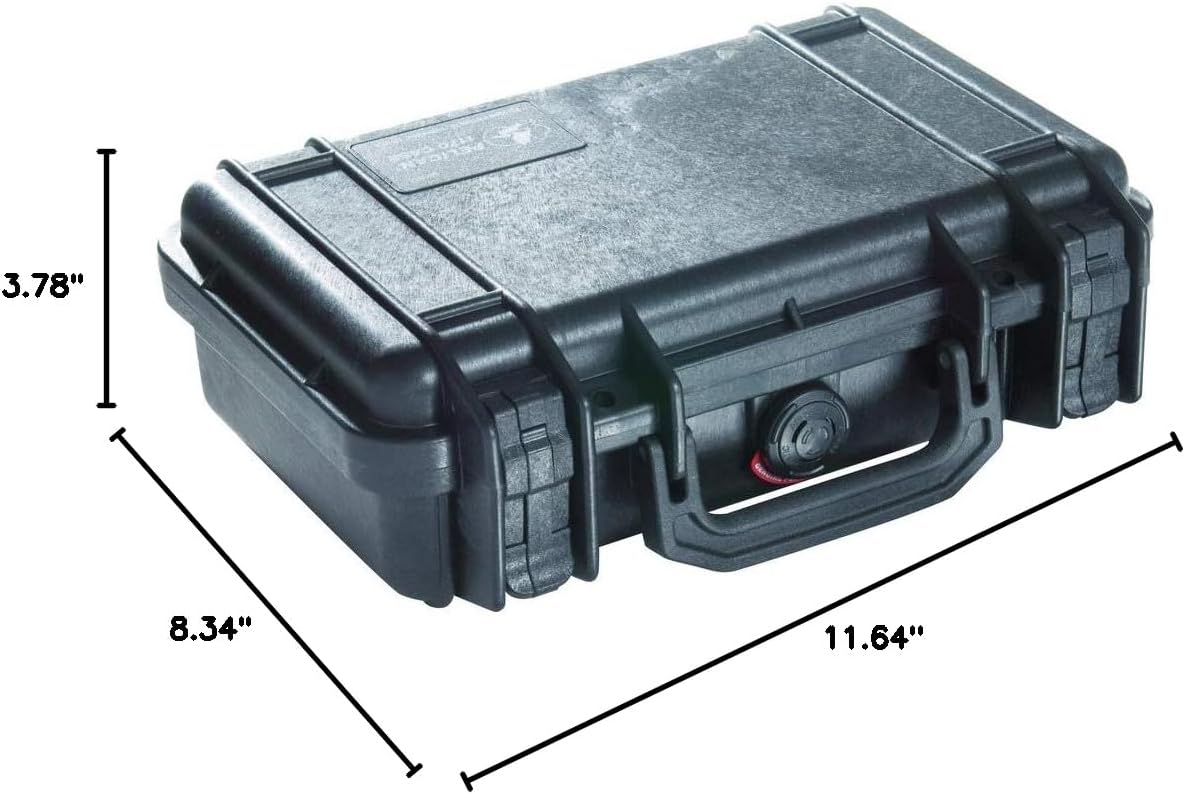
ചിത്രം: വിശദമായ ഒരു ചിത്രം view of the Pelican 1170 Case with its exterior dimensions (length, width, height) clearly indicated in inches.
Video: This video provides a measurement of the Pelican 1170 Case, detailing both its exterior and interior dimensions to help users understand its capacity and fit.
7. വാറൻ്റിയും പിന്തുണയും
The Pelican 1170 Case is backed by a Lifetime Warranty. Pelican stands by its products with a commitment to replace the case if it breaks, reflecting their dedication to quality and durability. For support or warranty claims, please refer to the official Pelican webസൈറ്റ് അല്ലെങ്കിൽ അവരുടെ ഉപഭോക്തൃ സേവനവുമായി ബന്ധപ്പെടുക.
Video: This video features a review and testing of the Pelican 1170 Case, demonstrating its robust features and durability, which aligns with the product's lifetime warranty.