
1. ആമുഖം
Thank you for choosing the Ground Zero GZNA 2800XII 2-Channel Ampലിഫയർ. നിങ്ങളുടെ ശരിയായ ഇൻസ്റ്റാളേഷൻ, പ്രവർത്തനം, പരിപാലനം എന്നിവയ്ക്ക് ആവശ്യമായ വിവരങ്ങൾ ഈ മാനുവൽ നൽകുന്നു. amplifier. To ensure optimal performance and safety, please read these instructions thoroughly before attempting to install or operate the unit. Keep this manual for future reference.
2. സുരക്ഷാ നിർദ്ദേശങ്ങൾ
- പ്രൊഫഷണൽ ഇൻസ്റ്റാളേഷൻ ശുപാർശ ചെയ്യുന്നു: Due to the complexity of car audio systems and the high power output of this amplifier, professional installation by a qualified technician is strongly recommended.
- വൈദ്യുതി വിതരണം: Ensure the vehicle's electrical system can support the amplifier's power requirements. Incorrect wiring can lead to fire, injury, or damage to the amplifier and vehicle.
- ഗ്രൗണ്ടിംഗ്: Always connect the ground terminal securely to a clean, unpainted metal surface of the vehicle chassis. A poor ground connection can cause noise or malfunction.
- ഫ്യൂസ് സംരക്ഷണം: Install an appropriate fuse (not supplied) on the power cable as close to the vehicle battery as possible. Refer to the specifications for recommended fuse ratings.
- ഈർപ്പവും ചൂടും ഒഴിവാക്കുക: തുറന്നുകാട്ടരുത് amplifier to moisture, water, or extreme temperatures. Install it in a dry, well-ventilated area.
- സുരക്ഷിത മൗണ്ടിംഗ്: മൗണ്ട് ദി amplifier securely to prevent it from coming loose during sudden stops or accidents.
- കേബിൾ റൂട്ടിംഗ്: Route all cables carefully to avoid pinching, chafing, or interference with vehicle controls. Keep power cables separate from signal cables to minimize noise.
- വോളിയം ലെവലുകൾ: Prolonged exposure to high volume levels can cause hearing damage. Adjust volume responsibly.
3. ഉൽപ്പന്നം കഴിഞ്ഞുview
The Ground Zero GZNA 2800XII is a high-performance 2-channel amplifier designed for car audio applications, capable of delivering up to 2800 Watts of maximum power. Its robust design ensures reliable operation and excellent sound reproduction.

ചിത്രം 1: മുകളിൽ view of the Ground Zero GZNA 2800XII 2-Channel Ampജീവപര്യന്തം. ദി amplifier features a dark blue top panel with the 'GROUND ZERO NUCLEAR HIGH POWER AMPLIFIER' logo, and silver-colored heatsink fins on the sides. A small, separate black power module is visible in the upper left corner, indicating a robust power supply design.
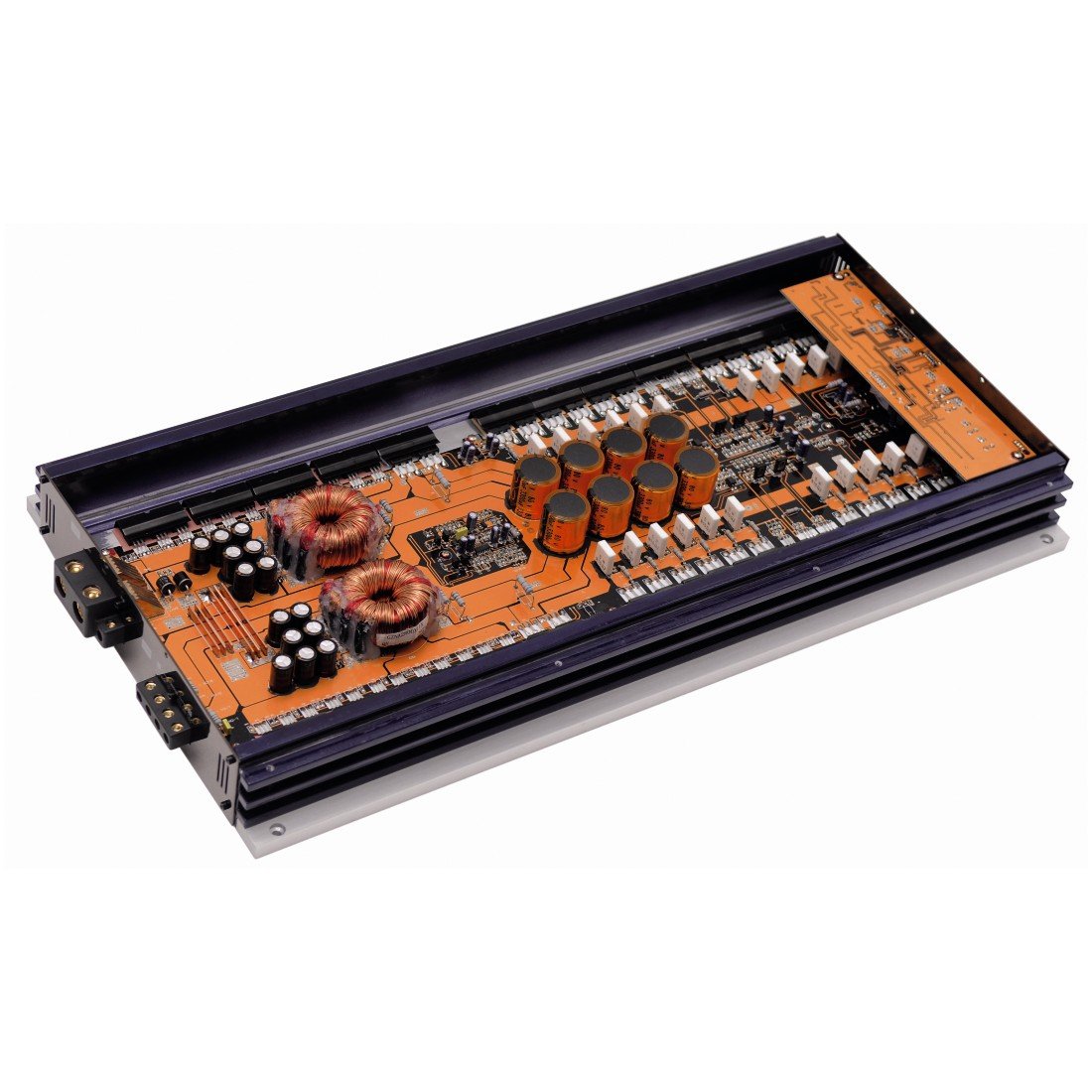
ചിത്രം 2: ആന്തരികം view of the Ground Zero GZNA 2800XII amplifier with the top cover removed, revealing the circuit board. The orange PCB is densely populated with high-quality components, including large toroidal transformers, numerous capacitors, and power transistors, indicating a high-current, high-power design for stable and efficient operation.
4. സജ്ജീകരണവും ഇൻസ്റ്റാളേഷനും
നിങ്ങളുടെ ഉപകരണത്തിന്റെ പ്രകടനത്തിനും ദീർഘായുസ്സിനും ശരിയായ ഇൻസ്റ്റാളേഷൻ നിർണായകമാണ്. amplifier. Always disconnect the vehicle's battery negative terminal before starting any electrical work.
4.1. മൗണ്ടിംഗ് ലൊക്കേഷൻ
- നേരിട്ടുള്ള സൂര്യപ്രകാശത്തിൽ നിന്നും താപ സ്രോതസ്സുകളിൽ നിന്നും മാറി, വരണ്ടതും നന്നായി വായുസഞ്ചാരമുള്ളതുമായ ഒരു സ്ഥലം തിരഞ്ഞെടുക്കുക.
- ചുറ്റും മതിയായ വായുസഞ്ചാരം ഉറപ്പാക്കുക amplifier's heatsink fins for proper cooling.
- മൗണ്ട് ദി amplifier securely to a solid surface using appropriate hardware.
4.2. പവർ കണക്ഷനുകൾ
- പവർ കേബിൾ (B+): Run a heavy-gauge power cable directly from the positive terminal of the vehicle's battery to the amplifier's B+ terminal. Install an in-line fuse holder with an appropriate fuse (refer to specifications) within 18 inches (45 cm) of the battery.
- ഗ്രൗണ്ട് കേബിൾ (GND): ഒരു ഹെവി-ഗേജ് ഗ്രൗണ്ട് കേബിൾ ബന്ധിപ്പിക്കുക amplifier's GND terminal to a clean, unpainted metal point on the vehicle chassis. The ground cable should be as short as possible, ideally less than 3 feet (1 meter).
- Remote Turn-On Cable (REM): Connect a smaller gauge wire from the amplifier's REM terminal to the remote turn-on output of your head unit. This signal turns the ampനിങ്ങളുടെ കാറിന്റെ ഓഡിയോ സിസ്റ്റം ഉപയോഗിച്ച് ലൈഫയർ ഓണും ഓഫും ആക്കുക.
4.3. സിഗ്നൽ ഇൻപുട്ട്
- Connect RCA cables from your head unit's pre-out outputs to the ampലിഫയറിന്റെ RCA ഇൻപുട്ട് ജാക്കുകൾ.
- Ensure proper channel matching (Left to Left, Right to Right).
4.4. സ്പീക്കർ put ട്ട്പുട്ട്
- ഇതിലേക്ക് നിങ്ങളുടെ സ്പീക്കറുകൾ ബന്ധിപ്പിക്കുക ampലിഫയറിന്റെ സ്പീക്കർ ഔട്ട്പുട്ട് ടെർമിനലുകൾ. ശരിയായ പോളാരിറ്റി (+ മുതൽ + വരെയും - മുതൽ - വരെയും) നിരീക്ഷിക്കുക.
- സ്പീക്കർ ഇംപെഡൻസ് പൊരുത്തപ്പെടുന്നുവെന്ന് ഉറപ്പാക്കുക amplifier's recommended load.
5. പ്രവർത്തന നിർദ്ദേശങ്ങൾ
ഒരിക്കൽ ദി amplifier is correctly installed, follow these steps for initial setup and operation:
- പ്രാരംഭ പവർ-അപ്പ്: വാഹനത്തിന്റെ ബാറ്ററി വീണ്ടും ബന്ധിപ്പിക്കുക. നിങ്ങളുടെ ഹെഡ് യൂണിറ്റ് ഓണാക്കുക. ദി amplifier should power on, indicated by an LED indicator.
- ഗെയിൻ സെറ്റിംഗ്: ഉപയോഗിച്ച് ആരംഭിക്കുക amplifier's gain control set to minimum. Play a familiar piece of music at a moderate volume on your head unit. Slowly increase the ampവക്രീകരണം കേൾക്കുന്നതുവരെ ലിഫയറിന്റെ ഗെയിൻ, തുടർന്ന് ചെറുതായി പിന്നോട്ട് പോകുക. ഗെയിൻ കൺട്രോൾ ഒരു വോളിയം കൺട്രോൾ അല്ല; ഇത് പൊരുത്തപ്പെടുന്നു ampഹെഡ് യൂണിറ്റിന്റെ ഔട്ട്പുട്ടിലേക്കുള്ള ലൈഫയറിന്റെ ഇൻപുട്ട് സെൻസിറ്റിവിറ്റി.
- ക്രോസ്ഓവർ ക്രമീകരണങ്ങൾ: ക്രമീകരിക്കുക amplifier's crossover filters (if available) according to your speaker type and system configuration. For subwoofers, use a Low-Pass Filter (LPF). For full-range speakers, use a High-Pass Filter (HPF).
- ശരിയാക്കുക: Make small adjustments to the gain and crossover settings to achieve balanced and clear sound.
6. പരിപാലനം
The Ground Zero GZNA 2800XII ampദീർഘകാല പ്രകടനം ഉറപ്പാക്കാൻ ലിഫയറിന് കുറഞ്ഞ അറ്റകുറ്റപ്പണികൾ ആവശ്യമാണ്.
- വൃത്തിയാക്കൽ: ഇടയ്ക്കിടെ പുറംഭാഗം തുടയ്ക്കുക amplifier with a soft, dry cloth to remove dust. Do not use harsh chemicals or abrasive cleaners.
- പരിശോധന: Regularly check all wiring connections for tightness and signs of corrosion. Ensure proper ventilation around the ampജീവൻ.
- തടസ്സങ്ങൾ ഒഴിവാക്കുക: വസ്തുക്കൾക്ക് മുകളിൽ വയ്ക്കരുത് amplifier that could block airflow to the heatsink.
7. പ്രശ്നപരിഹാരം
നിങ്ങളുടെ ഉപകരണത്തിൽ പ്രശ്നങ്ങൾ അനുഭവപ്പെടുകയാണെങ്കിൽ ampലിഫയർ, ഇനിപ്പറയുന്ന പൊതുവായ പ്രശ്നങ്ങളും പരിഹാരങ്ങളും കാണുക:
| പ്രശ്നം | സാധ്യമായ കാരണം | പരിഹാരം |
|---|---|---|
| Ampലൈഫയർ ഓണാക്കുന്നില്ല | No power, blown fuse, faulty ground, no remote signal | Check power cable connection, replace fuse, verify ground connection, check remote turn-on wire. |
| ശബ്ദ ഔട്ട്പുട്ട് ഇല്ല | No input signal, speaker wires disconnected, gain too low, ampപ്രൊട്ടക്റ്റ് മോഡിലുള്ള ലിഫയർ | Check RCA connections, verify speaker wiring, adjust gain, check for protect light (if lit, refer to manual or contact support). |
| വികലമായ ശബ്ദം | Gain set too high, poor ground, damaged speakers, incorrect crossover settings | Reduce gain, improve ground connection, inspect speakers, adjust crossover settings. |
| Excessive noise (hiss, whine) | Poor grounding, signal cable interference, faulty RCA cables | Ensure solid ground connection, route signal cables away from power cables, try different RCA cables. |
If the problem persists after attempting these solutions, please contact Ground Zero customer support or a qualified car audio technician.
8 സ്പെസിഫിക്കേഷനുകൾ
The following are the technical specifications for the Ground Zero GZNA 2800XII 2-Channel Ampജീവപര്യന്തം:
| ഫീച്ചർ | സ്പെസിഫിക്കേഷൻ |
|---|---|
| മോഡൽ നമ്പർ | 00113441 |
| ASIN | B003TSD3VI |
| അന്താരാഷ്ട്ര ആർട്ടിക്കിൾ കോഡ് | 04037072004311 |
| ചാനലുകളുടെ എണ്ണം | 2 |
| പരമാവധി ഔട്ട്പുട്ട് പവർ | 2800 വാട്ട്സ് |
| ഓപ്പറേറ്റിംഗ് വോളിയംtage | 14.4 വോൾട്ട് (നാമമാത്രം) |
| മൗണ്ടിംഗ് തരം | ഫ്രീസ്റ്റാൻഡിംഗ് |
| പാക്കേജ് അളവുകൾ | 70 x 36 x 12 സെ.മീ (27.5 x 14.2 x 4.7 ഇഞ്ച്) |
| പാക്കേജ് ഭാരം | 5.44 കി.ഗ്രാം (12 പൗണ്ട്) |
9. വാറൻ്റിയും പിന്തുണയും
Ground Zero products are manufactured to high-quality standards. For specific warranty information, please refer to the warranty card included with your product or visit the official Ground Zero website. In case of technical issues or questions not covered in this manual, please contact your authorized Ground Zero dealer or customer support for assistance.