
ആമുഖം
This manual provides detailed instructions for the assembly, operation, and maintenance of your Bush Furniture Salinas Computer Desk with Hutch. Please read all instructions carefully before beginning assembly and retain this manual for future reference. This desk is designed to provide a functional workspace with integrated storage solutions.

Image: The Bush Furniture Salinas Computer Desk with Hutch, showcasing its Vintage Black finish and overall design.
സുരക്ഷാ വിവരങ്ങൾ
പൊതു സുരക്ഷാ മുൻകരുതലുകൾ
- Always follow assembly instructions precisely. Incorrect assembly can lead to instability and injury.
- ഉപയോഗിക്കുന്നതിന് മുമ്പ് എല്ലാ ഹാർഡ്വെയറുകളും സുരക്ഷിതമായി മുറുക്കിയിട്ടുണ്ടെന്ന് ഉറപ്പാക്കുക. ഇടയ്ക്കിടെ പരിശോധിച്ച് ആവശ്യാനുസരണം വീണ്ടും മുറുക്കുക.
- Do not overload the desk or hutch shelves. Refer to the 'Specifications' section for maximum weight recommendations.
- ശ്വാസംമുട്ടൽ ഉണ്ടാകുന്നത് തടയാൻ ചെറിയ ഭാഗങ്ങളും പാക്കേജിംഗ് സാമഗ്രികളും കുട്ടികളിൽ നിന്ന് അകറ്റി നിർത്തുക.
- Use the desk on a level surface to prevent tipping.
- സംരക്ഷണമില്ലാതെ ചൂടുള്ള വസ്തുക്കൾ നേരിട്ട് മേശയുടെ പ്രതലത്തിൽ വയ്ക്കുന്നത് ഒഴിവാക്കുക.
പാക്കേജ് ഉള്ളടക്കം
Before beginning assembly, verify that all components and hardware are present. If any parts are missing or damaged, contact Bush Furniture customer support.
- Desk panels and components
- Hutch panels and components
- Hardware kit (screws, dowels, cam locks, drawer slides, handles, etc.)
- Assembly instructions booklet
അസംബ്ലി നിർദ്ദേശങ്ങൾ
Assembly typically requires two people and approximately 3 hours. Tools recommended for assembly include a hammer and a screwdriver. An additional tube of wood glue may be beneficial for enhanced stability.
ഘട്ടം 1: നിങ്ങളുടെ ജോലിസ്ഥലം തയ്യാറാക്കുക
Clear a spacious, clean, and level area for assembly. Lay out all parts and hardware, organizing them by type or part number to facilitate the process.
Step 2: Assemble the Desk Base
Follow the provided assembly booklet to construct the main desk frame. This typically involves attaching side panels to the desktop and base, securing them with the provided hardware. Ensure all connections are firm.
Step 3: Install Drawers and Cabinet
Assemble the drawer box and install the drawer slides onto both the drawer and the desk frame. Insert the drawer into its designated slot. For the cabinet, attach hinges to the door and the cabinet frame, then mount the door. Ensure smooth operation of both the drawer and cabinet door.
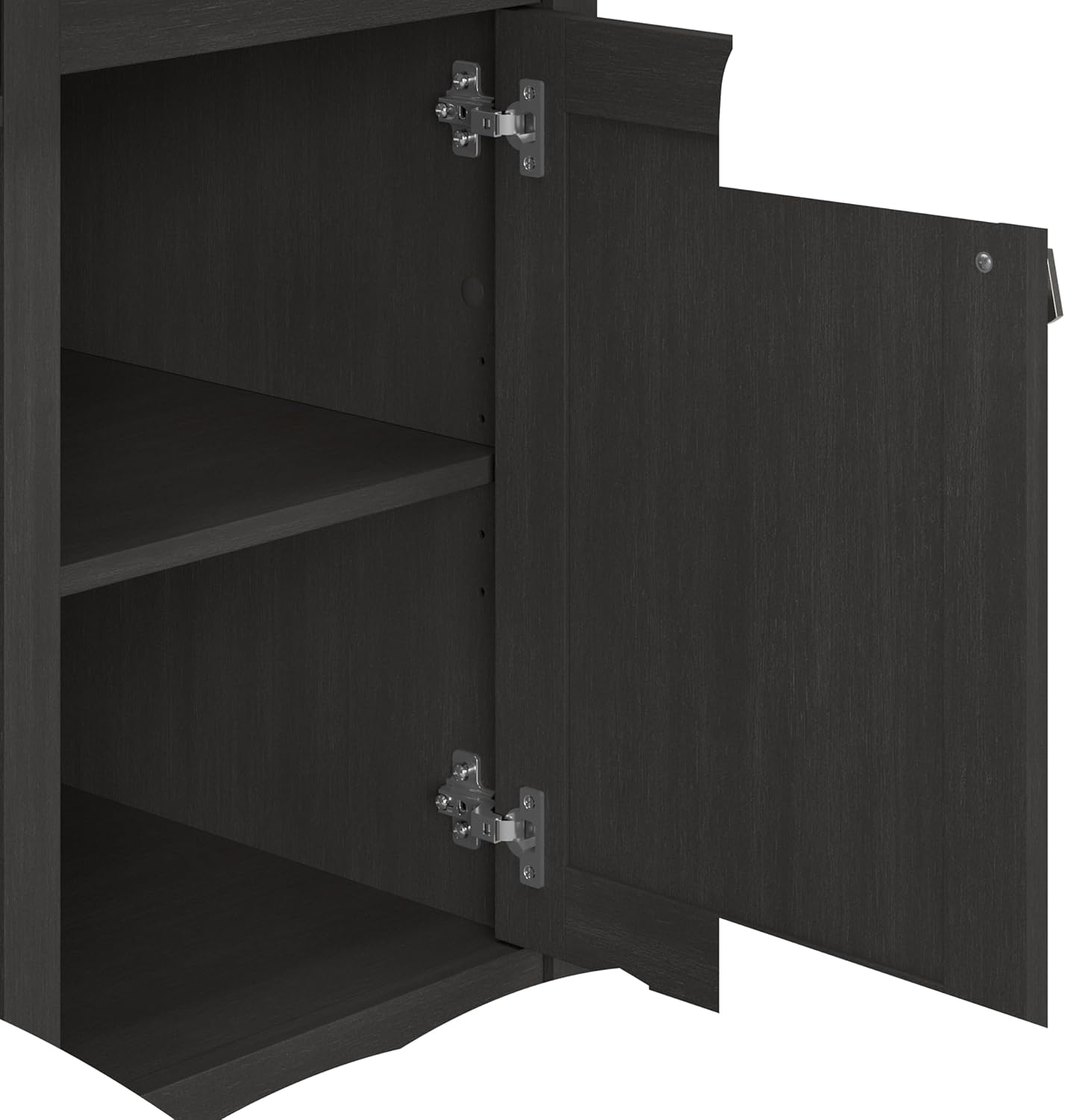
ചിത്രം: ഒരു തുറന്ന സ്ഥലം view of the desk's vertical storage cabinet, revealing internal shelving for organization.
Step 4: Attach Keyboard Tray
Mount the pull-out keyboard tray slides to the underside of the desk and then attach the tray itself. Test its smooth extension and retraction.

Image: A close-up of the integrated pull-out keyboard tray, extended to show space for a keyboard and mouse.
Step 5: Assemble and Mount the Hutch
Construct the hutch unit separately, then carefully lift and secure it onto the top of the desk. Ensure it is aligned and firmly attached using the specified hardware to prevent wobbling.

Image: A detailed dimensional diagram illustrating the overall measurements and key sections of the desk and hutch.
ഘട്ടം 6: അന്തിമ പരിശോധനകൾ
Once assembled, gently move the desk to its desired location. Re-check all screws and fasteners to ensure they are tight. Confirm that drawers and doors open and close smoothly.
പ്രവർത്തന നിർദ്ദേശങ്ങൾ
Using the Work Surface
The main desktop provides ample space for a computer monitor, laptop, and other work essentials. It supports up to 200 pounds. Utilize the built-in wire management system to keep cables organized and out of sight, maintaining a clutter-free environment.
Keyboard/Laptop Tray
The integrated pull-out tray is designed to hold a keyboard and mouse, or a laptop, freeing up valuable desktop space. Gently pull the tray forward to extend and push back to retract.
സ്റ്റോറേജ് ഡ്രോയർ
The box drawer is ideal for organizing office supplies, pens, and other small items. It features smooth ball-bearing glides for easy access.

Image: The desk's storage drawer, partially open, illustrating its capacity for office supplies.
Vertical Storage Cabinet
The cabinet provides enclosed storage for larger items or documents, helping to keep your workspace tidy. The internal shelf can be adjusted to accommodate various item heights.
ഹച്ച് ഷെൽഫുകൾ
The open hutch shelves offer convenient storage and display space for books, decorative items, or work-in-progress files. These shelves help maximize vertical space and keep frequently used items within reach.

Image: The open hutch shelves, demonstrating their use for storing books and displaying decorative objects.
പരിപാലനവും പരിചരണവും
To maintain the appearance and longevity of your Bush Furniture Salinas Computer Desk with Hutch, follow these care instructions:
- വൃത്തിയാക്കൽ: പരസ്യം ഉപയോഗിച്ച് ഉപരിതലങ്ങൾ തുടയ്ക്കുകamp തുണി. കഠിനമായ രാസവസ്തുക്കളോ അബ്രാസീവ് ക്ലീനറുകളോ ഒഴിവാക്കുക, കാരണം ഇവ ഫിനിഷിന് കേടുവരുത്തും.
- ചോർച്ച: Clean spills immediately to prevent staining or damage to the engineered wood surface.
- ഹാർഡ്വെയർ: Periodically check and tighten all screws and fasteners to ensure the desk remains stable.
- സൂര്യപ്രകാശം: നേരിട്ടുള്ള സൂര്യപ്രകാശം ദീർഘനേരം എക്സ്പോഷർ ചെയ്യുന്നത് ഒഴിവാക്കുക, കാരണം ഇത് നിറം മങ്ങുന്നതിനോ നിറവ്യത്യാസത്തിനോ കാരണമാകും.
ട്രബിൾഷൂട്ടിംഗ്
Desk Wobbles or is Unstable
- ഡെസ്ക് ഒരു ലെവൽ പ്രതലത്തിൽ സ്ഥാപിച്ചിട്ടുണ്ടെന്ന് ഉറപ്പാക്കുക.
- Check all assembly hardware. Tighten any loose screws or cam locks.
- Verify that all panels are correctly seated and aligned according to the assembly instructions.
Drawer Does Not Slide Smoothly
- Ensure the drawer slides are correctly installed and aligned on both the drawer box and the desk frame.
- Check for any obstructions in the drawer glides.
- Verify that the drawer box itself is assembled squarely.
Cabinet Door Does Not Close Properly
- ശരിയായ ഇൻസ്റ്റാളേഷനും വിന്യാസവും ഉറപ്പാക്കാൻ ഹിഞ്ചുകൾ പരിശോധിക്കുക. ആവശ്യമെങ്കിൽ ക്രമീകരിക്കുക.
- Ensure the cabinet frame is square and not warped.
സ്പെസിഫിക്കേഷനുകൾ
| ഫീച്ചർ | വിശദാംശങ്ങൾ |
|---|---|
| ബ്രാൻഡ് | ബുഷ് ഫർണിച്ചർ |
| മോഡൽ നമ്പർ | MY72708-03 |
| ഉൽപ്പന്ന അളവുകൾ (D x W x H) | 23.19"D x 47.17"W x 62.95"H |
| ഇനത്തിൻ്റെ ഭാരം | 115 പൗണ്ട് |
| നിറം | വിൻtage Black |
| മെറ്റീരിയൽ | Engineered Wood (Top, Hutch), Metal (Base, Furniture Legs) |
| പരമാവധി ഭാരം ശുപാർശ | 200 പൗണ്ട് (ഡെസ്ക്ടോപ്പ്) |
| ഡ്രോയറുകളുടെ എണ്ണം | 1 |
| കാബിനറ്റുകളുടെ എണ്ണം | 1 |
| ഷെൽഫുകളുടെ എണ്ണം | 1 (adjustable in cabinet) + multiple in hutch |
| ആവശ്യമായ അസംബ്ലി | അതെ (ശുപാർശ ചെയ്തത് 2 പേർ) |
| അസംബ്ലിക്ക് ശുപാർശ ചെയ്യുന്ന ഉപകരണങ്ങൾ | ചുറ്റിക, സ്ക്രൂഡ്രൈവർ |
വാറൻ്റിയും പിന്തുണയും
നിർമ്മാതാവിന്റെ വാറന്റി
This Bush Furniture product is backed by a 1-year manufacturer's warranty. This warranty covers defects in materials and workmanship under normal use. For specific details regarding coverage and limitations, please refer to the warranty information provided with your product packaging or contact Bush Furniture directly.
ഉപഭോക്തൃ പിന്തുണ
For assistance with assembly, missing parts, or any product-related inquiries, please contact Bush Furniture customer support. Contact information is typically found in the assembly instructions booklet or on the manufacturer's official webസൈറ്റ്.