
ആമുഖം
This manual provides comprehensive instructions for the operation and maintenance of your Memorex MI4703 Dual Alarm Clock Radio. This device features a dual alarm system, an integrated docking station for iPod and iPhone, and an FM/AM radio. Please read this manual thoroughly before use to ensure proper functionality and to maximize your product experience.
പ്രധാനപ്പെട്ട സുരക്ഷാ വിവരങ്ങൾ
- ഊർജ്ജ സ്രോതസ്സ്: Use only the specified power adapter. Do not expose the unit to water or moisture.
- വെൻ്റിലേഷൻ: ആവശ്യത്തിന് വായുസഞ്ചാരം ഉറപ്പാക്കുക. വായുസഞ്ചാര ദ്വാരങ്ങൾ തടയരുത്.
- വൃത്തിയാക്കൽ: Unplug the unit before cleaning. Use a soft, dry cloth. Do not use liquid cleaners.
- ബാറ്ററികൾ: For time backup, install 2 AAA batteries (not included). Do not mix old and new batteries or different types of batteries. Remove batteries if the unit is not used for extended periods.
- പ്ലേസ്മെൻ്റ്: Place the unit on a stable, flat surface. Avoid direct sunlight, heat sources, and excessive dust.
- സേവനം: ഈ ഉൽപ്പന്നം സ്വയം സേവിക്കാൻ ശ്രമിക്കരുത്. യോഗ്യതയുള്ള സേവന ഉദ്യോഗസ്ഥർക്ക് എല്ലാ സേവനങ്ങളും റഫർ ചെയ്യുക.
പാക്കേജ് ഉള്ളടക്കം
പാക്കേജിൽ എല്ലാ ഇനങ്ങളും ഉണ്ടെന്ന് ഉറപ്പാക്കുക:
- Memorex MI4703 Dual Alarm Clock Radio Unit
- എസി പവർ അഡാപ്റ്റർ
- ഉപയോക്തൃ മാനുവൽ (ഈ പ്രമാണം)
ഉൽപ്പന്ന സവിശേഷതകൾ
- Dual alarm settings for separate wake-up times.
- Integrated docking station for iPod and iPhone charging and playback.
- FM/AM digital radio tuner.
- Six-option display dimmer for adjustable brightness.
- Sleep timer and nap functions.
- Auxiliary input for connecting other audio devices.
സജ്ജമാക്കുക
1. പവർ കണക്ഷൻ
Connect the AC power adapter to the DC IN jack on the back of the unit, then plug the adapter into a standard wall outlet. The unit will power on and the display will illuminate.
2. Battery Installation (for Time Backup)
For backup power to maintain time settings during a power outage, install 2 AAA batteries (not included) into the battery compartment located on the bottom of the unit. Ensure correct polarity (+/-) as indicated inside the compartment. These batteries do not power the unit for operation, only for time memory.
3. പ്രാരംഭ സമയ ക്രമീകരണം
When first powered on, the time display may flash. To set the time:
- അമർത്തിപ്പിടിക്കുക ടൈം സെറ്റ് മണിക്കൂർ അക്കങ്ങൾ മിന്നുന്നത് വരെ ബട്ടൺ അമർത്തുക.
- ഉപയോഗിക്കുക മണിക്കൂർ ഒപ്പം മിനിറ്റ് സമയം ക്രമീകരിക്കാനുള്ള ബട്ടണുകൾ.
- അമർത്തുക ടൈം സെറ്റ് വീണ്ടും സ്ഥിരീകരിച്ച് സമയ ക്രമീകരണ മോഡിൽ നിന്ന് പുറത്തുകടക്കുക.
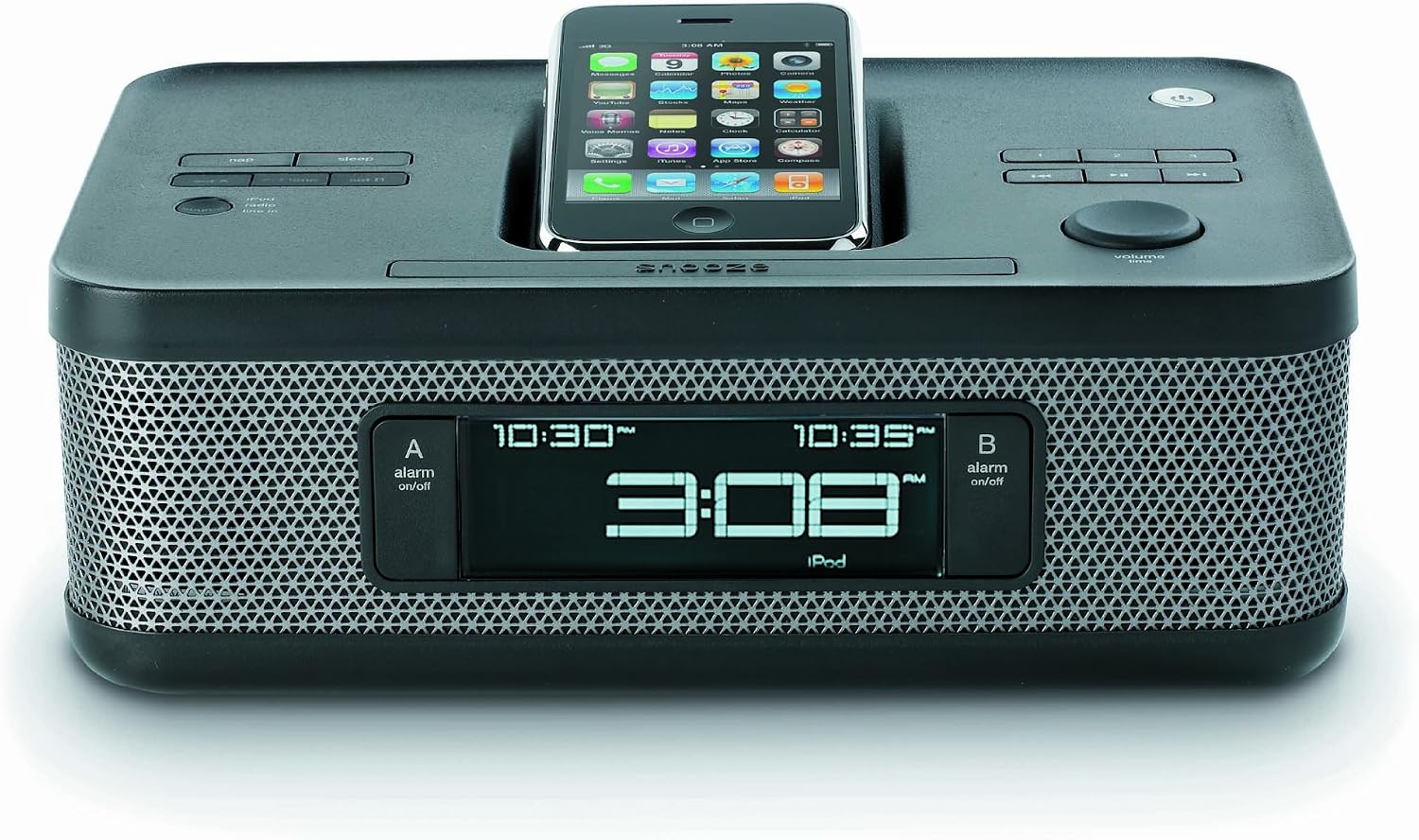
Image: The Memorex MI4703 Dual Alarm Clock Radio, showcasing its sleek black design and the integrated docking station. An iPod is shown docked in the lay-flat cradle, illustrating how devices are positioned for charging and playback.
പ്രവർത്തന നിർദ്ദേശങ്ങൾ
1. അലാറങ്ങൾ സജ്ജമാക്കുന്നു
യൂണിറ്റിൽ രണ്ട് സ്വതന്ത്ര അലാറങ്ങൾ (അലാറം 1 ഉം അലാറം 2 ഉം) ഉണ്ട്.
- അമർത്തിപ്പിടിക്കുക അലാറം 1 or അലാറം 2 അലാറം സമയം മിന്നുന്നത് വരെ ബട്ടൺ അമർത്തുക.
- ഉപയോഗിക്കുക മണിക്കൂർ ഒപ്പം മിനിറ്റ് ആവശ്യമുള്ള അലാറം സമയം സജ്ജമാക്കാൻ ബട്ടണുകൾ.
- അനുബന്ധം അമർത്തുക അലാറം അലാറം ഉറവിടം തിരഞ്ഞെടുക്കാൻ വീണ്ടും ബട്ടൺ അമർത്തുക: ബസർ, റേഡിയോ, അല്ലെങ്കിൽ ഐപോഡ് / ഐഫോൺ. The selected icon will appear on the display.
- അമർത്തുക അലാറം അലാറം സ്ഥിരീകരിക്കാനും സജീവമാക്കാനും ഒരിക്കൽ കൂടി ബട്ടൺ അമർത്തുക.
- ഒരു സജീവ അലാറം ഓഫാക്കാൻ, അനുബന്ധം അമർത്തുക അലാറം button. To temporarily silence, press സ്നൂസ് ചെയ്യുക.
2. Using the iPod/iPhone Dock
The integrated dock allows you to play audio from and charge your compatible iPod or iPhone device.
- Carefully place your iPod or iPhone onto the docking connector. Ensure it is seated properly. The unique lay-flat design helps protect your device.
- ഉപകരണം യാന്ത്രികമായി ചാർജ് ചെയ്യാൻ തുടങ്ങും.
- അമർത്തുക മോഡ് button repeatedly until "iPod" or "iPhone" is selected as the audio source.
- Use the controls on your device or the unit's വോളിയം knob to adjust playback.
- To remove your device, gently lift it from the dock.
കുറിപ്പ്: Some protective cases may prevent proper docking. It may be necessary to remove the case before docking your device.
3. റേഡിയോ ഓപ്പറേഷൻ
റേഡിയോ കേൾക്കാൻ:
- അമർത്തുക മോഡ് button repeatedly until "FM" or "AM" is selected.
- ഉപയോഗിക്കുക ട്യൂൺ + or ട്യൂൺ - ആവൃത്തി സ്വമേധയാ ക്രമീകരിക്കാനുള്ള ബട്ടണുകൾ.
- അമർത്തിപ്പിടിക്കുക ട്യൂൺ + or ട്യൂൺ - ലഭ്യമായ അടുത്ത സ്റ്റേഷനായി യാന്ത്രികമായി സ്കാൻ ചെയ്യാൻ.
- ഒരു സ്റ്റേഷൻ പ്രീസെറ്റ് ആയി സംരക്ഷിക്കാൻ:
- ആവശ്യമുള്ള സ്റ്റേഷനിലേക്ക് ട്യൂൺ ചെയ്യുക.
- അമർത്തിപ്പിടിക്കുക പ്രീസെറ്റ് പ്രീസെറ്റ് നമ്പർ മിന്നുന്നത് വരെ ബട്ടൺ അമർത്തുക.
- ഉപയോഗിക്കുക ട്യൂൺ + or ട്യൂൺ - ആവശ്യമുള്ള പ്രീസെറ്റ് നമ്പർ (1-10) തിരഞ്ഞെടുക്കാൻ ബട്ടണുകൾ.
- അമർത്തുക പ്രീസെറ്റ് സംരക്ഷിക്കാൻ വീണ്ടും.
- ഒരു പ്രീസെറ്റ് സ്റ്റേഷൻ തിരിച്ചുവിളിക്കാൻ, അമർത്തുക പ്രീസെറ്റ് സംരക്ഷിച്ച സ്റ്റേഷനുകളിലൂടെ സൈക്കിൾ ചെയ്യാൻ ആവർത്തിച്ച് ബട്ടൺ അമർത്തുക.
4. ഡിസ്പ്ലേ ഡിമ്മർ
അമർത്തുക ഡിമ്മർ button repeatedly to cycle through the six brightness levels of the display. Select the level most comfortable for your environment.
5. Sleep Timer and Nap Function
The sleep timer allows you to fall asleep to music, and the nap function provides a short alarm.
- സ്ലീപ്പ് ടൈമർ: അമർത്തുക ഉറങ്ങുക button repeatedly to set the duration (e.g., 90, 60, 30, 15 minutes, or OFF). The unit will automatically turn off after the selected time.
- Nap Function: അമർത്തുക എൻഎപി button repeatedly to set a short alarm duration (e.g., 10, 20, 30 minutes, or OFF). The buzzer will sound after the selected time.
മെയിൻ്റനൻസ്
- വൃത്തിയാക്കൽ: മൃദുവായതും ഉണങ്ങിയതും ലിന്റ് രഹിതവുമായ തുണി ഉപയോഗിച്ച് യൂണിറ്റ് തുടയ്ക്കുക. അബ്രാസീവ് ക്ലീനറുകൾ, മെഴുക് അല്ലെങ്കിൽ ലായകങ്ങൾ ഉപയോഗിക്കരുത്.
- പൊടി: Keep the docking connector free of dust and debris to ensure proper connection with your device.
- ബാറ്ററി മാറ്റിസ്ഥാപിക്കൽ: Replace the AAA backup batteries annually or if the time resets frequently during power interruptions.
ട്രബിൾഷൂട്ടിംഗ്
| പ്രശ്നം | സാധ്യമായ കാരണം | പരിഹാരം |
|---|---|---|
| യൂണിറ്റ് പവർ ഓണാക്കുന്നില്ല. | പവർ അഡാപ്റ്റർ ബന്ധിപ്പിച്ചിട്ടില്ല അല്ലെങ്കിൽ ഔട്ട്ലെറ്റ് തകരാറിലാണ്. | എസി അഡാപ്റ്റർ യൂണിറ്റിലേക്കും വർക്കിംഗ് വാൾ ഔട്ട്ലെറ്റിലേക്കും സുരക്ഷിതമായി പ്ലഗ് ചെയ്തിട്ടുണ്ടെന്ന് ഉറപ്പാക്കുക. |
| Time resets after power outage. | ബാക്കപ്പ് ബാറ്ററികൾ തീർന്നിരിക്കുന്നു അല്ലെങ്കിൽ ഇൻസ്റ്റാൾ ചെയ്തിട്ടില്ല. | Install 2 new AAA batteries or replace existing ones in the battery compartment. |
| ഐപോഡ്/ഐഫോൺ ചാർജ് ചെയ്യുന്നില്ല അല്ലെങ്കിൽ പ്ലേ ചെയ്യുന്നില്ല. | Device not properly docked; protective case interfering; device compatibility issue. | Ensure device is firmly seated on the connector. Remove any protective cases. Verify device compatibility with the dock. |
| Alarm volume is too loud/soft. | Alarm volume is fixed and not user-adjustable. | This model has a fixed alarm volume. Consider using a different alarm source (e.g., buzzer if radio is too loud). |
| റേഡിയോ സ്വീകരണം മോശമാണ്. | ആന്റിന നീട്ടിയിട്ടില്ല; ഇടപെടൽ. | Fully extend the FM wire antenna. Reposition the unit for better reception. Avoid placing near other electronic devices that may cause interference. |
സ്പെസിഫിക്കേഷനുകൾ
- മോഡൽ: MI4703
- ഊർജ്ജ സ്രോതസ്സ്: AC 120V ~ 60Hz (ഉൾപ്പെടുത്തിയ അഡാപ്റ്റർ വഴി)
- ബാറ്ററി ബാക്കപ്പ്: 2 x AAA ബാറ്ററികൾ (ഉൾപ്പെടുത്തിയിട്ടില്ല)
- റേഡിയോ ഫ്രീക്വൻസികൾ: എഫ്എം, എഎം
- ഫീച്ചറുകൾ: Dual Alarm, iPod/iPhone Docking, FM/AM Radio, Aux-in, Sleep Timer, Nap Function, Dimmer
- അളവുകൾ: Approximately 2 lbs (Weight)
വാറൻ്റിയും പിന്തുണയും
Memorex products are designed for reliability and performance. For specific warranty information, please refer to the warranty card included with your purchase or visit the official Memorex website. For technical support or service inquiries, please contact Memorex customer service through their official channels.