
ആമുഖം
The GIGABYTE GM-M7600 is a wireless precision optical mouse designed for comfortable and reliable use. This manual provides instructions for setting up, operating, maintaining, and troubleshooting your device.
പാക്കേജ് ഉള്ളടക്കം
എല്ലാ ഇനങ്ങളും ഉണ്ടെന്ന് ഉറപ്പാക്കാൻ പാക്കേജ് ഉള്ളടക്കങ്ങൾ പരിശോധിക്കുക:
- GIGABYTE GM-M7600 Wireless Optical Mouse
- Portable Nano USB Receiver
- 2 x AAA ബാറ്ററികൾ
സജ്ജമാക്കുക
1. ബാറ്ററികൾ ഇൻസ്റ്റാൾ ചെയ്യുന്നു
The GM-M7600 mouse requires two AAA batteries for operation. The batteries are included in the package.
- മൗസിന്റെ അടിഭാഗത്ത് ബാറ്ററി കമ്പാർട്ട്മെന്റ് കവർ കണ്ടെത്തുക.
- കമ്പാർട്ട്മെന്റ് തുറക്കാൻ കവർ പതുക്കെ സ്ലൈഡ് ചെയ്യുകയോ ഉയർത്തുകയോ ചെയ്യുക.
- രണ്ട് AAA ബാറ്ററികൾ ഇടുക, പോസിറ്റീവ് (+) ഉം നെഗറ്റീവ് (-) ടെർമിനലുകളും കമ്പാർട്ടുമെന്റിനുള്ളിലെ അടയാളപ്പെടുത്തലുകളുമായി ശരിയായി വിന്യസിക്കുന്നുണ്ടെന്ന് ഉറപ്പാക്കുക.
- ബാറ്ററി കമ്പാർട്ട്മെൻ്റ് കവർ സുരക്ഷിതമായി അടയ്ക്കുക.
2. യുഎസ്ബി റിസീവർ ബന്ധിപ്പിക്കുന്നു
The mouse connects to your computer via a portable Nano USB receiver.
- Locate the Nano USB receiver. It may be stored inside the mouse's battery compartment or packaged separately.
- Plug the Nano USB receiver into an available USB port on your computer (Laptop or Personal Computer).
- Your operating system (e.g., Windows XP, Linux) should automatically detect and install the necessary drivers. This process may take a few moments.
- ഡ്രൈവറുകൾ ഇൻസ്റ്റാൾ ചെയ്തുകഴിഞ്ഞാൽ, മൗസ് ഉപയോഗത്തിന് തയ്യാറാകും.
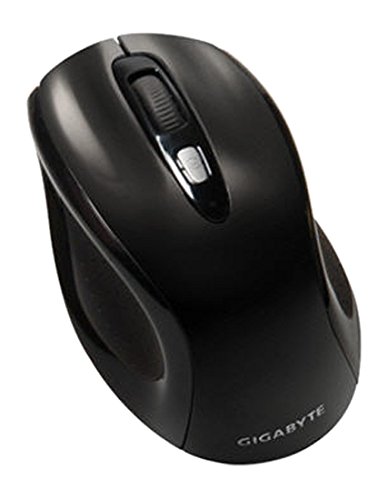
ചിത്രം 1: GIGABYTE GM-M7600 Wireless Optical Mouse. This image displays the ergonomic design of the mouse, highlighting its form factor and the location of its buttons. The Nano USB receiver is typically stored within the mouse or connected to a computer's USB port.
പ്രവർത്തന നിർദ്ദേശങ്ങൾ
1. പവർ ഓൺ/ഓഫ്
The mouse typically has a power switch on its underside. Slide the switch to the 'ON' position to activate the mouse. Slide it to 'OFF' when not in use to conserve battery life.
2. ഡിപിഐ (സെൻസിറ്റിവിറ്റി) ക്രമീകരിക്കൽ
The GM-M7600 features an adjustable DPI switch, allowing you to change the mouse sensitivity between 800 DPI and 1600 DPI. This switch is usually located near the scroll wheel. Press the DPI button to toggle between the two sensitivity settings.
3. മൗസിന്റെ അടിസ്ഥാന പ്രവർത്തനങ്ങൾ
- ഇടത് ക്ലിക്ക്: ഇനങ്ങൾ തിരഞ്ഞെടുക്കുന്നതിനും തുറക്കുന്നതിനുമുള്ള പ്രാഥമിക ബട്ടൺ fileകൾ, സോഫ്റ്റ്വെയറുമായി സംവദിക്കൽ.
- വലത് ക്ലിക്കിൽ: സന്ദർഭ മെനുകളും അധിക ഓപ്ഷനുകളും ആക്സസ് ചെയ്യുന്നതിനുള്ള സെക്കൻഡറി ബട്ടൺ.
- സ്ക്രോൾ വീൽ: പ്രമാണങ്ങളിലൂടെ സ്ക്രോൾ ചെയ്യാൻ ഉപയോഗിക്കുന്നു കൂടാതെ web പേജുകൾ. ഇത് ഒരു മിഡിൽ ക്ലിക്ക് ബട്ടണായും പ്രവർത്തിക്കും.
മെയിൻ്റനൻസ്
1. വൃത്തിയാക്കൽ
മികച്ച പ്രകടനവും രൂപഭംഗിയും നിലനിർത്താൻ:
- Disconnect the mouse from your computer and turn off the power switch.
- മൃദുവായ, ലിൻ്റ് രഹിത തുണി ഉപയോഗിക്കുകampമൗസിന്റെ ഉപരിതലം തുടയ്ക്കാൻ വെള്ളമോ നേരിയ ക്ലീനിംഗ് ലായനിയോ ഉപയോഗിച്ച് നനയ്ക്കുക.
- Avoid using harsh chemicals, abrasive cleaners, or spraying liquids directly onto the mouse.
- Clean the optical sensor area on the underside of the mouse with a dry cotton swab to remove any dust or debris.
2. ബാറ്ററി മാറ്റിസ്ഥാപിക്കൽ
When the mouse performance degrades or it stops responding, it may be time to replace the batteries.
- Turn off the mouse using the power switch.
- Open the battery compartment as described in the 'Installing Batteries' section.
- പഴയ AAA ബാറ്ററികൾ നീക്കം ചെയ്യുക.
- Insert two new AAA batteries, observing the correct polarity (+/-).
- ബാറ്ററി കമ്പാർട്ട്മെന്റ് അടച്ച് മൗസ് വീണ്ടും ഓണാക്കുക.
ട്രബിൾഷൂട്ടിംഗ്
If you encounter issues with your GIGABYTE GM-M7600 mouse, try the following solutions:
- മൗസ് പ്രതികരിക്കുന്നില്ല:
- മൗസ് ഓണാണെന്ന് ഉറപ്പാക്കുക.
- ബാറ്ററികൾ ശരിയായി ഇൻസ്റ്റാൾ ചെയ്തിട്ടുണ്ടോ എന്നും ആവശ്യത്തിന് ചാർജ് ഉണ്ടോ എന്നും പരിശോധിക്കുക. ആവശ്യമെങ്കിൽ മാറ്റിസ്ഥാപിക്കുക.
- Ensure the Nano USB receiver is securely plugged into a working USB port on your computer. Try a different USB port.
- നിങ്ങളുടെ കമ്പ്യൂട്ടർ പുനരാരംഭിക്കുക.
- ക്രമരഹിതമായ കഴ്സർ ചലനം:
- മൗസിന്റെ അടിവശത്തുള്ള ഒപ്റ്റിക്കൽ സെൻസർ വൃത്തിയാക്കുക.
- അനുയോജ്യമായ ഒരു പ്രതലത്തിലാണ് മൗസ് ഉപയോഗിക്കുന്നതെന്ന് ഉറപ്പാക്കുക. ഉയർന്ന പ്രതിഫലനമുള്ളതോ സുതാര്യമായതോ ആയ പ്രതലങ്ങൾ ഒഴിവാക്കുക.
- Check for any wireless interference. Move the mouse closer to the receiver or away from other wireless devices.
- DPI switch not working:
- മൗസ് ഓൺ ചെയ്തിട്ടുണ്ടെന്നും കണക്റ്റ് ചെയ്തിട്ടുണ്ടെന്നും ഉറപ്പാക്കുക.
- DPI ബട്ടൺ ദൃഢമായി അമർത്തുക.
സ്പെസിഫിക്കേഷനുകൾ
| മോഡലിൻ്റെ പേര് | ജിഎം-എം7600 |
| ബ്രാൻഡ് | ജിഗാബൈറ്റ് |
| കണക്റ്റിവിറ്റി ടെക്നോളജി | 2.4GHz Radio Frequency Wireless |
| ചലനം കണ്ടെത്തൽ | ഒപ്റ്റിക്കൽ |
| ക്രമീകരിക്കാവുന്ന ഡിപിഐ | 800 / 1600 ഡിപിഐ |
| ബട്ടണുകളുടെ എണ്ണം | 3 (Left, Right, Scroll Wheel/Middle Click) |
| പവർ ഉറവിടം | 2 x AAA ബാറ്ററികൾ (ഉൾപ്പെട്ടിരിക്കുന്നു) |
| റിസീവർ തരം | Portable Nano USB Receiver |
| അനുയോജ്യമായ ഉപകരണങ്ങൾ | ലാപ്ടോപ്പ്, പേഴ്സണൽ കമ്പ്യൂട്ടർ |
| ഓപ്പറേറ്റിംഗ് സിസ്റ്റം പിന്തുണ | Linux, Windows XP |
| എൻക്ലോഷർ മെറ്റീരിയൽ | Plastic with Rubberized Finish |
| നിറം | കറുപ്പ് |
വാറൻ്റിയും പിന്തുണയും
For warranty information and technical support, please refer to the warranty card included with your product or visit the official GIGABYTE webസൈറ്റ്. വാറൻ്റി ക്ലെയിമുകൾക്കായി നിങ്ങളുടെ വാങ്ങൽ രസീത് സൂക്ഷിക്കുക.