
cellularline BTCLIPARDP
Cellularline Roller Clip Bluetooth Headset User Manual
Model: BTCLIPARDP
ആമുഖം
The Cellularline Roller Clip Bluetooth Headset is designed for convenient, hands-free communication. Featuring a retractable cable and a wireless Bluetooth clip, this headset offers flexibility and ease of use. It supports simultaneous connection to two mobile phones, automatically activating when a call is received or made on either device. Its automatic cable winder ensures a tidy experience, making it ideal for users who prefer to wear the headset only during calls.
ഉൽപ്പന്നം കഴിഞ്ഞുview
Familiarize yourself with the components and features of your Cellularline Roller Clip Bluetooth Headset.

ചിത്രം 1: ഫ്രണ്ട് view of the Cellularline Roller Clip Bluetooth Headset, showing the main unit with the retractable earbud.
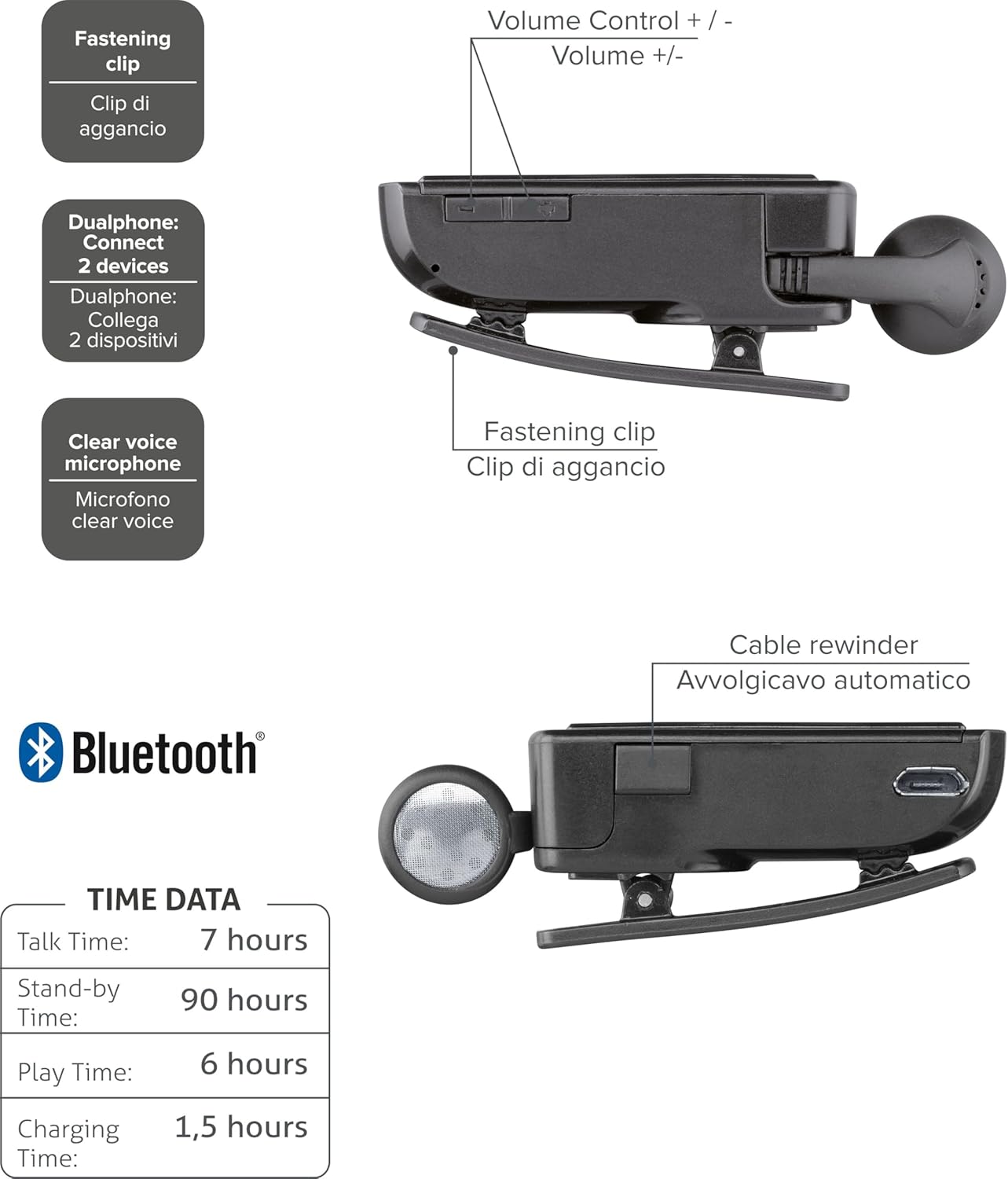
ചിത്രം 2: Diagram illustrating key features including the fastening clip, volume controls, dualphone connectivity, clear voice microphone, and cable rewinder.
- Retractable Earbud: The earbud cable automatically retracts into the main unit for compact storage.
- Bluetooth Clip: The main unit features a clip for attaching to clothing.
- വോളിയം നിയന്ത്രണങ്ങൾ: Buttons located on the side for adjusting audio volume.
- മൾട്ടി-പോയിന്റ് കണക്ഷൻ: ഒരേസമയം രണ്ട് മൊബൈൽ ഫോണുകളിലേക്ക് കണക്റ്റ് ചെയ്യാം.
- Clear Voice Microphone: Ensures clear audio transmission during calls.
- മൈക്രോ-യുഎസ്ബി പോർട്ട്: ഉപകരണം ചാർജ് ചെയ്യുന്നതിനായി.
സജ്ജമാക്കുക
1. ഹെഡ്സെറ്റ് ചാർജ് ചെയ്യുന്നു
Before first use, fully charge the headset. Use the provided Micro-USB cable to connect the headset to a USB power source (e.g., computer USB port or wall adapter).
- ചാർജ് ചെയ്യുമ്പോൾ ചാർജിംഗ് ഇൻഡിക്കേറ്റർ ലൈറ്റ് പ്രകാശിക്കും.
- ഒരു പൂർണ്ണ ചാർജ് സാധാരണയായി ഏകദേശം 1.5 മണിക്കൂർ എടുക്കും.
- ചാർജിംഗ് പൂർത്തിയായിക്കഴിഞ്ഞാൽ ഇൻഡിക്കേറ്റർ ലൈറ്റ് മാറുകയോ ഓഫാകുകയോ ചെയ്യും.

ചിത്രം 3: വശം view of the headset showing the Micro-USB charging port.
2. Pairing with a Mobile Device
To use the headset, it must be paired with your Bluetooth-enabled mobile phone or device.
- ഹെഡ്സെറ്റ് ഓഫാണെന്ന് ഉറപ്പാക്കുക.
- Press and hold the Multi-function button (usually the main power button) until the indicator light flashes blue and red alternately, indicating pairing mode.
- നിങ്ങളുടെ മൊബൈൽ ഉപകരണത്തിൽ, ബ്ലൂടൂത്ത് പ്രവർത്തനക്ഷമമാക്കി പുതിയ ഉപകരണങ്ങൾക്കായി തിരയുക.
- Select "Cellularline Roller Clip" or a similar name from the list of available devices.
- ഒരു പാസ്കോഡ് ആവശ്യപ്പെടുകയാണെങ്കിൽ, "0000" (നാല് പൂജ്യങ്ങൾ) നൽകുക.
- Once paired, the indicator light will typically flash blue slowly, and you may hear a confirmation tone.
3. Connecting to Two Devices (Multi-point)
The headset can be connected to two mobile phones simultaneously.
- Pair the headset with the first mobile device as described above.
- ആദ്യത്തെ ഉപകരണത്തിൽ ബ്ലൂടൂത്ത് പ്രവർത്തനരഹിതമാക്കുക.
- Put the headset back into pairing mode and pair it with the second mobile device.
- Once paired with the second device, re-enable Bluetooth on the first device.
- The headset should now be connected to both devices. It will automatically switch to the active call on either phone.
പ്രവർത്തന നിർദ്ദേശങ്ങൾ
പവർ ഓൺ/ഓഫ്
- പവർ ഓൺ: Press and hold the Multi-function button for approximately 3 seconds until the blue indicator light flashes.
- പവർ ഓഫ്: Press and hold the Multi-function button for approximately 3 seconds until the red indicator light flashes and then turns off.
കോളുകൾ ചെയ്യലും സ്വീകരിക്കലും
- മറുപടി കോൾ: Press the Multi-function button once when a call comes in.
- കോൾ അവസാനിപ്പിക്കുക: ഒരു കോൾ സമയത്ത് മൾട്ടി-ഫംഗ്ഷൻ ബട്ടൺ ഒരിക്കൽ അമർത്തുക.
- കോൾ നിരസിക്കുക: Press and hold the Multi-function button for approximately 2 seconds when a call comes in.
- അവസാന നമ്പർ വീണ്ടും ഡയൽ ചെയ്യുക: Double-press the Multi-function button when the headset is idle.
- Voice Dialing (if supported by phone): Press and hold the Multi-function button for approximately 1 second when the headset is idle.
വോളിയം നിയന്ത്രണം
Adjust the call or media volume using the dedicated volume buttons on the side of the headset.

ചിത്രം 4: വശം view of the headset showing the volume control buttons.
- വോളിയം കൂട്ടുക: '+' ബട്ടൺ അമർത്തുക.
- വോളിയം താഴേക്ക്: '-' ബട്ടൺ അമർത്തുക.
പിൻവലിക്കാവുന്ന കേബിൾ
To extend the earbud, gently pull it out. To retract, press the cable winder button (if present) or gently pull the cable slightly further and release to activate the retraction mechanism.
മെയിൻ്റനൻസ്
- വൃത്തിയാക്കൽ: മൃദുവായതും ഉണങ്ങിയതുമായ തുണി ഉപയോഗിച്ച് ഹെഡ്സെറ്റ് തുടയ്ക്കുക. അബ്രാസീവ് ക്ലീനറുകളോ ലായകങ്ങളോ ഉപയോഗിക്കരുത്.
- സംഭരണം: ഹെഡ്സെറ്റ് നേരിട്ട് സൂര്യപ്രകാശം ഏൽക്കാത്തതും ഉയർന്ന താപനില ഏൽക്കാത്തതുമായ ഒരു തണുത്ത വരണ്ട സ്ഥലത്ത് സൂക്ഷിക്കുക.
- ബാറ്ററി കെയർ: ബാറ്ററി ലൈഫ് വർദ്ധിപ്പിക്കാൻ, ബാറ്ററി ഇടയ്ക്കിടെ പൂർണ്ണമായും ഡിസ്ചാർജ് ചെയ്യുന്നത് ഒഴിവാക്കുക. ദീർഘനേരം ഉപയോഗിച്ചിട്ടില്ലെങ്കിൽ പോലും ഹെഡ്സെറ്റ് പതിവായി ചാർജ് ചെയ്യുക.
- കേബിൾ കെയർ: Avoid forcefully pulling the retractable cable. Allow the automatic winder to retract the cable smoothly.
ട്രബിൾഷൂട്ടിംഗ്
| പ്രശ്നം | സാധ്യമായ കാരണം | പരിഹാരം |
|---|---|---|
| ഹെഡ്സെറ്റ് ഓണാക്കുന്നില്ല. | കുറഞ്ഞ ബാറ്ററി. | ഹെഡ്സെറ്റ് പൂർണ്ണമായും ചാർജ് ചെയ്യുക. |
| ഹെഡ്സെറ്റ് ജോടിയാക്കാൻ കഴിയില്ല. | Headset not in pairing mode; Bluetooth disabled on device; device too far. | Ensure headset is in pairing mode (flashing red/blue). Enable Bluetooth on your device. Move headset closer to the device. |
| ഓഡിയോ ഇല്ല അല്ലെങ്കിൽ മോശം ഓഡിയോ നിലവാരം. | Volume too low; headset not connected; interference. | Increase volume on both headset and phone. Reconnect the headset. Move away from other electronic devices. |
| Retractable cable not working smoothly. | മെക്കാനിസത്തിന്റെ തടസ്സം അല്ലെങ്കിൽ കേടുപാടുകൾ. | Ensure no debris is obstructing the cable. Avoid forceful pulling. If damaged, contact support. |
| Cannot connect to two devices. | Incorrect pairing sequence. | Follow the multi-point pairing instructions carefully (pair first, disable Bluetooth, pair second, re-enable first). |
സ്പെസിഫിക്കേഷനുകൾ
| ഫീച്ചർ | വിശദാംശങ്ങൾ |
|---|---|
| മോഡൽ നമ്പർ | BTCLIPARDP |
| ബ്രാൻഡ് | സെല്ലുലാർലൈൻ |
| നിറം | Black/Grey (Schwarz) |
| ചെവി പ്ലേസ്മെൻ്റ് | ചെവിയിൽ |
| ഫോം ഫാക്ടർ | ചെവിയിൽ |
| പ്രതിരോധം | 32 ഓം |
| ഉൽപ്പന്ന അളവുകൾ | 9 x 2.4 x 11 സെ.മീ; 50 ഗ്രാം |
| ബാറ്ററി തരം | 1 ലിഥിയം അയൺ ബാറ്ററി |
| സംസാര സമയം | 7 മണിക്കൂർ വരെ |
| സ്റ്റാൻഡ്-ബൈ സമയം | 90 മണിക്കൂർ വരെ |
| കളിക്കുന്ന സമയം | 6 മണിക്കൂർ വരെ |
| ചാർജിംഗ് സമയം | ഏകദേശം 1.5 മണിക്കൂർ |
വാറൻ്റിയും പിന്തുണയും
For warranty information and technical support, please refer to the official Cellularline webസൈറ്റിൽ ബന്ധപ്പെടുകയോ അവരുടെ ഉപഭോക്തൃ സേവനവുമായി നേരിട്ട് ബന്ധപ്പെടുകയോ ചെയ്യുക. വാറന്റി ക്ലെയിമുകൾക്കായി നിങ്ങളുടെ വാങ്ങിയതിന്റെ തെളിവ് സൂക്ഷിക്കുക.
കൂടുതൽ സഹായത്തിന്, നിങ്ങൾക്ക് സന്ദർശിക്കാവുന്നതാണ് product page on Amazon.ae.
Ask a question about this manual
Ask about setup, troubleshooting, compatibility, parts, safety, or missing instructions. Manuals+ will review the question and use this page’s manual context to help answer it.