
1. ആമുഖം
Welcome to the Doro PhoneEasy 105wr user manual. This document provides essential information for setting up, operating, and maintaining your new cordless phone. The Doro PhoneEasy 105wr is designed for ease of use, featuring large, well-separated buttons, a clear backlit display, amplified sound, and an integrated answering machine.
Please read this manual carefully to ensure proper use and to maximize the benefits of your phone's features.
2 സുരക്ഷാ വിവരങ്ങൾ
- ബാറ്ററി സുരക്ഷ: Use only approved batteries. Do not dispose of batteries in fire. Recycle batteries according to local regulations.
- വാട്ടർ എക്സ്പോഷർ: Do not expose the phone or base unit to water or moisture.
- ശ്രവണ സംരക്ഷണം: Avoid prolonged listening at high volume levels to prevent hearing damage. The amplified sound feature should be used responsibly.
- വൃത്തിയാക്കൽ: Disconnect the power adapter before cleaning. Use a soft, damp തുണി. ലിക്വിഡ് അല്ലെങ്കിൽ എയറോസോൾ ക്ലീനറുകൾ ഉപയോഗിക്കരുത്.
- ഇടപെടൽ: This product operates on radio signals and may cause interference with other electronic devices.
3. പാക്കേജ് ഉള്ളടക്കം
The Doro PhoneEasy 105wr package typically includes the following items:
- Doro PhoneEasy 105wr Handset
- Base Unit with Integrated Answering Machine
- പവർ അഡാപ്റ്റർ
- ടെലിഫോൺ ലൈൻ കോർഡ്
- Rechargeable AAA Batteries (2x)
- ഉപയോക്തൃ മാനുവൽ (ഈ പ്രമാണം)
4. സജ്ജീകരണം
4.1. ബാറ്ററി ഇൻസ്റ്റാളേഷൻ
- ഹാൻഡ്സെറ്റിന്റെ പിൻഭാഗത്തുള്ള ബാറ്ററി കമ്പാർട്ട്മെന്റ് കവർ തുറക്കുക.
- ശരിയായ പോളാരിറ്റി (+ ഉം - ഉം) നിരീക്ഷിച്ചുകൊണ്ട്, വിതരണം ചെയ്ത രണ്ട് AAA റീചാർജ് ചെയ്യാവുന്ന ബാറ്ററികൾ ഇടുക.
- ബാറ്ററി കമ്പാർട്ട്മെൻ്റ് കവർ സുരക്ഷിതമായി അടയ്ക്കുക.
4.2. ബേസ് യൂണിറ്റ് ബന്ധിപ്പിക്കുന്നു.
Connect the base unit to the power outlet and the telephone line.
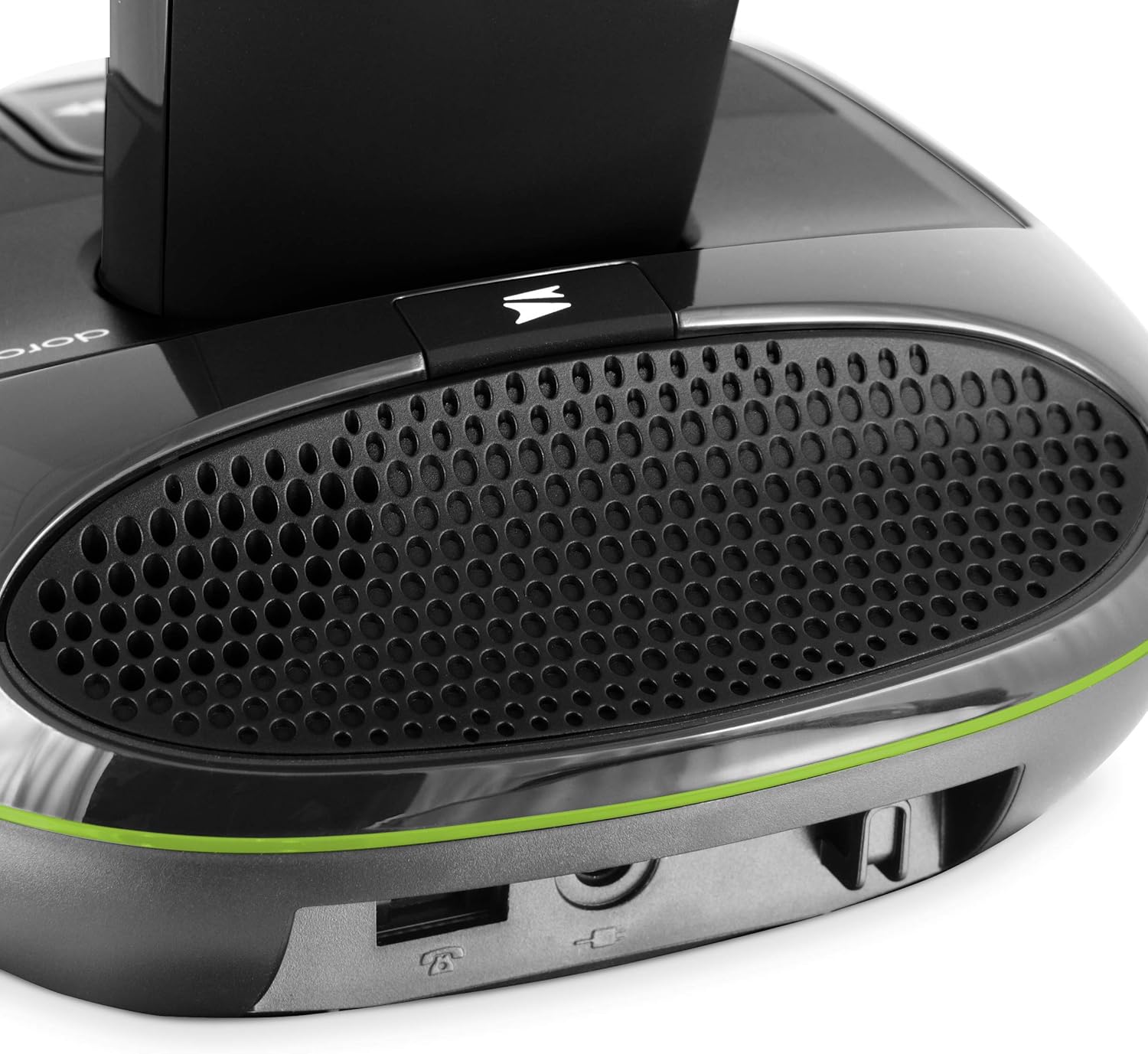
ചിത്രം: പിൻഭാഗം view of the base unit showing power and telephone line connections.
- Plug the small end of the power adapter into the 'DC IN' socket on the back of the base unit.
- പവർ അഡാപ്റ്ററിന്റെ മറ്റേ അറ്റം ഒരു മതിൽ പവർ ഔട്ട്ലെറ്റിലേക്ക് പ്ലഗ് ചെയ്യുക.
- Connect one end of the telephone line cord to the 'LINE' socket on the base unit.
- ടെലിഫോൺ ലൈൻ കോഡിന്റെ മറ്റേ അറ്റം നിങ്ങളുടെ ടെലിഫോൺ വാൾ സോക്കറ്റിൽ പ്ലഗ് ചെയ്യുക.
4.3. ഹാൻഡ്സെറ്റ് ചാർജ് ചെയ്യുന്നു
Place the handset on the base unit. Ensure the charging contacts on the handset align with those on the base. The battery icon on the handset display will indicate charging. For optimal battery performance, charge the handset for at least 24 hours before initial use.

Image: The Doro PhoneEasy 105wr handset correctly placed on its charging base.
5. പ്രവർത്തന നിർദ്ദേശങ്ങൾ
5.1 ഹാൻഡ്സെറ്റ് ഓവർview

ചിത്രം: മുൻഭാഗം view of the Doro PhoneEasy 105wr handset, highlighting the large, well-spaced buttons and clear display.
- ഡിസ്പ്ലേ: 23x38 mm backlit display for easy readability.
- M1/M2 ബട്ടണുകൾ: Speed dial keys for frequently called numbers.
- Green Call Button: To make or answer a call.
- Red End Call Button: To end a call or return to standby.
- നാവിഗേഷൻ ബട്ടണുകൾ: For menu navigation and volume adjustment during a call.
- Amplification Button: Located on the right side of the handset, press to increase call volume up to +10 dB.
5.2. കോളുകൾ ചെയ്യലും സ്വീകരിക്കലും
- ഒരു കോൾ ചെയ്യാൻ: Press the green call button, then dial the number. Alternatively, dial the number first, then press the green call button.
- ഒരു കോളിന് ഉത്തരം നൽകാൻ: ഫോൺ റിംഗ് ചെയ്യുമ്പോൾ, പച്ച കോൾ ബട്ടൺ അമർത്തുക.
- ഒരു കോൾ അവസാനിപ്പിക്കാൻ: ചുവന്ന എൻഡ് കോൾ ബട്ടൺ അമർത്തുക അല്ലെങ്കിൽ ഹാൻഡ്സെറ്റ് ബേസ് യൂണിറ്റിൽ തിരികെ വയ്ക്കുക.
- വീണ്ടും ഡയൽ ചെയ്യുക: താഴേക്കുള്ള അമ്പടയാള ബട്ടൺ അമർത്തുക view the last 5 dialed numbers. Select a number and press the green call button to redial.
5.3. ഉത്തരം നൽകുന്ന യന്ത്രം
The integrated answering machine can record up to 15 minutes of messages. Most functions are accessible from both the handset and the base unit.

Image: Close-up of the base unit showing the answering machine controls, including play/pause, skip, and volume buttons.
- സജീവമാക്കൽ/നിർജ്ജീവമാക്കൽ: Refer to the on-screen menu on the handset or the dedicated button on the base unit to activate or deactivate the answering machine.
- ഒരു ആശംസ രേഖപ്പെടുത്തുന്നു: Follow the menu prompts on the handset to record your personalized outgoing message.
- സന്ദേശങ്ങൾ വീണ്ടെടുക്കുന്നു: Press the play button on the base unit or access the answering machine menu on the handset.
- വിദൂര ആക്സസ്: You can access your answering machine remotely from any other phone by dialing your number and entering your PIN when prompted.
5.4. ഫോൺബുക്കും സ്പീഡ് ഡയലും
- കോൺടാക്റ്റുകൾ സംഭരിക്കുന്നു: The phonebook can store up to 20 contacts. Navigate to the phonebook menu on the handset to add, edit, or delete entries.
- Speed Dial (M1/M2): Assign frequently called numbers to the M1 and M2 buttons for one-touch dialing. Refer to the handset menu for programming instructions.
5.5. ശ്രവണസഹായി അനുയോജ്യത
The Doro PhoneEasy 105wr is compatible with hearing aids. To activate this feature, select the 'T' mode on your hearing aid device.
6. പരിപാലനം
6.1. വൃത്തിയാക്കൽ
മൃദുവായ, ചെറുതായി ഡി-ടച്ച് ഉപയോഗിച്ച് ഹാൻഡ്സെറ്റും ബേസ് യൂണിറ്റും തുടയ്ക്കുക.amp cloth. Do not use harsh chemicals or abrasive cleaners. Ensure the phone is disconnected from power before cleaning.
6.2. ബാറ്ററി പരിചരണം
To prolong battery life, avoid exposing the handset to extreme temperatures. If the phone will not be used for an extended period, remove the batteries.
7. പ്രശ്നപരിഹാരം
| പ്രശ്നം | സാധ്യമായ കാരണം | പരിഹാരം |
|---|---|---|
| ഡയൽ ടോൺ ഇല്ല | ടെലിഫോൺ ലൈൻ കോർഡ് ബന്ധിപ്പിച്ചിട്ടില്ല അല്ലെങ്കിൽ തകരാറിലായി. | Ensure the telephone line cord is securely connected to both the base unit and the wall socket. Test with another phone if possible. |
| ഹാൻഡ്സെറ്റ് ചാർജ് ചെയ്യുന്നില്ല | Handset not correctly placed on the base; dirty charging contacts; faulty batteries. | Ensure the handset is properly seated. Clean charging contacts with a dry cloth. Replace batteries if old. |
| മോശം ശബ്ദ നിലവാരം | Handset out of range; interference; low battery. | Move closer to the base unit. Avoid placing the base near other electronic devices. Charge the handset. |
| ഉത്തരം നൽകുന്ന മെഷീൻ റെക്കോർഡ് ചെയ്യുന്നില്ല | Answering machine is off; memory full. | Activate the answering machine. Delete old messages to free up memory. |
8 സ്പെസിഫിക്കേഷനുകൾ
- മോഡൽ: PHONEEASY105WR
- തരം: DECT Cordless Phone with Answering Machine
- ഡിസ്പ്ലേ: Backlit, 23x38 mm
- ഫോൺബുക്ക് ശേഷി: Up to 20 contacts
- ഉത്തരം നൽകുന്ന മെഷീൻ റെക്കോർഡിംഗ് സമയം: 15 മിനിറ്റ് വരെ
- Amplified Reception: 30 ഡിബി വരെ
- റിംഗർ വോളിയം: Up to 90 dB at 1 meter
- ശ്രവണസഹായി അനുയോജ്യത: Yes (T-mode)
- ഇൻഡോർ റേഞ്ച്: 50 മീറ്റർ വരെ
- Ranട്ട്ഡോർ റേഞ്ച്: 300 മീറ്റർ വരെ
- ബാറ്ററികൾ: 2 x AAA rechargeable (Alkaline composition)
- മെറ്റീരിയൽ: പ്ലാസ്റ്റിക്
- നിറം: കറുപ്പ്
9. വാറൻ്റിയും പിന്തുണയും
For warranty information and technical support, please refer to the warranty card included in your product packaging or visit the official Doro webസൈറ്റ്. വാറന്റി ക്ലെയിമുകൾക്കായി നിങ്ങളുടെ വാങ്ങലിന്റെ തെളിവ് സൂക്ഷിക്കുക.