
ആമുഖം
The Rocketfish RF-G1207 Component Video Cable is designed to provide high-quality video connections for various home theater components. It features 24K gold-plated connectors to ensure optimal signal transfer and resistance to corrosion, contributing to a clear and stable video signal.
ഫീച്ചറുകൾ
- അനുയോജ്യത: Designed for use with most home theater components, including LCD flat-panel TVs, Blu-ray disc and DVD players, high-definition gaming systems, satellite/cable boxes, and A/V receivers.
- High-Definition Video Transmission: Transmits high-definition video signals through component video jacks for improved picture quality.
- 24K സ്വർണ്ണം പൂശിയ കണക്ടറുകൾ: Ensures enhanced signal strength and corrosion resistance for reliable performance.
- കേബിൾ നീളം: A 4-foot (1.2 meter) cable allows for flexible device connection.
- കേബിൾ തരം: Component video cable.
സജ്ജീകരണവും കണക്ഷനും
Follow these steps to connect your Rocketfish RF-G1207 Component Video Cable:
- Identify Component Video Ports: Locate the component video input ports (typically labeled Y, Pb, Pr or Y, Cb, Cr, often color-coded green, blue, and red) on your display device (e.g., TV, projector).
- Identify Component Video Output Ports: Locate the component video output ports on your source device (e.g., DVD player, Blu-ray player, gaming console). These will also be color-coded green, blue, and red.
- കേബിൾ ബന്ധിപ്പിക്കുക: Connect one end of the Rocketfish RF-G1207 cable to the corresponding color-coded output ports on your source device. Ensure the green connector goes into the green port, the blue into the blue port, and the red into the red port.
- ഡിസ്പ്ലേയിലേക്ക് കണക്റ്റുചെയ്യുക: Connect the other end of the cable to the corresponding color-coded input ports on your display device. Again, match the colors (green to green, blue to blue, red to red).
- പവർ ഓൺ ഉപകരണങ്ങൾ: നിങ്ങളുടെ സോഴ്സ് ഉപകരണവും ഡിസ്പ്ലേ ഉപകരണവും ഓണാക്കുക.
- ഇൻപുട്ട് തിരഞ്ഞെടുക്കുക: On your display device, select the correct component video input source using your remote control (e.g., "Component 1", "YPbPr").
Note: Component video cables transmit video signals only. For audio, separate audio cables (e.g., RCA stereo audio cables) are required.
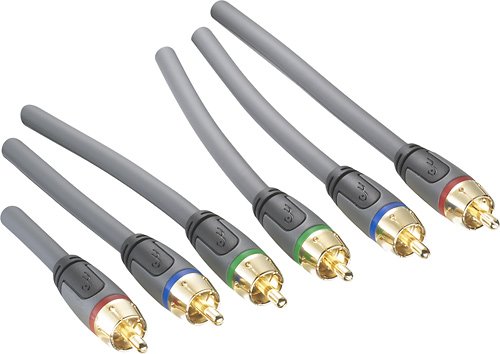
Image: The Rocketfish RF-G1207 Component Video Cable, showing the five color-coded connectors (green, blue, red for video, and typically white, red for audio, though this cable is video only). This image illustrates the cable's design and connector types for proper identification during setup.
പ്രവർത്തന നിർദ്ദേശങ്ങൾ
Once the Rocketfish RF-G1207 Component Video Cable is correctly connected between your source device and display, its operation is passive. The cable facilitates the transmission of video signals without requiring any user interaction beyond the initial connection. Ensure both connected devices are powered on and the correct input source is selected on your display for video to appear.
മെയിൻ്റനൻസ്
To ensure the longevity and optimal performance of your Rocketfish RF-G1207 Component Video Cable:
- സംഭരണം: ഉപയോഗത്തിലില്ലാത്തപ്പോൾ നേരിട്ടുള്ള സൂര്യപ്രകാശത്തിൽ നിന്നും കടുത്ത താപനിലയിൽ നിന്നും മാറി തണുത്തതും വരണ്ടതുമായ സ്ഥലത്ത് കേബിൾ സൂക്ഷിക്കുക.
- വൃത്തിയാക്കൽ: Gently wipe the cable and connectors with a soft, dry cloth to remove dust or debris. Avoid using liquid cleaners or abrasive materials.
- കൈകാര്യം ചെയ്യൽ: Avoid bending or kinking the cable sharply, as this can damage the internal wiring. Always grasp the connector housing when plugging or unplugging the cable, rather than pulling on the cable itself.
- നാശം: The 24K gold-plated connectors are designed to resist corrosion. However, ensure they remain clean and dry to maintain optimal signal integrity.
ട്രബിൾഷൂട്ടിംഗ്
| പ്രശ്നം | സാധ്യമായ കാരണം | പരിഹാരം |
|---|---|---|
| No video signal or black screen. | ഡിസ്പ്ലേയിൽ തെറ്റായ ഇൻപുട്ട് തിരഞ്ഞെടുത്തു. കേബിളുകൾ സുരക്ഷിതമായി ബന്ധിപ്പിച്ചിട്ടില്ല. Incorrect color matching of connectors. ഉറവിട ഉപകരണം ഓണാക്കിയിട്ടില്ല അല്ലെങ്കിൽ സിഗ്നൽ ഔട്ട്പുട്ട് ചെയ്തിട്ടില്ല. | Ensure the correct component video input is selected on your TV/display. Verify all connectors are firmly seated in their respective ports. Double-check that green, blue, and red connectors are matched correctly at both ends. Confirm your source device is powered on and configured to output via component video. |
| Poor picture quality (e.g., blurry, distorted colors). | അയഞ്ഞ കണക്ഷനുകൾ. കേടായ കേബിൾ. Interference from other cables. | എല്ലാ കണക്ഷനുകളും കട്ടിയുള്ളതാണെന്ന് ഉറപ്പാക്കുക. Inspect the cable for any visible damage (kinks, cuts). If damaged, replace the cable. Try to route the component video cable away from power cords or other signal cables to minimize interference. |
| ഓഡിയോ ഇല്ല. | Component video cable does not transmit audio. | Component video cables are for video only. Connect separate audio cables (e.g., RCA stereo audio cables) from your source device to your display or audio receiver. |
സ്പെസിഫിക്കേഷനുകൾ
- ബ്രാൻഡ്: റോക്കറ്റ്ഫിഷ്
- മോഡൽ നമ്പർ: RF-G1207
- കേബിൾ തരം: ഘടകം വീഡിയോ കേബിൾ
- കണക്റ്റർ തരം: RCA (Component Video)
- കണക്റ്റർ ലിംഗഭേദം: പുരുഷൻ-ആൺ
- കണക്റ്റർ പ്ലേറ്റിംഗ്: 24K സ്വർണ്ണം പൂശിയ
- കേബിൾ നീളം: 4 അടി (ഏകദേശം 1.2 മീറ്റർ)
- ഉൽപ്പന്ന അളവുകൾ: 8.4 x 5.8 x 1.5 ഇഞ്ച് (പാക്കേജിംഗ്)
- ഇനത്തിൻ്റെ ഭാരം: 8.8 ഔൺസ് (ഏകദേശം 0.25 കി.ഗ്രാം)
- UPC: 600603129766
വാറൻ്റിയും പിന്തുണയും
For information regarding warranty coverage or technical support for your Rocketfish RF-G1207 Component Video Cable, please refer to the documentation included with your purchase or visit the official Rocketfish webസൈറ്റ്. പ്രദേശത്തെയും റീട്ടെയിലറെയും ആശ്രയിച്ച് നിർദ്ദിഷ്ട വാറന്റി നിബന്ധനകൾ വ്യത്യാസപ്പെടാം.
ഓൺലൈൻ പിന്തുണ: Visit the Rocketfish Store on Amazon