
ആമുഖം
Thank you for choosing the Casio G-Shock GW-M5600A-7ER. This watch combines robust G-Shock durability with advanced radio-controlled timekeeping and solar power technology. This manual provides essential information for proper setup, operation, and maintenance of your watch. Please read it carefully to ensure optimal performance and longevity.
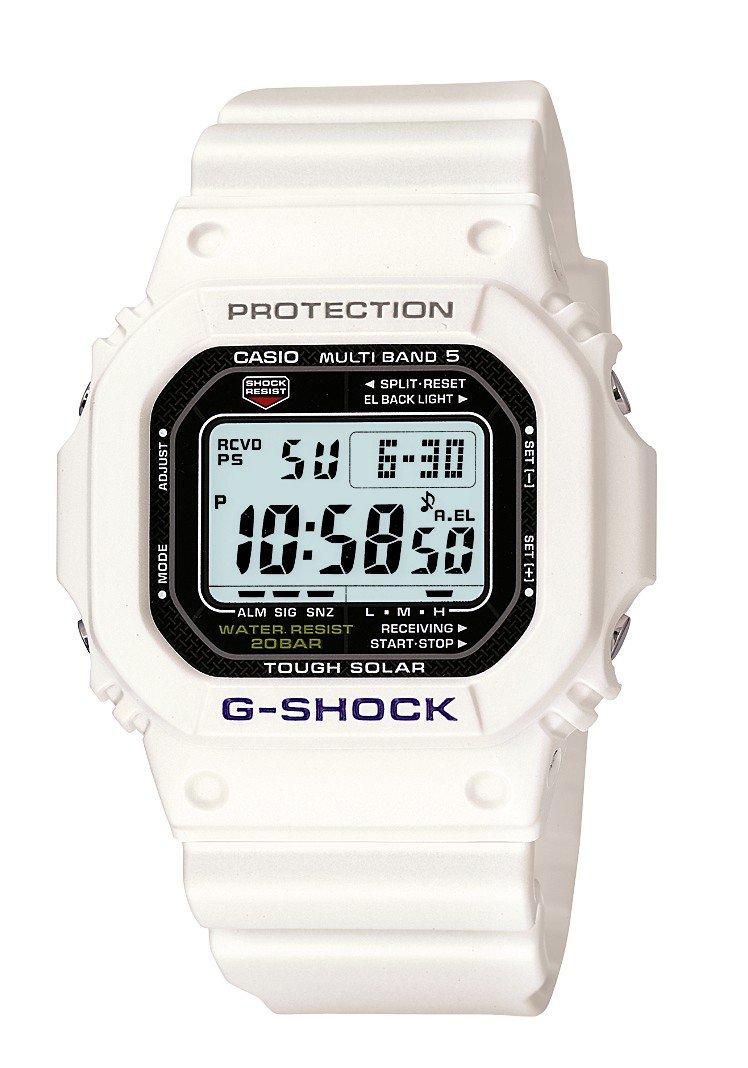
ചിത്രം: മുൻഭാഗം view of the Casio G-Shock GW-M5600A-7ER watch, showcasing its digital display and resin strap.
പ്രധാന സവിശേഷതകൾ
- Radio-Controlled Timekeeping: Automatically receives time calibration signals for accurate timekeeping.
- സൗരോർജ്ജം: Equipped with a solar panel that converts light into electrical power, eliminating the need for battery replacement.
- 200 മീറ്റർ ജല പ്രതിരോധം: Suitable for swimming, snorkeling, and diving (excluding saturation diving).
- ഷോക്ക് പ്രതിരോധം: Designed to withstand impacts and vibrations.
- ഡിജിറ്റൽ ഡിസ്പ്ലേ: Clear and easy-to-read digital time and function display.
- സ്റ്റോപ്പ് വാച്ച് ഫംഗ്ഷൻ: Measures elapsed time, split time, and 1st-2nd place times.
- അലാറം പ്രവർത്തനം: Multiple daily alarms and an hourly സമയ സിഗ്നൽ.
- ലോക സമയം: Displays current time in major cities and specific areas around the world.
- മിനറൽ ഗ്ലാസ്: Protective, scratch-resistant hard mineral lens.
- ഈടുനിൽക്കുന്ന റെസിൻ നിർമ്മാണം: High-performance and durable resin case and strap.
സജ്ജമാക്കുക
1. പ്രാരംഭ ചാർജിംഗ്
Your watch is powered by a solar cell. Before initial use, expose the watch face to bright light for several hours to ensure it is sufficiently charged. The watch may arrive with a low charge, indicated by a flashing 'CHG' or 'LOW' indicator on the display. Avoid prolonged storage in dark places.
2. Setting Your Home City
The Home City setting is crucial for correct time calibration and World Time functionality. Refer to the detailed instructions in the full manual for specific button operations to set your Home City. This setting determines which time calibration signal the watch attempts to receive.
3. Time Calibration Signal Reception
The watch automatically attempts to receive a time calibration signal up to six times a day (or five times a day for the Chinese calibration signal). For optimal reception, place the watch near a window at night, away from metal objects and electronic devices. Manual reception can also be initiated:
- In Timekeeping Mode, hold down the 'A' button (top left) for several seconds until the current time calibration status appears.
- Press the 'D' button (bottom right) to initiate manual reception.
- The watch will display 'RCVD' upon successful reception.
പ്രവർത്തന നിർദ്ദേശങ്ങൾ
മോഡ് നാവിഗേഷൻ
Press the 'C' button (bottom left) to cycle through the different modes:
- ടൈം കീപ്പിംഗ് മോഡ്: നിലവിലെ സമയവും തീയതിയും പ്രദർശിപ്പിക്കുന്നു.
- ലോക സമയ മോഡ്: Displays current time in various time zones.
- അലാറം മോഡ്: ദിവസേനയുള്ള അലാറങ്ങൾ സജ്ജീകരിച്ച് സജീവമാക്കുക.
- സ്റ്റോപ്പ് വാച്ച് മോഡ്: കഴിഞ്ഞ സമയം അളക്കുക.
- കൗണ്ട്ഡൗൺ ടൈമർ മോഡ്: Set a countdown from a specified time.
സ്റ്റോപ്പ് വാച്ച് ഉപയോഗിക്കുന്നു
- Navigate to Stopwatch Mode using the 'C' button.
- Press the 'D' button (bottom right) to start/stop the stopwatch.
- Press the 'B' button (top right) to record split times or reset the stopwatch when stopped.
അലാറങ്ങൾ സജ്ജീകരിക്കുന്നു
- Navigate to Alarm Mode using the 'C' button.
- Hold down the 'A' button (top left) until the alarm time starts flashing.
- Use the 'B' and 'D' buttons to adjust the hour and minute settings.
- Press 'A' to confirm and exit the setting screen.
- Press 'D' to toggle the alarm ON/OFF.
പ്രകാശം
Press the 'B' button (top right) to illuminate the display for easy viewing in low light conditions. The duration of illumination can be adjusted in the watch settings.
മെയിൻ്റനൻസ്
വാച്ച് ചാർജ് ചെയ്യുന്നു
To maintain optimal performance, ensure your watch is regularly exposed to light. The power indicator on the display shows the current charge level. If the charge level is low, expose the watch to direct sunlight or strong artificial light. Avoid covering the watch face when charging.
വൃത്തിയാക്കൽ
Wipe the watch with a soft, dry cloth to remove dirt and moisture. For stubborn dirt, use a soft cloth dampവെള്ളവും നേരിയ ന്യൂട്രൽ ഡിറ്റർജന്റും ചേർത്ത് തുടച്ചു ഉണക്കുക. തിന്നർ അല്ലെങ്കിൽ ബെൻസിൻ പോലുള്ള ബാഷ്പശീലമുള്ള വസ്തുക്കൾ ഉപയോഗിക്കുന്നത് ഒഴിവാക്കുക, കാരണം അവ റെസിൻ ഘടകങ്ങളെ നശിപ്പിക്കും.
ജല പ്രതിരോധ മുൻകരുതലുകൾ
While your watch is water-resistant to 200 meters, it is important to observe the following:
- വാച്ച് നനഞ്ഞിരിക്കുമ്പോഴോ വെള്ളത്തിൽ മുങ്ങിക്കിടക്കുമ്പോഴോ ബട്ടണുകൾ പ്രവർത്തിപ്പിക്കരുത്.
- Avoid exposing the watch to hot water or steam (e.g., in showers, saunas) as this can compromise seals.
- After exposure to saltwater, rinse the watch thoroughly with fresh water and wipe dry.
ട്രബിൾഷൂട്ടിംഗ്
Time Not Syncing
- Check Home City Setting: Ensure your Home City is correctly set to a region that receives time calibration signals.
- Reception Environment: Move the watch to a location with better signal reception, ideally near a window, away from electronic interference.
- മാനുവൽ സ്വീകരണം: Attempt a manual time calibration signal reception (refer to Setup section).
- ചാർജ് ലെവൽ: Ensure the watch has sufficient charge. Low power can affect signal reception.
Display is Blank or Dim
- ചാർജ് ലെവൽ: The watch may be in power-saving mode or have a very low charge. Expose it to bright light for an extended period.
- വൈദ്യുതി ലാഭിക്കൽ: The watch enters power-saving mode when left in the dark for a certain period. Press any button or expose it to light to reactivate the display.
ബട്ടണുകൾ പ്രതികരിക്കുന്നില്ല
- പുന et സജ്ജമാക്കുക: In rare cases, a full reset might be necessary. Consult the full Casio manual for your specific module number (usually found on the watch's case back) for detailed reset procedures.
- വെള്ളം: Ensure the watch is completely dry if it has been exposed to water.
സ്പെസിഫിക്കേഷനുകൾ
| മോഡൽ നമ്പർ | GW-M5600A-7ER |
| നിർമ്മാതാവ് | ജി-ഷോക്ക് |
| ഡിസ്പ്ലേ തരം | ഡിജിറ്റൽ |
| പ്രസ്ഥാനം | ക്വാർട്സ് |
| പവർ ഉറവിടം | സൗരോർജ്ജം |
| ജല പ്രതിരോധ ആഴം | 200 മീറ്റർ |
| Case Material Type | റെസിൻ |
| ബാൻഡ് മെറ്റീരിയൽ തരം | റെസിൻ |
| വിൻഡോ മെറ്റീരിയൽ തരം ഡയൽ ചെയ്യുക | ധാതു |
| കേസ് വ്യാസം | 49 മി.മീ |
| കേസ് കനം | 17 മി.മീ |
| ബാൻഡ് വീതി | 25 മി.മീ |
| ക്ലാസ്പ് തരം | ടാങ് ബക്കിൾ |
| ഇനത്തിൻ്റെ ആകൃതി | സമചതുരം |
| ബാൻഡ് നിറം | വെള്ള |
| ഡയൽ കളർ | ചാരനിറം |
വാറൻ്റിയും പിന്തുണയും
Your Casio G-Shock GW-M5600A-7ER watch comes with a 2 വർഷത്തെ നിർമ്മാതാവിന്റെ വാറന്റി. സാധാരണ ഉപയോഗത്തിലുള്ള മെറ്റീരിയലുകളിലെയും നിർമ്മാണത്തിലെയും വൈകല്യങ്ങൾ ഈ വാറന്റി ഉൾക്കൊള്ളുന്നു. വാറന്റി ക്ലെയിമുകൾക്കായി നിങ്ങളുടെ വാങ്ങലിന്റെ തെളിവ് സൂക്ഷിക്കുക.
For detailed warranty terms, service, or technical support, please refer to the official Casio website or contact your local authorized Casio service center. Contact information can typically be found in the full product manual or on the manufacturer's webസൈറ്റ്.