
DoorKing 1503
Doorking 1503 Keypad User Manual
Model: 1503 | Brand: DoorKing
ഉൽപ്പന്നം കഴിഞ്ഞുview
The DoorKing 1503 Keypad is an advanced access control device designed for both residential and commercial applications. It features a durable stainless steel faceplate and offers secure access through programmable entry codes. This manual provides comprehensive instructions for the installation, operation, and maintenance of your DoorKing 1503 Keypad.
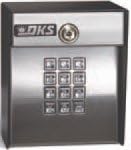
ചിത്രം 1: ഫ്രണ്ട് view of the DoorKing 1503 Keypad, displaying the numeric buttons and an integrated key lock mechanism at the top for manual override.
പ്രധാന സവിശേഷതകൾ
- Code Storage: Stores two 4-digit entry codes, two 5-digit entry codes, and two 4-digit hold codes.
- പ്രോഗ്രാമിംഗ്: Codes can be programmed and activated via the keypad or through the DoorKing app.
- ഓർമ്മ നിലനിർത്തൽ: EEPROM memory ensures programmed codes are retained even during power outages.
- പവർ എഫിഷ്യൻസി: Features a low power mode, making it suitable for solar installations.
- നിർമ്മാണം: Durable stainless steel faceplate.
- അളവുകൾ: Approximately 5 x 5 x 4 inches (L x W x H).
- ഭാരം: ഏകദേശം 3 പൗണ്ട്.
സജ്ജീകരണവും ഇൻസ്റ്റാളേഷനും
1. അൺപാക്ക് ചെയ്യലും പരിശോധനയും
പാക്കേജിംഗിൽ നിന്ന് എല്ലാ ഘടകങ്ങളും ശ്രദ്ധാപൂർവ്വം നീക്കം ചെയ്യുക. പാക്കിംഗ് ലിസ്റ്റിൽ പട്ടികപ്പെടുത്തിയിരിക്കുന്ന എല്ലാ ഇനങ്ങളും നിലവിലുണ്ടെന്നും കേടുപാടുകൾ സംഭവിച്ചിട്ടില്ലെന്നും ഉറപ്പാക്കുക. ഏതെങ്കിലും ഇനങ്ങൾ കാണുന്നില്ലെങ്കിലോ കേടായതാണെങ്കിലോ, ഉടൻ തന്നെ നിങ്ങളുടെ വിതരണക്കാരനെ ബന്ധപ്പെടുക.
2. മൗണ്ടിംഗ് ലൊക്കേഷൻ
Select a suitable mounting location. The keypad should be installed on a flat, stable surface at a convenient height for users. Ensure the location is protected from direct harsh weather conditions if possible, although the unit is designed for outdoor use.
3. വയറിംഗ് കണക്ഷനുകൾ
മുന്നറിയിപ്പ്: Disconnect all power to the access control system before making any wiring connections. Improper wiring can damage the unit or cause electrical shock.
- Connect the power supply wires to the designated terminals on the keypad. Refer to the wiring diagram provided with your specific access control system.
- Connect the output wires from the keypad to the control board of your gate operator or door strike.
- ഷോർട്ട് സർക്യൂട്ടുകൾ തടയാൻ എല്ലാ കണക്ഷനുകളും സുരക്ഷിതമാണെന്നും ഇൻസുലേറ്റ് ചെയ്തിട്ടുണ്ടെന്നും ഉറപ്പാക്കുക.
4. Securing the Keypad
Use the provided mounting hardware to securely attach the keypad to the chosen surface. Do not overtighten screws, as this may damage the housing.
പ്രവർത്തന നിർദ്ദേശങ്ങൾ
1. പ്രാരംഭ പവർ-അപ്പ്
Once all wiring is complete and secure, restore power to the access control system. The keypad should illuminate or provide an audible confirmation of power.
2. Programming Entry Codes (Keypad Method)
To program a new entry code:
- Enter the Master Programming Code (refer to your system's main control board manual for the default or current master code).
- അമർത്തുക * താക്കോൽ.
- Enter the desired new entry code (4 or 5 digits).
- അമർത്തുക # സ്ഥിരീകരിക്കാനുള്ള കീ.
- The keypad will provide an audible beep or visual flash to confirm successful programming.
കുറിപ്പ്: The DoorKing 1503 supports two 4-digit codes, two 5-digit codes, and two 4-digit hold codes. Consult the DoorKing app for advanced programming options.
3. Using Entry Codes
To gain access, simply enter your valid entry code on the keypad. The system will activate the gate or door strike upon successful code entry.
4. Using Hold Codes
Hold codes are typically used to keep a gate or door open for an extended period. Enter the hold code, and the system will maintain the open state until the code is re-entered or a timer expires (if configured).
മെയിൻ്റനൻസ്
The DoorKing 1503 Keypad is designed for minimal maintenance. However, regular checks can ensure optimal performance and longevity.
- വൃത്തിയാക്കൽ: Periodically wipe the keypad surface with a soft, damp തുണി. ഫിനിഷിനോ കീപാഡ് ബട്ടണുകൾക്കോ കേടുവരുത്തുന്ന അബ്രാസീവ് ക്ലീനറുകളോ ലായകങ്ങളോ ഒഴിവാക്കുക.
- കണക്ഷൻ പരിശോധന: Annually inspect all wiring connections for corrosion or looseness. Ensure all connections are secure.
- പ്രവർത്തനക്ഷമത പരിശോധന: Regularly test all programmed entry codes and hold codes to ensure they are functioning correctly.
- ഫേംവെയർ അപ്ഡേറ്റുകൾ: Check the DoorKing website or app for any available firmware updates for your model to ensure you have the latest features and security enhancements.
ട്രബിൾഷൂട്ടിംഗ്
| പ്രശ്നം | സാധ്യമായ കാരണം | പരിഹാരം |
|---|---|---|
| Keypad not responding to input. | No power; loose wiring; keypad malfunction. | Check power supply. Verify all wiring connections are secure. If problem persists, contact technical support. |
| Entry code not granting access. | Incorrect code entered; code not programmed; system fault. | Ensure correct code is entered. Verify the code is properly programmed via keypad or app. Check the main access control system for error indicators. |
| Keypad lights are dim or flickering. | Insufficient power supply; faulty unit. | പവർ സപ്ലൈ വോള്യം പരിശോധിക്കുകtage. If using solar, ensure adequate sunlight and battery charge. |
| പുതിയ കോഡുകൾ പ്രോഗ്രാം ചെയ്യാൻ കഴിയില്ല. | Incorrect master code; memory full; programming error. | Verify the master programming code. Ensure you are following the programming steps precisely. The unit has limited code storage; consider deleting old codes if necessary. |
സ്പെസിഫിക്കേഷനുകൾ
| ഫീച്ചർ | വിശദാംശങ്ങൾ |
|---|---|
| മോഡൽ | 1503 (Note: Model 1503-080 is obsolete, replaced by 1515-081) |
| ബ്രാൻഡ് | ഡോർകിംഗ് |
| ലോക്ക് തരം | കീപാഡ് |
| അളവുകൾ (L x W x H) | 5 x 5 x 4 ഇഞ്ച് |
| ഭാരം | 3 പൗണ്ട് |
| കോഡ് ശേഷി | Two 4-digit entry codes, two 5-digit entry codes, two 4-digit hold codes |
| മെമ്മറി തരം | EEPROM (Non-volatile) |
| പ്രത്യേക സവിശേഷതകൾ | Low power mode for solar installations, Ergonomic design |
| കണക്റ്റിവിറ്റി | Wi-Fi (for App control) |
| ശുപാർശ ചെയ്യുന്ന ഉപയോഗം | വാസയോഗ്യവും വാണിജ്യപരവും |
വാറൻ്റി വിവരങ്ങൾ
DoorKing products are manufactured to the highest quality standards. For specific warranty terms and conditions, please refer to the warranty card included with your product or visit the official DoorKing website. Typically, DoorKing offers a limited warranty covering defects in materials and workmanship from the date of purchase.
കുറിപ്പ്: The warranty may be voided by improper installation, unauthorized repairs, or damage caused by misuse or neglect.
പിന്തുണയും കോൺടാക്റ്റും
For technical assistance, troubleshooting beyond this manual, or warranty claims, please contact DoorKing customer support:
- Webസൈറ്റ്: Visit the official DoorKing website for FAQs, updated manuals, and support resources.
- ഫോൺ: Refer to the contact information provided on the DoorKing webനേരിട്ടുള്ള ഫോൺ പിന്തുണയ്ക്കായി സൈറ്റ് അല്ലെങ്കിൽ ഉൽപ്പന്ന പാക്കേജിംഗ്.
- ആപ്പ് പിന്തുണ: Utilize the DoorKing app for certain support features and programming assistance.
When contacting support, please have your product model number (1503) and serial number (if applicable) ready.
Ask a question about this manual
Ask about setup, troubleshooting, compatibility, parts, safety, or missing instructions. Manuals+ will review the question and use this page’s manual context to help answer it.