
1. ആമുഖം
This manual provides detailed instructions for the safe and efficient operation of your Caliber PMT302 FM Transmitter and MP3/WMA Player. The PMT302 allows you to play MP3 or WMA music files from a USB flash drive or SD card and broadcast them to your car's FM stereo. It also features an AUX input for connecting external audio devices.
2 സുരക്ഷാ വിവരങ്ങൾ
പ്രധാനപ്പെട്ട സുരക്ഷാ നിർദ്ദേശങ്ങൾ:
- Avoid using the device near other wireless devices to prevent interference.
- Keep the device and any associated batteries away from extreme temperatures and high humidity.
- Always eject memory cards safely before removing them from the device to prevent data loss.
- Dispose of batteries and electronic waste according to local regulations.
- ഉപകരണം ഡിസ്അസംബ്ലിംഗ് ചെയ്യാനോ പരിഷ്ക്കരിക്കാനോ ശ്രമിക്കരുത്. എല്ലാ സേവനങ്ങളും യോഗ്യതയുള്ള ഉദ്യോഗസ്ഥരെ ഏൽപ്പിക്കുക.
3. ഉൽപ്പന്നം കഴിഞ്ഞുview
The Caliber PMT302 is a versatile FM transmitter designed for in-car audio playback. It features a compact design and an intuitive interface.

Figure 1: Caliber PMT302 FM Transmitter with accessories. This image displays the main transmitter unit, the remote control, a 3.5mm AUX cable, and a spare fuse.
3.1 പ്രധാന യൂണിറ്റ് സവിശേഷതകൾ
- ഡിജിറ്റൽ എൽസിഡി ഡിസ്പ്ലേ: Shows frequency, track information, and volume.
- USB പോർട്ട്: For connecting USB flash drives (up to 32 GB).
- SD കാർഡ് സ്ലോട്ട്: For inserting SD cards (up to 32 GB).
- 3.5mm AUX ഇൻപുട്ട്: For connecting external audio devices like smartphones or MP3 players.
- നിയന്ത്രണ ബട്ടണുകൾ: For frequency adjustment, track navigation, volume control, and playback modes.
- ഊർജ്ജ സ്രോതസ്സ്: Plugs into a 12V car cigarette lighter socket.
3.2 വിദൂര നിയന്ത്രണം
The included remote control provides convenient access to various functions of the PMT302 from a distance.
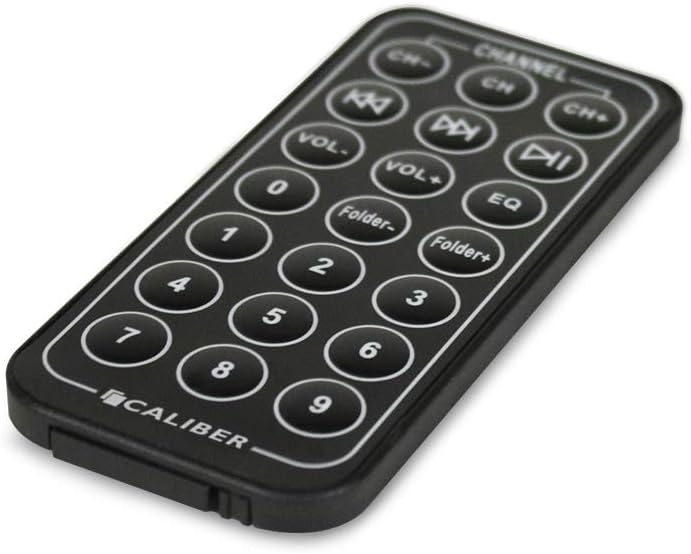
Figure 2: Remote control for the Caliber PMT302. This image shows the layout of buttons on the remote, including channel selection, volume, track navigation, folder navigation, and EQ settings.
- CH-/CH+: Adjust FM frequency.
- VOL-/VOL+: വോളിയം ക്രമീകരിക്കുക.
- മുമ്പത്തെ/അടുത്ത ട്രാക്ക്: Navigate through music files.
- പ്ലേ/താൽക്കാലികമായി നിർത്തുക: സംഗീത പ്ലേബാക്ക് നിയന്ത്രിക്കുക.
- ഫോൾഡർ-/ഫോൾഡർ+: Navigate through folders on USB/SD card.
- EQ: ഇക്വലൈസർ പ്രീസെറ്റുകൾ തിരഞ്ഞെടുക്കുക.
- സംഖ്യാ കീപാഡ്: Direct track selection.
4. സജ്ജീകരണം
- Insert into Car Power Outlet: Plug the PMT302 into your vehicle's 12V cigarette lighter socket. The device will power on automatically.
- Prepare Music Files:
- For USB: Load MP3 or WMA files onto a USB flash drive (up to 32 GB).
- For SD Card: Load MP3 or WMA files onto an SD card (up to 32 GB).
- സംഭരണ ഉപകരണം ചേർക്കുക: Insert the prepared USB flash drive into the USB port or the SD card into the SD card slot on the PMT302. The device will automatically detect and begin playing music.
- Connect External Audio (Optional): If using an external device (e.g., smartphone), connect it to the PMT302's 3.5mm AUX input using the provided AUX cable.
5. പ്രവർത്തന നിർദ്ദേശങ്ങൾ
5.1 Setting the FM Frequency
- Turn on your car's FM radio.
- Tune your car radio to an unused FM frequency (one with static or no broadcast).
- On the PMT302, use the "CH-" or "CH+" buttons (on the device or remote) to match the FM frequency displayed on the PMT302's LCD screen to the frequency set on your car radio.
- Adjust the frequency until the music from the PMT302 is clearly heard through your car speakers.
Note: The PMT302 supports 206 FM channels from 87.5 MHz to 108 MHz. For best audio quality, select a frequency that is clear of strong radio stations.
5.2 Playing Music from USB/SD Card
- Once a USB drive or SD card is inserted, the device will automatically start playing MP3/WMA files.
- Use the Previous/Next Track buttons to skip between songs.
- പ്ലേബാക്ക് നിയന്ത്രിക്കാൻ പ്ലേ/താൽക്കാലികമായി നിർത്തുക ബട്ടൺ ഉപയോഗിക്കുക.
- Adjust volume using the VOL-/VOL+ buttons on the device or remote.
- The device has a memory feature that saves the last played frequency, song, and volume settings.
5.3 Loop Playback Modes
The PMT302 offers four loop playback modes:
- ക്രമരഹിതം: Plays songs in a random order.
- ഫോൾഡർ ആവർത്തിക്കുക: Repeats all songs within the current folder.
- എല്ലാം ആവർത്തിക്കുക: Repeats all songs on the storage device.
- ഒന്ന് ആവർത്തിക്കുക: Repeats the current song.
Refer to the device's on-screen menu or remote control for selecting these modes.
5.4 AUX ഇൻപുട്ട് ഉപയോഗിക്കുന്നു
To play music from an external device:
- Connect your external audio device (e.g., smartphone, MP3 player) to the PMT302's 3.5mm AUX input using the provided cable.
- Ensure the external device is playing audio.
- The PMT302 will automatically switch to AUX input mode or may require manual selection via a mode button (if available).
- Adjust the volume on both the PMT302 and your external device for optimal sound.
6. പരിപാലനം
- വൃത്തിയാക്കൽ: ഉപകരണം വൃത്തിയാക്കാൻ മൃദുവായതും ഉണങ്ങിയതുമായ തുണി ഉപയോഗിക്കുക. ലിക്വിഡ് ക്ലീനറുകളോ എയറോസോളുകളോ ഉപയോഗിക്കരുത്.
- സംഭരണം: ഉപയോഗിക്കാത്തപ്പോൾ, നേരിട്ട് സൂര്യപ്രകാശത്തിൽ നിന്നും തീവ്രമായ താപനിലയിൽ നിന്നും അകലെ തണുത്തതും വരണ്ടതുമായ സ്ഥലത്ത് ഉപകരണം സൂക്ഷിക്കുക.
- ഫ്യൂസ് മാറ്റിസ്ഥാപിക്കൽ: If the device stops working, check the fuse located in the tip of the car charger plug. Replace it with a fuse of the same type and rating (a spare fuse is often included).
- Memory Card/USB Care: Handle SD cards and USB drives carefully. Avoid bending or exposing them to moisture.
7. പ്രശ്നപരിഹാരം
| പ്രശ്നം | സാധ്യമായ കാരണം | പരിഹാരം |
|---|---|---|
| ഉപകരണത്തിന് പവർ ഇല്ല. | Car power outlet is not working, or fuse is blown. | Check if the car power outlet is active. Replace the fuse in the PMT302's plug if necessary. |
| മോശം ശബ്ദ നിലവാരം/സ്റ്റാറ്റിക്. | FM frequency interference, low volume, or weak signal. | Tune to a different, clear FM frequency on both the PMT302 and your car radio. Increase volume on both devices. Ensure no other strong radio signals are on the chosen frequency. |
| Music not playing from USB/SD card. | തെറ്റാണ് file ഫോർമാറ്റ്, കേടായി files, or card/drive not inserted correctly. | ഉറപ്പാക്കുക files are MP3 or WMA format. Reinsert the USB drive/SD card. Try a different USB drive/SD card. |
| റിമോട്ട് കൺട്രോൾ പ്രവർത്തിക്കുന്നില്ല. | ബാറ്ററി തീർന്നു അല്ലെങ്കിൽ കാഴ്ച രേഖ തടസ്സപ്പെട്ടു. | Replace the remote control battery. Ensure there is a clear path between the remote and the PMT302. |
| LCD display is dim or not working correctly. | ഉപകരണത്തിന്റെ തകരാർ. | This may indicate a hardware issue. If within warranty, contact customer support. |
8 സ്പെസിഫിക്കേഷനുകൾ
- മോഡൽ: PMT302
- പിന്തുണയ്ക്കുന്ന ഓഡിയോ ഫോർമാറ്റുകൾ: MP3, WMA
- FM ഫ്രീക്വൻസി റേഞ്ച്: 87.5 - 108 MHz (206 channels)
- സംഭരണ പിന്തുണ: USB Flash Drive (up to 32 GB), SD Card (up to 32 GB)
- കണക്റ്റിവിറ്റി: Auxiliary (3.5mm), USB 1.1
- ഡിസ്പ്ലേ: എൽസിഡി
- ഊർജ്ജ സ്രോതസ്സ്: 12V DC Car Cigarette Lighter
- ഇനത്തിൻ്റെ ഭാരം: 78 ഗ്രാം
- നിയന്ത്രണ രീതി: Touch (on device), Remote Control
- നിറം: കറുപ്പ്
9. വാറൻ്റിയും പിന്തുണയും
This Caliber PMT302 FM Transmitter comes with a 15-day exchange warranty വാങ്ങിയ തീയതി മുതൽ. വാറന്റി ക്ലെയിമുകൾക്കായി നിങ്ങളുടെ വാങ്ങിയതിന്റെ തെളിവ് സൂക്ഷിക്കുക.
For technical support or warranty inquiries, please contact your retailer or the manufacturer, Sondpex Corporation of America.