1. ആമുഖം
Thank you for choosing the Bazooka RXT2 12-inch Triangular Subwoofer. This manual provides essential information for the proper installation, operation, and maintenance of your new subwoofer. Please read this manual thoroughly before use to ensure optimal performance and safety.
The Bazooka RXT2 is an innovative 12-inch triangular subwoofer designed to deliver powerful bass for car audio systems. It features 450W RMS and 900W MAX power handling, with a 4 Ohm impedance and a frequency response of 20 Hz to 250 Hz. Its robust construction includes a steel basket and polyester membrane, with water cooling for enhanced durability.
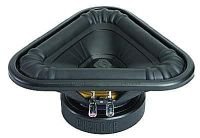
ചിത്രം 1: ഫ്രണ്ട് view of the Bazooka RXT2 12-inch Triangular Subwoofer. This image shows the unique triangular design and the speaker cone.
2 സുരക്ഷാ വിവരങ്ങൾ
- ഏതെങ്കിലും വൈദ്യുത ജോലി ചെയ്യുന്നതിന് മുമ്പ് എല്ലായ്പ്പോഴും വാഹനത്തിന്റെ ബാറ്ററി വിച്ഛേദിക്കുക.
- ഷോർട്ട് സർക്യൂട്ടുകൾ തടയുന്നതിന് എല്ലാ വയറിംഗ് കണക്ഷനുകളും സുരക്ഷിതമാണെന്നും ശരിയായി ഇൻസുലേറ്റ് ചെയ്തിട്ടുണ്ടെന്നും ഉറപ്പാക്കുക.
- Do not expose the subwoofer to excessive moisture or extreme temperatures. While it features water cooling, it is not waterproof.
- Mount the subwoofer securely to prevent it from becoming a projectile in the event of a sudden stop or accident.
- ഏതെങ്കിലും ഇൻസ്റ്റാളേഷൻ ഘട്ടങ്ങളെക്കുറിച്ച് നിങ്ങൾക്ക് ഉറപ്പില്ലെങ്കിൽ ഒരു പ്രൊഫഷണൽ ഇൻസ്റ്റാളറെ സമീപിക്കുക.
- Operating the subwoofer at excessively high volumes for extended periods can cause hearing damage.
3. സജ്ജീകരണവും ഇൻസ്റ്റാളേഷനും
The Bazooka RXT2 subwoofer is designed for integration into car audio systems. Proper installation is crucial for optimal performance and safety.
3.1 അൺപാക്കിംഗ്
Carefully remove the subwoofer from its packaging. Inspect for any signs of damage during transit. Retain the packaging for future transport or storage.
3.2 മൗണ്ടിംഗ്
The RXT2 is a 12-inch triangular subwoofer. It is recommended for flush mounting in a suitable enclosure or vehicle compartment. Ensure the mounting location is sturdy enough to support the subwoofer's weight and withstand vehicle vibrations.
- Choose a secure, flat surface within your vehicle, typically in the trunk or a dedicated subwoofer enclosure.
- Mark the mounting points using the subwoofer's frame as a template.
- Drill pilot holes if necessary, ensuring not to damage any vehicle components behind the mounting surface.
- Secure the subwoofer using appropriate screws or bolts, ensuring a tight fit without over-tightening.
3.3 വയറിംഗ് കണക്ഷനുകൾ
The RXT2 subwoofer requires a wired connection to an appropriate amplifier. It has a 4 Ohm impedance.
- പവർ കണക്ഷൻ: സബ് വൂഫറിന്റെ പോസിറ്റീവ് (+) ടെർമിനൽ നിങ്ങളുടെ പോസിറ്റീവ് (+) ഔട്ട്പുട്ടുമായി ബന്ധിപ്പിക്കുക amplifier. Connect the negative (-) terminal of the subwoofer to the negative (-) output of your ampജീവൻ.
- ഗ്രൗണ്ടിംഗ്: നിങ്ങളുടെ ഉറപ്പാക്കുക amplifier is properly grounded to the vehicle chassis.
- സിഗ്നൽ ഇൻപുട്ട്: ബന്ധിപ്പിക്കുക amplifier's input to your head unit's subwoofer output or full-range output (if using a crossover).
- കേബിൾ ഗേജ്: Use appropriate gauge wiring for power and speaker connections to handle the subwoofer's power requirements (450W RMS / 900W MAX). Consult your amplifier's manual for recommended wire gauges.
കുറിപ്പ്: Incorrect wiring can damage the subwoofer, amplifier, or vehicle electrical system. If you are unsure, seek professional assistance.
4. ഓപ്പറേഷൻ
Once installed and wired correctly, the Bazooka RXT2 subwoofer operates in conjunction with your car audio ampലൈഫയറും ഹെഡ് യൂണിറ്റും.
4.1 പ്രാരംഭ പവർ-അപ്പ്
- After all connections are made, reconnect the vehicle's battery.
- Turn on your car's ignition and then the head unit.
- ഉപയോഗിച്ച് ആരംഭിക്കുക amplifier's gain control set to its minimum position.
- Play a familiar audio track with good bass content.
- പതുക്കെ വർദ്ധിപ്പിക്കുക ampവികലമാക്കാതെ ആവശ്യമുള്ള ബാസ് ലെവൽ കൈവരിക്കുന്നതുവരെ ലിഫയറിന്റെ നേട്ടം.
4.2 ക്രമീകരണങ്ങൾ ക്രമീകരിക്കുന്നു
Most adjustments for the subwoofer's performance will be made on your ampലൈഫയറും ഹെഡ് യൂണിറ്റും.
- നിയന്ത്രണം നേടുക: ക്രമീകരിക്കുക ampഔട്ട്പുട്ട് വോള്യവുമായി പൊരുത്തപ്പെടുന്ന ലിഫയറിന്റെ ഗെയിൻtagനിങ്ങളുടെ ഹെഡ് യൂണിറ്റിന്റെ e. ഗെയിൻ വളരെ ഉയർന്നതായി സജ്ജീകരിക്കുന്നത് ഒഴിവാക്കുക, കാരണം ഇത് വികലതയ്ക്കും സാധ്യതയുള്ള കേടുപാടുകൾക്കും കാരണമാകും.
- ലോ-പാസ് ഫിൽട്ടർ (LPF): നിങ്ങളുടെ LPF സജ്ജമാക്കുക amplifier or head unit to filter out high frequencies from the subwoofer, typically between 80 Hz and 120 Hz. This ensures the subwoofer only reproduces bass frequencies.
- ബാസ് ബൂസ്റ്റ്: Use bass boost sparingly, if at all, as it can quickly lead to distortion and overheating.
- ഘട്ടം നിയന്ത്രണം: എങ്കിൽ നിങ്ങളുടെ amplifier has a phase switch (0°/180°), experiment with both settings to find the one that provides the most cohesive bass response with your front speakers.
The subwoofer itself does not have external controls; its operation is managed through the connected ampലൈഫയറും ഹെഡ് യൂണിറ്റും.
5. പരിപാലനം
The Bazooka RXT2 subwoofer is designed for durability and requires minimal maintenance.
- വൃത്തിയാക്കൽ: Use a soft, dry cloth to wipe down the subwoofer's exterior. Do not use harsh chemicals or abrasive cleaners.
- പരിശോധന: എല്ലാ വയറിംഗ് കണക്ഷനുകളും സുരക്ഷിതമായും നാശത്തിൽ നിന്നും മുക്തമായും ഉറപ്പാക്കാൻ ഇടയ്ക്കിടെ പരിശോധിക്കുക.
- പരിസ്ഥിതി: Ensure the subwoofer is not exposed to direct sunlight for prolonged periods or extreme temperatures, which can degrade materials over time.
- വാട്ടർ കൂളിംഗ്: The water cooling feature is internal and does not require user maintenance. Avoid attempting to open the subwoofer enclosure.
6. പ്രശ്നപരിഹാരം
If you experience issues with your Bazooka RXT2 subwoofer, refer to the following common problems and solutions:
| പ്രശ്നം | സാധ്യമായ കാരണം | പരിഹാരം |
|---|
| സബ് വൂഫറിൽ നിന്ന് ശബ്ദമില്ല | - Ampലിഫയർ ഓൺ ചെയ്തിട്ടില്ല
- അയഞ്ഞതോ തെറ്റായതോ ആയ വയറിംഗ്
- ഹെഡ് യൂണിറ്റ് ക്രമീകരണങ്ങൾ തെറ്റാണ്
- ഊതപ്പെട്ട ഫ്യൂസ് ampലിഫയർ അല്ലെങ്കിൽ പവർ ലൈൻ
| - പരിശോധിക്കുക ampലിഫയർ പവറും റിമോട്ട് ടേൺ-ഓൺ വയറും.
- Verify all speaker and power connections.
- സബ് വൂഫർ ഔട്ട്പുട്ട് പ്രവർത്തനക്ഷമമാക്കിയിട്ടുണ്ടെന്നും ഹെഡ് യൂണിറ്റിൽ വോളിയം കൂടിയിട്ടുണ്ടെന്നും ഉറപ്പാക്കുക.
- പൊട്ടിപ്പോയ ഫ്യൂസുകൾ പരിശോധിച്ച് മാറ്റി സ്ഥാപിക്കുക.
|
| വികലമായ ശബ്ദം | - Ampലിഫയർ ഗെയിൻ വളരെ ഉയർന്നതായി സജ്ജീകരിച്ചിരിക്കുന്നു
- ഇൻപുട്ട് സിഗ്നൽ വളരെ ഉയർന്നതാണ്
- തെറ്റായ LPF സജ്ജീകരണം
- കേടായ സബ് വൂഫർ
| - കുറയ്ക്കുക ampലൈഫയർ നേട്ടം.
- Lower head unit volume or ampലിഫയർ ഇൻപുട്ട് സെൻസിറ്റിവിറ്റി.
- Adjust LPF to appropriate frequency (e.g., 80-120 Hz).
- If distortion persists at low volumes, subwoofer may be damaged; seek professional service.
|
| ദുർബലമായ അല്ലെങ്കിൽ ചെളി നിറഞ്ഞ ബാസ് | - തെറ്റായ ഘട്ടം ക്രമീകരണം
- താഴ്ന്നത് ampലൈഫയർ നേട്ടം
- അനുചിതമായ ആവരണം
| - ഫേസ് സ്വിച്ച് (0°/180°) ടോഗിൾ ചെയ്യുക ampജീവൻ.
- വർധിപ്പിക്കുക ampക്രമേണ ലിഫയർ നേട്ടം.
- Ensure subwoofer is mounted in a suitable, sealed, or ported enclosure as recommended for its design.
|
If these steps do not resolve the issue, contact Bazooka customer support or a qualified car audio technician.
7 സ്പെസിഫിക്കേഷനുകൾ
| ഫീച്ചർ | വിശദാംശങ്ങൾ |
|---|
| മോഡൽ | Bazooka RXT2 |
| സ്പീക്കർ തരം | സബ് വൂഫർ |
| സബ് വൂഫർ വ്യാസം | 12 ഇഞ്ച് (30.48 സെ.മീ) |
| ആർഎംഎസ് പവർ putട്ട്പുട്ട് | 450 വാട്ട്സ് |
| പരമാവധി പവർ ഔട്ട്പുട്ട് | 900 വാട്ട്സ് |
| പ്രതിരോധം | 4 ഓം |
| ഫ്രീക്വൻസി പ്രതികരണം | 20 ഹെർട്സ് - 250 ഹെർട്സ് |
| കണക്റ്റിവിറ്റി ടെക്നോളജി | വയർഡ് |
| ഓഡിയോ put ട്ട്പുട്ട് മോഡ് | Mono or Stereo (via ampജീവപര്യന്തം) |
| കോൺ മെറ്റീരിയൽ | Polyester membrane |
| ബാസ്കറ്റ് മെറ്റീരിയൽ | ഉരുക്ക് |
| തണുപ്പിക്കൽ | വെള്ളം തണുപ്പിക്കൽ |
| ശുപാർശ ചെയ്യുന്ന ഉപയോഗം | കാർ ഓഡിയോ സിസ്റ്റങ്ങൾ |
| നിയന്ത്രണ രീതി | Tactile (via ampലിഫയർ/ഹെഡ് യൂണിറ്റ്) |
| വാട്ടർപ്രൂഫ് | ഇല്ല |
8. വാറൻ്റിയും പിന്തുണയും
Specific warranty information for the Bazooka RXT2 subwoofer is typically provided with the product at the time of purchase or can be found on the official Bazooka webസൈറ്റ്. വാറന്റി ക്ലെയിമുകൾക്കായി നിങ്ങളുടെ വാങ്ങലിന്റെ തെളിവ് സൂക്ഷിക്കുക.
For technical support, service, or warranty inquiries, please contact Bazooka customer service through their official webസൈറ്റ് അല്ലെങ്കിൽ നിങ്ങളുടെ വാങ്ങൽ ഡോക്യുമെന്റേഷനോടൊപ്പം നൽകിയിരിക്കുന്ന ബന്ധപ്പെടാനുള്ള വിവരങ്ങൾ.
ഓൺലൈൻ ഉറവിടങ്ങൾ: For additional information, FAQs, or to locate authorized service centers, please visit the official Bazooka webസൈറ്റ്.
