
നിപെക്സ് 97 51 10
KNIPEX Crimping Pliers - Western Plug Type User Manual
മോഡൽ: 97 51 10
ആമുഖം
This manual provides comprehensive instructions for the safe and effective use of your KNIPEX Crimping Pliers, Western Plug Type. Designed for professional and reliable crimping, this tool ensures high-quality connections for various telecommunication applications.

ചിത്രം 1: ഓവർview of the KNIPEX Crimping Pliers 97 51 10. This image displays the tool's ergonomic red and blue handles and the crimping jaws, designed for Western plug types.
സജ്ജമാക്കുക
The KNIPEX Crimping Pliers 97 51 10 are ready for immediate use upon unboxing. No assembly is required. Before first use, inspect the tool for any visible damage or manufacturing defects. Ensure the crimping jaws and cutting blades are clean and free of debris.
- പ്രാഥമിക പരിശോധന: Verify all moving parts operate smoothly.
- പരിചിതമാക്കൽ: Take a moment to understand the tool's components, including the crimping dies, cutting blades, and stripping mechanisms.
പ്രവർത്തന നിർദ്ദേശങ്ങൾ
These pliers are designed for cutting, stripping, and crimping unshielded ribbon telephone cables and various Western plugs.
1. Cutting and Stripping Cables
The tool features integrated cutting and stripping functions for efficient cable preparation.
- For Ribbon Telephone Cables: Use the length cutter and dismantling knife for ribbon cables of 6 mm (1/4-inch) and 12 mm (1/2-inch) lengths.
- For Round Cables: An additional stripping device is provided for round cables. Carefully insert the cable into the appropriate slot and rotate the tool around the cable to strip the insulation without damaging the conductors.
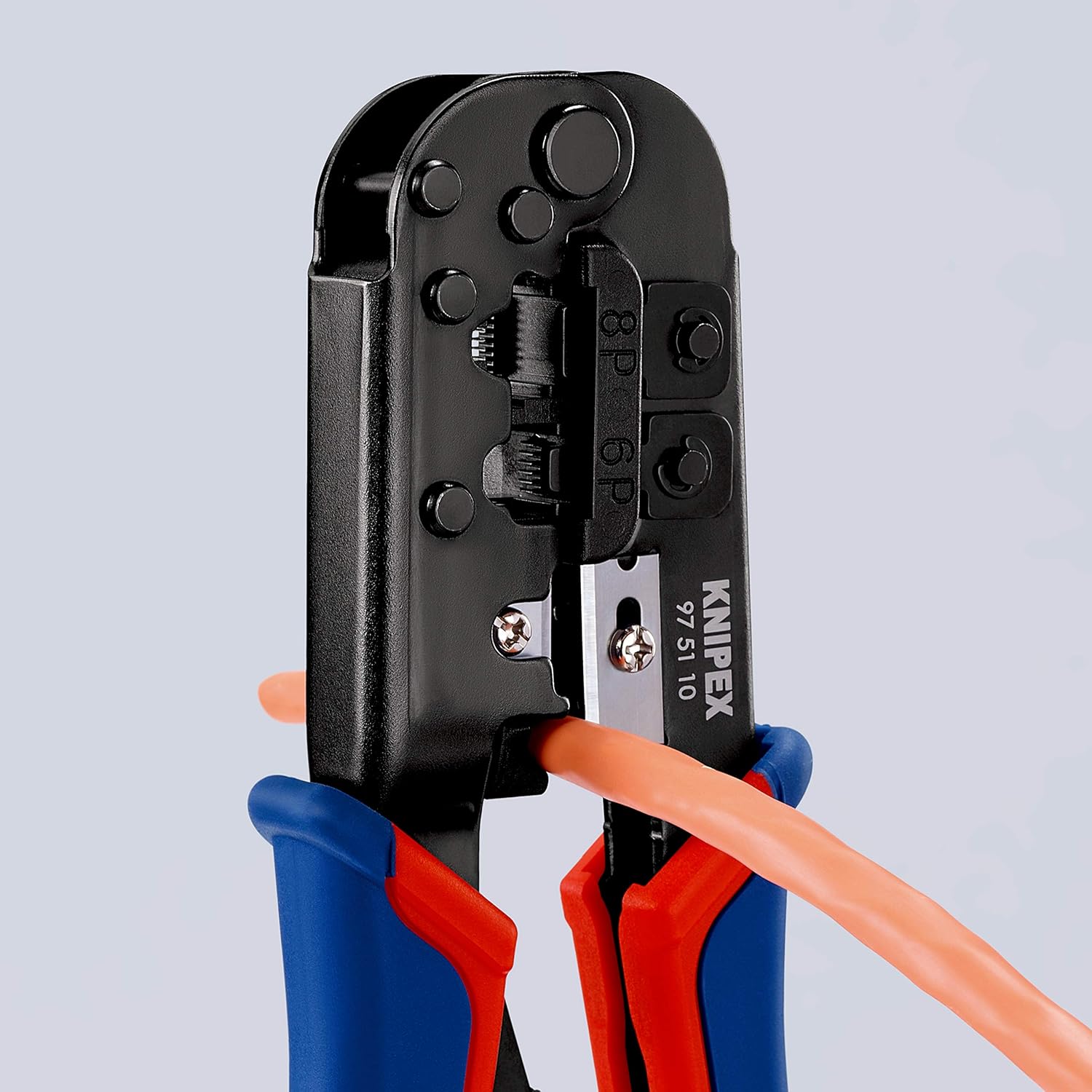
Figure 2: Demonstrates the stripping function for round cables. The orange cable is inserted into the dedicated stripping slot on the pliers.

Figure 3: Illustrates the result of stripping a cable using the pliers. The outer jacket of the orange cable is removed, exposing the internal conductors.
2. Crimping Western Plugs
The pliers are designed for crimping 6-pole and 8-pole Western plugs.
- പിന്തുണയ്ക്കുന്ന പ്ലഗ് തരങ്ങൾ:
- RJ 11/12 (3/8-inch or 9.65 mm width)
- RJ 45 (15/32-inch or 11.68 mm width)
- ക്രിമ്പിംഗ് പ്രക്രിയ:
- Prepare the cable by stripping the outer jacket to the appropriate length, exposing the individual wires.
- Arrange the wires according to the desired wiring standard (e.g., T568A or T568B for RJ45).
- Insert the prepared wires into the Western plug, ensuring each wire reaches the end of its channel.
- Place the loaded plug into the corresponding crimping die on the pliers (marked 6P for 6-pole or 8P for 8-pole).
- Squeeze the handles firmly and completely until the integral lock (self-releasing mechanism) disengages. This ensures a complete and high-quality crimp.
- Release the handles and remove the crimped plug.
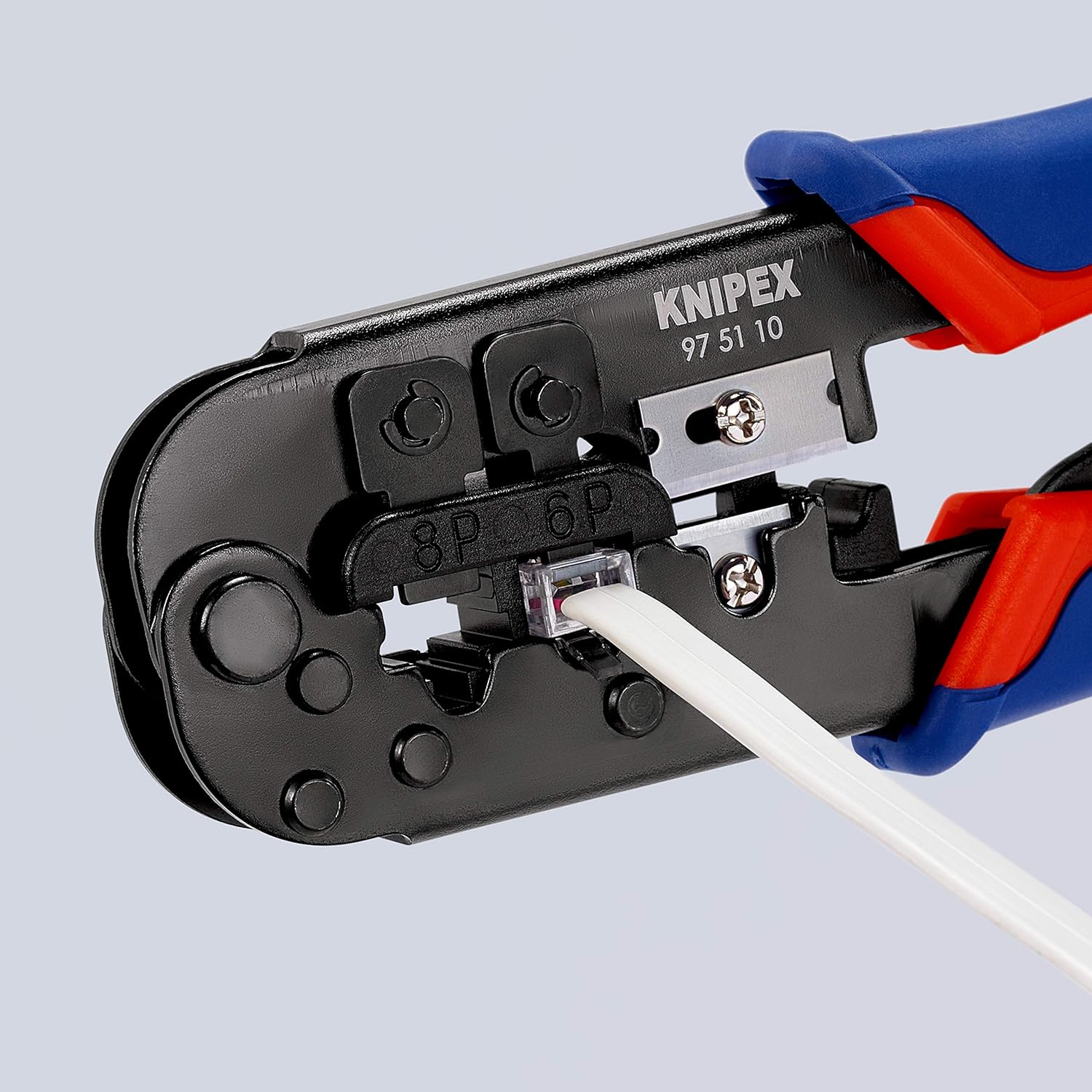
Figure 4: Shows the crimping action. A white RJ45 plug is inserted into the 8P crimping die, ready for the crimping process.
മെയിൻ്റനൻസ്
Proper maintenance will extend the life and performance of your KNIPEX Crimping Pliers.
- വൃത്തിയാക്കൽ: After each use, wipe down the tool with a clean, dry cloth to remove any dust, dirt, or cable residue. For stubborn grime, a mild cleaning solution can be used, ensuring the tool is thoroughly dried afterwards.
- ലൂബ്രിക്കേഷൻ: Periodically apply a light machine oil to the pivot points and moving parts to ensure smooth operation.
- സംഭരണം: Store the pliers in a dry environment to prevent rust and corrosion. Keep them away from excessive heat or cold.
- ബ്ലേഡ് പരിശോധന: Regularly inspect the cutting and stripping blades for sharpness and damage. Dull or damaged blades can lead to poor performance and should be addressed.
ട്രബിൾഷൂട്ടിംഗ്
If you encounter issues while using your crimping pliers, refer to the following common problems and solutions:
- Poor Crimps (Loose or Damaged Connections):
- Ensure the cable wires are fully inserted into the plug and seated correctly before crimping.
- Verify that the correct crimping die (6P or 8P) is used for the plug type.
- Apply full pressure until the self-releasing mechanism disengages, indicating a complete crimp cycle.
- Inspect the crimping dies for wear or damage.
- Difficulty Stripping Cables:
- Ensure the cable is correctly positioned in the stripping slot.
- Check the stripping blades for sharpness. If dull, the tool may require professional servicing or replacement.
- Verify you are using the correct stripping method for the cable type (ribbon vs. round).
- Tool Jams or Sticks:
- Clean any debris from the pivot points and crimping dies.
- Apply a small amount of lubricant to the moving parts.
സ്പെസിഫിക്കേഷനുകൾ
| ബ്രാൻഡ് | നൈപെക്സ് |
| മോഡൽ നമ്പർ | 97 51 10 |
| ഇനത്തിൻ്റെ ഭാരം | 10.7 ഔൺസ് (303.3 ഗ്രാം) |
| ഉൽപ്പന്ന അളവുകൾ | 7.45 x 2.65 x 0.95 ഇഞ്ച് (18.9 x 6.7 x 2.4 സെ.മീ) |
| നിറം | ചുവപ്പും നീലയും |
| ഹാൻഡിൽ മെറ്റീരിയൽ | ബഹുവർണ്ണം |
| ഗ്രിപ്പ് തരം | Ergonomic, Textured |
| പിന്തുണയ്ക്കുന്ന പ്ലഗ് തരങ്ങൾ | RJ 11/12 (6-pole), RJ 45 (8-pole) |
| ഫീച്ചറുകൾ | Integral lock (self-releasing mechanism), Length cutter, Dismantling knife for ribbon cables, Additional stripping device for round cables. |
| യു.പി.സി | 843221006136 |
വാറൻ്റി വിവരങ്ങൾ
KNIPEX tools are manufactured to the highest quality standards. For specific warranty terms and conditions, please refer to the official KNIPEX webസൈറ്റിൽ ബന്ധപ്പെടുക അല്ലെങ്കിൽ അവരുടെ ഉപഭോക്തൃ സേവനവുമായി ബന്ധപ്പെടുക. ഏതെങ്കിലും വാറന്റി ക്ലെയിമുകൾക്കായി നിങ്ങളുടെ വാങ്ങലിന്റെ തെളിവ് സൂക്ഷിക്കുക.
പിന്തുണ
For further assistance, technical support, or inquiries regarding your KNIPEX Crimping Pliers, please visit the official KNIPEX webസൈറ്റ് അല്ലെങ്കിൽ അവരുടെ ഉപഭോക്തൃ പിന്തുണ ടീമിനെ ബന്ധപ്പെടുക.
Official KNIPEX Store: KNIPEX Tools Store on Amazon
Ask a question about this manual
Ask about setup, troubleshooting, compatibility, parts, safety, or missing instructions. Manuals+ will review the question and use this page’s manual context to help answer it.