
ആമുഖം
This manual provides detailed instructions for the safe installation, operation, and maintenance of your Woods 59745WD 24-Hour Mechanical In-Wall Timer. Please read all instructions carefully before installation and use. Retain this manual for future reference.

Image 1: Woods 59745WD 24-Hour Mechanical In-Wall Timer. This image shows the front view of the white mechanical timer with its circular dial and two-prong outlet.
സുരക്ഷാ വിവരങ്ങൾ
മുന്നറിയിപ്പ്: വൈദ്യുതാഘാതത്തിനുള്ള സാധ്യത. Installation requires working with electrical wiring. If you are not familiar with electrical wiring, consult a qualified electrician. Improper installation can result in serious injury or death.
- ടൈമർ ഇൻസ്റ്റാൾ ചെയ്യുന്നതിനോ സർവീസ് ചെയ്യുന്നതിനോ മുമ്പ് സർക്യൂട്ട് ബ്രേക്കറിലോ ഫ്യൂസ് ബോക്സിലോ വൈദ്യുതി വിച്ഛേദിക്കുക.
- എല്ലാ വയറിംഗ് കണക്ഷനുകളും സുരക്ഷിതമാണെന്നും പ്രാദേശിക ഇലക്ട്രിക്കൽ കോഡുകൾ പാലിക്കുന്നുണ്ടെന്നും ഉറപ്പാക്കുക.
- This timer is designed for indoor use only.
- Do not exceed the maximum electrical ratings of the device.
പാക്കേജ് ഉള്ളടക്കം
ഇൻസ്റ്റാളേഷൻ ആരംഭിക്കുന്നതിന് മുമ്പ് എല്ലാ ഘടകങ്ങളും നിലവിലുണ്ടെന്ന് ഉറപ്പാക്കുക:
- Woods 59745WD 24-Hour Mechanical In-Wall Timer
- ഇൻസ്ട്രക്ഷൻ മാനുവൽ
- മൗണ്ടിംഗ് സ്ക്രൂകൾ (ബാധകമെങ്കിൽ)
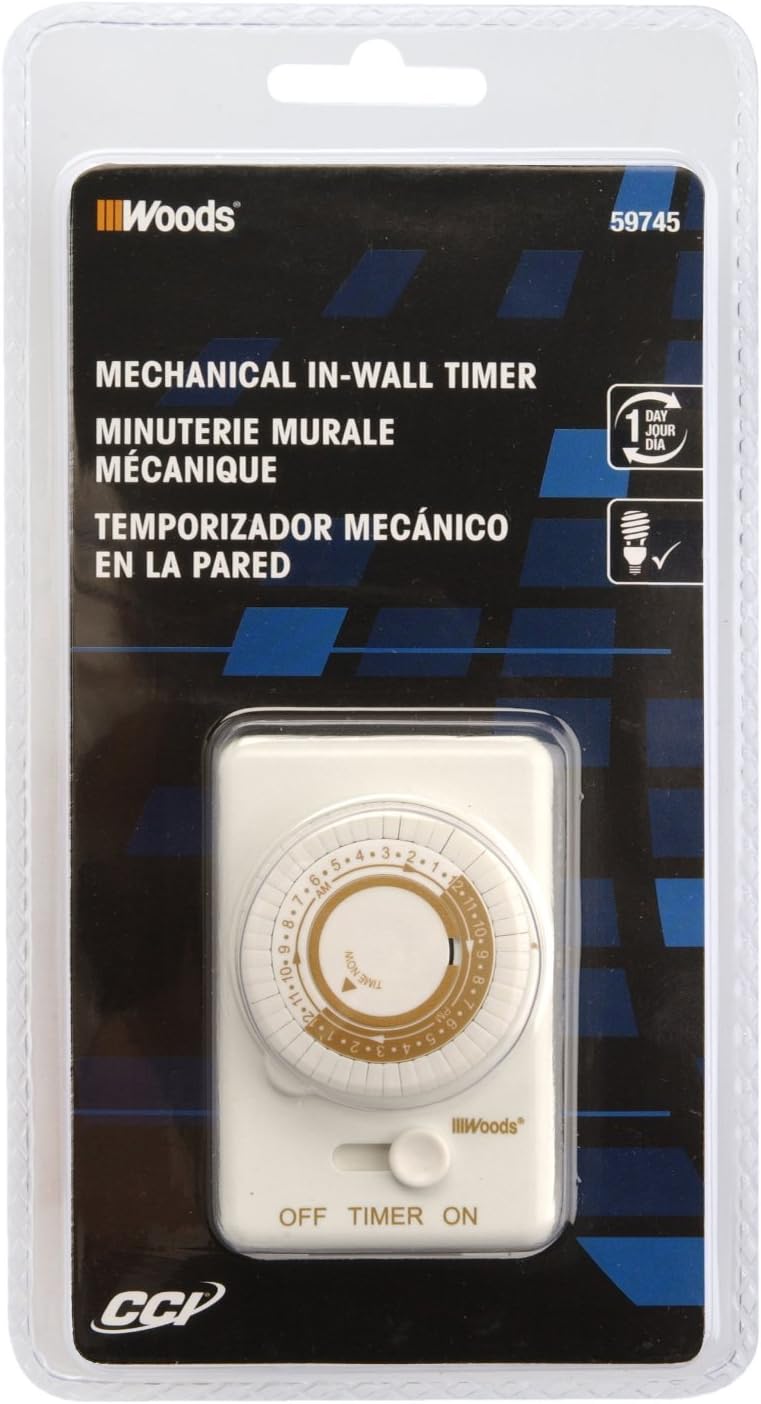
Image 2: Packaging for the Woods 59745WD In-Wall Timer. The image displays the product in its retail packaging, highlighting the brand and model number.
സജ്ജീകരണവും ഇൻസ്റ്റാളേഷനും
This timer is designed to replace a standard wall light switch. Professional installation is recommended.
- പവർ ഓഫ് ചെയ്യുക: Locate the circuit breaker or fuse that controls the light switch you intend to replace. Turn off the power completely to avoid electrical shock. Verify power is off using a voltagഇ ടെസ്റ്റർ.
- പഴയ സ്വിച്ച് നീക്കം ചെയ്യുക: Carefully remove the wall plate and unscrew the existing light switch from the electrical box. Disconnect the wires from the old switch. Note the connections: typically, a neutral (white), an incoming hot (black), and an outgoing load (black or red).
- Wire the Timer: Connect the Woods 59745WD timer according to the following common wiring scheme. Note: Wiring colors may vary. If unsure, consult a qualified electrician.
- ബന്ധിപ്പിക്കുക വെള്ള wire from the timer to the neutral (white) ഇലക്ട്രിക്കൽ ബോക്സിലെ വയറുകൾ.
- ബന്ധിപ്പിക്കുക കറുപ്പ് wire from the timer to the incoming hot (black) wire from the power source.
- ബന്ധിപ്പിക്കുക ചുവപ്പ് wire from the timer to the outgoing load (black or red) wire that goes to the light fixture.
- If a ground wire is present in the electrical box, connect it to the timer's ground terminal (if available). The product specifications indicate no explicit ground wire mentioned in some reviews, but proper grounding is always recommended.
- Mount the Timer: Carefully push the wired timer into the electrical box. Secure it with the provided screws.
- ഫെയ്സ് പ്ലേറ്റ് ഇൻസ്റ്റാൾ ചെയ്യുക: Attach the decorative wall plate over the timer. The instructions suggest disassembling the timer (removing the time knob and face plate held by 2 screws), installing the light according to the wiring diagram, securing the timer in the box, placing the decorative light plate over it and screwing the plate to the timer. The opening aligns to the timer as you screw the plate and the timer together. Install the timer faceplate and secure with the two screws. Replace the knobs.
- പവർ പുന ore സ്ഥാപിക്കുക: സർക്യൂട്ട് ബ്രേക്കറിലോ ഫ്യൂസ് ബോക്സിലോ വീണ്ടും പവർ ഓണാക്കുക.
പ്രവർത്തന നിർദ്ദേശങ്ങൾ
The Woods 59745WD timer features a 24-hour mechanical dial with 30-minute interval settings.
- നിലവിലെ സമയം സജ്ജമാക്കുക: Rotate the inner dial clockwise until the current time aligns with the "TIME NOW" arrow indicator. The dial is marked with 24 hours (1-12 AM/PM).
- പ്രോഗ്രാം ഓൺ/ഓഫ് സമയങ്ങൾ: The outer ring of the dial has small pins. Each pin represents a 30-minute interval.
- To set an ON period, pull the pins പുറത്തേക്ക് for the desired duration.
- To set an ഓഫ് period, push the pins ഉള്ളിലേക്ക് for the desired duration.
ഉദാample, to turn a light on from 7 PM to 11 PM, pull out all pins corresponding to the 7:00 PM, 7:30 PM, 8:00 PM, 8:30 PM, 9:00 PM, 9:30 PM, 10:00 PM, and 10:30 PM segments.
- ഓപ്പറേറ്റിംഗ് മോഡ് തിരഞ്ഞെടുക്കുക: Use the side switch to select the desired mode:
- ഓൺ: The connected device will remain continuously on, bypassing the timer settings.
- ടൈമർ: The connected device will operate according to the programmed ON/OFF times.
- ഓഫാണ്: The connected device will remain continuously off, bypassing the timer settings.

Image 3: Woods In-Wall Timer in a home setting. This image illustrates the timer installed in a wall, controlling a light fixture, demonstrating its practical application.
മെയിൻ്റനൻസ്
The Woods 59745WD timer requires minimal maintenance.
- വൃത്തിയാക്കൽ: Disconnect power before cleaning. Wipe the exterior with a soft, dry cloth. Do not use liquid cleaners or abrasive materials.
- പരിശോധന: Periodically inspect the timer for any signs of damage, loose connections, or wear. If any issues are found, discontinue use and consult a qualified electrician.
ട്രബിൾഷൂട്ടിംഗ്
| പ്രശ്നം | സാധ്യമായ കാരണം | പരിഹാരം |
|---|---|---|
| Timer does not turn ON/OFF at set times. |
|
|
| Timer stops working or does not keep accurate time. |
|
|
| Light remains ON or OFF continuously. |
|
|
സ്പെസിഫിക്കേഷനുകൾ
| ഫീച്ചർ | വിശദാംശങ്ങൾ |
|---|---|
| മോഡൽ നമ്പർ | 59745WD |
| ടൈപ്പ് ചെയ്യുക | 24-Hour Mechanical In-Wall Timer |
| വാല്യംtage | 125 വോൾട്ട് എസി |
| ക്രമീകരണങ്ങളുടെ എണ്ണം | 24 daily settings, programmable in 30-minute intervals |
| മൗണ്ടിംഗ് തരം | മതിൽ മൗണ്ട് |
| സ്വിച്ച് തരം | 1-വഴി |
| അളവുകൾ (D x W x H) | 2.25"D x 4.25"W x 8.25"H |
| ഇനത്തിൻ്റെ ഭാരം | 4.69 ഔൺസ് |
| മെറ്റീരിയൽ | ബ്ലെൻഡ് |
| യു.പി.സി | 078693597459 |
വാറൻ്റി വിവരങ്ങൾ
According to available product information, there is no specific warranty description provided for this product.
പിന്തുണ
For further assistance or technical support, please contact the manufacturer, Woods, or refer to their official website. When contacting support, please have your product model number (59745WD) and UPC (078693597459) available.
You can visit the Woods store on Amazon for more information: Woods Store


