
ആമുഖം
This manual provides essential information for the installation, operation, and maintenance of your ADTRAN NetVanta 644 VoIP Gateway. The NetVanta 644 is designed to provide reliable voice over IP (VoIP) services, integrating traditional telephony with modern IP networks. Please read this manual thoroughly before operating the device to ensure proper functionality and safety.
സുരക്ഷാ വിവരങ്ങൾ
- ഊർജ്ജ സ്രോതസ്സ്: Use only the power adapter supplied with the device. Ensure the power outlet meets the specified voltagഇ ആവശ്യകതകൾ.
- വെൻ്റിലേഷൻ: വെന്റിലേഷൻ തുറസ്സുകൾ തടയരുത്. അമിതമായി ചൂടാകുന്നത് തടയാൻ ഉപകരണത്തിന് ചുറ്റും മതിയായ വായുസഞ്ചാരം ഉറപ്പാക്കുക.
- സ്ഥാനം: Install the device in a dry, stable environment, away from direct sunlight, heat sources, and excessive moisture.
- സേവനം: Do not attempt to open or service the device yourself. Refer all servicing to qualified ADTRAN personnel.
- കേബിളുകൾ: Ensure all cables are securely connected and routed to prevent tripping hazards or damage.
പാക്കേജ് ഉള്ളടക്കം
നിങ്ങളുടെ പാക്കേജിൽ ഇനിപ്പറയുന്ന ഇനങ്ങൾ അടങ്ങിയിട്ടുണ്ടെന്ന് പരിശോധിക്കുക:
- ADTRAN NetVanta 644 VoIP Gateway (Model 1700144G1)
- പവർ അഡാപ്റ്റർ
- ഇഥർനെറ്റ് കേബിൾ
- ക്വിക്ക് സ്റ്റാർട്ട് ഗൈഡ് (ബാധകമെങ്കിൽ)
ഉൽപ്പന്നം കഴിഞ്ഞുview
The ADTRAN NetVanta 644 is a versatile VoIP gateway designed for business and home use, facilitating the integration of traditional T1/E1 lines with IP-based communication systems. It features multiple ports for network connectivity and voice interfaces.
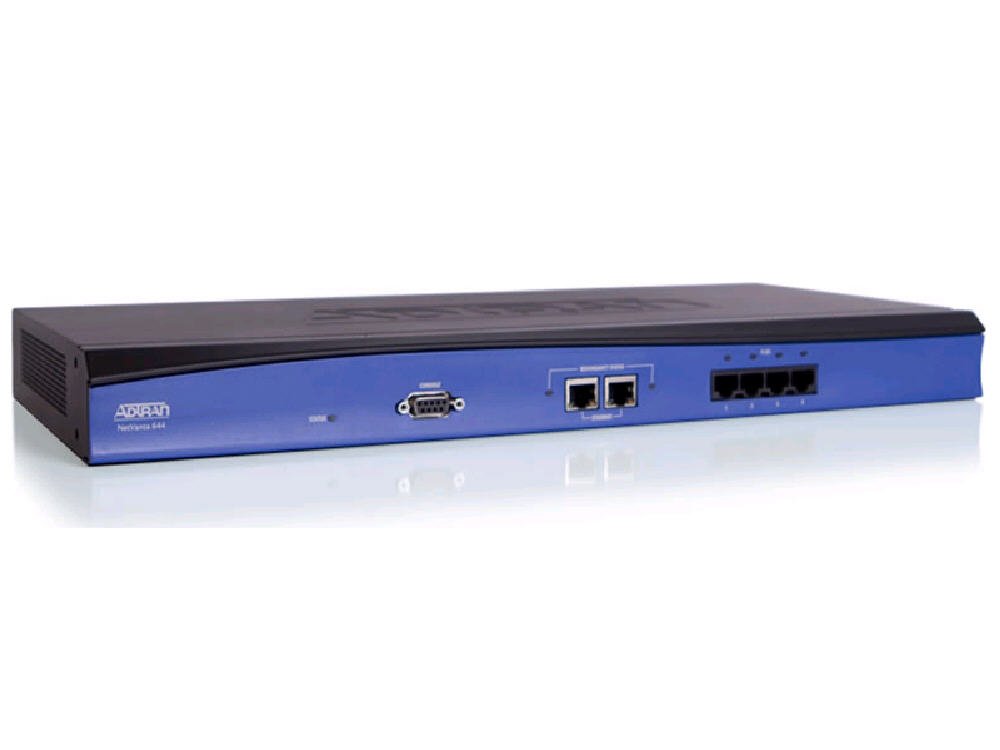
ചിത്രം 1: മുൻഭാഗം view of the ADTRAN NetVanta 644 VoIP Gateway, showing various ports and indicator lights.
പ്രധാന ഘടകങ്ങളിൽ സാധാരണയായി ഇവ ഉൾപ്പെടുന്നു:
- ഇഥർനെറ്റ് പോർട്ടുകൾ: For connecting to your local area network (LAN) and wide area network (WAN).
- T1/E1 Ports: For connecting to traditional telephony lines. The NetVanta 644 features 4 T1/E1 ports.
- കൺസോൾ പോർട്ട്: For local management and configuration via a serial connection.
- പവർ ഇൻപുട്ട്: പവർ അഡാപ്റ്റർ ബന്ധിപ്പിക്കുന്നതിന്.
- LED സൂചകങ്ങൾ: Provide status information for power, network activity, and voice line status.
സജ്ജമാക്കുക
1. ഫിസിക്കൽ ഇൻസ്റ്റലേഷൻ
- ഉപകരണം അൺപാക്ക് ചെയ്യുക: Carefully remove the NetVanta 644 from its packaging.
- പ്ലേസ്മെൻ്റ്: Place the gateway on a flat, stable surface or mount it in a standard equipment rack (mounting hardware sold separately). Ensure proper ventilation.
- Connect T1/E1 Lines: Connect your T1/E1 lines to the corresponding T1/E1 ports on the gateway.
- ഇഥർനെറ്റ് കേബിളുകൾ ബന്ധിപ്പിക്കുക: Connect an Ethernet cable from your LAN to an appropriate Ethernet port on the gateway. If connecting to a WAN, use the designated WAN port.
- പവർ ബന്ധിപ്പിക്കുക: Connect the power adapter to the gateway's power input and then plug it into a suitable electrical outlet.
2. പ്രാരംഭ കോൺഫിഗറേഷൻ
Upon powering on, the device will initiate its boot sequence. Initial configuration is typically performed via a web-based interface or a command-line interface (CLI) through the console port. Refer to the ADTRAN documentation for detailed configuration steps specific to your network environment and desired VoIP services.
- ആക്സസ് ചെയ്യുന്നു Web ഇൻ്റർഫേസ്: Typically, the device will obtain an IP address via DHCP or use a default static IP. Consult the Quick Start Guide for the default IP address and login credentials.
- CLI ആക്സസ്: Connect a serial cable from your computer to the gateway's console port. Use a terminal emulation program (e.g., PuTTY) with settings: 9600 baud, 8 data bits, no parity, 1 stop bit, no flow control.
പ്രവർത്തിക്കുന്നു
അടിസ്ഥാന പ്രവർത്തനം
Once configured, the NetVanta 644 operates as an intermediary between your IP network and traditional T1/E1 voice lines. It translates voice signals between these two environments, enabling calls to be routed efficiently.
- സ്റ്റാറ്റസ് മോണിറ്ററിംഗ്: Monitor the LED indicators on the front panel for operational status. Green LEDs typically indicate normal operation, while amber or red may indicate a fault or warning.
- Voice Call Routing: The gateway will automatically route calls based on the configuration settings established during setup.
വിപുലമായ സവിശേഷതകൾ
The NetVanta 644 supports various advanced VoIP features, including:
- SIP (Session Initiation Protocol) support for connecting to IP PBXs or VoIP service providers.
- H.323 protocol support.
- Quality of Service (QoS) mechanisms to prioritize voice traffic.
- Security features such as VPN and firewall capabilities.
Detailed configuration of these features is available in the comprehensive ADTRAN operating system (AOS) documentation, accessible via the ADTRAN support webസൈറ്റ്.
മെയിൻ്റനൻസ്
- ഫേംവെയർ അപ്ഡേറ്റുകൾ: ഇടയ്ക്കിടെ ADTRAN പിന്തുണ പരിശോധിക്കുക website for firmware updates. Keeping the firmware current ensures optimal performance, security, and access to new features. Follow ADTRAN's instructions carefully when performing updates.
- വൃത്തിയാക്കൽ: Gently wipe the exterior of the device with a soft, dry cloth. Do not use liquid cleaners or aerosols. Ensure ventilation openings are free from dust accumulation.
- കോൺഫിഗറേഷൻ ബാക്കപ്പ്: Regularly back up your device configuration. This allows for quick restoration in case of accidental changes or system failures.
- പരിസ്ഥിതി പരിശോധനകൾ: പ്രവർത്തന അന്തരീക്ഷം നിശ്ചിത താപനിലയിലും ഈർപ്പത്തിലും പരിധിക്കുള്ളിൽ തുടരുന്നുവെന്ന് ഉറപ്പാക്കുക.
ട്രബിൾഷൂട്ടിംഗ്
This section addresses common issues you might encounter with your NetVanta 644.
LED സൂചകങ്ങളുടെ ഗൈഡ്
| എൽഇഡി | നില | വിവരണം |
|---|---|---|
| ശക്തി | സോളിഡ് ഗ്രീൻ | ഉപകരണം ഓണാക്കി സാധാരണ രീതിയിൽ പ്രവർത്തിക്കുന്നു. |
| ശക്തി | ഓഫ് | No power or device malfunction. Check power connection. |
| ഇഥർനെറ്റ് ലിങ്ക്/ആക്ട് | സോളിഡ് ഗ്രീൻ | ഇഥർനെറ്റ് ലിങ്ക് സ്ഥാപിച്ചു. |
| ഇഥർനെറ്റ് ലിങ്ക്/ആക്ട് | മിന്നുന്ന പച്ച | Data activity on the Ethernet port. |
| T1/E1 Status | സോളിഡ് ഗ്രീൻ | T1/E1 line is active and synchronized. |
| T1/E1 Status | Flashing Amber/Red | Indicates a line error or synchronization issue. Check cabling and service provider status. |
പൊതുവായ പ്രശ്നങ്ങളും പരിഹാരങ്ങളും
- ശക്തിയില്ല: പവർ അഡാപ്റ്റർ ഉപകരണത്തിലേക്കും പ്രവർത്തിക്കുന്ന ഒരു ഇലക്ട്രിക്കൽ ഔട്ട്ലെറ്റിലേക്കും സുരക്ഷിതമായി ബന്ധിപ്പിച്ചിട്ടുണ്ടെന്ന് ഉറപ്പാക്കുക. പവർ ഔട്ട്ലെറ്റ് പ്രവർത്തനക്ഷമമാണെന്ന് ഉറപ്പാക്കുക.
- നെറ്റ്വർക്ക് കണക്റ്റിവിറ്റി ഇല്ല: Check Ethernet cable connections. Verify that the Ethernet Link/Act LED is solid or flashing. Confirm network settings (IP address, subnet mask, gateway) are correct.
- Voice Calls Not Working: Check T1/E1 Status LEDs. If amber or red, inspect physical connections and contact your service provider. Verify VoIP configuration settings (SIP/H.323 registration, dial plans).
- ആക്സസ് ചെയ്യാൻ കഴിയില്ല Web ഇൻ്റർഫേസ്: Ensure your computer is on the same network segment as the gateway. Verify the gateway's IP address. Try clearing your browser's cache or using a different browser.
If issues persist, consult the detailed troubleshooting guides available on the ADTRAN support website or contact ADTRAN technical support.
സ്പെസിഫിക്കേഷനുകൾ
| ഫീച്ചർ | വിശദാംശങ്ങൾ |
|---|---|
| മോഡൽ നമ്പർ | 1700144G1 |
| ഉൽപ്പന്ന അളവുകൾ | 22.5 x 16 x 6 ഇഞ്ച് |
| ഇനത്തിൻ്റെ ഭാരം | 5 പൗണ്ട് |
| നിർമ്മാതാവ് | ADTRAN, INC. |
| ആദ്യ തീയതി ലഭ്യമാണ് | ഒക്ടോബർ 24, 2011 |
| പ്രത്യേക ഫീച്ചർ | WPS (Wi-Fi Protected Setup - Note: This feature is typically for Wi-Fi devices. For a VoIP Gateway, this might refer to a related network security feature or be a general specification listed.) |
| അനുയോജ്യമായ ഉപകരണങ്ങൾ | പേഴ്സണൽ കമ്പ്യൂട്ടർ |
| ശുപാർശ ചെയ്യുന്ന ഉപയോഗങ്ങൾ | ബിസിനസ്, വീട് |
| കണക്റ്റിവിറ്റി ടെക്നോളജി | ഇഥർനെറ്റ് |
| നിയന്ത്രണ രീതി | ശബ്ദം |
| ലാൻ പോർട്ട് ബാൻഡ്വിഡ്ത്ത് | 10/100/1000 megabits per second |
| യു.പി.സി | 607565032691, 604501605254 |
വാറൻ്റിയും പിന്തുണയും
ADTRAN products are typically covered by a limited warranty. For specific warranty terms and conditions applicable to your NetVanta 644 (Model 1700144G1), please refer to the warranty information provided at the time of purchase or visit the official ADTRAN webസൈറ്റ്.
For technical support, documentation, firmware downloads, and additional resources, please visit the official ADTRAN support portal. You may need your product's serial number for support inquiries.
ADTRAN ഉദ്യോഗസ്ഥൻ Webസൈറ്റ്: www.adtran.com