
1. ആമുഖം
The ECS Elitegroup A55F-M2 motherboard is designed to integrate AMD FM1 APU processors with the AMD A55 chipset, offering a balanced performance solution. This motherboard supports excellent graphics capabilities, including DirectX 11, and can utilize AMD Dual Graphics technology to combine APU and select Radeon discrete graphics cards for enhanced visual output. Key features include Dual-Channel DDR3 memory support up to 16GB, UVD3.0, SATA 3Gb/s, and USB 2.0 connectivity. This manual provides essential information for the proper installation, configuration, and maintenance of your A55F-M2 motherboard.
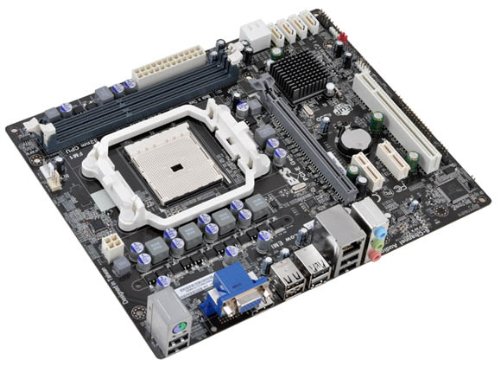
ചിത്രം 1: ECS Elitegroup A55F-M2 Motherboard. This image displays the overall layout of the motherboard, including the CPU socket, RAM slots, PCIe slots, and various connectors.
2 പ്രധാന സവിശേഷതകൾ
- Supports AMD FM1 socket for AMD A series, E Series, Athlon Quad-core, Athlon Dual-core, and Sempron Dual-core processors.
- Features ESD protection design to prevent damage and extend product lifespan.
- Includes ECS Intelligent EZ Utility suite: eBLU, eDLU, eOC, eSF for system management.
- Supports AMD Dual Graphics technology for enhanced visual performance.
- Equipped with solid capacitors for improved VRM stability and longevity.
- Expansion slots include 1 x PCIe x16 and 1 x PCIe x1.
- Compatible with Microsoft Windows 8, Windows 7, Windows Vista, and Windows XP (32-bit and 64-bit versions).
3. സജ്ജീകരണവും ഇൻസ്റ്റാളേഷനും
Follow these steps for proper installation of the motherboard and its components:
- കേസ് തയ്യാറാക്കുക: Ensure your computer case is compatible with Micro ATX motherboards. Install the I/O shield into the case's rear opening.
- സിപിയു ഇൻസ്റ്റാൾ ചെയ്യുക:
- സിപിയു സോക്കറ്റ് ലിവർ തുറക്കുക.
- സിപിയു സോക്കറ്റുമായി ശ്രദ്ധാപൂർവ്വം വിന്യസിക്കുക, സിപിയുവിലെ ത്രികോണാകൃതിയിലുള്ള അടയാളം സോക്കറ്റിലെ അടയാളവുമായി പൊരുത്തപ്പെടുന്നുണ്ടെന്ന് ഉറപ്പാക്കുക.
- നിർബന്ധിച്ച് അമർത്താതെ സിപിയു സോക്കറ്റിൽ സൌമ്യമായി വയ്ക്കുക.
- സിപിയു സുരക്ഷിതമാക്കാൻ സോക്കറ്റ് ലിവർ അടയ്ക്കുക.
- Apply a thin layer of thermal paste to the CPU's surface.
- നിർമ്മാതാവിന്റെ നിർദ്ദേശങ്ങൾക്കനുസൃതമായി സിപിയു കൂളർ ഇൻസ്റ്റാൾ ചെയ്യുക.
- റാം മൊഡ്യൂളുകൾ ഇൻസ്റ്റാൾ ചെയ്യുക:
- DIMM സ്ലോട്ടുകളുടെ രണ്ടറ്റത്തുമുള്ള ക്ലിപ്പുകൾ തുറക്കുക.
- സ്ലോട്ടിലെ കീയുമായി മൊഡ്യൂളിലെ നോച്ച് പൊരുത്തപ്പെടുന്നുണ്ടെന്ന് ഉറപ്പാക്കിക്കൊണ്ട്, RAM മൊഡ്യൂൾ സ്ലോട്ടുമായി വിന്യസിക്കുക.
- ക്ലിപ്പുകൾ ശരിയായ സ്ഥാനത്ത് വരുന്നത് വരെ RAM മൊഡ്യൂളിന്റെ രണ്ട് അറ്റങ്ങളിലും ദൃഢമായി അമർത്തുക.
- മദർബോർഡ് മൌണ്ട് ചെയ്യുക:
- Place the motherboard into the case, aligning the screw holes with the standoffs.
- മദർബോർഡ് സ്ക്രൂകൾ ഉപയോഗിച്ച് ഉറപ്പിക്കുക. അമിതമായി മുറുക്കരുത്.
- പവർ സപ്ലൈ ബന്ധിപ്പിക്കുക:
- Connect the 24-pin ATX power connector from the power supply to the motherboard.
- Connect the 4-pin or 8-pin ATX 12V power connector (CPU power) to the motherboard.
- സംഭരണ ഉപകരണങ്ങൾ ബന്ധിപ്പിക്കുക: Connect SATA data cables from your storage drives (HDD/SSD) to the SATA ports on the motherboard. Connect power cables from the power supply to the drives.
- ഫ്രണ്ട് പാനൽ കേബിളുകൾ ബന്ധിപ്പിക്കുക: Connect the power button, reset button, HDD LED, power LED, and USB/audio headers from the case to the corresponding pins on the motherboard. Refer to the motherboard's silkscreen labels for correct orientation.
- എക്സ്പാൻഷൻ കാർഡുകൾ ഇൻസ്റ്റാൾ ചെയ്യുക (ഓപ്ഷണൽ): If using a discrete graphics card or other PCIe cards, insert them into the appropriate PCIe slots and secure them with the case's retention mechanism.
4 ഓപ്പറേറ്റിംഗ് സിസ്റ്റം പിന്തുണ
The ECS Elitegroup A55F-M2 motherboard supports a range of Microsoft Windows operating systems:
- വിൻഡോസ് എക്സ്പി (32-ബിറ്റ്, 64-ബിറ്റ്)
- Windows Vista (32-bit and 64-bit)
- വിൻഡോസ് 7 (32-ബിറ്റും 64-ബിറ്റും)
- വിൻഡോസ് 8 (32-ബിറ്റും 64-ബിറ്റും)
Ensure you install the correct drivers for your operating system after installation for optimal performance and functionality.
5 സാങ്കേതിക സവിശേഷതകൾ
| ഫീച്ചർ | വിശദാംശങ്ങൾ |
|---|---|
| സിപിയു സോക്കറ്റ് | സോക്കറ്റ് FM1 |
| അനുയോജ്യമായ പ്രോസസ്സറുകൾ | AMD A-Series, AMD Athlon, AMD Sempron (FM1) |
| ചിപ്സെറ്റ് | AMD A55 (Hudson D2) |
| മെമ്മറി തരം | DDR3 SDRAM |
| മെമ്മറി സ്പീഡ് | 1800 MHz വരെ |
| പരമാവധി RAM ശേഷി | 32 ജിബി |
| ഗ്രാഫിക്സ് കോപ്രൊസസർ | Integrated AMD Graphics (APU dependent) |
| വിപുലീകരണ സ്ലോട്ടുകൾ | 1 x PCIe x16, 1 x PCIe x1 |
| USB 2.0 പോർട്ടുകൾ | 8 (via headers and rear panel) |
| സ്റ്റോറേജ് ഇൻ്റർഫേസ് | SATA 3Gb/s |
| ഫോം ഫാക്ടർ | മൈക്രോ എടിഎക്സ് |
| അളവുകൾ (LxWxH) | 10.5 x 9 x 2 ഇഞ്ച് |
| ഇനത്തിൻ്റെ ഭാരം | 1.7 പൗണ്ട് |
6. പ്രശ്നപരിഹാരം
നിങ്ങൾ നേരിട്ടേക്കാവുന്ന പൊതുവായ പ്രശ്നങ്ങൾക്കുള്ള പരിഹാരങ്ങൾ ഈ വിഭാഗം നൽകുന്നു.
- ശക്തിയില്ല:
- Ensure the power supply is connected correctly to the motherboard (24-pin ATX and 4/8-pin CPU power).
- പവർ സപ്ലൈ സ്വിച്ച് 'ഓൺ' സ്ഥാനത്താണെന്ന് ഉറപ്പാക്കുക.
- മദർബോർഡിലേക്കുള്ള ഫ്രണ്ട് പാനൽ പവർ ബട്ടൺ കണക്ഷൻ പരിശോധിക്കുക.
- സാധ്യമെങ്കിൽ മറ്റൊരു പവർ സപ്ലൈ ഉപയോഗിച്ച് പരീക്ഷിക്കുക.
- ഡിസ്പ്ലേ ഇല്ല:
- Ensure the monitor is connected to the correct video output (onboard or discrete graphics card).
- Reseat the RAM modules. Try booting with only one RAM module.
- ഗ്രാഫിക്സ് കാർഡ് വീണ്ടും സ്ഥാപിക്കുക (ബാധകമെങ്കിൽ).
- Clear CMOS by removing the CMOS battery for 5-10 minutes or using the clear CMOS jumper.
- സിസ്റ്റം അസ്ഥിരത/ക്രാഷുകൾ:
- സിപിയു, ജിപിയു താപനിലകൾ പരിശോധിക്കുക. അമിതമായി ചൂടാകുന്നത് അസ്ഥിരതയ്ക്ക് കാരണമാകും.
- എല്ലാ ഡ്രൈവർമാരും കാലികമാണെന്ന് ഉറപ്പാക്കുക.
- തകരാറുള്ള RAM പരിശോധിക്കാൻ മെമ്മറി ഡയഗ്നോസ്റ്റിക് ഉപകരണങ്ങൾ പ്രവർത്തിപ്പിക്കുക.
- Verify power supply is sufficient for all components.
- Peripheral Devices Not Detected:
- Ensure devices are properly connected to the correct ports (USB, SATA).
- Check device manager in your operating system for driver issues.
- Try connecting the device to a different port.
7. പരിപാലനം
Proper maintenance can extend the lifespan and ensure optimal performance of your motherboard.
- പൊടി നീക്കം: Regularly clean dust from inside your computer case, especially from CPU heatsinks, GPU fans, and case fans. Use compressed air for this purpose. Ensure the system is powered off and unplugged before cleaning.
- കേബിൾ മാനേജുമെന്റ്: വായുസഞ്ചാരം മെച്ചപ്പെടുത്തുന്നതിനും ഘടകങ്ങളുടെ തടസ്സം തടയുന്നതിനും കേബിളുകൾ വൃത്തിയായി റൂട്ട് ചെയ്തിട്ടുണ്ടെന്ന് ഉറപ്പാക്കുക.
- ഡ്രൈവർ അപ്ഡേറ്റുകൾ: Keep your motherboard drivers (chipset, audio, network) and graphics drivers updated to ensure compatibility and performance. Visit the ECS Elitegroup webഏറ്റവും പുതിയ ഡ്രൈവറുകൾക്കായുള്ള സൈറ്റ്.
- ബയോസ്/യുഇഎഫ്ഐ അപ്ഡേറ്റുകൾ: Periodically check for BIOS/UEFI updates from the manufacturer's website. Updates can improve stability, add support for new hardware, or fix bugs. Follow the update instructions carefully.
- പരിസ്ഥിതി നിയന്ത്രണം: Operate the computer in a well-ventilated area, away from direct sunlight, excessive heat, or humidity.
8. വാറൻ്റിയും പിന്തുണയും
For specific warranty terms and conditions, please refer to the warranty card included with your product or visit the official ECS Elitegroup webസൈറ്റ്. വാറന്റി കവറേജിൽ സാധാരണയായി സാധാരണ ഉപയോഗത്തിലുള്ള മെറ്റീരിയലുകളിലെയും ജോലികളിലെയും വൈകല്യങ്ങൾ ഉൾപ്പെടുന്നു.
For technical support, driver downloads, and further assistance, please visit the ECS Elitegroup support page. Have your product model number (A55F-M2) and serial number ready when contacting support.
ഉദ്യോഗസ്ഥൻ Webസൈറ്റ്: https://www.ecs.com.tw/