
1. ആമുഖം
The Nissin MF18 Macro Ring Flash is designed for professional macro photography, offering precise control and soft, diffuse light. This manual provides instructions for the proper setup, operation, and maintenance of your MF18 flash unit for Nikon cameras.
- Intuitive Color LCD: Features a bright, easy-to-read display for clear numerical values.
- ശക്തമായ ഔട്ട്പുട്ട്: Guide number of 16 (m) for achieving significant depth of field in close-up photography.
- കൃത്യമായ പവർ നിയന്ത്രണം: Offers Manual power from 1/1 to 1/64 (1/3 EV steps), Fine Macro power from 1/128 to 1/1024 (1/6 EV steps), and TTL compensation from -3.0 to +3.0 (1/3 EV steps).
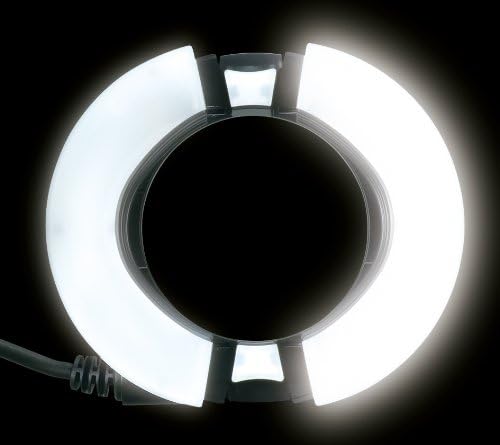
- LED Modeling Lights: Four built-in LED lights assist with focusing in low-light conditions.
- ഹൈ-സ്പീഡ് സിങ്ക് (HSS): Supports shutter speeds up to 1/8000 second for wider apertures in bright light.
2. പാക്കേജ് ഉള്ളടക്കം
പാക്കേജിൽ എല്ലാ ഇനങ്ങളും ഉണ്ടെന്ന് ഉറപ്പാക്കുക:
- Nissin Digital MF18 Macro Ring Flash Unit
- Anodized aluminum adapter rings for lenses with filter sizes: 52mm, 58mm, 62mm, 67mm, 72mm, and 77mm
- സംരക്ഷണ കേസ്
- ഉപയോക്തൃ മാനുവൽ (ഈ പ്രമാണം)
3. സജ്ജീകരണം
3.1. ബാറ്ററി ഇൻസ്റ്റാളേഷൻ
The MF18 requires 4 AA batteries. Ensure correct polarity when inserting the batteries.
- Locate the battery compartment on the control unit.
- ബാറ്ററി കമ്പാർട്ട്മെൻ്റ് കവർ തുറക്കുക.
- Insert 4 AA batteries, matching the positive (+) and negative (-) terminals as indicated inside the compartment.
- ബാറ്ററി കമ്പാർട്ട്മെൻ്റ് കവർ സുരക്ഷിതമായി അടയ്ക്കുക.
3.2. Mounting the Control Unit to the Camera
Attach the control unit to your camera's hot shoe.
- Slide the control unit's mounting foot into the camera's hot shoe.
- Secure the unit by tightening the locking mechanism on the control unit.
3.3. Attaching the Ring Flash Head to the Lens
The MF18 comes with various adapter rings to fit different lens filter sizes.
- Select the appropriate adapter ring for your lens's filter thread size (52mm, 58mm, 62mm, 67mm, 72mm, or 77mm).
- തിരഞ്ഞെടുത്ത അഡാപ്റ്റർ റിംഗ് നിങ്ങളുടെ ക്യാമറ ലെൻസിന്റെ മുൻ ഫിൽറ്റർ ത്രെഡിൽ സ്ക്രൂ ചെയ്യുക.
- Align the ring flash head with the adapter ring and gently push it until it clicks into place. Ensure it is securely attached.

Image: The Nissin MF18 Macro Ring Flash control unit mounted on a camera hot shoe, with the ring flash head attached to the lens. This illustrates the complete setup.
3.4. Connecting the Flash Head to the Control Unit
Connect the coiled cable from the ring flash head to the control unit.
- Insert the connector from the ring flash head's coiled cable into the designated port on the control unit.
- Ensure the connection is firm to prevent accidental disconnection during use.
ചിത്രം: ഒരു ക്ലോസ്-അപ്പ് view of the connection ports on the Nissin MF18 control unit, including the flash head connection port and a USB port.
4. പ്രവർത്തന നിർദ്ദേശങ്ങൾ
4.1. പവർ ഓൺ/ഓഫ്
Press and hold the power button on the control unit to turn the flash on or off. The color LCD will illuminate upon power-on.
4.2. LCD Display and Navigation
The MF18 features an intuitive color LCD display. Use the control buttons to navigate through menus and adjust settings. The screen automatically rotates for easier viewing when the camera is rotated.
4.3. Flash Modes and Power Control
The MF18 offers several flash modes for versatile lighting control:
- TTL മോഡ്: Automatic flash exposure control, compatible with Nikon's i-TTL system. Adjust compensation from -3.0 to +3.0 EV in 1/3 EV steps.
- മാനുവൽ മോഡ്: Manually set flash power from 1/1 (full power) to 1/64 in 1/3 EV steps.
- Fine Macro Mode: For extremely precise light control, power can be set from 1/128 to 1/1024 in 1/6 EV steps. This is ideal for very close-up subjects.
4.4. LED Modeling Lights
The four built-in LED modeling lights can be activated to assist with focusing in dim environments. Press the dedicated button to toggle the modeling lights on or off.
4.5. ഹൈ-സ്പീഡ് സിങ്ക് (HSS)
When enabled, HSS allows the flash to synchronize with shutter speeds up to 1/8000 second. This feature is useful for shooting with wide apertures in bright ambient light to achieve shallow depth of field.
4.6. Adjusting Flash Head Position
The ring flash head can be adjusted to spread the light wider or to prevent vignetting with certain lenses. Press the release buttons on the sides of the flash head to expand or contract its diameter.

Image: The Nissin MF18 ring flash head shown in both its compact and expanded configurations, demonstrating its adjustable design.

Image: The Nissin MF18 Macro Ring Flash head with its LED modeling lights illuminated, providing continuous light for focusing.
5. പരിപാലനം
- വൃത്തിയാക്കൽ: ഫ്ലാഷ് യൂണിറ്റ് വൃത്തിയാക്കാൻ മൃദുവായതും ഉണങ്ങിയതുമായ ഒരു തുണി ഉപയോഗിക്കുക. കഠിനമായ അഴുക്കിന്, അല്പം ഡി.amp cloth can be used, followed by a dry cloth. Do not use solvents or abrasive cleaners.
- ബാറ്ററി കെയർ: Remove batteries if the flash will not be used for an extended period to prevent leakage.
- സംഭരണം: Store the flash in its protective case in a cool, dry place away from direct sunlight and extreme temperatures.
- കൈകാര്യം ചെയ്യൽ: Avoid dropping the flash or subjecting it to strong impacts.
6. പ്രശ്നപരിഹാരം
| പ്രശ്നം | സാധ്യമായ കാരണം | പരിഹാരം |
|---|---|---|
| ഫ്ലാഷ് ഓണാക്കുന്നില്ല. | ഡെഡ് അല്ലെങ്കിൽ തെറ്റായി ചേർത്ത ബാറ്ററികൾ. | ബാറ്ററികൾ പുതിയവ ഉപയോഗിച്ച് മാറ്റിസ്ഥാപിക്കുക, ശരിയായ പോളാരിറ്റി ഉറപ്പാക്കുക. |
| ഫ്ലാഷ് കത്തുന്നില്ല. |
|
|
| Images are too dark/bright (TTL mode). | Incorrect flash exposure compensation. | Adjust flash exposure compensation on the MF18 or camera. |
| Vignetting (dark corners) in images. | Flash head not expanded sufficiently for the lens. | Expand the ring flash head using the side release buttons. |
7 സ്പെസിഫിക്കേഷനുകൾ
| ഫീച്ചർ | വിശദാംശങ്ങൾ |
|---|---|
| മോഡലിൻ്റെ പേര് | MF18 |
| അനുയോജ്യമായ മൗണ്ടിംഗുകൾ | Nikon (This model is specifically for Nikon) |
| ഗൈഡ് നമ്പർ | 16 (മീറ്റർ) |
| എക്സ്പോഷർ നിയന്ത്രണ തരം | TTL, High-Speed Sync |
| ഫ്ലാഷ് സമന്വയ വേഗത | Up to 1/8000 seconds (HSS) |
| Power Control (Manual) | 1/1 to 1/64 in 1/3 EV steps |
| Power Control (Fine Macro) | 1/128 to 1/1024 in 1/6 EV steps |
| TTL Compensation | -3.0 to +3.0 EV in 1/3 EV steps |
| വർണ്ണ താപനില | 5600 കെൽവിൻ |
| ബാറ്ററികളുടെ എണ്ണം | 4 AA ബാറ്ററികൾ ആവശ്യമാണ് |
| ഇനത്തിൻ്റെ ഭാരം | 0.45 കിലോഗ്രാം |
| കണക്റ്റിവിറ്റി ടെക്നോളജി | Wired (for flash head), Optical Pulse (for wireless) |
| ബിൽറ്റ്-ഇൻ മീഡിയ | Adapter rings for 52mm, 58mm, 62mm, 67mm, 72mm, 77mm lenses |
8. വാറൻ്റി
The Nissin MF18 Macro Ring Flash comes with a 2 Year parts and Labor warranty. Please retain your proof of purchase for warranty claims. For detailed warranty terms and conditions, refer to the official Nissin webസൈറ്റ് അല്ലെങ്കിൽ ഉപഭോക്തൃ പിന്തുണയുമായി ബന്ധപ്പെടുക.
9. പിന്തുണ
For technical assistance, troubleshooting beyond this manual, or warranty inquiries, please contact Nissin customer support. Visit the official Nissin webബന്ധപ്പെടാനുള്ള വിവരങ്ങൾക്കും അധിക ഉറവിടങ്ങൾക്കുമായി സൈറ്റ്.
നിസ്സിൻ Webസൈറ്റ്: www.nissindigital.com