
1. ആമുഖം
This manual provides essential information for the proper installation, operation, and maintenance of your Technical Pro LZ6200 2U Professional 2-Channel Power Ampലിഫയർ. ഉപയോഗിക്കുന്നതിന് മുമ്പ് ദയവായി ഈ മാനുവൽ നന്നായി വായിക്കുക ampഒപ്റ്റിമൽ പ്രകടനവും സുരക്ഷയും ഉറപ്പാക്കാൻ ലിഫയർ.
The LZ6200 is a professional-grade 2-channel power amplifier designed for reliable audio amplification in various settings. It features a robust design, versatile input/output options, and a selectable operating voltag110V അല്ലെങ്കിൽ 220V യുടെ e.
2. സുരക്ഷാ നിർദ്ദേശങ്ങൾ
- ഊർജ്ജ സ്രോതസ്സ്: ഉറപ്പാക്കുക amplifier is connected to a power source matching the selected voltage (110V or 220V) on the rear panel. Incorrect voltage selection can cause severe damage.
- വെൻ്റിലേഷൻ: Do not block ventilation openings. Ensure adequate airflow around the unit to prevent overheating. Maintain at least 4 inches (10 cm) of clear space around the ampജീവൻ.
- ഈർപ്പം: തുറന്നുകാട്ടരുത് ampമഴ, ഈർപ്പം അല്ലെങ്കിൽ അമിതമായ ഈർപ്പം എന്നിവയിലേക്ക് ലിഫയർ പരിമിതപ്പെടുത്തുക. ദ്രാവകങ്ങൾ യൂണിറ്റിൽ നിന്ന് അകറ്റി നിർത്തുക.
- പ്ലേസ്മെൻ്റ്: സ്ഥാപിക്കുക amplifier on a stable, level surface. Avoid placing it near heat sources or in direct sunlight.
- സേവനം: ഈ യൂണിറ്റ് സ്വയം സർവീസ് ചെയ്യാൻ ശ്രമിക്കരുത്. എല്ലാ സർവീസിംഗും യോഗ്യതയുള്ള സർവീസ് ഉദ്യോഗസ്ഥരെ ഏൽപ്പിക്കുക.
- ഗ്രൗണ്ടിംഗ്: Always use a grounded power cord.
3. പാക്കേജ് ഉള്ളടക്കം
നിങ്ങളുടെ പാക്കേജിൽ ഇനിപ്പറയുന്ന ഇനങ്ങൾ അടങ്ങിയിട്ടുണ്ടെന്ന് പരിശോധിക്കുക:
- Technical Pro LZ6200 Power Ampലൈഫയർ യൂണിറ്റ്
- എസി പവർ കേബിൾ
- നിർദ്ദേശ മാനുവൽ (ഈ പ്രമാണം)
- Key for Front Panel Lock
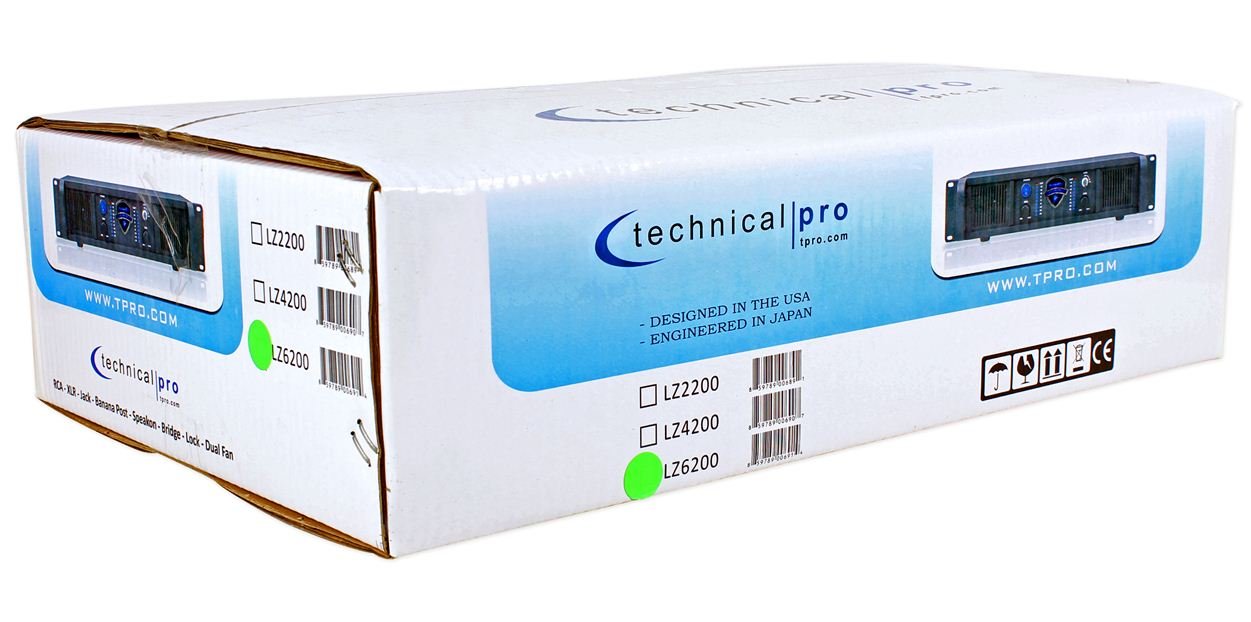
Image: Packaging box for the Technical Pro LZ6200 amplifier, showing the model number and brand logo.
4. ഫ്രണ്ട് പാനൽ സവിശേഷതകൾ
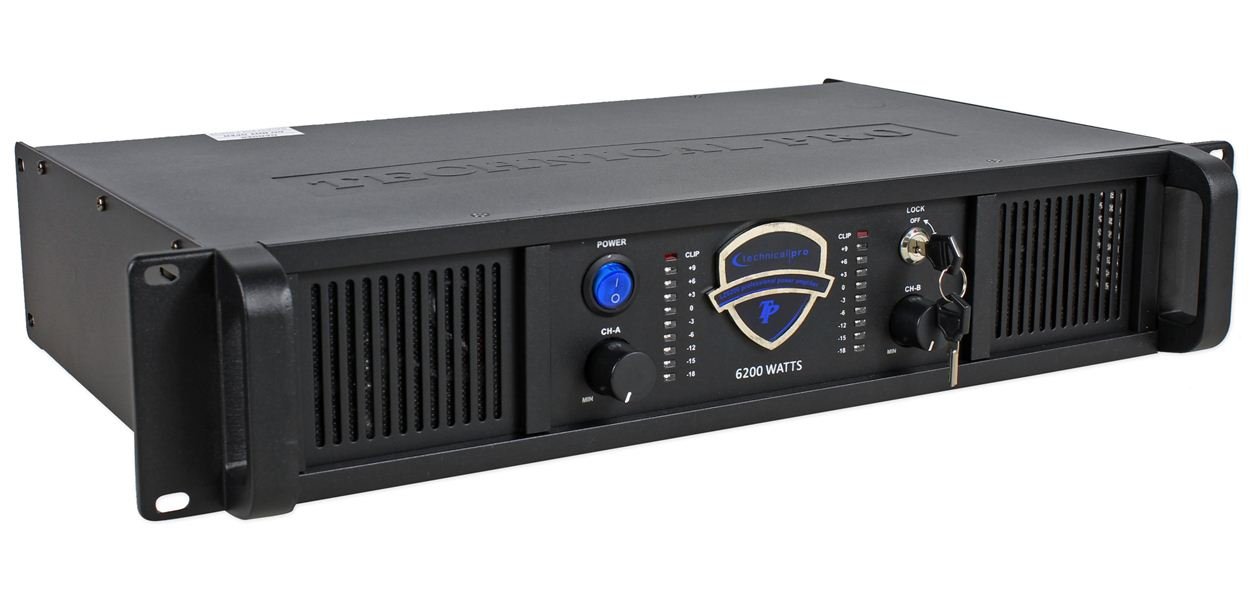
ചിത്രം: മുൻഭാഗം view of the Technical Pro LZ6200 amplifier, displaying the power button, level controls, LED meters, and lock switch.
- പവർ ബട്ടൺ: ടോഗിൾ ചെയ്യുന്നു amplifier's power on and off.
- CH-A / CH-B Level Controls: Rotary knobs to adjust the output level for Channel A and Channel B independently.
- CLIP സൂചകങ്ങൾ: Red LEDs that illuminate when the input signal is too high, indicating potential distortion. Reduce the input level if these LEDs light up frequently.
- LED മീറ്ററുകൾ: Multi-segment LED displays showing the output level for each channel.
- ലോക്ക് സ്വിച്ച്: A key-operated switch to prevent unauthorized operation of the amplifier. Insert the provided key to enable or disable the amplifier's functions.

ചിത്രം: മുൻഭാഗം view of the Technical Pro LZ6200 amplifier with the security key inserted into the lock switch.
5. പിൻ പാനൽ കണക്ഷനുകൾ
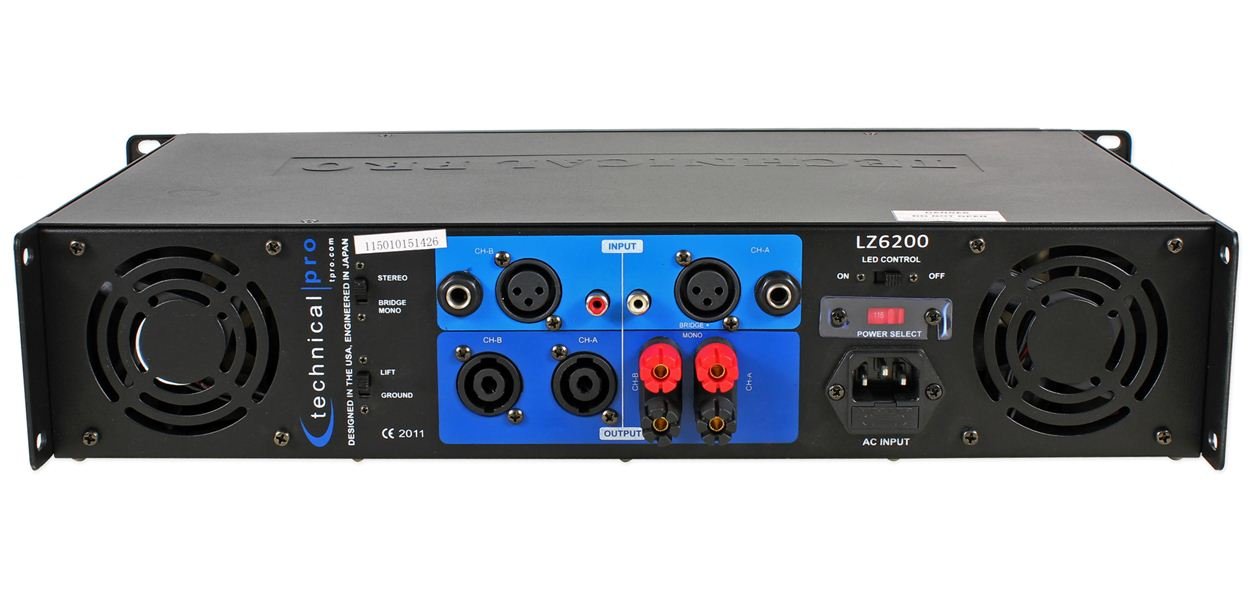
ചിത്രം: പിൻഭാഗം view of the Technical Pro LZ6200 amplifier, showing input and output connectors, mode switches, and power input.
- INPUT (CH-A / CH-B): Balanced XLR and 1/4" TRS combo jacks for connecting audio sources.
- OUTPUT (CH-A / CH-B): Speakon and Binding Post terminals for connecting speakers.
- മോഡ് സ്വിച്ച്: തിരഞ്ഞെടുക്കുന്നു ampലിഫയറിന്റെ പ്രവർത്തന രീതി: സ്റ്റീരിയോ (two independent channels), പാലം (combines both channels for mono, higher power output), or മോണോ (parallel input to both channels, independent outputs).
- LIFT / GROUND Switch: Used to break the ground loop if hum or noise is present in the audio signal.
- LED CONTROL Switch: Toggles the front panel LED meters on or off.
- POWER SELECT Switch (110V/220V): ഉചിതമായ ഓപ്പറേറ്റിംഗ് വോളിയം തിരഞ്ഞെടുക്കുന്നുtagനിങ്ങളുടെ പ്രദേശത്തിനായുള്ള ഇ. Ensure this is set correctly before connecting to power.
- എസി ഇൻപുട്ട്: Standard IEC power inlet for the AC power cable.
6. സജ്ജീകരണം
6.1 പ്ലേസ്മെൻ്റ്
സ്ഥാനം amplifier in a location that allows for proper ventilation. Avoid enclosed spaces or stacking other heat-generating equipment directly on top of the unit. Ensure the surface is stable and can support the ampലിഫയറിന്റെ ഭാരം.
6.2 പവർ കണക്ഷൻ
- പരിശോധിച്ചുറപ്പിക്കുക പവർ തിരഞ്ഞെടുക്കൽ പിൻ പാനലിലെ സ്വിച്ച് ശരിയായ വോളിയത്തിലേക്ക് സജ്ജീകരിച്ചിരിക്കുന്നുtage (110V or 220V) for your electrical supply.
- Connect the supplied AC power cable to the എസി ഇൻപുട്ട് on the rear panel and then to a grounded electrical outlet.
6.3 ഇൻപുട്ട് കണക്ഷനുകൾ
നിങ്ങളുടെ ഓഡിയോ ഉറവിടം ബന്ധിപ്പിക്കുക (മിക്സർ, പ്രീampലിഫയർ മുതലായവ) ഇൻപുട്ട് jacks (XLR or 1/4" TRS) on the rear panel. Use high-quality shielded cables to minimize noise.
6.4 Output Connections (Speakers)
ഇതിലേക്ക് നിങ്ങളുടെ സ്പീക്കറുകൾ ബന്ധിപ്പിക്കുക ഔട്ട്പുട്ട് terminals (Speakon or Binding Post) on the rear panel. Ensure correct polarity (+ to + and - to -) for all connections. Match speaker impedance to amplifier capabilities.
6.5 മോഡ് തിരഞ്ഞെടുക്കൽ
സജ്ജമാക്കുക മോഡ് switch on the rear panel according to your desired configuration:
- സ്റ്റീരിയോ: For typical two-channel operation, with independent signals for Channel A and Channel B.
- ബ്രിഡ്ജ്: For combining both channels into a single, higher-power mono output. Connect the speaker to the designated bridge output terminals (refer to markings on the unit).
- മോണോ: For parallel input to both channels, with independent outputs. Both channels receive the same input signal.
7. പ്രവർത്തന നിർദ്ദേശങ്ങൾ
- Ensure all connections (power, input, output) are secure and correct.
- നിരസിക്കുക സിഎച്ച്-എ ഒപ്പം CH-B Level Controls on the front panel to their minimum (MIN) position.
- അമർത്തുക പവർ ഓണാക്കാനുള്ള ബട്ടൺ amplifier. The power indicator will illuminate.
- If desired, insert the key into the ലോക്ക് ചെയ്യുക switch and turn it to the 'ON' position to enable ampലൈഫയർ പ്രവർത്തനങ്ങൾ.
- Start playing audio from your source device.
- പതുക്കെ വർദ്ധിപ്പിക്കുക സിഎച്ച്-എ ഒപ്പം CH-B Level Controls ആവശ്യമുള്ള വോളിയം നേടാൻ.
- നിരീക്ഷിക്കുക LED മീറ്റർ to observe output levels and the CLIP Indicators to prevent distortion. If a CLIP indicator flashes frequently, reduce the input level from your source or the amplifier's level control.
- ഓഫ് ചെയ്യാൻ amplifier, first reduce the level controls to minimum, then press the പവർ ബട്ടൺ.
8. പരിപാലനം
- വൃത്തിയാക്കൽ: വിച്ഛേദിക്കുക amplifier from power before cleaning. Use a soft, dry cloth to wipe the exterior. Do not use liquid cleaners or solvents.
- വെൻ്റിലേഷൻ: Regularly check that the ventilation grilles are free from dust and obstructions. Dust accumulation can lead to overheating.
- കണക്ഷനുകൾ: Periodically check all cable connections for tightness and wear.
9. പ്രശ്നപരിഹാരം
| പ്രശ്നം | സാധ്യമായ കാരണം | പരിഹാരം |
|---|---|---|
| ശക്തിയില്ല | Power cable disconnected; Power switch off; Incorrect voltage selection; Blown fuse; Lock switch engaged. | Check power cable connection; Ensure power switch is ON; Verify 110V/220V switch setting; Check/replace fuse (by qualified personnel); Disengage lock switch with key. |
| ശബ്ദ ഔട്ട്പുട്ട് ഇല്ല | Input cables disconnected; Speaker cables disconnected/incorrectly wired; Input source not playing; Amplifier level controls at minimum; Incorrect mode selection. | Check all input and output cable connections; Ensure input source is active; Increase amplifier level controls; Verify MODE switch setting. |
| വികലമായ ശബ്ദം | Input signal too high (clipping); Speaker impedance mismatch; Damaged speaker. | Reduce input level from source or amplifier level controls; Ensure speaker impedance is compatible; Test with different speakers. |
| ഹം അല്ലെങ്കിൽ ശബ്ദം | Ground loop; Poor cable shielding. | Engage the LIFT switch on the rear panel; Use higher quality shielded cables. |
| അമിത ചൂടാക്കൽ | Blocked ventilation; Excessive load. | Ensure adequate airflow around the unit; Reduce output level or speaker load. |
10 സ്പെസിഫിക്കേഷനുകൾ
- ബ്രാൻഡ്: സാങ്കേതിക പ്രോ
- മോഡൽ: LZ6200
- ചാനലുകൾ: 2
- പീക്ക് പവർ: 6200W
- ഓപ്പറേറ്റിംഗ് വോളിയംtage: 110V/220V (selectable)
- ഇൻപുട്ട് കണക്ടറുകൾ: എക്സ്എൽആർ, 1/4" ടിആർഎസ്
- ഔട്ട്പുട്ട് കണക്ടറുകൾ: Speakon, Binding Post
- സറൗണ്ട് സൗണ്ട് ചാനൽ കോൺഫിഗറേഷൻ: 2
- അളവുകൾ (പാക്കേജ്): 52.07 x 35.56 x 14.73 സെ.മീ (ഏകദേശം)
- ഇനത്തിൻ്റെ ഭാരം: 7.98 കി.ഗ്രാം (ഏകദേശം)
11. വാറൻ്റിയും പിന്തുണയും
For warranty information and technical support, please refer to the documentation provided at the time of purchase or contact Technical Pro customer service directly. Keep your purchase receipt as proof of purchase.
For further assistance, visit the official Technical Pro webസൈറ്റ് ചെയ്യുക അല്ലെങ്കിൽ അവരുടെ അംഗീകൃത സേവന കേന്ദ്രങ്ങളുമായി ബന്ധപ്പെടുക.