
ആമുഖം
This manual provides detailed instructions for the installation, operation, and maintenance of the Sure Electronics AA-AB32231 2x8W at 4 Ohm TPA3110 Class-D Audio Amplifier Board. This compact and efficient amplifier board is designed for various audio applications requiring reliable stereo ampലിഫിക്കേഷൻ.
ഉൽപ്പന്ന സവിശേഷതകൾ
- ഔട്ട്പുട്ട് പവർ: 2 x 8 Watts at 4 Ohm
- Ampജീവിത തരം: Class-D (TPA3110 chip)
- വൈദ്യുതി വിതരണം: DC 8V to 19V (recommended 12V-16V)
- ചാനലുകൾ: 2.0 സ്റ്റീരിയോ
- ഇൻപുട്ട് ഓപ്ഷനുകൾ: 3.5mm audio jack or solder terminals
- കോംപാക്റ്റ് ഡിസൈൻ: Ideal for embedded audio projects
സുരക്ഷാ വിവരങ്ങൾ
Please read and understand the following safety precautions before operating the amplifier board:
- വൈദ്യുതി വിതരണം വോളിയം ഉറപ്പാക്കുകtage is within the specified range (DC 8V-19V). Exceeding this range can damage the board.
- ഏതെങ്കിലും കണക്ഷനുകൾ നടത്തുന്നതിനോ വിച്ഛേദിക്കുന്നതിനോ മുമ്പ് വൈദ്യുതി വിച്ഛേദിക്കുക.
- Avoid short-circuiting speaker outputs or power supply terminals.
- Do not expose the board to moisture, extreme temperatures, or static electricity.
- Handle the board by its edges to prevent damage to components.
- This product is intended for experienced users familiar with electronic components and wiring.
സജ്ജീകരണവും കണക്ഷനുകളും
Refer to the images below for visual guidance on connecting the ampലൈഫ് ബോർഡ്.

ചിത്രം 1: മുകളിൽ view of the AA-AB32231 ampലൈഫ് ബോർഡ്.
This image displays the top side of the amplifier board, highlighting the various connection points. On the left, you can see the DC power input terminals (GND and VCC). The audio input jack is visible on the top left, and speaker output terminals (OUT1+, OUT1-, OUT2+, OUT2-) are located on the top and right sides of the board.
1. വൈദ്യുതി വിതരണ കണക്ഷൻ
- Connect a DC power supply (8V to 19V) to the "DC IN 8-19V" terminals (J1) on the left side of the board.
- Ensure correct polarity: connect the positive (+) terminal of the power supply to VCC and the negative (-) terminal to GND.
- A 12V or 16V power supply is generally recommended for optimal performance. Note that some 9V power supplies may not provide sufficient voltagശരിയായ പ്രവർത്തനത്തിന് ഇ.
2. ഓഡിയോ ഇൻപുട്ട് കണക്ഷൻ
- The board offers two audio input methods:
- 3.5mm Audio Jack (J3): Connect your audio source (e.g., smartphone, MP3 player, computer) directly to the 3.5mm stereo input jack.
- Solder Terminals (J2): For custom installations, audio input can be wired directly to the "GND", "IN1", and "IN2" solder pads.
3. സ്പീക്കർ ഔട്ട്പുട്ട് കണക്ഷൻ
- Connect your speakers to the "OUT1" and "OUT2" terminals.
- For Channel 1 (OUT1): Connect the positive (+) terminal of the speaker to OUT1+ and the negative (-) terminal to OUT1-.
- For Channel 2 (OUT2): Connect the positive (+) terminal of the speaker to OUT2+ and the negative (-) terminal to OUT2-.
- Ensure speakers have an impedance of 4 Ohms for optimal 8W output.
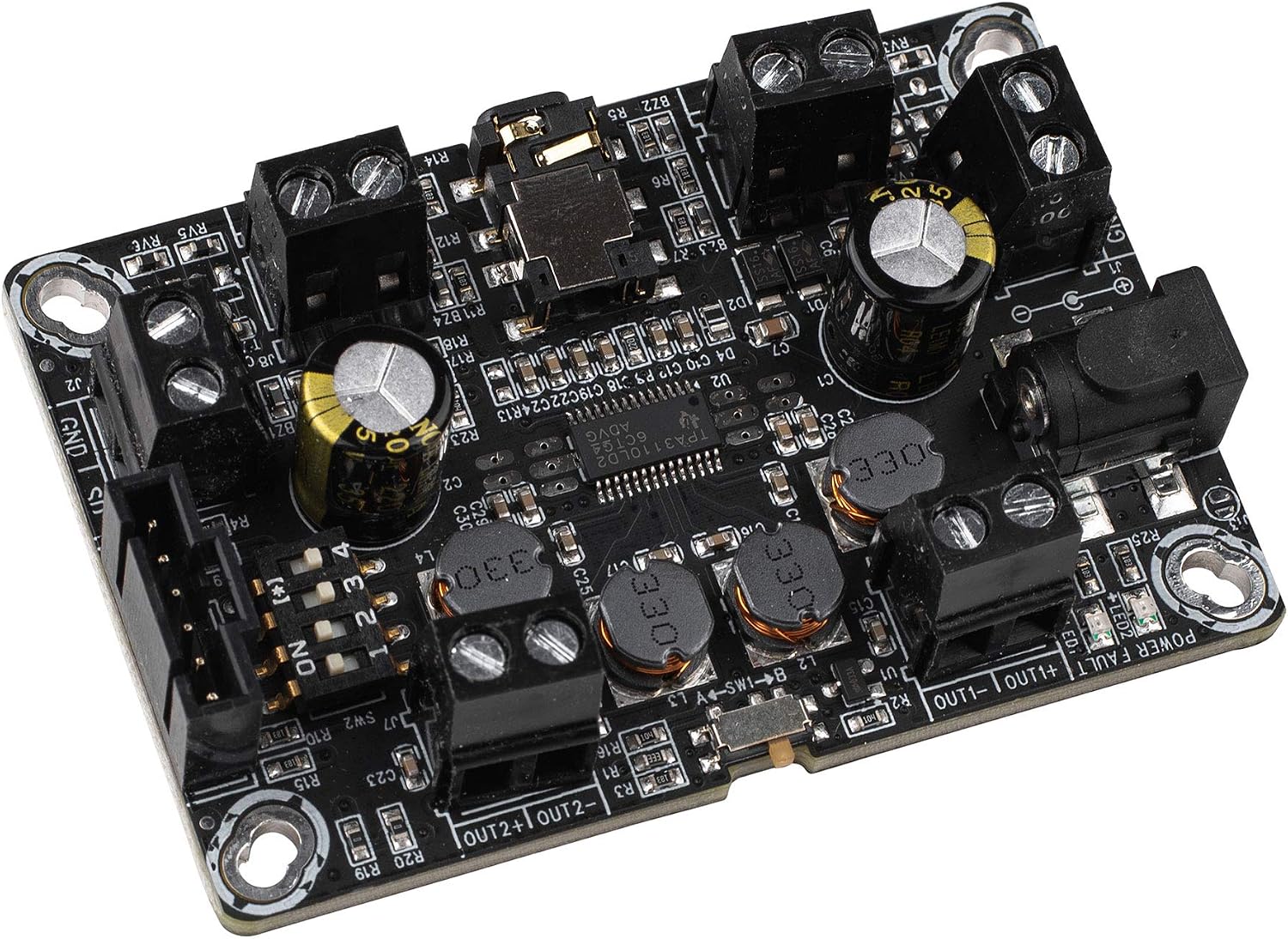
ചിത്രം 2: കോണാകൃതിയിലുള്ളത് view of the AA-AB32231 ampലൈഫ് ബോർഡ്.
ഈ കോണാകൃതിയിലുള്ള view provides a clearer perspective of the screw terminals for speaker outputs and power input, as well as the 3.5mm audio input jack. It also illustrates the compact form factor of the ampലൈഫ് ബോർഡ്.
4. Mode Selection (Mono/Stereo, BTL/PBTL)
The board features switches on the underside for configuring the output mode. Refer to Figure 3 for switch locations.

ചിത്രം 3: താഴെ view of the AA-AB32231 amplifier board with mode switches.
This image shows the underside of the amplifier board, where SW1 and SW2 are located. These switches control the operating mode, allowing selection between stereo (DIFF/SE) and mono (BTL/PBTL) configurations. The labels indicate the specific settings for each switch position.
- SW1 (MODE): Selects between BTL (Bridge-Tied Load) and PBTL (Parallel Bridge-Tied Load) modes.
- SW2 (MODE): Configures the input and output differential/single-ended modes. The combination of SW1 and SW2 determines the final operating mode (e.g., stereo differential input, mono BTL output).
- Consult the markings on the board for specific switch positions corresponding to desired modes (e.g., "SHORT IN MONO MODE" for mono input).
- Ensure the board is powered off before changing switch settings.
പ്രവർത്തന നിർദ്ദേശങ്ങൾ
- After all connections (power, audio input, speakers) are securely made, apply power to the board.
- The power indicator LED (if present) should illuminate.
- Start playing audio from your source device.
- Adjust the volume using your audio source device. This amplifier board typically operates at a fixed gain.
- If no sound is heard, refer to the Troubleshooting section.
സ്പെസിഫിക്കേഷനുകൾ
| ഫീച്ചർ | സ്പെസിഫിക്കേഷൻ |
|---|---|
| മോഡൽ | AA-AB32231 |
| Ampലൈഫയർ ചിപ്പ് | TPA3110 |
| ഔട്ട്പുട്ട് പവർ | 2 x 8W @ 4 ഓം |
| പവർ സപ്ലൈ വോളിയംtage | ഡിസി 8V - 19V |
| ചാനലുകളുടെ എണ്ണം | 2 (സ്റ്റീരിയോ) |
| അളവുകൾ (L x W x H) | 3.58 x 2.68 x 0.59 ഇഞ്ച് (ഏകദേശം 91 x 68 x 15 മിമി) |
| ഇനത്തിൻ്റെ ഭാരം | 1.76 ഔൺസ് (ഏകദേശം 50 ഗ്രാം) |
| മൗണ്ടിംഗ് തരം | ഉപരിതല മൗണ്ട് |
ട്രബിൾഷൂട്ടിംഗ്
- ശബ്ദമില്ല:
- Check power supply connections and ensure the power LED is on.
- ഓഡിയോ ഇൻപുട്ട് കേബിൾ ഉറവിടത്തിലേക്കും ഉപകരണത്തിലേക്കും സുരക്ഷിതമായി ബന്ധിപ്പിച്ചിട്ടുണ്ടെന്ന് ഉറപ്പാക്കുക. ampലൈഫ് ബോർഡ്.
- Ensure speaker wires are correctly connected to the output terminals and not short-circuited.
- ഓഡിയോ ഉറവിടം പ്ലേ ചെയ്യുന്നുണ്ടെന്നും അതിന്റെ വോളിയം കൂട്ടിയിട്ടുണ്ടെന്നും ഉറപ്പാക്കുക.
- Check the mode switches (SW1, SW2) on the underside of the board to ensure they are set for the desired stereo or mono operation.
- വികലമായ ശബ്ദം:
- Reduce the volume from the audio source. Overdriving the input can cause distortion.
- Ensure the power supply is stable and provides sufficient current.
- സ്പീക്കർ ഇംപെഡൻസ് പൊരുത്തപ്പെടുന്നുണ്ടോയെന്ന് പരിശോധിക്കുക amplifier's requirements (4 Ohms recommended).
- Intermittent Sound or Muting:
- Some power supplies, particularly 9V, may not provide stable operation. Try a 12V or 16V power supply.
- Check for loose connections on power, input, or output terminals.
- Ensure the board is not overheating. Provide adequate ventilation if enclosed.
മെയിൻ്റനൻസ്
The Sure Electronics AA-AB32231 amplifier board requires minimal maintenance:
- Keep the board clean and free from dust and debris. Use a soft, dry brush or compressed air for cleaning.
- Avoid touching the electronic components directly, especially when powered.
- ഉപയോഗത്തിലില്ലാത്തപ്പോൾ ബോർഡ് വരണ്ടതും തണുത്തതുമായ അന്തരീക്ഷത്തിൽ സൂക്ഷിക്കുക.
- Regularly check connections for tightness and corrosion.
വാറൻ്റിയും പിന്തുണയും
For warranty information and technical support, please refer to the documentation provided at the point of purchase or contact Sure Electronics directly through their official webസൈറ്റ്. വാങ്ങിയതിന്റെ തെളിവായി നിങ്ങളുടെ വാങ്ങൽ രസീത് സൂക്ഷിക്കുക.