
1. ആമുഖം
This manual provides detailed instructions for the assembly, operation, and maintenance of your Sauder Carson Forge Entertainment Credenza, Model 412922. Designed to accommodate TVs up to 60 inches, this credenza features a Washington Cherry finish, a Digital Dock for electronics, adjustable shelving, and a storage drawer. Please read all instructions carefully before beginning assembly and retain this manual for future reference.

Image 1.1: Sauder Carson Forge Entertainment Credenza, Model 412922, in Washington Cherry finish.
2 സുരക്ഷാ വിവരങ്ങൾ
- അസംബ്ലി നിർദ്ദേശങ്ങൾ എപ്പോഴും ശ്രദ്ധാപൂർവ്വം പാലിക്കുക.
- ഉപയോഗിക്കുന്നതിന് മുമ്പ് എല്ലാ ഫാസ്റ്റനറുകളും സുരക്ഷിതമായി മുറുക്കിയിട്ടുണ്ടെന്ന് ഉറപ്പാക്കുക.
- Do not overload shelves or drawers. Refer to specifications for weight limits.
- Place the credenza on a level surface to prevent tipping.
- Use caution when moving the assembled unit. It is recommended to have two or more people for moving.
- അസംബ്ലി സമയത്ത് കുട്ടികളിൽ നിന്ന് ചെറിയ ഭാഗങ്ങൾ സൂക്ഷിക്കുക.
- ഈ യൂണിറ്റ് ഇൻഡോർ ഉപയോഗത്തിനായി മാത്രം രൂപകൽപ്പന ചെയ്തിരിക്കുന്നു.
3. ഭാഗങ്ങളുടെ പട്ടിക
Before beginning assembly, verify that all parts and hardware are present. Refer to the included components list in your packaging. If any parts are missing or damaged, contact Sauder customer support.
ഉൾപ്പെടുത്തിയ ഘടകങ്ങൾ: Assembly instructions, Hardware, Materials.
4. അസംബ്ലി നിർദ്ദേശങ്ങൾ
Follow these steps to assemble your Sauder Carson Forge Entertainment Credenza. It is recommended to assemble the unit in the room where it will be used.
4.1. Identifying Drawer Glides
Proper identification of drawer glides is crucial for correct drawer assembly and function. The glides consist of universal cabinet rails and drawer glides (marked "Drawer Right" and "Drawer Left").
Video 4.1.1: Instructions on how to identify the different types of drawer rails and glides for assembly.
Ensure you separate the universal cabinet rails from the drawer glides. The universal cabinet rails are used for the main cabinet structure, while the drawer glides (marked "Drawer Right" and "Drawer Left") are attached to the drawer box itself. Pay close attention to the orientation of the flanges and rollers as shown in the video.
4.2. Cam and Dowel Fastening System
Your furniture utilizes a cam and dowel fastening system for secure connections. This system may include hidden cams with cam dowels or cam screws, or both.
Video 4.2.1: Detailed guide on assembling components using the cam and dowel fastening system.
When inserting hidden cams, ensure the arrow on the cam points towards the edge of the board. If using cam dowels, insert the metal end into the hidden cam. For cam screws, screw them into the designated hole until the shoulder rests on the board. Always tighten hidden cams by turning them 210 degrees with a screwdriver to ensure a secure connection and prevent parts from separating.
4.3. പൊതുസമ്മേളന നുറുങ്ങുകൾ
- പോറലുകൾ ഉണ്ടാകാതിരിക്കാൻ എല്ലാ ഘടകങ്ങളും മൃദുവും വൃത്തിയുള്ളതുമായ ഒരു പ്രതലത്തിൽ നിരത്തുക.
- Use the provided hardware and tools. Do not substitute.
- Do not overtighten screws unless specified, as this can damage the wood.
- Periodically check and re-tighten all fasteners to ensure stability.

Image 4.3.1: Dimensions of the credenza and its internal compartments.
5. പ്രവർത്തന നിർദ്ദേശങ്ങൾ
Your Sauder Carson Forge Entertainment Credenza is designed for versatile use. Here's how to utilize its features:
5.1. Digital Dock
The credenza features a flip-up panel that reveals a Digital Dock. This area is designed for parking, recharging, and syncing mobile electronics and game controllers. Lift the panel gently to access the compartment.
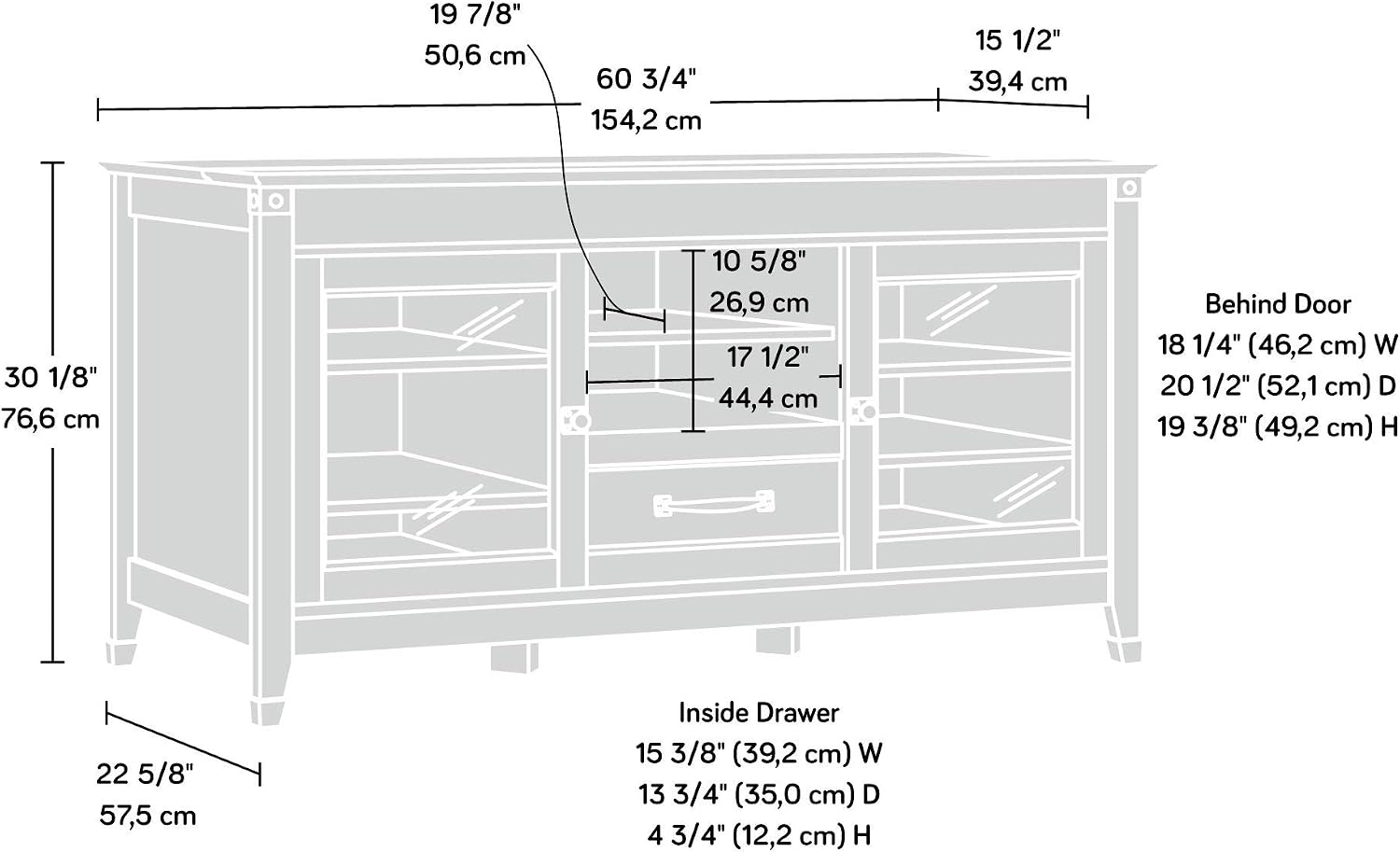
Image 5.1.1: Digital Dock with flip-up panel open, showing space for devices and cable access.
5.2. ക്രമീകരിക്കാവുന്ന ഷെൽഫുകൾ
The center compartment and the areas behind the framed, safety-tempered glass doors feature adjustable shelves. These are ideal for holding audio/video equipment, books, knick-knacks, or decorative plants. To adjust a shelf, remove any items, lift the shelf, and reposition the shelf pins to the desired height.
5.3. സ്റ്റോറേജ് ഡ്രോയർ
A storage drawer is located below the center adjustable shelf. This drawer opens and closes on smooth metal runners, providing convenient storage for movies, games, or other accessories.

Image 5.3.1: Detail of the storage drawer and its handle.
5.4. കേബിൾ മാനേജ്മെന്റ്
The enclosed back panel includes cord access cutouts to help keep wires neat and organized, preventing tangles and improving aesthetics.
6. പരിപാലനം
To maintain the appearance and longevity of your credenza, follow these simple care instructions:
- വൃത്തിയാക്കൽ: പരസ്യം ഉപയോഗിച്ച് ഉപരിതലങ്ങൾ തുടയ്ക്കുകamp cloth. Avoid harsh chemicals or abrasive cleaners, as these can damage the Washington Cherry finish.
- പൊടിയിടൽ: മൃദുവായതും ഉണങ്ങിയതുമായ തുണി ഉപയോഗിച്ച് പതിവായി തുടയ്ക്കുക.
- ചോർച്ച: ചോർച്ച വൃത്തിയുള്ളതും ഉണങ്ങിയതുമായ തുണി ഉപയോഗിച്ച് ഉടൻ തുടയ്ക്കുക.
- ഹാർഡ്വെയർ: എല്ലാ സ്ക്രൂകളും ഫാസ്റ്റനറുകളും ഇറുകിയതാണെന്ന് ഉറപ്പാക്കാൻ ഇടയ്ക്കിടെ പരിശോധിക്കുക. ആവശ്യാനുസരണം വീണ്ടും മുറുക്കുക.
- സൂര്യപ്രകാശം: മങ്ങുന്നത് തടയാൻ നേരിട്ട് സൂര്യപ്രകാശം ദീർഘനേരം എക്സ്പോഷർ ചെയ്യുന്നത് ഒഴിവാക്കുക.
7. പ്രശ്നപരിഹാരം
If you encounter any issues with your credenza, refer to the following common solutions:
- ചലിക്കുന്ന യൂണിറ്റ്: Ensure the credenza is on a level surface. Check and tighten all cam and dowel fasteners and screws.
- ഡ്രോയർ സുഗമമായി സ്ലൈഡുചെയ്യുന്നില്ല: Verify that the drawer glides are correctly installed and free of obstructions. Ensure the drawer is not overloaded.
- വാതിലുകൾ വിന്യസിക്കാത്തത്: Check the hinge adjustments. Minor adjustments can often correct door alignment issues.
- വിട്ടുപോയ ഭാഗങ്ങൾ: If parts are missing during initial assembly, do not proceed. Contact Sauder customer support for replacements.
8 സ്പെസിഫിക്കേഷനുകൾ
| ഉൽപ്പന്ന അളവുകൾ | 60.71 x 22.64 x 30.16 ഇഞ്ച് (W x D x H) |
| ഇനത്തിൻ്റെ ഭാരം | 167 പൗണ്ട് |
| നിർമ്മാതാവ് | സോഡർ വുഡ്വർക്കിംഗ് കമ്പനി |
| മോഡൽ നമ്പർ | 412922 |
| ഫിനിഷ് തരം | Washington Cherry Finish |
| അസംബ്ലി ആവശ്യമാണ് | അതെ |
| ഷെൽഫുകളുടെ എണ്ണം | 8 (സ്ഥിരവും ക്രമീകരിക്കാവുന്നതും ഉൾപ്പെടെ) |
| TV Accommodation | Up to 60" TV weighing 95 lbs. or less |
9. വാറണ്ടിയും പിന്തുണയും
ഈ ഉൽപ്പന്നം എ 5 വർഷത്തെ ഭാഗങ്ങളുടെ വാറന്റി. For warranty claims, missing parts, or any other support needs, please contact Sauder customer service directly. Refer to the contact information provided in your product packaging or visit the official Sauder webസൈറ്റ്.