
1. പ്രധാന സുരക്ഷാ നിർദ്ദേശങ്ങൾ
Please read this manual carefully before using the Emerio FH-102990 Commercial Heater. Failure to follow these instructions may result in electric shock, fire, or serious injury. Keep this manual for future reference.
- Always ensure the heater is placed on a stable, level surface to prevent tipping.
- വെള്ളത്തിനടുത്തോ വെള്ളം കെട്ടിനിൽക്കുന്ന സ്ഥലത്തോ ഹീറ്റർ പ്രവർത്തിപ്പിക്കരുത്.amp സ്ഥാനങ്ങൾ.
- ഹീറ്ററിന്റെ മുൻവശത്ത് നിന്നും വശങ്ങളിൽ നിന്നും പിൻഭാഗത്തുനിന്നും കുറഞ്ഞത് 1 മീറ്റർ (3 അടി) അകലെയെങ്കിലും കത്തുന്ന വസ്തുക്കൾ (ഫർണിച്ചർ, കർട്ടനുകൾ, പേപ്പർ, വസ്ത്രങ്ങൾ മുതലായവ) സൂക്ഷിക്കുക.
- Do not cover the heater or block the air intake/outlet openings. This can cause overheating and fire.
- Do not insert any objects into the heater's openings.
- ഉപയോഗത്തിലില്ലാത്തപ്പോഴോ വൃത്തിയാക്കുന്നതിന് മുമ്പോ ഹീറ്റർ അൺപ്ലഗ് ചെയ്യുക.
- ഈ ഉപകരണം, അവരുടെ സുരക്ഷയ്ക്ക് ഉത്തരവാദിയായ ഒരു വ്യക്തി ഉപകരണത്തിൻ്റെ ഉപയോഗത്തെ സംബന്ധിച്ച മേൽനോട്ടമോ നിർദ്ദേശമോ നൽകിയിട്ടില്ലെങ്കിൽ, ശാരീരികമോ ഇന്ദ്രിയപരമോ മാനസികമോ ആയ കഴിവുകൾ കുറഞ്ഞതോ അനുഭവത്തിൻ്റെയും അറിവിൻ്റെയും അഭാവം ഉള്ള വ്യക്തികൾക്ക് (കുട്ടികൾ ഉൾപ്പെടെ) ഉപയോഗിക്കാൻ ഉദ്ദേശിച്ചുള്ളതല്ല.
- സപ്ലൈ കോഡിന് കേടുപാടുകൾ സംഭവിച്ചാൽ, അപകടം ഒഴിവാക്കാൻ നിർമ്മാതാവ്, അതിൻ്റെ സേവന ഏജൻ്റ് അല്ലെങ്കിൽ സമാനമായ യോഗ്യതയുള്ള വ്യക്തികൾ അത് മാറ്റിസ്ഥാപിക്കേണ്ടതാണ്.
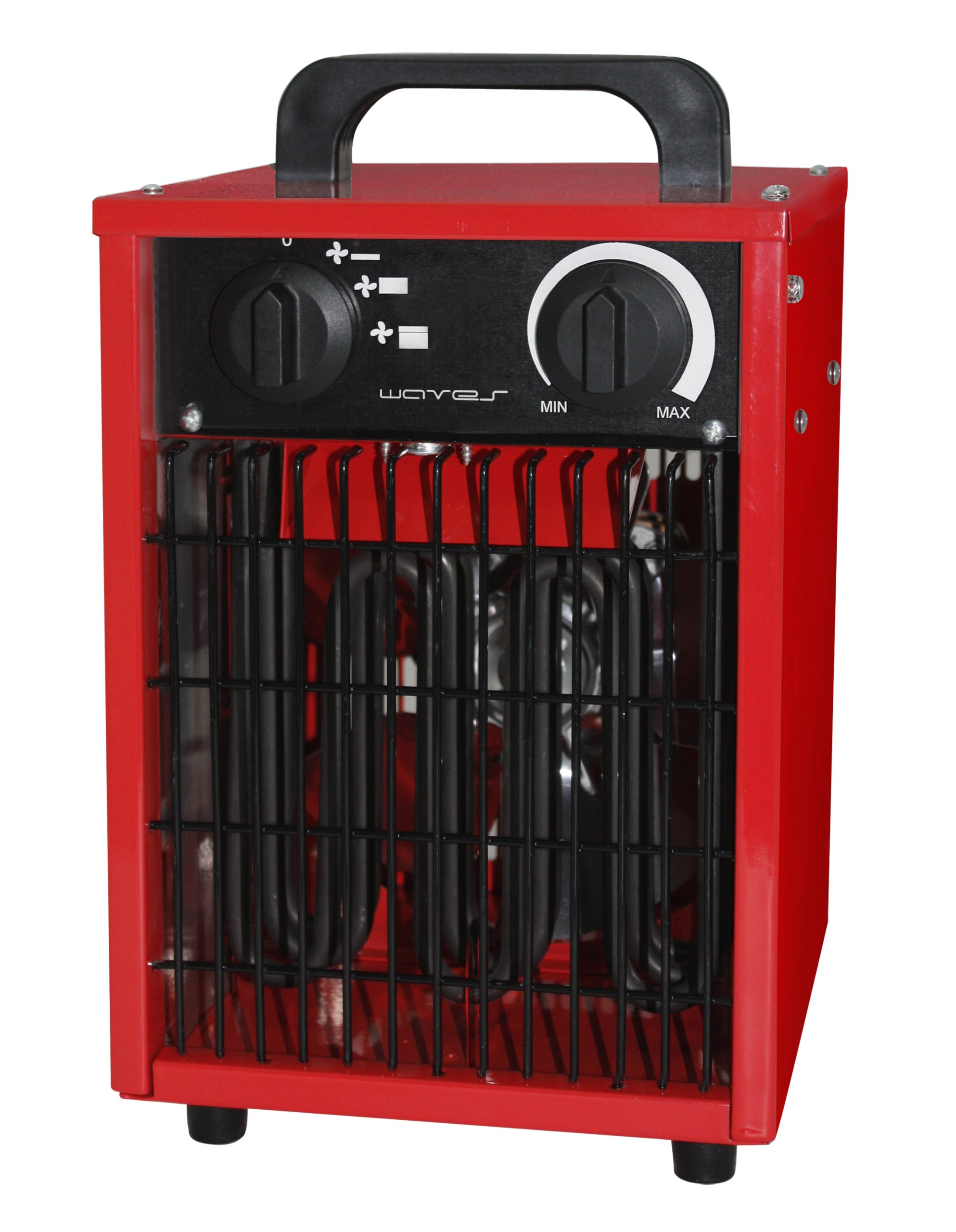
Image of the Emerio FH-102990 commercial heater, showing its compact design and robust casing suitable for commercial environments.
2. സജ്ജീകരണം
2.1 അൺപാക്കിംഗ്
Carefully remove the heater from its packaging. Retain the packaging for storage or in case of return. Check for any signs of damage. If the heater appears damaged, do not use it and contact your supplier.
2.2 പ്ലേസ്മെൻ്റ്
- Place the heater on a firm, level, and heat-resistant surface.
- Ensure there is adequate clearance around the heater for proper air circulation. Maintain a minimum distance of 1 meter (3 feet) from walls, furniture, and other objects.
- ഹീറ്റർ നേരിട്ട് പവർ ഔട്ട്ലെറ്റിന് താഴെ വയ്ക്കരുത്.
- Avoid placing the heater in areas where it could be easily knocked over or where children or pets could come into contact with it.
2.3 പവർ കണക്ഷൻ
വോളിയം ഉറപ്പാക്കുകtage indicated on the heater's rating label matches your local power supply. Plug the power cord into a grounded electrical outlet. Do not use extension cords unless absolutely necessary, and ensure any extension cord used is rated for the heater's power consumption.
3. പ്രവർത്തന നിർദ്ദേശങ്ങൾ
3.1 പവർ ഓൺ/ഓഫ്
To turn the heater on, rotate the function control knob to the desired setting (Fan, Low Heat, High Heat). To turn the heater off, rotate the function control knob to the "OFF" position. Always unplug the heater from the power outlet when not in use.
3.2 Temperature Control (Thermostat)
The heater is equipped with an adjustable thermostat. Rotate the thermostat knob clockwise to increase the desired temperature setting, and counter-clockwise to decrease it. The heater will cycle on and off to maintain the set temperature.
3.3 ഹീറ്റ് ക്രമീകരണങ്ങൾ
- ആരാധകൻ മാത്രം: Provides air circulation without heat. Useful for cooling or ventilation.
- കുറഞ്ഞ ചൂട്: Provides a lower level of heating for moderate warmth.
- ഉയർന്ന ചൂട്: Provides maximum heating output for rapid warming of the area.
4. പരിപാലനം
Regular maintenance ensures optimal performance and extends the life of your heater. Always unplug the heater and allow it to cool completely before performing any maintenance.
4.1 വൃത്തിയാക്കൽ
- പുറം: ഒരു മൃദുവായ, ഡി ഉപയോഗിച്ച് ബാഹ്യ പ്രതലങ്ങൾ തുടയ്ക്കുകamp തുണി. അബ്രാസീവ് ക്ലീനറുകളോ ലായകങ്ങളോ ഉപയോഗിക്കരുത്, കാരണം ഇവ ഫിനിഷിന് കേടുവരുത്തും.
- എയർ ഇൻടേക്ക്/ഔട്ട്ലെറ്റ്: Use a vacuum cleaner with a brush attachment to gently remove dust and debris from the air intake and outlet grilles. Ensure these areas are clear to prevent overheating.
- ഹീറ്റർ വെള്ളത്തിൽ മുക്കുകയോ വെള്ളം നേരിട്ട് അതിൽ തളിക്കുകയോ ചെയ്യരുത്.
4.2 സംഭരണം
ഉപയോഗത്തിലില്ലാത്തപ്പോൾ, ഹീറ്റർ തണുത്തതും വരണ്ടതുമായ സ്ഥലത്ത് സൂക്ഷിക്കുക, വെയിലത്ത് അതിന്റെ യഥാർത്ഥ പാക്കേജിംഗിൽ, പൊടിയിൽ നിന്നും കേടുപാടുകളിൽ നിന്നും സംരക്ഷിക്കുക.
5. പ്രശ്നപരിഹാരം
| പ്രശ്നം | സാധ്യമായ കാരണം | പരിഹാരം |
|---|---|---|
| ഹീറ്റർ ഓണാക്കുന്നില്ല. |
|
|
| ഹീറ്റർ താപം ഉൽപാദിപ്പിക്കുന്നില്ല. |
|
|
| ഹീറ്റർ ഇടയ്ക്കിടെ ഓണും ഓഫും ആകാറുണ്ട്. |
|
|
If you experience problems not listed above, or if the suggested solutions do not resolve the issue, please contact customer support.
6 സ്പെസിഫിക്കേഷനുകൾ
| ബ്രാൻഡ് | എമേരിയോ |
| മോഡൽ നമ്പർ | FH-102990 |
| പാക്കേജ് അളവുകൾ | 36.2 x 25.8 x 23.8 സെ.മീ |
| ഉൽപ്പന്ന ഭാരം | 4.72 കി.ഗ്രാം |
| ASIN | B008LT4H7O |
| Available on Amazon.es since | 13 ജൂലൈ 2012 |
7. വാറൻ്റിയും പിന്തുണയും
For warranty information and customer support, please refer to the warranty card included with your product or visit the official Emerio website. Do not attempt to repair the heater yourself, as this may void the warranty and pose safety risks. For technical assistance or service, contact Emerio customer service directly.
This manual is subject to change without notice. Please refer to the latest version available on the manufacturer's webസൈറ്റ്.