
1. ഉൽപ്പന്നം കഴിഞ്ഞുview
The Pelican 9460 LED Remote Area Lighting System is a robust and portable lighting solution designed for various applications requiring powerful, rechargeable illumination. This system features an Intelligent Control System for battery life management and adjustable light intensity. It includes two swiveling telescope masts that extend to nearly 6 feet, each equipped with a 360-degree articulated light array.
പ്രധാന സവിശേഷതകൾ:
- Intelligent Control System: Calculates and displays current battery life, allowing users to regulate light intensity and choose desired run time.
- Dual Telescoping Masts: Two swiveling masts, each extending to approximately 6 feet.
- Articulated Light Arrays: Two 360-degree adjustable light arrays for versatile illumination.
- Durable Construction: Housed in a rugged Pelican case for protection and portability.
- Integrated Wheels: Features a rolling platform for easy transport.
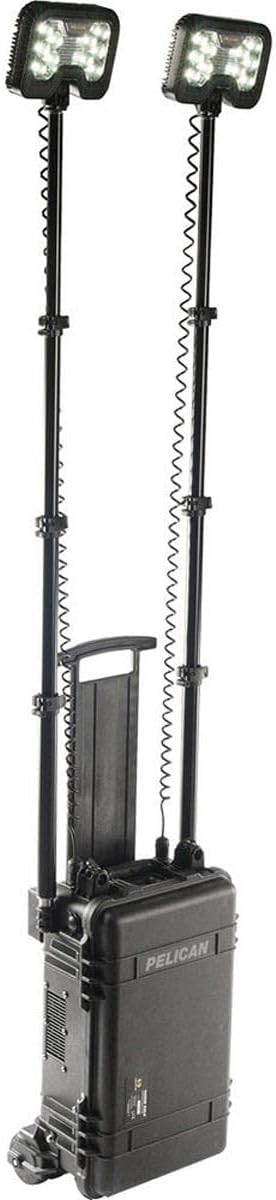
Figure 1.1: The Pelican 9460 Remote Area Lighting System in its fully assembled and extended configuration.
2. സജ്ജീകരണ നിർദ്ദേശങ്ങൾ
Follow these steps to set up your Pelican 9460 Remote Area Lighting System:
- സിസ്റ്റം അൺപാക്ക് ചെയ്യുക: Open the latches on the Pelican case. The case is designed to be lockable for security.
- Extend the Rolling Platform: The system is heavy. To move it easily, pull out the rolling platform from underneath the case. This platform provides wheels and leverage for transport.
- Position the Case: The case can be positioned vertically or horizontally. For vertical pole deployment, stand the case upright. For horizontal pole deployment, lay the case flat.
- Retrieve Masts and Lights: Inside the lid, locate the telescoping masts. Remove them from their secure compartments. The LED light heads are stored within the main compartment.
- Assemble Masts: The masts feature quick-release clamps. Extend each mast to the desired height by releasinജി ദി ക്ലോസ്amps, pulling the sections, and then securing the clamps.
- ലൈറ്റ് ഹെഡുകൾ ഘടിപ്പിക്കുക: Connect each LED light head to the top of its respective mast. The connections are designed for heavy-duty use and quick attachment.
- പവർ കേബിളുകൾ ബന്ധിപ്പിക്കുക: Plug the coiled power cables from the light heads into the designated ports on the main unit. These ports are located on the side of the case.
Video 2.1: A demonstration of the Pelican 9460 system's unboxing, rolling platform deployment, and light mast assembly.

Figure 2.2: The Pelican 9460 system with one light mast extended, demonstrating its modular design.
3. സിസ്റ്റം ഓപ്പറേറ്റിംഗ്
The Pelican 9460 features an Intelligent Control System for intuitive operation:
- പവർ ഓൺ: Locate the control panel on the front of the main unit. Press the power button to turn on the system.
- പ്രകാശ തീവ്രത ക്രമീകരിക്കുക: Use the up and down arrow buttons on the control panel to increase or decrease the light output. The display will show the current intensity level.
- ബാറ്ററി ലൈഫ് നിരീക്ഷിക്കുക: The Intelligent Control System display provides real-time information on the remaining battery life, allowing you to plan your usage effectively.
- പ്രകാശ ദിശ ക്രമീകരിക്കുക: The articulated light arrays on top of each mast can be swiveled 360 degrees to direct light precisely where needed.
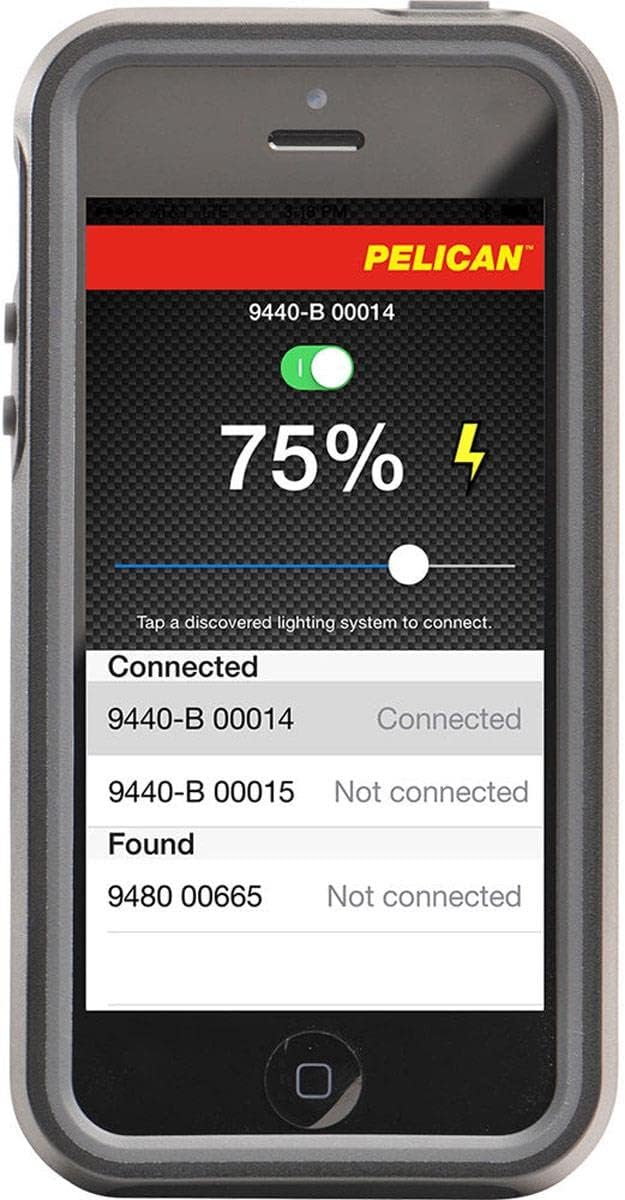
Figure 3.1: A smartphone interface showing the control application for the Pelican lighting system, including battery status and connection options.
4. പരിപാലനവും പരിചരണവും
Proper maintenance ensures the longevity and optimal performance of your Pelican 9460 system:
- വൃത്തിയാക്കൽ: Wipe down the exterior of the case and light heads with a damp തുണി. ഉരച്ചിലുകൾ ഉള്ള ക്ലീനറുകൾ ഒഴിവാക്കുക.
- ബാറ്ററി കെയർ: Recharge the battery regularly, especially after prolonged use. Store the system with a charged battery to maintain battery health. Do not charge with the lid closed.
- പരിശോധന: Periodically inspect all cables, connections, and mast sections for any signs of wear or damage.
- സംഭരണം: Store the system in a cool, dry place when not in use. Ensure all components are properly secured within the case.
5. പൊതുവായ പ്രശ്നങ്ങൾ പരിഹരിക്കുന്നു
If you encounter issues with your Pelican 9460, consider the following:
- ലൈറ്റുകൾ ഓണാക്കുന്നില്ല: Check if the system is powered on and the battery has sufficient charge. Ensure all cables are securely connected.
- കുറഞ്ഞ പ്രകാശ ഔട്ട്പുട്ട്: This may indicate a low battery. Recharge the system.
- Masts Not Extending/Retracting Smoothly: Inspect mast sections for dirt or debris. Clean as necessary. Avoid forcing the sections.
- നിയന്ത്രണ പാനൽ പ്രതികരിക്കുന്നില്ല: Try restarting the system. If the issue persists, ensure the battery is charged.
6 സാങ്കേതിക സവിശേഷതകൾ
| സ്പെസിഫിക്കേഷൻ | വിശദാംശങ്ങൾ |
|---|---|
| ബ്രാൻഡ് | പെലിക്കൻ |
| മോഡൽ നമ്പർ | 9460-000-110 |
| ഇനത്തിൻ്റെ തരം പേര് | റിമോട്ട് ഏരിയ ലൈറ്റ് |
| പ്രകാശ സ്രോതസ്സ് തരം | എൽഇഡി |
| പവർ ഉറവിടം | ബാറ്ററി പവർ |
| ബാറ്ററി തരം | ലെഡ് ആസിഡ് |
| ബാറ്ററികളുടെ എണ്ണം | 1 12V ബാറ്ററികൾ ആവശ്യമാണ്. (ഉൾപ്പെടുത്തിയിരിക്കുന്നു) |
| വാല്യംtage | 12.00 വി |
| മെറ്റീരിയൽ | അലുമിനിയം |
| നിറം | കറുപ്പ് |
| ഇനത്തിൻ്റെ ഭാരം | 22997 ഗ്രാം |
| ഇനത്തിൻ്റെ അളവുകൾ L x W x H | 14"L x 9.25"W x 23.25"H |
| മൗണ്ടിംഗ് തരം | ധ്രുവം |
| ജല പ്രതിരോധ നില | വാട്ടർ റെസിസ്റ്റൻ്റ് അല്ല |
| യു.പി.സി | 019428109684 |
| GTIN | 019428109684 |
7. വാറൻ്റിയും പിന്തുണയും
The Pelican 9460 Remote Area Lighting System is covered by a manufacturer's warranty. For specific details regarding coverage, duration, and terms, please refer to the warranty documentation included with your product or visit the official Pelican Products webസൈറ്റ്.
For technical support, service, or inquiries not covered in this manual, please contact Pelican Products customer service through their official channels.