
1. ആമുഖം
This manual provides detailed instructions for the proper use, setup, operation, and maintenance of your Telex RE-92TX Cardioid Lavalier Condenser Microphone. The RE-92TX is a premium lapel microphone designed for professional audio applications, featuring a cardioid polar pattern and a TA4F connector for compatibility with various wireless systems, including Telex R100, RE-2, and RE-1.
Please read this manual thoroughly before using the microphone to ensure optimal performance and longevity of the product.
2. ഉൽപ്പന്നം കഴിഞ്ഞുview
The Telex RE-92TX is a compact and discreet lavalier microphone engineered for clear and articulate speech reproduction. Its cardioid pickup pattern helps to reduce background noise, focusing on the sound source directly in front of the microphone.
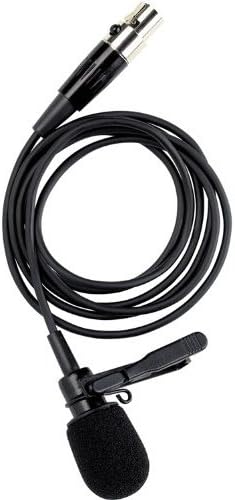
Figure 2.1: The Telex RE-92TX Cardioid Lavalier Condenser Microphone, showing the microphone capsule, cable, and attached lapel clip.
2.1 ഘടകങ്ങൾ
- RE-92TX Lavalier Microphone with integrated cable
- Lapel Clip (pre-attached or included)
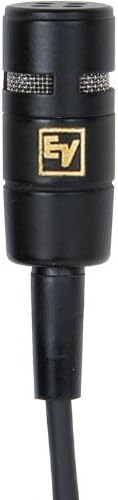
ചിത്രം 2.2: ക്ലോസപ്പ് view of the RE-92TX microphone capsule, highlighting the grille and compact design.
2.2 പ്രധാന സവിശേഷതകൾ
- കാർഡിയോയിഡ് പോളാർ പാറ്റേൺ: Provides excellent off-axis rejection, minimizing pickup of sounds from the sides and rear, which helps to reduce feedback and ambient noise.
- കണ്ടൻസർ ഘടകം: Offers a wide frequency response and high sensitivity for clear, detailed audio capture.
- TA4F Connector: Ensures compatibility with a wide range of Telex and Electro-Voice wireless bodypack transmitters.
- ഒതുക്കമുള്ളതും വിവേകപൂർണ്ണവുമായ ഡിസൈൻ: Easily concealed for on-camera or stagഇ ഉപയോഗം.
3. സജ്ജീകരണം
Proper setup is crucial for optimal performance of your RE-92TX microphone.
3.1 മൈക്രോഫോൺ ബന്ധിപ്പിക്കുന്നു
- Ensure your wireless bodypack transmitter (e.g., Telex R100, RE-2, RE-1) is turned off.
- Align the TA4F connector of the RE-92TX microphone with the input jack on your bodypack transmitter.
- Push the connector firmly into the jack until it clicks into place, indicating a secure connection.
- To disconnect, gently pull back on the release collar of the TA4F connector and then pull the connector out of the jack. Do not pull directly on the cable.
3.2 മൈക്രോഫോൺ പ്ലേസ്മെന്റ്
The placement of the lavalier microphone significantly impacts sound quality.
- Optimal Position: For most applications, clip the microphone to clothing approximately 6-8 inches (15-20 cm) below the chin, centered on the chest. This position typically provides a balanced sound.
- Clothing Noise: Ensure the microphone is not rubbing against clothing, jewelry, or other objects, as this can cause unwanted noise. Use the included clip to secure the microphone firmly.
- കാറ്റിന്റെ ശബ്ദം: If operating outdoors or in windy conditions, consider using an additional foam windscreen (not included) to minimize wind noise.
- പ്രോക്സിമിറ്റി ഇഫക്റ്റ്: Be aware that placing the microphone too close to the mouth can result in an exaggerated bass response (proximity effect). Adjust placement to achieve desired tonal balance.
4. പ്രവർത്തിക്കുന്നു
Once connected and placed, follow these guidelines for operating your RE-92TX microphone.
4.1 ഗെയിൻ സെറ്റിംഗ്
The input gain on your wireless bodypack transmitter should be set correctly to prevent distortion and ensure a strong signal.
- പരീക്ഷണ നില: Speak into the microphone at your normal speaking volume.
- നേട്ടം ക്രമീകരിക്കുക: Adjust the gain control on your transmitter until the audio level indicator (if present) shows a strong signal without consistently peaking or clipping.
- ക്ലിപ്പിംഗ് ഒഴിവാക്കുക: If the indicator frequently shows red or maximum levels, reduce the gain to prevent distortion.
4.2 Performance Tips
- വ്യക്തമായി സംസാരിക്കുക: Articulate your words clearly and maintain a consistent distance from the microphone for best results.
- ഓഡിയോ നിരീക്ഷിക്കുക: If possible, monitor the audio output through headphones to catch any issues (e.g., clothing noise, low battery, interference) in real-time.
- ബാറ്ററി ലൈഫ്: Ensure your wireless transmitter has sufficient battery life for the duration of your use. Low battery can affect audio quality.
5. പരിപാലനം
Proper care and maintenance will extend the life of your RE-92TX microphone.
5.1 വൃത്തിയാക്കൽ
- മൈക്രോഫോൺ കാപ്സ്യൂൾ: Gently wipe the microphone capsule and grille with a soft, dry, lint-free cloth. Do not use liquid cleaners directly on the capsule.
- കേബിൾ: പരസ്യം ഉപയോഗിച്ച് കേബിൾ തുടയ്ക്കുകamp cloth if necessary, then dry thoroughly. Avoid harsh chemicals.
- വിൻഡ്സ്ക്രീൻ: If a foam windscreen is used, it can typically be removed and gently hand-washed with mild soap and water, then air-dried completely before reattaching.
5.2 സംഭരണവും കൈകാര്യം ചെയ്യലും
- തീവ്രമായ അവസ്ഥകൾ ഒഴിവാക്കുക: തീവ്രമായ താപനില, ഉയർന്ന ഈർപ്പം, നേരിട്ടുള്ള സൂര്യപ്രകാശം എന്നിവയ്ക്ക് മൈക്രോഫോൺ ദീർഘനേരം വിധേയമാക്കരുത്.
- ആഘാതത്തിൽ നിന്ന് സംരക്ഷിക്കുക: Handle the microphone carefully. Avoid dropping it or subjecting it to strong impacts.
- കേബിൾ കെയർ: Do not sharply bend or crimp the cable. Coil it loosely when storing to prevent damage.
- സംഭരണം: Store the microphone in a clean, dry place, preferably in its original packaging or a protective case.
6. പ്രശ്നപരിഹാരം
If you encounter issues with your RE-92TX microphone, refer to the following common problems and solutions.
| പ്രശ്നം | സാധ്യമായ കാരണം | പരിഹാരം |
|---|---|---|
| ശബ്ദ ഔട്ട്പുട്ട് ഇല്ല | മൈക്രോഫോൺ ശരിയായി ബന്ധിപ്പിച്ചിട്ടില്ല Transmitter/receiver off Low/dead battery in transmitter തെറ്റായ ഗെയിൻ ക്രമീകരണം Faulty cable/microphone | Ensure TA4F connector is fully seated. Verify transmitter and receiver are powered on. Replace or recharge transmitter batteries. Increase gain on transmitter. Test with another microphone/cable if available. |
| വികലമായ ശബ്ദം | ഗെയിൻ വളരെ ഉയർന്നതായി സജ്ജീകരിച്ചിരിക്കുന്നു Microphone too close to sound source Damaged microphone element | Reduce gain on transmitter. Adjust microphone placement further from mouth. Contact support if distortion persists after adjusting gain and placement. |
| അമിതമായ പശ്ചാത്തല ശബ്ദം/ഫീഡ്ബാക്ക് | Improper microphone placement റൂം അക്കോസ്റ്റിക്സ് വളരെ ഉയർന്ന നേട്ടം | Ensure microphone is positioned correctly and not rubbing against clothing. Adjust room acoustics if possible. Reduce gain. |
| ഇടവിട്ടുള്ള ശബ്ദം | അയഞ്ഞ കണക്ഷൻ ഇടപെടൽ കുറഞ്ഞ ബാറ്ററി | എല്ലാ കണക്ഷനുകളും പരിശോധിക്കുക. Ensure clear line of sight between transmitter and receiver; check for other wireless devices. Replace or recharge transmitter batteries. |
ഈ പരിഹാരങ്ങൾ പരീക്ഷിച്ചതിനുശേഷവും പ്രശ്നം നിലനിൽക്കുകയാണെങ്കിൽ, ദയവായി ഉപഭോക്തൃ പിന്തുണയുമായി ബന്ധപ്പെടുക.
7 സ്പെസിഫിക്കേഷനുകൾ
The following are the technical specifications for the Telex RE-92TX Cardioid Lavalier Condenser Microphone:
| ഫീച്ചർ | സ്പെസിഫിക്കേഷൻ |
|---|---|
| ബ്രാൻഡ് | ഇലക്ട്രോ-വോയ്സ് |
| നിർമ്മാതാവ് | ടെലക്സ് |
| മോഡൽ | RE-92TX |
| മൈക്രോഫോൺ ഫോം ഫാക്ടർ | ലാവലിയർ |
| പോളാർ പാറ്റേൺ | ഏകദിശയിലുള്ള (കാർഡിയോയിഡ്) |
| കണക്റ്റിവിറ്റി ടെക്നോളജി | TA4F (compatible with XLR via adapter, not included) |
| പ്രത്യേക ഫീച്ചർ | Wireless (requires compatible transmitter) |
| ഉൾപ്പെടുത്തിയ ഘടകങ്ങൾ | മൈക്രോഫോൺ |
| ഇനത്തിൻ്റെ ഭാരം | 2 പൗണ്ട് (ഏകദേശ ഷിപ്പിംഗ് ഭാരം) |
| യു.പി.സി | 800549416641 |
| ആദ്യം ലഭ്യമായ തീയതി | ഒക്ടോബർ 16, 2012 |
8. വാറൻ്റിയും പിന്തുണയും
For specific warranty information regarding your Telex RE-92TX microphone, please refer to the warranty card included with your product or visit the official Electro-Voice webസൈറ്റ്. വാറന്റി നിബന്ധനകളും വ്യവസ്ഥകളും പ്രദേശത്തിനും റീട്ടെയിലർക്കും അനുസരിച്ച് വ്യത്യാസപ്പെടാം.
8.1 ഉപഭോക്തൃ പിന്തുണ
If you require technical assistance, have questions about your product, or need to arrange for service, please contact Electro-Voice customer support through their official website or the retailer from whom you purchased the product. When contacting support, please have your product model number (RE-92TX) and purchase information readily available.
You can visit the Electro-Voice Store for more information: Electro-Voice Store on Amazon