
ആമുഖം
The Peerless-AV PTM400 Desk Mount is designed to securely hold a wide range of tablet PCs and iPads. Featuring a width and height adjustable cradle, this versatile mount adapts to various tablet sizes, ensuring a tight and stable fit. Its sleek design incorporates 30 degrees of tilt and swivel, along with 360 degrees of roll, providing flexible viewing angles for any desktop workspace. This manual will guide you through the installation, operation, and maintenance of your PTM400 mount.
സജ്ജമാക്കുക
അൺപാക്ക് ചെയ്യുന്നു
പാക്കേജിംഗിൽ നിന്ന് എല്ലാ ഘടകങ്ങളും ശ്രദ്ധാപൂർവ്വം നീക്കം ചെയ്യുക. പാക്കിംഗ് ലിസ്റ്റിൽ ലിസ്റ്റ് ചെയ്തിരിക്കുന്ന എല്ലാ ഭാഗങ്ങളും ഉണ്ടെന്നും കേടുപാടുകൾ സംഭവിച്ചിട്ടില്ലെന്നും ഉറപ്പാക്കുക. ഏതെങ്കിലും ഭാഗങ്ങൾ നഷ്ടപ്പെട്ടിട്ടുണ്ടെങ്കിലോ കേടുപാടുകൾ സംഭവിച്ചിട്ടുണ്ടെങ്കിലോ, അസംബ്ലിയുമായി മുന്നോട്ട് പോകരുത്, ഉപഭോക്തൃ പിന്തുണയുമായി ബന്ധപ്പെടുക.
അസംബ്ലി നിർദ്ദേശങ്ങൾ
The PTM400 mount comes pre-assembled for ease of use. No complex assembly is required. Simply place the mount on a stable, flat surface.
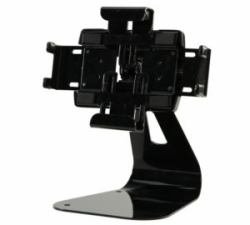
Image: The Peerless-AV PTM400 Desk Mount, showcasing its adjustable cradle and sturdy base, ready for tablet placement.
Securing Your Tablet
- Gently pull apart the adjustable arms of the cradle to widen the opening.
- Carefully insert your tablet into the cradle, ensuring it is centered and securely seated.
- Release the adjustable arms, allowing them to firmly grip the tablet. Ensure the tablet is stable and does not wobble.
പ്രവർത്തന നിർദ്ദേശങ്ങൾ
മൗണ്ട് ക്രമീകരിക്കുന്നു
- ടിൽറ്റ്: The mount allows for 30 degrees of tilt. Gently push or pull the tablet to achieve your desired vertical viewing ആംഗിൾ.
- സ്വിവൽ: The mount offers 30 degrees of swivel. Rotate the tablet horizontally to adjust the side-to-side viewing ആംഗിൾ.
- റോൾ: The mount supports 360 degrees of roll. Rotate the tablet to switch between portrait and landscape orientations as needed.
Always adjust the mount smoothly and avoid excessive force to prevent damage to the mechanism or your tablet.
മെയിൻ്റനൻസ്
To ensure the longevity and optimal performance of your Peerless-AV PTM400 Desk Mount, follow these simple maintenance guidelines:
- വൃത്തിയാക്കൽ: Use a soft, dry cloth to wipe down the mount. For stubborn marks, a slightly damp മൃദുവായ സോപ്പ് ഉപയോഗിച്ച് തുണി ഉപയോഗിക്കാം, തുടർന്ന് നന്നായി ഉണക്കുക. അബ്രസിവ് ക്ലീനറുകളോ ലായകങ്ങളോ ഉപയോഗിക്കരുത്, കാരണം അവ ഫിനിഷിന് കേടുവരുത്തും.
- പരിശോധന: Periodically check all moving parts and connections to ensure they are secure. If any looseness is detected, gently tighten the relevant screws if accessible and designed for user adjustment.
- സംഭരണം: If storing the mount for an extended period, keep it in a cool, dry place away from direct sunlight and extreme temperatures.
ട്രബിൾഷൂട്ടിംഗ്
This section addresses common issues you might encounter with your PTM400 Desk Mount.
| പ്രശ്നം | സാധ്യമായ കാരണം | പരിഹാരം |
|---|---|---|
| Tablet not holding securely | Cradle arms not fully gripping the tablet. | Ensure the tablet is properly seated and centered within the adjustable cradle. The arms should automatically adjust to grip the tablet firmly. |
| Difficulty adjusting tilt/swivel/roll | മെക്കാനിസം കട്ടിയുള്ളതോ തടസ്സമുള്ളതോ ആകാം. | Apply gentle, even pressure. Do not force the movement. Ensure no cables or other objects are obstructing the movement. |
| മൗണ്ട് അസ്ഥിരമായി തോന്നുന്നു | Mount not on a flat, stable surface. | Place the mount on a solid, level desk or table. Ensure the surface is clean and free of debris that could cause instability. |
സ്പെസിഫിക്കേഷനുകൾ
- മോഡൽ നമ്പർ: PTM400
- ബ്രാൻഡ്: പിയർലെസ്-എവി
- മൗണ്ടിംഗ് തരം: Desk Mount, Desktop
- ക്രമീകരണങ്ങൾ: 30 degrees Tilt, 30 degrees Swivel, 360 degrees Roll
- അനുയോജ്യത: Universal, fits most Tablet PCs and iPads with adjustable cradle
- ഇനത്തിൻ്റെ ഭാരം: ഏകദേശം 5.1 പൗണ്ട് (2.3 കി.ഗ്രാം)
- ആദ്യം ലഭ്യമായത്: നവംബർ 16, 2012
വാറൻ്റി വിവരങ്ങൾ
For specific warranty details regarding your Peerless-AV PTM400 Desk Mount, please refer to the warranty card included with your product or visit the official Peerless-AV webസൈറ്റ്. വാറന്റി നിബന്ധനകൾ സാധാരണയായി വാങ്ങിയ തീയതി മുതൽ ഒരു നിശ്ചിത കാലയളവിലേക്ക് നിർമ്മാണ വൈകല്യങ്ങൾ ഉൾക്കൊള്ളുന്നു.
ഉപഭോക്തൃ പിന്തുണ
If you require further assistance, have questions about your PTM400 mount, or need to report an issue, please contact Peerless-AV customer support. Contact information can typically be found on the product packaging or the official Peerless-AV webസൈറ്റ്.