
Vivitek D519
Vivitek D519 3000 Lumen XGA HDMI Portable DLP Projector User Manual
മോഡൽ: ബി 519
1. ആമുഖം
The Vivitek D519 is a versatile and portable digital projector designed to deliver high-quality presentations and media experiences. Featuring 3000 lumens of brightness, XGA (1024x768) native resolution, and a 15,000:1 contrast ratio, it ensures clear and vibrant images. This manual will guide you through the setup, operation, and maintenance of your D519 projector.
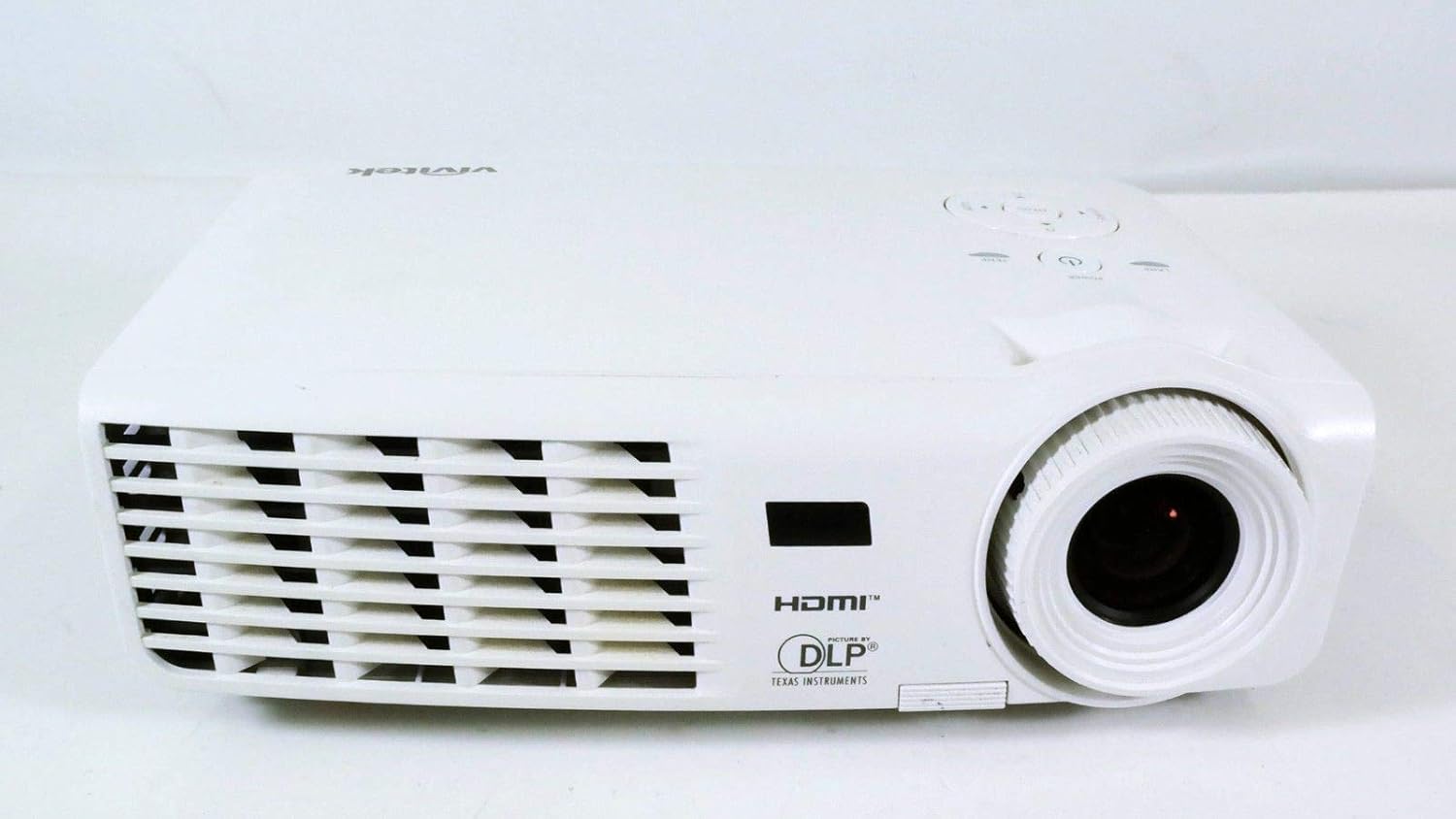
ചിത്രം 1.1: മുൻഭാഗം view of the Vivitek D519 Projector, showing the lens and ventilation.
2. സജ്ജീകരണം
2.1 Unpacking the Projector
പാക്കേജിംഗിൽ നിന്ന് എല്ലാ ഘടകങ്ങളും ശ്രദ്ധാപൂർവ്വം നീക്കം ചെയ്യുക. താഴെ പട്ടികപ്പെടുത്തിയിരിക്കുന്ന എല്ലാ ഇനങ്ങളും ഉണ്ടെന്ന് ഉറപ്പാക്കുക:
- Vivitek D519 Projector
- എസി പവർ കോർഡ്
- വിജിഎ കേബിൾ
- റിമോട്ട് കൺട്രോൾ (ബാറ്ററികൾക്കൊപ്പം)
- ചുമക്കുന്ന കേസ്
- User's Manual (CD)
- ലെൻസ് ക്യാപ്
- വാറൻ്റി കാർഡ്
2.2 ഫിസിക്കൽ പ്ലേസ്മെന്റ്
Place the projector on a stable, flat surface or mount it securely. Ensure adequate ventilation around the projector to prevent overheating. Avoid placing it near heat sources or in direct sunlight.
2.3 ഉപകരണങ്ങൾ ബന്ധിപ്പിക്കുന്നു
The D519 offers various connectivity options. Connect your source device (e.g., laptop, DVD player) to the appropriate input port on the projector.

ചിത്രം 2.1: പിൻഭാഗം view of the Vivitek D519 Projector, highlighting the HDMI, VGA, S-Video, and audio input ports.
- എച്ച്ഡിഎംഐ: For high-definition digital video and audio. Connect an HDMI cable from your source to the projector's HDMI port.
- വി.ജി.എ: For analog computer video. Connect a VGA cable from your computer to the projector's VGA port.
- ഓഡിയോ ഇൻ: For analog audio input. Connect audio cables to the L-AUDIO-R or AUDIO IN ports as needed.
- എസ്-വീഡിയോ: സ്റ്റാൻഡേർഡ് ഡെഫനിഷൻ വീഡിയോയ്ക്ക്.
- ആർഎസ് -232: ഒരു കമ്പ്യൂട്ടർ അല്ലെങ്കിൽ നിയന്ത്രണ സംവിധാനം വഴിയുള്ള പ്രൊജക്ടർ നിയന്ത്രണത്തിനായി.
2.4 പവർ ചെയ്യുന്നു
Connect the AC power cord to the projector's power inlet and then to a power outlet. Press the ശക്തി button on the projector's control panel or the remote control to turn on the projector. The power indicator light will illuminate.
3. പ്രൊജക്ടർ പ്രവർത്തിപ്പിക്കൽ
3.1 കൺട്രോൾ പാനൽ ഓവർview
The control panel on top of the projector allows for basic operation without the remote control.

ചിത്രം 3.1: മുകളിൽ view of the Vivitek D519 Projector, showing the control panel with power, menu, source, and navigation buttons.
- പവർ ബട്ടൺ: പ്രൊജക്ടർ ഓണാക്കുകയോ ഓഫാക്കുകയോ ചെയ്യുന്നു.
- ഉറവിട ബട്ടൺ: Cycles through available input sources (HDMI, VGA, S-Video, etc.).
- മെനു ബട്ടൺ: വിപുലമായ ക്രമീകരണങ്ങൾക്കായി ഓൺ-സ്ക്രീൻ ഡിസ്പ്ലേ (OSD) മെനു ആക്സസ് ചെയ്യുന്നു.
- നാവിഗേഷൻ ബട്ടണുകൾ (മുകളിലേക്ക്/താഴേക്ക്/ഇടത്/വലത്): മെനു ഓപ്ഷനുകളിലൂടെ നാവിഗേറ്റ് ചെയ്യാനും ക്രമീകരണങ്ങൾ ക്രമീകരിക്കാനും ഉപയോഗിക്കുന്നു.
- യാന്ത്രിക ബട്ടൺ: Automatically adjusts the image for optimal display.
3.2 ചിത്രം ക്രമീകരിക്കൽ
Once the projector is powered on and an input source is selected, you may need to adjust the image for clarity and size.
- ഫോക്കസ് റിംഗ്: ചിത്രം മൂർച്ച കൂട്ടാൻ ലെൻസിന് ചുറ്റും ഫോക്കസ് റിംഗ് തിരിക്കുക.
- സൂം റിംഗ്: Rotate the zoom ring to adjust the image size without moving the projector. The D519 has a 1.1:1 zoom ratio.
- കീസ്റ്റോൺ തിരുത്തൽ: If the image appears trapezoidal, use the keystone correction feature (accessible via the OSD menu) to square the image.
3.3 Using the On-Screen Display (OSD) Menu
അമർത്തുക മെനു button on the projector or remote to access the OSD. Use the navigation buttons to browse categories such as Picture, Display, Setup, and Information. Press നൽകുക (or the center button on the navigation pad) to select an option and adjust settings.
4. പരിപാലനം
4.1 എൽamp ജീവിതവും പകരക്കാരനും
പ്രൊജക്ടർ എൽamp has a rated life of 4000 hours in Standard mode and up to 6000 hours in Economy mode. When the lamp അതിന്റെ ജീവിതാവസാനം എത്തുന്നു, lamp indicator light will illuminate, and a message may appear on screen. Refer to the detailed user manual (on CD) for lamp മാറ്റിസ്ഥാപിക്കാനുള്ള നിർദ്ദേശങ്ങൾ.
4.2 പ്രൊജക്ടർ വൃത്തിയാക്കൽ
- ലെൻസ്: ഒപ്റ്റിക്കൽ ലെൻസുകൾക്കായി പ്രത്യേകം രൂപകൽപ്പന ചെയ്ത മൃദുവായ, ലിന്റ് രഹിത തുണി ഉപയോഗിക്കുക. അബ്രാസീവ് ക്ലീനറുകൾ ഉപയോഗിക്കരുത്.
- Casing: പ്രൊജക്ടർ തുടയ്ക്കുക casinഗ്രാം വിത്ത് എ സോഫ്റ്റ്, ഡിamp തുണി. കഠിനമായ രാസവസ്തുക്കളോ ലായകങ്ങളോ ഉപയോഗിക്കുന്നത് ഒഴിവാക്കുക.
- എയർ വെൻ്റുകൾ: Regularly check and clean the air vents to ensure proper airflow and prevent dust buildup, which can lead to overheating. Use a soft brush or compressed air.
5. പ്രശ്നപരിഹാരം
This section addresses common issues you might encounter with your Vivitek D519 projector.
| പ്രശ്നം | സാധ്യമായ കാരണം | പരിഹാരം |
|---|---|---|
| സ്ക്രീനിൽ ചിത്രമൊന്നുമില്ല | Power cable disconnected; Incorrect input source; Source device off. | Check power connection; Press 'Source' button to select correct input; Ensure source device is on. |
| ചിത്രം മങ്ങിയതാണ് | ലെൻസ് ഫോക്കസിന് പുറത്താണ്; പ്രൊജക്ടർ സ്ക്രീനിൽ നിന്ന് വളരെ അടുത്താണ്/അകലെയാണ്. | Adjust the focus ring; Adjust projector distance or use zoom ring. |
| ചിത്രം ട്രപസോയിഡൽ ആണ് | പ്രൊജക്ടർ സ്ക്രീനിന് ലംബമല്ല. | Adjust keystone correction via OSD menu. |
| Projector shuts down unexpectedly | Overheating; Lamp ജീവിതാവസാനത്തോട് അടുക്കുന്നു. | Ensure vents are clear; Allow projector to cool; Consider lamp replacement if indicator light is on. |
| Distorted image on startup | Software glitch; Connection issue. | Restart the projector; Check all cable connections; If persistent, consult Vivitek support. |
6 സ്പെസിഫിക്കേഷനുകൾ
Key technical specifications for the Vivitek D519 Projector:
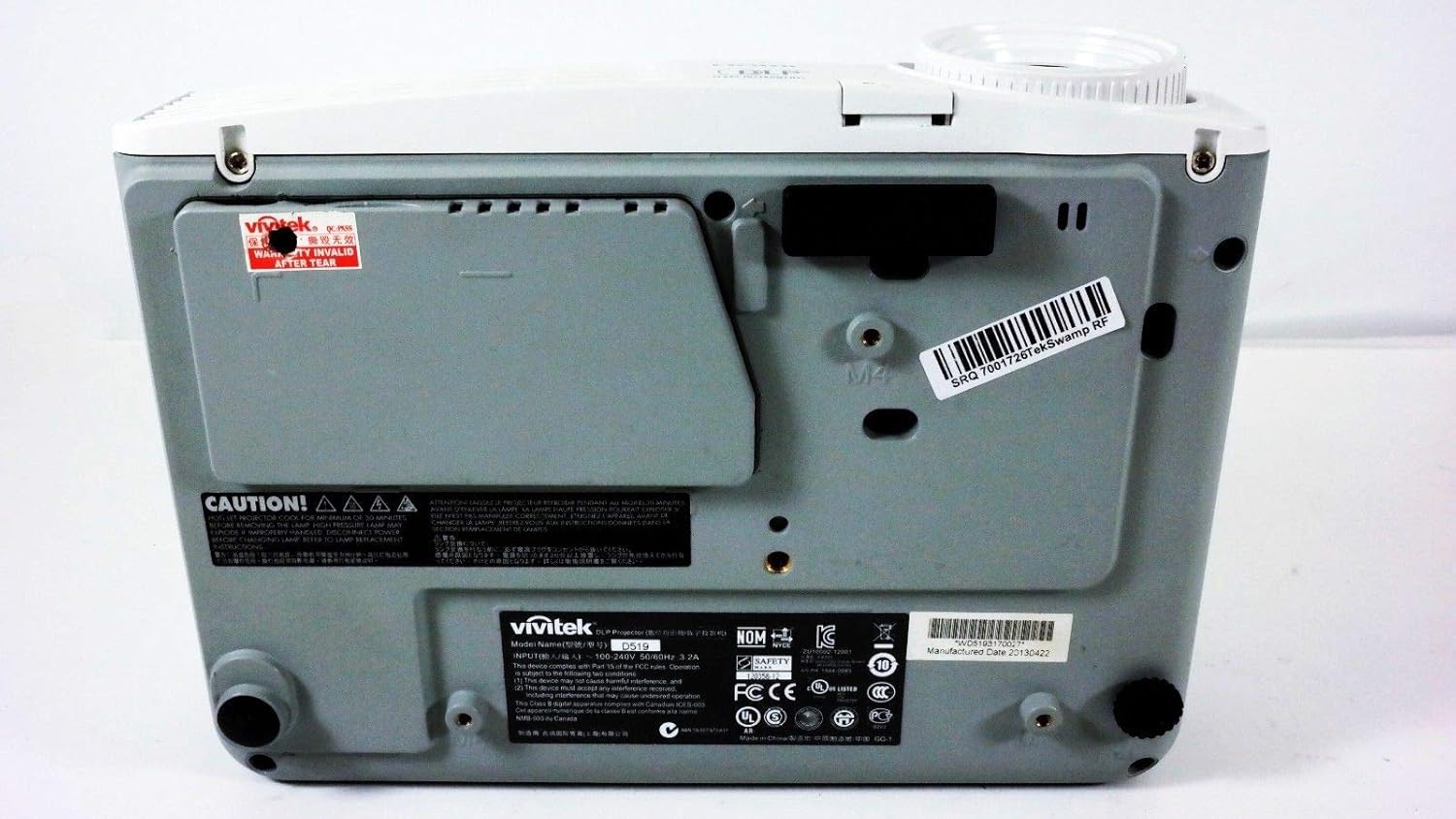
ചിത്രം 6.1: താഴെ view of the Vivitek D519 Projector, showing the product label with model and serial information.
| ഫീച്ചർ | വിശദാംശങ്ങൾ |
|---|---|
| മോഡൽ നമ്പർ | DPU35-262VVUA |
| ഡിസ്പ്ലേ ടെക്നോളജി | Single 0.55” DLP Display Technology by Texas Instruments |
| നേറ്റീവ് റെസല്യൂഷൻ | XGA (1024 x 768) |
| തെളിച്ചം | 3000 ല്യൂമെൻസ് |
| കോൺട്രാസ്റ്റ് റേഷ്യോ | 15,000:1 |
| Lamp ജീവിതം | 4000 hours (Standard) / 6000 hours (Economy) |
| സൂം അനുപാതം | 1.1:1 (Manual Zoom and Focus) |
| കണക്റ്റിവിറ്റി | HDMI v1.3, VGA, S-Video, L-Audio-R, Audio In, RS-232 |
| പ്രത്യേക സവിശേഷതകൾ | HD Compatible, 3D-Ready, Screen Size compatibility: 40 - 300 inches |
| ഉൽപ്പന്ന അളവുകൾ | 7.5 x 10.3 x 3.1 ഇഞ്ച് |
| ഇനത്തിൻ്റെ ഭാരം | 4.35 പൗണ്ട് |
7. വാറൻ്റിയും പിന്തുണയും
Your Vivitek D519 projector comes with a limited warranty. Please refer to the Warranty Card included in your product packaging for detailed terms and conditions. For technical support, service, or warranty claims, please contact Vivitek customer service through their official webസൈറ്റ് അല്ലെങ്കിൽ നിങ്ങളുടെ വാറന്റി ഡോക്യുമെന്റേഷനിൽ നൽകിയിരിക്കുന്ന ബന്ധപ്പെടാനുള്ള വിവരങ്ങൾ.
It is recommended to register your product online to receive updates and support.
Ask a question about this manual
Ask about setup, troubleshooting, compatibility, parts, safety, or missing instructions. Manuals+ will review the question and use this page’s manual context to help answer it.